
Overview
Allen-Bradley 1756-EN2TXT Maintenance-Proven Spare Part for Factory Uptime
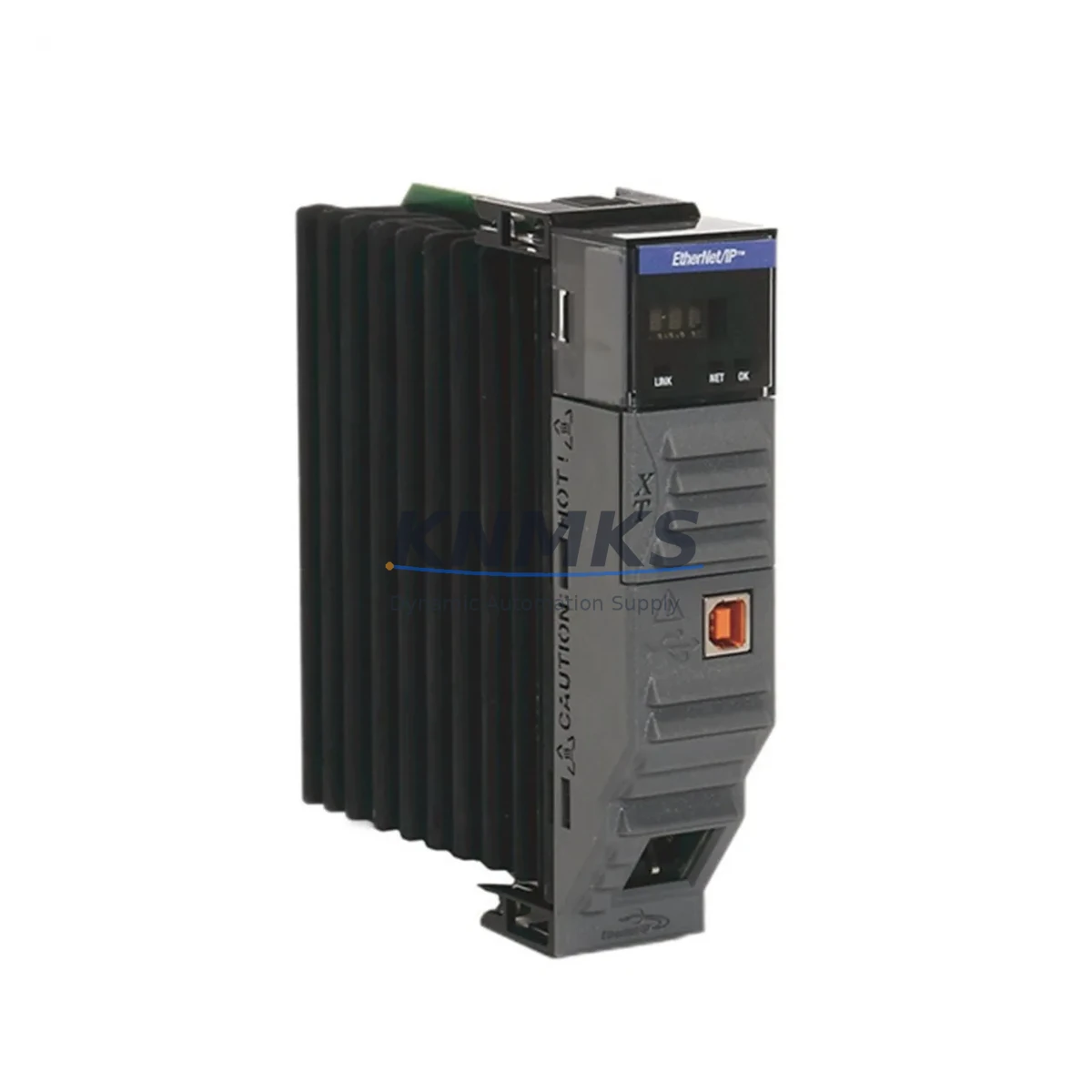
The Allen-Bradley 1756-EN2TXT is a dual-port EtherNet/IP communication bridge module designed for ControlLogix XT (extreme environment) chassis. As a genuine OEM spare, it delivers the network redundancy and deterministic I/O scanning that mission-critical manufacturing lines depend on. Whether you are managing a scheduled annual shutdown, responding to an unplanned network fault, or building a proactive spare parts inventory for your control cabinet, the 1756-EN2TXT is a direct, drop-in replacement that restores full system communication without firmware re-engineering or topology redesign.
Maintenance engineers working with ControlLogix XT platforms understand that a failed EtherNet/IP bridge can cascade into complete line stoppage within minutes. Stocking a verified 1756-EN2TXT spare eliminates the lead-time risk associated with spot-market procurement and ensures your team can execute a hot-swap replacement during the next available maintenance window — or immediately during an emergency. Every unit shipped from KNMKS undergoes pre-shipment functional verification and is backed by a support terms confirmed by quotation, giving procurement engineers the confidence to approve the purchase without additional qualification overhead.
Spare Maintenance Table
| SKU / Part Number | 1756-EN2TXT |
| Brand | Allen-Bradley (Rockwell Automation) |
| Series | ControlLogix XT (1756 XT Series) |
| Module Type | Dual-Port EtherNet/IP Communication Bridge |
| Network Protocol | EtherNet/IP (CIP), DLR (Device Level Ring) support |
| Port Configuration | 2 x RJ-45 (10/100 Mbps, auto-negotiate) |
| Backplane Compatibility | 1756 XT Chassis (ControlLogix XT) |
| Operating Temperature | -25 to +70 deg C (XT-rated extended range) |
| Certifications | UL, CE, cUL; ATEX / Class I Div 2 compatible chassis |
| Firmware | Field-upgradeable via Studio 5000 / ControlFLASH |
| Replacement Compatibility | Direct replacement for 1756-EN2T in XT chassis with XT power supply |
| Application Environment | Outdoor substations, offshore platforms, mining, heavy industry |
| Maintenance Recommendation | Inspect RJ-45 ports and backplane connector annually; verify DLR ring health via RSLinx or Studio 5000 diagnostics |
| Support terms | 12 Months — covers manufacturing defects; pre-shipment functional test included |
Maintenance Planning for Continuous Operation
When replacing a 1756-EN2TXT in the field, a disciplined maintenance engineer will not stop at the module itself. The surrounding control cabinet ecosystem must be inspected in parallel to prevent repeat failures and ensure the restored network segment operates reliably until the next planned outage.
Begin with the 1756-PA75XT or 1756-PB75XT power supply — the XT-rated chassis power source that feeds the backplane. A degraded power supply delivering marginal voltage can cause intermittent communication faults that mimic a failed EN2T module. Measure output voltage under load before declaring the power supply healthy. Next, inspect the 1756-BPXT XT backplane itself: check for corrosion on the backplane connector fingers, particularly in high-humidity or coastal environments where the XT chassis is commonly deployed.
On the network side, verify the integrity of the EtherNet/IP ring topology by checking the Device Level Ring (DLR) supervisor status. If the plant uses managed switches such as the Stratix 5700 or Stratix 8000 series, confirm that the ring port configurations and VLAN assignments are intact after the module swap. A misconfigured switch port is a common post-replacement fault that delays line restart.
For I/O continuity, audit the 1756-IB16XT or 1756-OB16EIXT digital I/O modules seated in the same chassis. XT-rated I/O modules share the same extended temperature and vibration specifications as the EN2TXT and are subject to the same environmental stressors. If the EN2TXT failed due to thermal cycling or moisture ingress, adjacent I/O modules should be treated as suspect and scheduled for replacement during the same maintenance window.
Finally, review the 1756-L7xXT ControlLogix XT controller firmware version and the project file backup. After a communication module replacement, confirm that the controller I/O tree reflects the correct module slot assignment and that no unresolved faults are latched in the controller fault log. Procurement engineers should also consider stocking a 1756-EN2TXT spare alongside a 1756-EN2T for standard (non-XT) chassis in the same facility, ensuring cross-platform coverage without duplicating the entire spare parts budget.
Site Replacement Workflow
Step 1 — Isolation and Safety: Place the ControlLogix XT controller in Program mode via Studio 5000 or the keyswitch. Notify the SCADA/DCS operator that the EtherNet/IP segment will be briefly interrupted. Document the current IP address, subnet mask, gateway, and DLR supervisor settings from the existing 1756-EN2TXT using RSLinx Classic or Studio 5000 before powering down the chassis slot.
Step 2 — Module Removal: De-energize the chassis slot (or the full chassis if hot-swap is not permitted under your site safety procedure). Remove the failed 1756-EN2TXT by pressing the top and bottom locking tabs and sliding the module out of the backplane. Inspect the backplane connector for bent pins or debris before inserting the replacement unit.
Step 3 — Replacement and Configuration: Insert the new 1756-EN2TXT and allow it to seat fully on the backplane. Power the chassis. The module will boot and acquire its configuration from the controller project file if the slot assignment is unchanged — no manual IP reconfiguration is required in a pre-configured project. Verify the module status LED shows solid green (Network OK) and the port LEDs indicate active link on both RJ-45 ports.
Step 4 — DLR Ring Restoration: Confirm the Device Level Ring has re-closed by checking the DLR supervisor status in Studio 5000 or via the module web interface. A ring fault at this stage indicates a cable or switch issue downstream — not a module fault.
Step 5 — Return to Run: Place the controller back in Run mode. Verify all I/O modules in the chassis are communicating (no faulted modules in the I/O tree). Notify the operator that the segment is restored. Log the replacement in your CMMS with the new module serial number and the support terms confirmed by quotation start date.
This workflow minimizes mean time to repair (MTTR) and ensures the replacement is documented for future audit and support requests. KNMKS ships the 1756-EN2TXT with a pre-shipment test report, which can be attached to your CMMS work order as evidence of incoming inspection.
Spare Parts Support FAQ
Q1: Is the 1756-EN2TXT a direct drop-in replacement for the 1756-EN2T in a standard ControlLogix chassis?
No — the 1756-EN2TXT is specifically designed for the ControlLogix XT chassis and requires an XT-rated backplane and power supply. It is not mechanically or electrically interchangeable with a standard 1756 chassis. For standard chassis applications, the correct replacement is the 1756-EN2T. If you are unsure which chassis variant is installed at your site, check the chassis part number label: XT chassis will carry the XT suffix (e.g., 1756-A7XT).
Q2: How does KNMKS verify the 1756-EN2TXT before shipment?
Every 1756-EN2TXT unit undergoes a pre-shipment functional test that includes backplane communication verification, dual-port Ethernet link-up confirmation, and firmware version check. A test report is included with each shipment. The support terms confirmed by quotation cover manufacturing defects and any failure attributable to the module itself under normal operating conditions.
Q3: What is the recommended spare parts stocking strategy for the 1756-EN2TXT?
For facilities with a single ControlLogix XT chassis, a minimum of one 1756-EN2TXT spare is recommended. For multi-chassis or multi-line installations, a ratio of one spare per three to five installed modules is a common industry benchmark. Given the XT module deployment in remote or harsh environments where expedited shipping may not be feasible, procurement engineers should factor in site access time when determining safety stock levels.
Q4: Can KNMKS support long-term supply of the 1756-EN2TXT for multi-year maintenance contracts?
Yes. KNMKS maintains ongoing inventory of the 1756-EN2TXT and can support blanket purchase orders and annual supply agreements. For OEM-discontinued or allocation-constrained part numbers, we provide advance notification and can source from verified secondary-market channels with full traceability documentation. Contact admin@knmks.com or +86 18359268345 to discuss long-term supply arrangements.
2026 KNMKS. All rights reserved.
Original Source: https://knmks.com
Contact: admin@knmks.com | +86 18359268345
Product Identification
- Brand / Ecosystem
-
Allen-Bradley
Allen-Bradley - Model / Series
-
1756-EN2TXT
ControlLogix Series - Product Family
- PLCs & Controllers
- Availability Status
- Available on request after model and quantity confirmation
- Inquiry Type
- B2B RFQ, replacement inquiry and project spare-part request
- Pre-Quote Check
- Exact SKU, brand, series, quantity, nameplate photos and destination country are checked before quotation
System Path
Where this product fits in the KNMKS automation structure.
Specification & Inquiry Focus
- Control platform
- PLC, PAC and modular controllers
- Common needs
- CPU, rack, power and I/O expansion
- Project support
- Replacement, cabinet build and maintenance
Buyer Confirmation
Information KNMKS checks before replying.
- Exact model
- 1756-EN2TXT
- Brand / ecosystem
- Allen-Bradley
- Product family
- PLCs & Controllers
- Application note
- Replacement, maintenance, project build or spare-part list
- Useful photos
- Nameplate, installed unit, cabinet layout or connector side
- Delivery details
- Quantity, destination country and target schedule
Document Support
Files and notes can be confirmed during quotation.
- Product photos or nameplate confirmation when available
- Packing and delivery notes before quotation confirmation
- Support scope and delivery terms confirmed per inquiry
- Export document coordination for qualified B2B requests
Inquiry Support
- Model cross-checking before quotation
- CPU, power, rack and expansion module matching
- Support for replacement and project inquiry
What to Send Us
- Brand and exact model number: Allen-Bradley 1756-EN2TXT
- Quantity and required delivery time
- Application, replacement requirement or nameplate photo
- Destination country and shipping preference
RFQ Preparation
This is a product inquiry page built for RFQ communication.
Fast Model Check
Send this model to KNMKS for confirmation.
Include quantity, destination country and photos if this is a maintenance replacement. The inquiry will be saved with a reference number after submission.
Brand & Compatibility Note
KNMKS displays automation product information for well-known industrial brand ecosystems and compatible replacement references. Brand names are used for product identification and compatibility reference only; final availability and commercial terms are confirmed per quotation.
 Manufacturing
 Machine Tools
 Packaging
 Energy & Power



 HMI & Displays
 Servo Systems
 Variable Frequency Drives
 Sensors