
Overview
Allen-Bradley 1756-EN2TRK Maintenance-Proven Spare Part for Factory Uptime
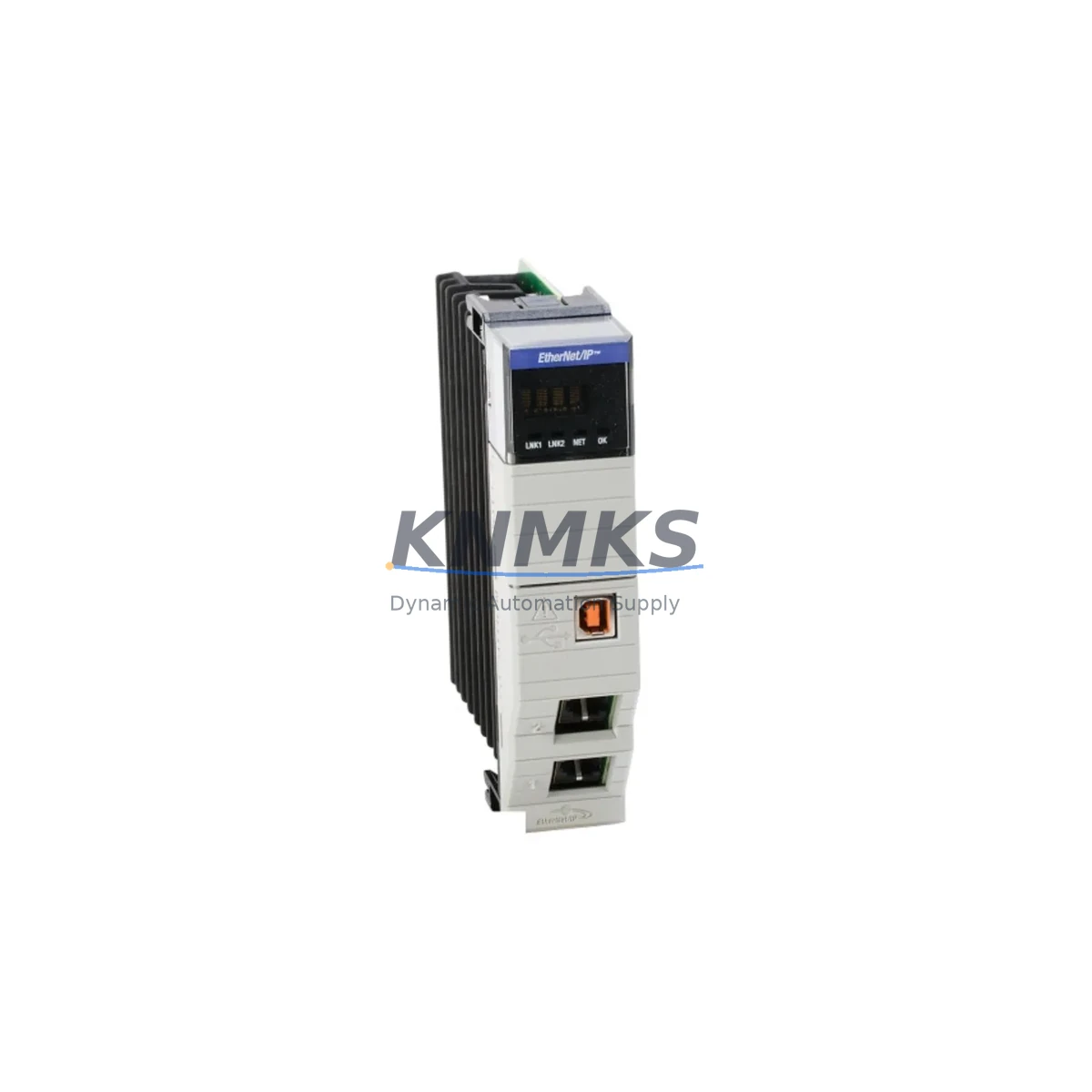
The Allen-Bradley 1756-EN2TRK is an EtherNet/IP communication module designed for the ControlLogix 1756 platform, supporting Device Level Ring (DLR) topology for high-availability industrial networks. As a critical infrastructure component in manufacturing control cabinets, this module enables real-time I/O communication, controller-to-controller messaging, and HMI connectivity across Ethernet-based automation architectures. Maintaining a verified spare of the 1756-EN2TRK in your parts inventory is a proven strategy for minimizing unplanned downtime and protecting production continuity in facilities running Rockwell Automation ControlLogix systems.
For maintenance engineers managing aging ControlLogix installations, the 1756-EN2TRK represents a high-priority spare. Network communication failures at the module level can cascade into full line stoppages within minutes. Having a pre-tested, original replacement on-site reduces mean time to repair (MTTR) from hours to under 30 minutes — a critical advantage in continuous-process and discrete manufacturing environments alike.
Procurement engineers sourcing long-cycle spare parts for multi-site facilities will find the 1756-EN2TRK well-suited for 12–36 month supply agreements. Its compatibility across the ControlLogix 1756 chassis family — including the 1756-A4, 1756-A7, 1756-A10, and 1756-A13 backplanes — means a single SKU can serve multiple control cabinet configurations without variant proliferation.
Spare Maintenance Table
| Parameter | Specification |
|---|---|
| SKU / Part Number | 1756-EN2TRK |
| Brand | Allen-Bradley (Rockwell Automation) |
| Series | ControlLogix 1756 |
| Module Type | EtherNet/IP Communication Module with DLR Support |
| Network Protocol | EtherNet/IP (CIP), Device Level Ring (DLR) |
| Data Rate | 10/100 Mbps |
| Ports | 2 × RJ45 (DLR ring ports) |
| Backplane Compatibility | 1756-A4, 1756-A7, 1756-A10, 1756-A13, 1756-A17 |
| Power Consumption | Supplied via ControlLogix backplane (1756 chassis) |
| Operating Temperature | 0°C to 60°C (32°F to 140°F) |
| Mounting | ControlLogix 1756 chassis slot (any slot) |
| Origin | United States |
| Condition | Original / Genuine — Pre-shipment tested |
| Support terms | 12 Months from date of shipment |
| Typical Application | Factory automation, process control, DLR ring networks, HMI/SCADA connectivity |
| Maintenance Interval | Inspect annually; replace on communication fault or ring break event |
Maintenance Planning for Continuous Operation
When replacing or inspecting the 1756-EN2TRK in a ControlLogix cabinet, a disciplined maintenance engineer will treat the module swap as an opportunity for a broader system health check. The EtherNet/IP communication layer touches nearly every other component in the control architecture, and a module failure often surfaces latent issues in adjacent hardware.
Begin by verifying the integrity of the 1756-PA72 or 1756-PB72 power supply feeding the chassis — a marginal power supply is a common root cause of intermittent communication faults that are incorrectly attributed to the network module itself. Check the DC bus voltage under load before inserting the replacement 1756-EN2TRK.
Inspect all Cat5e/Cat6 patch cables and RJ45 connectors on the DLR ring. Cable degradation, bent pins, or loose terminations at the ring supervisor port are frequent contributors to ring break events. Replace any suspect cables as part of the corrective maintenance cycle rather than deferring to the next scheduled outage.
Review the 1756-L7x or 1756-L8x ControlLogix controller firmware version to confirm compatibility with the replacement module. Mismatched firmware between the controller and the EtherNet/IP bridge can cause unexpected connection timeouts or I/O faults after module replacement. Update controller firmware in a maintenance window if required.
For facilities using 1756-IB16 or 1756-OB16E I/O modules on the same chassis, verify that I/O connections are re-established cleanly after the network module is reseated. Persistent I/O faults following a module swap may indicate a corrupted connection object in the controller project — a controller download or partial restore may be required.
If the control cabinet includes a PanelView Plus HMI communicating over EtherNet/IP, confirm that the HMI re-establishes its RSLinx Enterprise or FactoryTalk View connection after the module replacement. HMI communication paths are often hardcoded to a specific module IP address and may require reconfiguration if the replacement module is assigned a different address.
Finally, inspect the 1492-AIFM analog interface modules or 1756-IF8 analog input modules for any signal drift or calibration alarms that may have been masked during the communication outage. Restoring network visibility sometimes reveals pre-existing process anomalies that were not alarmed during the fault period.
Site Replacement Workflow
Step 1 — Pre-replacement verification: Confirm the replacement 1756-EN2TRK firmware revision matches or is compatible with the installed ControlLogix controller. Document the existing module’s IP address, subnet mask, gateway, and DLR supervisor settings using RSLinx Classic or Studio 5000 Logix Designer before powering down.
Step 2 — Safe removal: Place the controller in Program mode to inhibit I/O updates. Remove the faulty 1756-EN2TRK from the chassis slot. Inspect the backplane connector for damage or contamination. Clean with dry compressed air if required.
Step 3 — Module installation: Insert the replacement 1756-EN2TRK into the same chassis slot. The module will power up and perform a self-test. Observe the module status LEDs — a solid green OK LED and flashing green NET LED indicate normal operation.
Step 4 — Network configuration restore: Using BOOTP/DHCP Server or RSLinx Classic, assign the original IP address to the replacement module’s MAC address. Verify DLR ring supervisor settings are restored. Confirm ring health status in Studio 5000 or via the module’s web interface.
Step 5 — System validation: Return the controller to Run mode. Verify all I/O connections, HMI communications, and inter-controller messaging are re-established. Run a 15-minute observation period before releasing the line to production. Document the replacement in the site maintenance log.
This workflow is applicable to legacy 1756-ENBT and 1756-EN2T replacements as well, making the 1756-EN2TRK a compatible upgrade path that adds DLR ring resilience to previously linear EtherNet/IP topologies — extending system life without requiring a full controls upgrade.
Spare Parts Support FAQ
Q: Is the 1756-EN2TRK a direct replacement for the 1756-EN2T or 1756-ENBT?
A: The 1756-EN2TRK is functionally compatible with the 1756-EN2T in standard EtherNet/IP applications and adds DLR ring supervisor capability. It is a recommended upgrade replacement for the discontinued 1756-ENBT. Firmware and Studio 5000 project compatibility should be verified before installation. Our team can assist with compatibility confirmation prior to shipment.
Q: What pre-shipment testing is performed on the 1756-EN2TRK?
A: Each unit undergoes power-on self-test, LED status verification, and EtherNet/IP communication validation before dispatch. Units are shipped with a support terms confirmed by quotation covering manufacturing defects and functional failures under normal operating conditions. Test records are available upon request for quality-critical procurement.
Q: Can KNMKS support long-term supply agreements for the 1756-EN2TRK?
A: Yes. We support 12–36 month supply agreements for facilities requiring guaranteed spare parts availability. Blanket orders with scheduled releases are available for multi-site maintenance programs. Contact admin@knmks.com or +86 18359268345 to discuss volume pricing and delivery scheduling.
Q: How should the 1756-EN2TRK be stored as a long-term spare?
A: Store in original anti-static packaging in a dry, temperature-controlled environment (10°C–40°C, <85% RH non-condensing). Avoid proximity to strong magnetic fields or high-vibration areas. Inspect annually for physical damage and verify firmware currency against your installed controller revision. Modules stored correctly retain full functionality for 5+ years.
© 2026 KNMKS. All rights reserved.
Original Source: https://knmks.com
Contact: admin@knmks.com | +86 18359268345
Product Identification
- Brand / Ecosystem
-
Allen-Bradley
Allen-Bradley - Model / Series
-
1756-EN2TRK
ControlLogix Series - Product Family
- PLCs & Controllers
- Availability Status
- Available on request after model and quantity confirmation
- Inquiry Type
- B2B RFQ, replacement inquiry and project spare-part request
- Pre-Quote Check
- Exact SKU, brand, series, quantity, nameplate photos and destination country are checked before quotation
System Path
Where this product fits in the KNMKS automation structure.
Specification & Inquiry Focus
- Control platform
- PLC, PAC and modular controllers
- Common needs
- CPU, rack, power and I/O expansion
- Project support
- Replacement, cabinet build and maintenance
Buyer Confirmation
Information KNMKS checks before replying.
- Exact model
- 1756-EN2TRK
- Brand / ecosystem
- Allen-Bradley
- Product family
- PLCs & Controllers
- Application note
- Replacement, maintenance, project build or spare-part list
- Useful photos
- Nameplate, installed unit, cabinet layout or connector side
- Delivery details
- Quantity, destination country and target schedule
Document Support
Files and notes can be confirmed during quotation.
- Product photos or nameplate confirmation when available
- Packing and delivery notes before quotation confirmation
- Support scope and delivery terms confirmed per inquiry
- Export document coordination for qualified B2B requests
Inquiry Support
- Model cross-checking before quotation
- CPU, power, rack and expansion module matching
- Support for replacement and project inquiry
What to Send Us
- Brand and exact model number: Allen-Bradley 1756-EN2TRK
- Quantity and required delivery time
- Application, replacement requirement or nameplate photo
- Destination country and shipping preference
RFQ Preparation
This is a product inquiry page built for RFQ communication.
Fast Model Check
Send this model to KNMKS for confirmation.
Include quantity, destination country and photos if this is a maintenance replacement. The inquiry will be saved with a reference number after submission.
Brand & Compatibility Note
KNMKS displays automation product information for well-known industrial brand ecosystems and compatible replacement references. Brand names are used for product identification and compatibility reference only; final availability and commercial terms are confirmed per quotation.
 Manufacturing
 Machine Tools
 Packaging
 Energy & Power



 HMI & Displays
 Servo Systems
 Variable Frequency Drives
 Sensors