
Overview
Allen-Bradley 1756-EN2TK Maintenance-Proven Spare Part for Factory Uptime
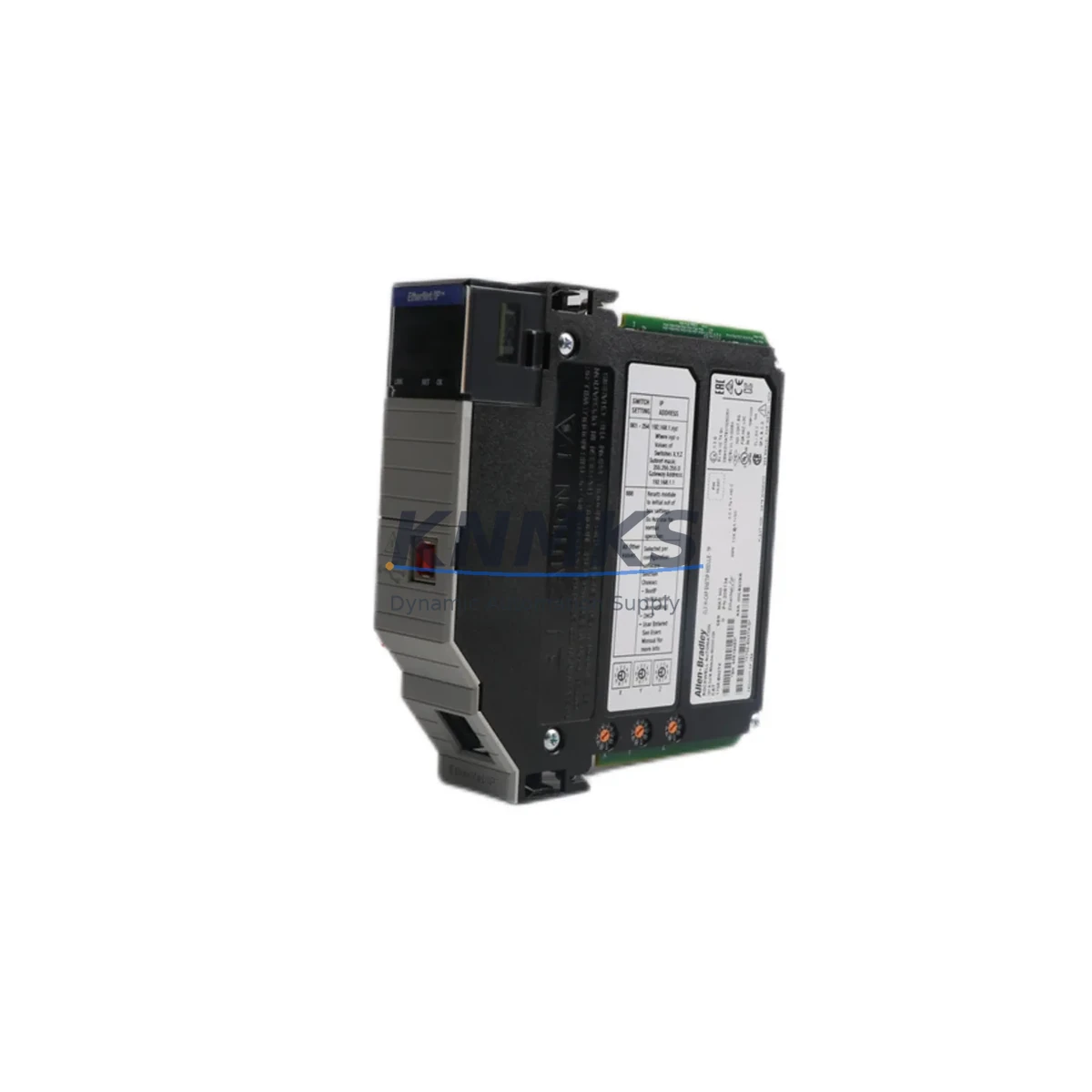
The Allen-Bradley 1756-EN2TK is a dual-port EtherNet/IP bridge module designed for the ControlLogix 1756 platform. As a critical network communication component, it enables high-speed data exchange between ControlLogix controllers and EtherNet/IP-based field devices, SCADA systems, and HMI panels. For maintenance engineers managing continuous production lines, keeping a verified 1756-EN2TK spare on the shelf is a fundamental strategy for minimizing unplanned downtime and ensuring rapid system recovery.
This module supports Device Level Ring (DLR) topology, providing network redundancy that is essential in high-availability manufacturing environments. When a 1756-EN2TK fails in service, the impact is immediate: loss of network communication, controller isolation, and potential full-line shutdown. Having a tested, ready-to-deploy spare eliminates the lead time risk associated with emergency procurement and allows maintenance teams to restore operations within a single shift.
At KNMKS, every 1756-EN2TK unit is sourced from verified supply channels, functionally tested prior to dispatch, and backed by a support terms confirmed by quotation. We support long-term supply agreements for MRO teams managing multi-site ControlLogix installations.
Spare Maintenance Table
| SKU / Part Number | 1756-EN2TK |
| Brand | Allen-Bradley (Rockwell Automation) |
| Series | ControlLogix 1756 |
| Module Type | Dual-Port EtherNet/IP Bridge Module |
| Network Protocol | EtherNet/IP (CIP), DLR (Device Level Ring) |
| Communication Speed | 10/100/1000 Mbps (Gigabit) |
| Ports | 2 × RJ45 Ethernet |
| Backplane Compatibility | 1756 ControlLogix Chassis (all standard slot widths) |
| Power Consumption | Supplied via 1756 backplane |
| Operating Temperature | 0°C to 60°C (32°F to 140°F) |
| Mounting | 1756 chassis slot, tool-free keying |
| Firmware | Field-upgradeable via Studio 5000 / RSLogix 5000 |
| Certifications | UL, CE, cUL |
| Country of Origin | United States |
| Support terms | 12 Months — Functional test verified before shipment |
| Application Environment | Industrial control cabinets, DCS integration, SCADA networks, process automation |
| Maintenance Recommendation | Inspect port LEDs, verify IP configuration, check DLR ring status quarterly |
Maintenance Planning for Continuous Operation
When planning a 1756-EN2TK replacement or scheduled inspection, experienced maintenance engineers treat the module not in isolation but as part of the broader ControlLogix communication architecture. A structured cabinet inspection should accompany any network module swap to prevent secondary failures and confirm system integrity before returning the line to production.
Begin by verifying the 1756-PA75 or 1756-PB75 power supply module — backplane voltage stability directly affects communication module performance. A degraded power supply can cause intermittent EN2TK faults that mimic network issues. Inspect the power supply’s output LEDs and measure DC rail voltage under load before concluding the EN2TK is the root cause.
Next, inspect the 1756 chassis backplane itself. Loose module seating, bent backplane connectors, or chassis damage can cause communication errors that persist even after a module swap. Reseat all modules and verify chassis ground continuity as part of the replacement workflow.
For I/O integrity, check associated 1756-IB16 digital input modules or 1756-OB16E digital output modules that communicate over the same EtherNet/IP network segment. A network topology change caused by a failed EN2TK can leave I/O modules in a faulted state that requires manual reset after the bridge module is restored.
If the installation uses 1756-L7x or 1756-L8x ControlLogix controllers, confirm that the controller firmware version is compatible with the replacement EN2TK firmware. Mismatched firmware revisions can prevent the module from being recognized on the backplane. Use Studio 5000 Logix Designer to verify compatibility before installation.
For sites using PanelView Plus HMI terminals connected via EtherNet/IP, confirm that HMI communication paths are re-established after the EN2TK replacement. HMI path configurations may need to be updated if the module’s IP address or slot assignment changes during the swap.
Finally, inspect Ethernet patch cables, managed switches, and DLR ring couplers in the network segment. A failed EN2TK often stresses adjacent network hardware; cables with marginal terminations or switches with aging firmware may exhibit instability after the primary module is restored. Replace suspect cables and update switch firmware as part of the corrective maintenance record.
Site Replacement Workflow
Step 1 — Pre-Replacement Verification: Before removing the 1756-EN2TK, document the module’s current IP address, subnet mask, gateway, and slot number from the RSLogix 5000 / Studio 5000 I/O tree. Export the controller project as a backup. Note the DLR ring status (if applicable) and confirm which devices are downstream of this module.
Step 2 — Safe Removal: Place the controller in Program mode to halt active I/O scanning. Remove the EN2TK from the chassis slot. Inspect the backplane connector on both the module and chassis for damage or contamination.
Step 3 — Spare Module Preparation: Confirm the replacement 1756-EN2TK firmware revision matches or is compatible with the controller firmware. If required, update firmware using ControlFLASH or Studio 5000 before installation. Configure the IP address using BOOTP/DHCP server or RSLinx Classic prior to chassis insertion.
Step 4 — Installation and Verification: Insert the replacement module into the correct chassis slot. Power up and observe the module status LEDs — the OK LED should display solid green and the NET LED should indicate active network communication. Verify the module appears correctly in the Studio 5000 I/O tree with no faults.
Step 5 — System Restoration: Return the controller to Run mode. Confirm all downstream EtherNet/IP devices, I/O modules, and HMI connections are re-established. Perform a functional test of critical I/O points before releasing the line to production. Document the replacement in the site maintenance log.
This workflow is applicable to both emergency corrective replacements and planned preventive maintenance swaps. For sites managing multiple ControlLogix racks, maintaining at least one 1756-EN2TK spare per installation is a recognized best practice for MRO inventory planning.
Spare Parts Support FAQ
Q1: Is the 1756-EN2TK compatible with all ControlLogix 1756 chassis sizes?
Yes. The 1756-EN2TK is compatible with all standard 1756 ControlLogix chassis configurations, including 4-slot, 7-slot, 10-slot, 13-slot, and 17-slot chassis. It occupies a single slot and draws power from the backplane. Confirm chassis power supply capacity before adding additional modules to a fully loaded rack.
Q2: How do you verify a 1756-EN2TK spare before installation on a live system?
Each unit shipped by KNMKS is functionally tested prior to dispatch. On-site, you can verify the spare using a bench test setup: insert the module into a spare chassis with a compatible power supply, connect to a laptop via Ethernet, and confirm the module responds to BOOTP/DHCP requests and is discoverable in RSLinx Classic. Check firmware revision and LED status before deploying to the production rack.
Q3: What is the lead time and support terms coverage for the 1756-EN2TK?
KNMKS maintains stock of the 1756-EN2TK for immediate dispatch. Standard lead time is 3–7 business days for international shipments, with expedited options available for emergency requirements. All units are covered by a support terms confirmed by quotation from the date of shipment, covering functional defects under normal operating conditions. Long-term supply agreements are available for MRO teams requiring guaranteed stock allocation.
Q4: Can the 1756-EN2TK replace older EtherNet/IP bridge modules in legacy ControlLogix systems?
Yes. The 1756-EN2TK is designed as a direct replacement for earlier Allen-Bradley EtherNet/IP bridge modules in the 1756 series. It provides backward compatibility with existing EtherNet/IP network configurations while adding Gigabit speed and DLR support. Firmware updates may be required to ensure full compatibility with older controller revisions. Contact KNMKS with your existing module part number and controller firmware version for a pre-sale compatibility confirmation.
© 2026 KNMKS. All rights reserved.
Original Source: https://knmks.com
Contact: admin@knmks.com | +86 18359268345
Product Identification
- Brand / Ecosystem
-
Allen-Bradley
Allen-Bradley - Model / Series
-
1756-EN2TK
ControlLogix Series - Product Family
- PLCs & Controllers
- Availability Status
- Available on request after model and quantity confirmation
- Inquiry Type
- B2B RFQ, replacement inquiry and project spare-part request
- Pre-Quote Check
- Exact SKU, brand, series, quantity, nameplate photos and destination country are checked before quotation
System Path
Where this product fits in the KNMKS automation structure.
Specification & Inquiry Focus
- Control platform
- PLC, PAC and modular controllers
- Common needs
- CPU, rack, power and I/O expansion
- Project support
- Replacement, cabinet build and maintenance
Buyer Confirmation
Information KNMKS checks before replying.
- Exact model
- 1756-EN2TK
- Brand / ecosystem
- Allen-Bradley
- Product family
- PLCs & Controllers
- Application note
- Replacement, maintenance, project build or spare-part list
- Useful photos
- Nameplate, installed unit, cabinet layout or connector side
- Delivery details
- Quantity, destination country and target schedule
Document Support
Files and notes can be confirmed during quotation.
- Product photos or nameplate confirmation when available
- Packing and delivery notes before quotation confirmation
- Support scope and delivery terms confirmed per inquiry
- Export document coordination for qualified B2B requests
Inquiry Support
- Model cross-checking before quotation
- CPU, power, rack and expansion module matching
- Support for replacement and project inquiry
What to Send Us
- Brand and exact model number: Allen-Bradley 1756-EN2TK
- Quantity and required delivery time
- Application, replacement requirement or nameplate photo
- Destination country and shipping preference
RFQ Preparation
This is a product inquiry page built for RFQ communication.
Fast Model Check
Send this model to KNMKS for confirmation.
Include quantity, destination country and photos if this is a maintenance replacement. The inquiry will be saved with a reference number after submission.
Brand & Compatibility Note
KNMKS displays automation product information for well-known industrial brand ecosystems and compatible replacement references. Brand names are used for product identification and compatibility reference only; final availability and commercial terms are confirmed per quotation.
 Manufacturing
 Machine Tools
 Packaging
 Energy & Power



 HMI & Displays
 Servo Systems
 Variable Frequency Drives
 Sensors