
Overview
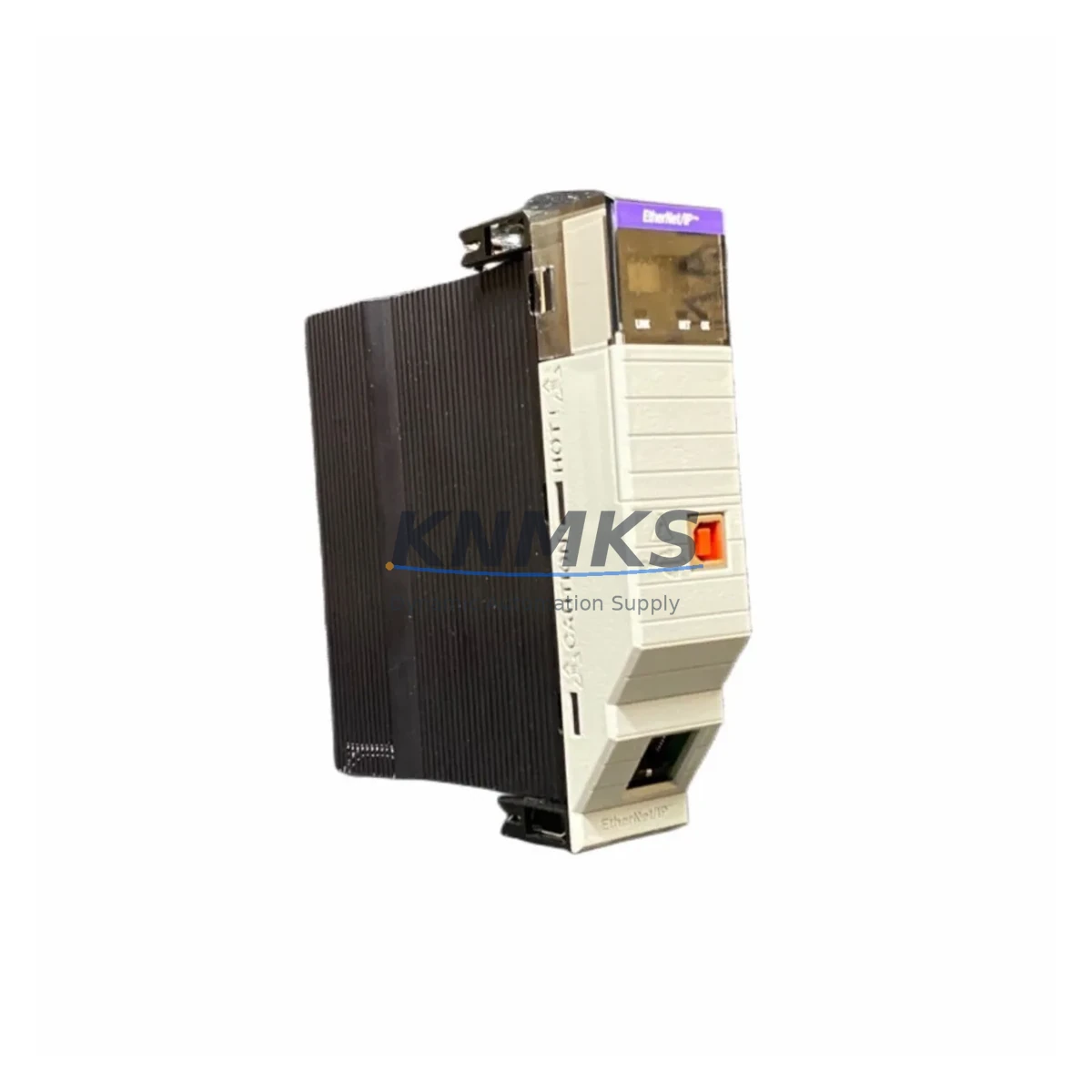
Allen-Bradley 1756-EN2T/D Maintenance-Proven Spare Part for Factory Uptime
The Allen-Bradley 1756-EN2T/D is a Series D EtherNet/IP communication bridge module designed for the ControlLogix 1756 platform. As a critical network interface between the ControlLogix backplane and the plant-floor EtherNet/IP network, this module enables high-speed I/O messaging, controller-to-controller communication, and HMI connectivity across industrial Ethernet infrastructure. Maintaining a verified spare of the 1756-EN2T/D in your MRO inventory is a proven strategy for minimizing unplanned downtime in automation-intensive production environments.
For maintenance engineers managing ControlLogix-based control systems, the 1756-EN2T/D is a high-priority spare. Network communication faults at the module level can isolate an entire ControlLogix chassis from the supervisory network, halting production across multiple lines. A pre-tested, shelf-ready replacement unit allows technicians to execute a hot-swap procedure within minutes, restoring system communication without waiting for emergency procurement cycles that can extend downtime by days.
Procurement engineers sourcing MRO spares for long-running ControlLogix installations should note that the 1756-EN2T/D Series D revision incorporates firmware and hardware improvements over earlier Series A and B variants. Confirming the correct series revision before purchase prevents compatibility mismatches during emergency replacement. KNMKS supplies original Allen-Bradley 1756-EN2T/D units with full traceability, pre-shipment functional testing, and a support terms confirmed by quotation covering defects in materials and workmanship.
Spare Maintenance Table
| Parameter | Specification |
|---|---|
| Part Number | 1756-EN2T/D |
| Series | Series D |
| Platform | ControlLogix 1756 |
| Protocol | EtherNet/IP (IEEE 802.3) |
| Network Speed | 10/100 Mbps, auto-negotiate |
| Ports | 1 × RJ-45 EtherNet/IP |
| Backplane Current Draw | 1A @ 5VDC, 3mA @ 24VDC |
| Operating Temperature | 0°C to 60°C (32°F to 140°F) |
| Chassis Compatibility | 1756-A4, 1756-A7, 1756-A10, 1756-A13, 1756-A17 |
| Controller Compatibility | 1756-L6x, 1756-L7x, 1756-L8x series |
| Firmware Upgrade | Supported via ControlFLASH |
| Installation | Hot-swap capable (chassis powered) |
| Certifications | UL, CE, C-Tick |
| Support terms | 12 Months — KNMKS Tested & Verified |
Maintenance Planning for Continuous Operation
When replacing or inspecting the 1756-EN2T/D in a ControlLogix cabinet, a disciplined maintenance engineer will not limit the inspection to the communication module alone. The surrounding electrical environment directly affects module longevity and network reliability. Begin by verifying the 1756-PA75 or 1756-PB75 power supply output voltage and ripple — an aging or undersized power supply is a leading cause of premature module failure and intermittent communication faults. Check the backplane connector on the chassis for bent pins or contamination before seating the replacement module.
Inspect the 1756-A10 or 1756-A17 chassis backplane for signs of heat stress or corrosion, particularly in high-humidity or high-ambient-temperature environments. Verify that the 1756-L74 or 1756-L75 ControlLogix controller firmware is compatible with the Series D module revision to avoid post-replacement communication errors. If the control cabinet includes a 1756-DNB DeviceNet bridge or 1756-CN2 ControlNet bridge in the same chassis, confirm that backplane slot assignments and I/O tree configurations remain intact after the EtherNet/IP module swap.
For plants running PanelView Plus 7 HMI terminals connected via EtherNet/IP, validate that the HMI communication path is re-established after module replacement and that the IP address assignment — whether static or DHCP-reserved — matches the original configuration. Where 1492-AIFM analog interface modules or 1756-IF16 analog input modules are present in the same I/O tree, confirm that analog signal integrity is unaffected following the network restoration. Maintaining a documented IP address register and module configuration backup in RSLogix 5000 or Studio 5000 significantly reduces restoration time during emergency replacements.
Site Replacement Workflow
The 1756-EN2T/D supports hot-swap installation, allowing technicians to replace the module without powering down the ControlLogix chassis. Before removal, document the module’s IP address, subnet mask, gateway, and chassis slot number from the existing configuration in Studio 5000 Logix Designer. Export the controller project file as a backup prior to any hardware change.
Remove the failed module by pressing the top and bottom locking tabs simultaneously and sliding the module out of the chassis slot. Insert the replacement 1756-EN2T/D, ensuring the backplane connector seats fully. The module will boot and acquire its network identity; if the controller project uses a module-defined IP address, the replacement module will inherit the configuration automatically upon controller download or online edit. If BOOTP or DHCP is used, confirm the MAC address of the replacement unit is registered in the network’s address reservation table before going online.
After restoration, verify EtherNet/IP I/O connections in the controller’s I/O tree show a healthy status (no inhibited or faulted connections). Confirm that all HMI communication paths, historian connections, and remote I/O adapter links are re-established. Log the replacement event, module serial number, and firmware version in the site maintenance record. This workflow is compatible with ControlLogix systems running Logix firmware v20 through v35, covering the majority of installed base systems still in active production.
Spare Parts Support FAQ
Q1: Is the 1756-EN2T/D Series D backward compatible with earlier Series A and B chassis installations?
Yes. The 1756-EN2T/D Series D is functionally compatible with all 1756-series chassis and ControlLogix controllers supported by earlier series revisions. Series D incorporates hardware and firmware refinements but maintains full backward compatibility. Always verify the Studio 5000 module definition matches the installed series to avoid configuration mismatch warnings.
Q2: How does KNMKS verify spare modules before shipment?
Each 1756-EN2T/D unit undergoes a pre-shipment functional test that includes backplane communication verification, EtherNet/IP port link-up confirmation, and firmware version check. Units are inspected for physical damage, connector integrity, and label authenticity. A test report is available upon request. All units are covered by a support terms confirmed by quotation from the date of shipment.
Q3: What is the recommended spare inventory strategy for ControlLogix EtherNet/IP modules?
For production facilities with three or more ControlLogix chassis on a single EtherNet/IP network, maintaining a minimum of one 1756-EN2T/D spare per five installed modules is a widely adopted MRO benchmark. High-criticality lines — such as automotive assembly or pharmaceutical batch processing — typically maintain a 1:3 spare ratio. KNMKS supports long-term supply agreements to ensure consistent availability without requiring large upfront inventory commitments.
Q4: Can KNMKS supply 1756-EN2T/D units for legacy systems that are no longer in Rockwell Automation’s active catalog?
Yes. KNMKS specializes in sourcing and supplying original Allen-Bradley modules for installed-base systems, including models that have reached end-of-life or limited-availability status with the OEM. Long-term supply capability, combined with pre-shipment testing and a support terms confirmed by quotation, makes KNMKS a reliable partner for extending the operational life of existing ControlLogix installations without requiring a full system upgrade.
© 2026 KNMKS. All rights reserved.
Original Source: https://knmks.com
Contact: admin@knmks.com | +86 18359268345
Product Identification
- Brand / Ecosystem
-
Allen-Bradley
Allen-Bradley - Model / Series
-
1756-EN2T/D
ControlLogix Series - Product Family
- PLCs & Controllers
- Availability Status
- Available on request after model and quantity confirmation
- Inquiry Type
- B2B RFQ, replacement inquiry and project spare-part request
- Pre-Quote Check
- Exact SKU, brand, series, quantity, nameplate photos and destination country are checked before quotation
System Path
Where this product fits in the KNMKS automation structure.
Specification & Inquiry Focus
- Control platform
- PLC, PAC and modular controllers
- Common needs
- CPU, rack, power and I/O expansion
- Project support
- Replacement, cabinet build and maintenance
Buyer Confirmation
Information KNMKS checks before replying.
- Exact model
- 1756-EN2T/D
- Brand / ecosystem
- Allen-Bradley
- Product family
- PLCs & Controllers
- Application note
- Replacement, maintenance, project build or spare-part list
- Useful photos
- Nameplate, installed unit, cabinet layout or connector side
- Delivery details
- Quantity, destination country and target schedule
Document Support
Files and notes can be confirmed during quotation.
- Product photos or nameplate confirmation when available
- Packing and delivery notes before quotation confirmation
- Support scope and delivery terms confirmed per inquiry
- Export document coordination for qualified B2B requests
Inquiry Support
- Model cross-checking before quotation
- CPU, power, rack and expansion module matching
- Support for replacement and project inquiry
What to Send Us
- Brand and exact model number: Allen-Bradley 1756-EN2T/D
- Quantity and required delivery time
- Application, replacement requirement or nameplate photo
- Destination country and shipping preference
RFQ Preparation
This is a product inquiry page built for RFQ communication.
Fast Model Check
Send this model to KNMKS for confirmation.
Include quantity, destination country and photos if this is a maintenance replacement. The inquiry will be saved with a reference number after submission.
Brand & Compatibility Note
KNMKS displays automation product information for well-known industrial brand ecosystems and compatible replacement references. Brand names are used for product identification and compatibility reference only; final availability and commercial terms are confirmed per quotation.
 Manufacturing
 Machine Tools
 Packaging
 Energy & Power



 HMI & Displays
 Servo Systems
 Variable Frequency Drives
 Sensors