
Overview
Allen-Bradley 1756-CNBR/D Maintenance-Proven Spare Part for Factory Uptime
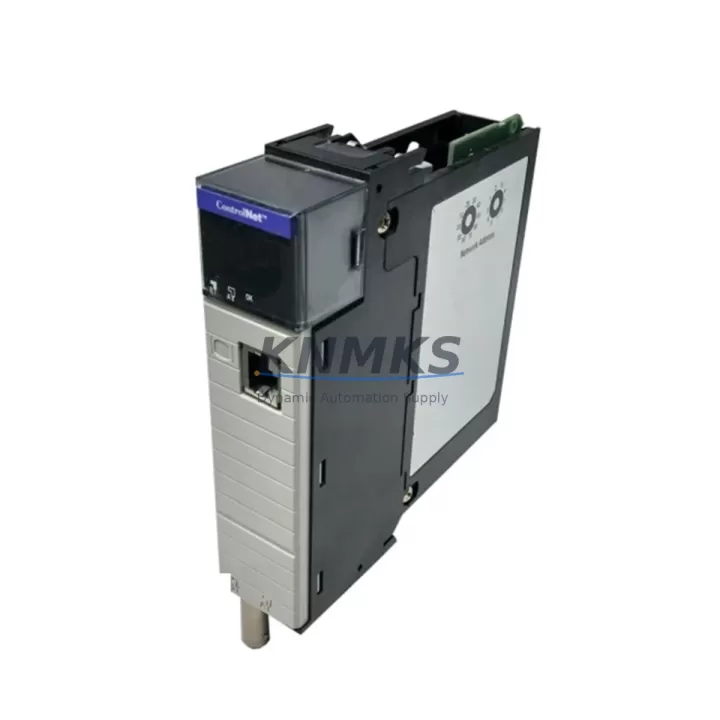
The Allen-Bradley 1756-CNBR/D is a ControlNet Bridge Module designed for the Rockwell Automation ControlLogix 1756 platform. As a critical network interface component, it enables seamless ControlNet communication between ControlLogix chassis and field devices, remote I/O racks, and distributed control nodes across industrial production environments. For maintenance engineers managing aging ControlLogix systems, keeping a verified spare of the 1756-CNBR/D on the shelf is a non-negotiable element of any serious MRO strategy.
Whether you are executing a planned annual shutdown, responding to an unscheduled line stoppage, or conducting a routine control cabinet inspection, the 1756-CNBR/D is a module that demands immediate availability. ControlNet bridge failures are among the most disruptive events in a ControlLogix-based architecture — they sever communication between the controller and remote I/O, triggering faults across the entire network segment. A pre-tested, shelf-ready replacement unit is the fastest path to restoring production continuity.
At KNMKS, every 1756-CNBR/D unit is sourced from verified supply channels, functionally tested prior to dispatch, and backed by a support terms confirmed by quotation. We support long-term procurement relationships with maintenance teams, plant engineers, and MRO purchasing departments across manufacturing, oil & gas, water treatment, automotive, and process industries.
Spare Maintenance Table
| Part Number | 1756-CNBR/D |
| Brand | Allen-Bradley / Rockwell Automation |
| Series | ControlLogix 1756 |
| Module Type | ControlNet Bridge Module |
| Network Protocol | ControlNet (IEC 61158) |
| Backplane Interface | ControlLogix 1756 chassis backplane |
| Power Consumption | Supplied via ControlLogix backplane (1756-PA72 / 1756-PB72 compatible) |
| Operating Temperature | 0°C to 60°C (32°F to 140°F) |
| Humidity | 5% to 95% non-condensing |
| Mounting | ControlLogix 1756 chassis slot (any slot) |
| Compatibility | ControlLogix 1756 Series chassis; compatible with 1756-L6x, 1756-L7x, 1756-L8x controllers |
| Origin | United States |
| Condition | Original, tested before shipment |
| Support terms | 12 Months |
| Lead Time | availability confirmed by RFQ — ships within 1–3 business days |
| Application | Manufacturing, Oil & Gas, Water Treatment, Automotive, Process Control |
Maintenance Planning for Continuous Operation
When a 1756-CNBR/D fails or is flagged during a scheduled inspection, the replacement process should be treated as a system-level event, not an isolated module swap. Experienced maintenance engineers know that ControlNet bridge faults rarely occur in isolation — they are often preceded or accompanied by degradation in adjacent components that share the same chassis, power rail, or network segment.
Before or during replacement of the 1756-CNBR/D, the following components should be inspected and verified:
- 1756-PA72 / 1756-PB72 Power Supply: Verify output voltage stability and check for thermal stress or capacitor aging. A marginal power supply is a common root cause of intermittent bridge module faults.
- 1756-CHASSIS (4, 7, 10, 13, or 17-slot): Inspect backplane connectors for oxidation, debris, or mechanical damage. A damaged backplane slot can cause repeated module failures.
- 1756-L6x / 1756-L7x Controller Module: Confirm firmware version compatibility with the replacement 1756-CNBR/D. Mismatched firmware revisions can prevent proper network initialization.
- ControlNet Coaxial Cable and BNC Connectors: Inspect the physical ControlNet media — coaxial cable, BNC T-connectors, and terminators. Damaged or corroded connectors are a leading cause of ControlNet communication errors that are incorrectly attributed to the bridge module itself.
- 1756-DNB DeviceNet Bridge or 1756-ENBT EtherNet/IP Bridge: If the control cabinet hosts multiple network bridge modules, inspect adjacent modules for similar wear indicators, particularly if the cabinet has experienced thermal cycling or vibration.
- Terminal Blocks and I/O Wiring: For remote I/O racks connected via ControlNet, verify terminal block integrity and I/O module seating. Loose connections in remote racks can generate false ControlNet fault diagnostics.
For procurement engineers, we recommend maintaining a minimum of one verified spare 1756-CNBR/D per ControlNet network segment in your facility. For high-criticality lines with zero-tolerance downtime requirements, a two-unit buffer is advisable. KNMKS supports blanket purchase orders and long-term supply agreements for MRO teams managing multi-site ControlLogix installations.
Site Replacement Workflow
Replacing the 1756-CNBR/D on a live ControlLogix system requires a structured approach to minimize downtime and avoid secondary faults. The following workflow reflects best practices for field replacement in industrial environments:
- Document the current configuration: Before removing the module, use RSLogix 5000 or Studio 5000 to export the current I/O configuration and ControlNet node assignments. Record the module’s slot position, node address, and network parameters.
- Coordinate with operations: Notify the production team and confirm a safe window for the network segment to be taken offline. For systems without redundancy, this will result in a brief production interruption.
- Power down the chassis (if required): The 1756-CNBR/D is not hot-swappable in all configurations. Confirm your system’s hot-swap capability before attempting live removal. If in doubt, power down the chassis using the 1756-PA72 or 1756-PB72 power supply switch.
- Remove and inspect the faulty module: Check the module’s backplane connector for physical damage. Retain the faulty unit for failure analysis if required by your maintenance records.
- Install the replacement 1756-CNBR/D: Seat the new module firmly in the same chassis slot. Reconnect ControlNet coaxial cables and verify BNC connector torque.
- Restore power and verify communication: Power up the chassis and monitor the module’s status LEDs. Use RSLinx Classic or Studio 5000 to confirm ControlNet node discovery and I/O mapping restoration.
- Validate production resumption: Confirm all remote I/O racks are communicating correctly and that the controller has resumed normal scan cycle operation before releasing the line to production.
This workflow is compatible with both revision upgrades (replacing an older /A or /B revision with a /D) and like-for-like replacements. The 1756-CNBR/D revision D is backward compatible with earlier ControlLogix chassis and controller firmware versions, making it a reliable drop-in replacement for legacy system maintenance.
Spare Parts Support FAQ
Q1: Is the 1756-CNBR/D compatible with all ControlLogix 1756 chassis and controller revisions?
The 1756-CNBR/D revision D is designed for use in any ControlLogix 1756 chassis slot and is compatible with 1756-L6x, 1756-L7x, and 1756-L8x series controllers. For older L55 or L6 controllers, verify firmware compatibility using the Rockwell Automation Product Compatibility and Download Center (PCDC) before installation. KNMKS technical support can assist with compatibility verification prior to purchase.
Q2: What testing is performed on each unit before shipment?
Every 1756-CNBR/D supplied by KNMKS undergoes functional verification prior to dispatch. This includes power-on testing, backplane communication verification, and visual inspection of connectors and firmware revision markings. Units are packaged in anti-static protective packaging to prevent ESD damage during transit. A support terms confirmed by quotation is provided on all units from the date of shipment.
Q3: Can KNMKS support long-term or recurring supply of the 1756-CNBR/D for multi-site MRO programs?
Yes. KNMKS supports blanket purchase orders, scheduled delivery agreements, and priority stock reservation for maintenance teams managing multiple facilities or large ControlLogix installations. Contact our sales team at admin@knmks.com or +86 18359268345 to discuss your annual spare parts requirements and establish a supply agreement.
Q4: What should I do if the replacement 1756-CNBR/D does not restore ControlNet communication after installation?
If communication is not restored after module replacement, the fault is likely in the ControlNet physical media (coaxial cable, BNC connectors, or terminators), the chassis backplane, or the controller firmware configuration rather than the module itself. Verify ControlNet cable continuity, check for missing or damaged terminators at both ends of the ControlNet segment, and confirm that the controller’s I/O configuration matches the new module’s slot assignment. KNMKS provides post-sale technical support to assist with installation troubleshooting.
© 2026 KNMKS. All rights reserved.
Original Source: https://knmks.com
Contact: admin@knmks.com | +86 18359268345
Product Identification
- Brand / Ecosystem
-
Allen-Bradley
Allen-Bradley - Model / Series
-
1756-CNBR/D
ControlLogix Series - Product Family
- PLCs & Controllers
- Availability Status
- Available on request after model and quantity confirmation
- Inquiry Type
- B2B RFQ, replacement inquiry and project spare-part request
- Pre-Quote Check
- Exact SKU, brand, series, quantity, nameplate photos and destination country are checked before quotation
System Path
Where this product fits in the KNMKS automation structure.
Specification & Inquiry Focus
- Control platform
- PLC, PAC and modular controllers
- Common needs
- CPU, rack, power and I/O expansion
- Project support
- Replacement, cabinet build and maintenance
Buyer Confirmation
Information KNMKS checks before replying.
- Exact model
- 1756-CNBR/D
- Brand / ecosystem
- Allen-Bradley
- Product family
- PLCs & Controllers
- Application note
- Replacement, maintenance, project build or spare-part list
- Useful photos
- Nameplate, installed unit, cabinet layout or connector side
- Delivery details
- Quantity, destination country and target schedule
Document Support
Files and notes can be confirmed during quotation.
- Product photos or nameplate confirmation when available
- Packing and delivery notes before quotation confirmation
- Support scope and delivery terms confirmed per inquiry
- Export document coordination for qualified B2B requests
Inquiry Support
- Model cross-checking before quotation
- CPU, power, rack and expansion module matching
- Support for replacement and project inquiry
What to Send Us
- Brand and exact model number: Allen-Bradley 1756-CNBR/D
- Quantity and required delivery time
- Application, replacement requirement or nameplate photo
- Destination country and shipping preference
RFQ Preparation
This is a product inquiry page built for RFQ communication.
Fast Model Check
Send this model to KNMKS for confirmation.
Include quantity, destination country and photos if this is a maintenance replacement. The inquiry will be saved with a reference number after submission.
Brand & Compatibility Note
KNMKS displays automation product information for well-known industrial brand ecosystems and compatible replacement references. Brand names are used for product identification and compatibility reference only; final availability and commercial terms are confirmed per quotation.
 Manufacturing
 Machine Tools
 Packaging
 Energy & Power



 HMI & Displays
 Servo Systems
 Variable Frequency Drives
 Sensors