
Overview
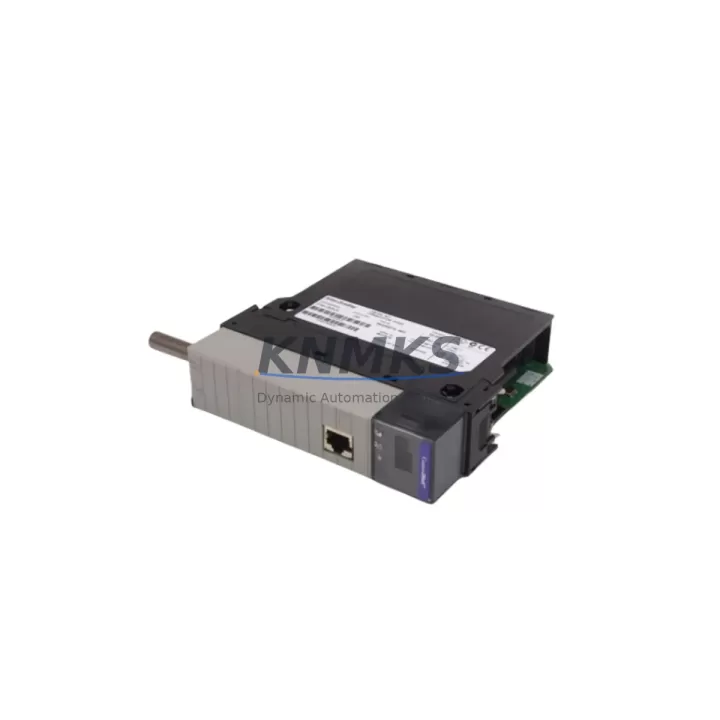
Allen-Bradley 1756-CN2R/B Maintenance-Proven Spare Part for Factory Uptime
The Allen-Bradley 1756-CN2R/B is a redundant ControlNet communication bridge module designed for the ControlLogix 1756 chassis platform. In high-availability manufacturing environments — automotive assembly, oil & gas processing, water treatment, and discrete manufacturing — this module serves as the backbone of deterministic, real-time I/O communication across ControlNet networks. When this module fails or degrades, the entire ControlNet segment loses synchronization, triggering unplanned downtime that can cost thousands of dollars per hour. Stocking a verified original 1756-CN2R/B spare is not optional for facilities running redundant ControlLogix architectures — it is a fundamental maintenance discipline.
At KNMKS, every 1756-CN2R/B unit is sourced as an original Allen-Bradley component, subjected to pre-shipment functional testing, and dispatched with a support terms confirmed by quotation. Our supply chain supports long-term spare parts agreements of 12 to 36 months, giving maintenance engineers and procurement teams the confidence to plan annual shutdowns and emergency replacement inventories without sourcing risk.
Spare Maintenance Table
| Parameter | Specification |
|---|---|
| SKU / Part Number | 1756-CN2R/B |
| Brand | Allen-Bradley (Rockwell Automation) |
| Series | ControlLogix 1756 |
| Module Type | Redundant ControlNet Communication Bridge |
| Network Standard | ControlNet (IEC 61158 / EN 50170) |
| Redundancy | Dual ControlNet ports (coax BNC), media redundancy supported |
| Data Rate | 5 Mbps |
| Backplane Interface | ControlLogix 1756 chassis backplane |
| Power Consumption | Supplied via 1756 chassis backplane (1756-PA72 / 1756-PB72 compatible) |
| Operating Temperature | 0°C to 60°C (32°F to 140°F) |
| Relative Humidity | 5% to 95% non-condensing |
| Mounting | 1756 ControlLogix chassis slot (any slot) |
| Firmware Compatibility | RSLogix 5000 / Studio 5000 Logix Designer |
| Origin | USA |
| Condition | Original, pre-shipment tested |
| Support terms | 12 Months (KNMKS) |
| Long-Term Supply | 12–36 month spare parts agreements available |
Maintenance Planning for Continuous Operation
Replacing a 1756-CN2R/B in a live ControlLogix system requires a structured approach to avoid cascading faults across the ControlNet segment. Maintenance engineers should treat this replacement as a system-level event, not a single-module swap. Before pulling the module, verify that the redundant ControlNet path (if configured) is active and carrying traffic — the dual BNC coaxial ports on the 1756-CN2R/B are designed precisely for this failover scenario.
Begin by inspecting the 1756-PA72 or 1756-PB72 chassis power supply for output voltage stability. A degraded power supply is a common root cause of intermittent ControlNet communication faults that are misdiagnosed as module failures. Simultaneously, check the 1756-CNBR ControlNet Bridge or any co-installed 1756-EN2T EtherNet/IP communication module for fault indicators — a simultaneous fault across multiple communication modules often points to a backplane or power issue rather than the ControlNet module itself.
Inspect the ControlNet coaxial cable terminations and BNC connectors at both ends of the segment. Corroded or loose BNC terminations are a leading cause of ControlNet NUT (Network Update Time) violations. Replace any suspect RG-6 coaxial cable sections and verify 75-ohm termination resistors are installed at both ends of the trunk. For installations using 1786-RPCD ControlNet repeaters, confirm repeater power and signal integrity before concluding the module is at fault.
On the I/O side, document all 1756-IB16 digital input and 1756-OB16E digital output modules scheduled on the ControlNet network. After module replacement, use RSNetWorx for ControlNet to re-schedule the network and confirm all I/O connections are re-established within the configured RPI (Requested Packet Interval). For systems with 1756-DNB DeviceNet Bridge modules in the same chassis, verify that DeviceNet scanner operation is unaffected by the ControlNet reconfiguration.
Procurement engineers should note that the 1756-CN2R/B is a legacy module in Rockwell’s portfolio. Securing a 12 to 36-month supply agreement with KNMKS ensures that emergency replacement needs are met without exposure to grey-market sourcing risks, counterfeit components, or extended lead times from distribution channels.
Site Replacement Workflow
Step 1 — Pre-Replacement Verification: Confirm the ControlNet network topology in RSNetWorx for ControlNet. Export the current network schedule (.xc file) and save it to a maintenance laptop. Verify the redundant ControlNet path is active. Note the module’s slot position in the 1756 chassis.
Step 2 — Controller Preparation: In Studio 5000 Logix Designer, inhibit the 1756-CN2R/B module in the I/O tree to prevent controller faults during removal. For redundant controller systems (1756-L7xS), coordinate with the primary/secondary switchover procedure before proceeding.
Step 3 — Physical Replacement: Power down is not required for hot-swap in a ControlLogix chassis, but confirm chassis power supply health before proceeding. Remove the faulty 1756-CN2R/B by pressing the top and bottom locking tabs. Insert the replacement unit into the same slot. The module will initialize and the status LEDs (MOD, NET A, NET B) should cycle through initialization states.
Step 4 — Network Re-commissioning: Open RSNetWorx for ControlNet and re-optimize the network schedule. Download the updated schedule to the 1756-CN2R/B. Verify all scheduled and unscheduled connections are re-established. Confirm NUT compliance and check for any keeper conflicts.
Step 5 — Post-Replacement Validation: Un-inhibit the module in Studio 5000. Monitor the controller’s I/O fault log for 15 minutes. Confirm all ControlNet I/O modules report healthy status. Document the replacement in the site maintenance log with the new module’s serial number and firmware revision.
This workflow minimizes downtime to under 30 minutes for experienced maintenance teams and ensures full system compatibility is restored without requiring a controller program download.
Spare Parts Support FAQ
Q1: Is the 1756-CN2R/B still available as a new original part, or only as refurbished?
KNMKS supplies original Allen-Bradley 1756-CN2R/B units sourced through verified industrial channels. Each unit undergoes pre-shipment functional testing. While Rockwell Automation has transitioned newer platforms to EtherNet/IP-centric architectures, the 1756-CN2R/B remains available as an original spare to support installed ControlNet infrastructure. Contact admin@knmks.com to confirm current stock status and lead time.
Q2: What is the support terms confirmed by quotation coverage and how does it apply to this module?
All 1756-CN2R/B units supplied by KNMKS carry a support terms confirmed by quotation from the date of dispatch. The support terms covers functional failure under normal operating conditions. It does not cover damage resulting from incorrect installation, overvoltage events, or physical mishandling. KNMKS provides replacement or repair support within the confirmed support period. Long-term supply agreements (12–36 months) include priority support terms processing.
Q3: Can the 1756-CN2R/B replace the 1756-CN2/B (non-redundant) in an existing installation?
Yes. The 1756-CN2R/B is backward compatible with the 1756-CN2/B in terms of chassis slot and backplane interface. The /B firmware revision supports the same RSNetWorx scheduling tools. When upgrading from a non-redundant to a redundant ControlNet configuration, both ControlNet trunk cables must be connected and the network schedule must be re-optimized in RSNetWorx to take advantage of media redundancy. Verify your Studio 5000 project’s I/O tree reflects the correct module catalog number after replacement.
Q4: How should maintenance teams manage long-term spare parts inventory for legacy ControlNet systems?
For facilities running ControlLogix systems with ControlNet I/O, KNMKS recommends maintaining a minimum of one 1756-CN2R/B per ControlNet segment as a hot-spare. For multi-segment installations or critical production lines, a two-unit buffer per segment reduces emergency procurement risk. KNMKS offers 12 to 36-month supply agreements that lock in pricing and availability, ensuring that annual shutdown maintenance and unplanned emergency replacements are covered without reliance on spot-market sourcing. All units are stored in ESD-safe packaging and dispatched with pre-shipment test records.
© 2026 KNMKS. All rights reserved.
Original Source: https://knmks.com
Contact: admin@knmks.com | +86 18359268345
Product Identification
- Brand / Ecosystem
-
Allen-Bradley
Allen-Bradley - Model / Series
-
1756-CN2R/B
ControlLogix Series - Product Family
- PLCs & Controllers
- Availability Status
- Available on request after model and quantity confirmation
- Inquiry Type
- B2B RFQ, replacement inquiry and project spare-part request
- Pre-Quote Check
- Exact SKU, brand, series, quantity, nameplate photos and destination country are checked before quotation
System Path
Where this product fits in the KNMKS automation structure.
Specification & Inquiry Focus
- Control platform
- PLC, PAC and modular controllers
- Common needs
- CPU, rack, power and I/O expansion
- Project support
- Replacement, cabinet build and maintenance
Buyer Confirmation
Information KNMKS checks before replying.
- Exact model
- 1756-CN2R/B
- Brand / ecosystem
- Allen-Bradley
- Product family
- PLCs & Controllers
- Application note
- Replacement, maintenance, project build or spare-part list
- Useful photos
- Nameplate, installed unit, cabinet layout or connector side
- Delivery details
- Quantity, destination country and target schedule
Document Support
Files and notes can be confirmed during quotation.
- Product photos or nameplate confirmation when available
- Packing and delivery notes before quotation confirmation
- Support scope and delivery terms confirmed per inquiry
- Export document coordination for qualified B2B requests
Inquiry Support
- Model cross-checking before quotation
- CPU, power, rack and expansion module matching
- Support for replacement and project inquiry
What to Send Us
- Brand and exact model number: Allen-Bradley 1756-CN2R/B
- Quantity and required delivery time
- Application, replacement requirement or nameplate photo
- Destination country and shipping preference
RFQ Preparation
This is a product inquiry page built for RFQ communication.
Fast Model Check
Send this model to KNMKS for confirmation.
Include quantity, destination country and photos if this is a maintenance replacement. The inquiry will be saved with a reference number after submission.
Brand & Compatibility Note
KNMKS displays automation product information for well-known industrial brand ecosystems and compatible replacement references. Brand names are used for product identification and compatibility reference only; final availability and commercial terms are confirmed per quotation.
 Manufacturing
 Machine Tools
 Packaging
 Energy & Power



 HMI & Displays
 Servo Systems
 Variable Frequency Drives
 Sensors