
Overview
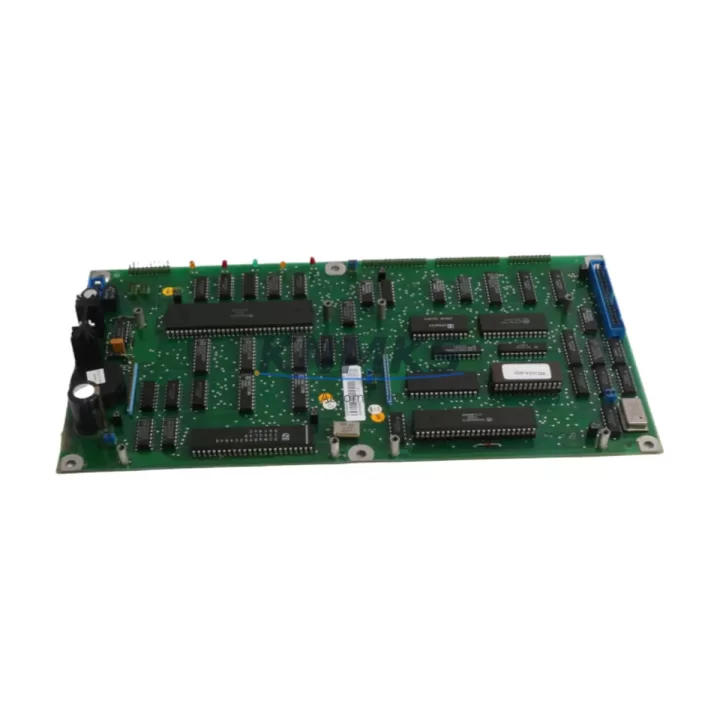
ABB YPK107E 3ASD489301A410 Migration-Ready DCS Module for Legacy Control Systems
The ABB YPK107E (part number 3ASD489301A410) is a DCS communication module engineered for the AC800M controller platform, widely deployed across process industries including oil & gas, chemical, pulp & paper, and power generation. As legacy control architectures approach end-of-life and OEM support windows close, the YPK107E has become a critical spare and migration component for engineers tasked with sustaining or modernizing existing AC800M-based distributed control systems without full platform replacement.
This module supports PROFIBUS DP communication, enabling it to serve as a direct interface between the AC800M controller and field devices, remote I/O stations, and third-party subsystems. Its compatibility with established fieldbus topologies makes it a preferred choice when upgrading communication infrastructure while preserving existing wiring, field instruments, and HMI configurations. Engineers migrating from older ABB Advant OCS or MOD 300 architectures frequently specify the YPK107E as part of a phased migration strategy, allowing the AC800M platform to absorb legacy I/O and control logic incrementally.
Migration Compatibility Table
| Parameter | Specification / Recommendation |
|---|---|
| Compatible Controller | ABB AC800M (PM861, PM864, PM866 series) |
| Communication Protocol | PROFIBUS DP (EN 50170) |
| Backplane Interface | AC800M S800 I/O bus — verify slot addressing before installation |
| Power Supply Requirement | 24 VDC via backplane; confirm rack PSU capacity before adding module |
| Terminal / Wiring Compatibility | Standard PROFIBUS DB9 connector; verify cable shielding and termination resistors |
| Firmware Compatibility | Confirm AC800M firmware version supports YPK107E GSD file revision |
| Module Address Configuration | Set via Control Builder Plus software; verify no address conflicts with existing modules |
| HMI / SCADA Impact | Update tag mappings in ABB 800xA or third-party SCADA if communication path changes |
| Installation Footprint | Standard AC800M module width; confirm available rack slots before ordering |
| Replacement Path | Direct replacement for failed or end-of-life YPK107E units; no rack modification required |
| Pre-Shipment Testing | Each unit tested for communication integrity and I/O response prior to dispatch |
| Support terms | support terms confirmed by quotation — covers manufacturing defects and functional failure under normal operating conditions |
Retrofit Planning for Existing Automation Systems
Successful integration of the YPK107E into a running or partially decommissioned AC800M system requires a structured retrofit plan that accounts for both hardware and software dependencies. Before installation, engineers should audit the existing rack configuration to confirm available backplane slots, verify that the installed PM864 or PM866 controller module has sufficient processing headroom to manage the additional PROFIBUS segment, and review the current power supply module — typically an SD821 or SD822 — to ensure adequate current capacity after adding the communication module.
On the software side, the project configuration in ABB Control Builder Plus must be updated to include the YPK107E hardware object and assign the correct PROFIBUS DP master address. If the system previously used an older CI854 or CI858 communication interface module for PROFIBUS connectivity, the GSD file for the YPK107E must be imported and slave device configurations remapped accordingly. Engineers should also verify that any S800 I/O modules — such as AI810, AO810, or DI810 units — connected downstream on the PROFIBUS segment are correctly addressed and that their signal scaling parameters are preserved during the migration.
For systems that include an ABB Panel 800 HMI or a third-party SCADA interface, communication link parameters including baud rate, station address, and watchdog timeout should be reviewed and updated to match the YPK107E configuration. Where programming cables such as the TK212A are used for local firmware verification or diagnostic access, ensure the cable driver version is compatible with the target controller firmware. Signal isolators installed on analog I/O loops should also be verified for loop power compatibility if the PROFIBUS segment topology changes during the retrofit.
Downtime Control During System Migration
Minimizing unplanned downtime during a DCS communication module replacement is a primary concern for process engineers operating continuous or semi-continuous production lines. When replacing a failed YPK107E or migrating to a new rack configuration, the recommended approach is to pre-configure the replacement module offline using a spare AC800M test rack or a simulation environment in Control Builder Plus, validating the hardware object, address assignments, and PROFIBUS slave list before the scheduled maintenance window.
During the cutover, the existing control program should be backed up and version-tagged before any hardware changes are made. If the AC800M controller supports hot-standby redundancy via a paired controller module, the switchover can be executed with minimal process impact by activating the standby controller before removing the communication module from the active rack. For non-redundant systems, a cold-swap procedure with a pre-tested replacement unit and a documented reconnection sequence for PROFIBUS cabling will reduce the risk of extended downtime caused by wiring errors or address conflicts.
Post-installation, a structured commissioning sequence should include PROFIBUS segment diagnostics using the built-in diagnostic functions in Control Builder Plus, verification of all slave device status indicators, confirmation of I/O signal integrity across representative analog and digital channels, and a review of alarm and event logs to confirm no spurious fault conditions were introduced during the module swap. Field calibration records for connected instruments should be cross-checked to ensure signal scaling was not affected by the configuration change.
Retrofit Support FAQ
Q1: Is the YPK107E 3ASD489301A410 a direct replacement for an existing failed unit in my AC800M rack?
Yes. The YPK107E 3ASD489301A410 is a direct form-fit-function replacement for existing units of the same part number installed in AC800M racks. No rack modification or backplane adapter is required. Verify that the replacement unit’s firmware revision is compatible with your current Control Builder Plus project version before installation.
Q2: What commissioning steps are required after installing the replacement module?
After physical installation, reload the hardware configuration in Control Builder Plus and perform a PROFIBUS segment scan to confirm all slave devices are recognized. Verify module address assignments, check I/O signal status for all connected field devices, and review the system event log for any communication fault codes. A functional test of representative control loops is recommended before returning the system to automatic operation.
Q3: Can the YPK107E be used to migrate from an older ABB Advant or MOD 300 PROFIBUS segment to an AC800M platform?
Yes, with planning. The YPK107E supports standard PROFIBUS DP, making it compatible with field devices and remote I/O stations previously managed by Advant OCS or MOD 300 communication interfaces. GSD files for existing slave devices must be imported into the AC800M project, and address assignments must be remapped. Wiring and termination should be verified against PROFIBUS EN 50170 specifications.
Q4: What does the support terms confirmed by quotation cover, and what is the typical lead time?
The support terms confirmed by quotation cover manufacturing defects and functional failure under normal operating and storage conditions from the date of shipment. Units are dispatched from verified stock and undergo pre-shipment functional testing. Typical dispatch is within 2–5 business days for in-stock units. Contact admin@knmks.com or +86 18359268345 for current availability and expedited shipping options.
© 2026 KNMKS. All rights reserved.
Original Source: https://knmks.com
Contact: admin@knmks.com | +86 18359268345
Product Identification
- Brand / Ecosystem
-
ABB
ABB - Model / Series
-
YPK107E 3ASD489301A410
AC800M Series - Product Family
- PLCs & Controllers
- Availability Status
- Available on request after model and quantity confirmation
- Inquiry Type
- B2B RFQ, replacement inquiry and project spare-part request
- Pre-Quote Check
- Exact SKU, brand, series, quantity, nameplate photos and destination country are checked before quotation
System Path
Where this product fits in the KNMKS automation structure.
Specification & Inquiry Focus
- Control platform
- PLC, PAC and modular controllers
- Common needs
- CPU, rack, power and I/O expansion
- Project support
- Replacement, cabinet build and maintenance
Buyer Confirmation
Information KNMKS checks before replying.
- Exact model
- YPK107E 3ASD489301A410
- Brand / ecosystem
- ABB
- Product family
- PLCs & Controllers
- Application note
- Replacement, maintenance, project build or spare-part list
- Useful photos
- Nameplate, installed unit, cabinet layout or connector side
- Delivery details
- Quantity, destination country and target schedule
Document Support
Files and notes can be confirmed during quotation.
- Product photos or nameplate confirmation when available
- Packing and delivery notes before quotation confirmation
- Support scope and delivery terms confirmed per inquiry
- Export document coordination for qualified B2B requests
Inquiry Support
- Model cross-checking before quotation
- CPU, power, rack and expansion module matching
- Support for replacement and project inquiry
What to Send Us
- Brand and exact model number: ABB YPK107E 3ASD489301A410
- Quantity and required delivery time
- Application, replacement requirement or nameplate photo
- Destination country and shipping preference
RFQ Preparation
This is a product inquiry page built for RFQ communication.
Fast Model Check
Send this model to KNMKS for confirmation.
Include quantity, destination country and photos if this is a maintenance replacement. The inquiry will be saved with a reference number after submission.
Brand & Compatibility Note
KNMKS displays automation product information for well-known industrial brand ecosystems and compatible replacement references. Brand names are used for product identification and compatibility reference only; final availability and commercial terms are confirmed per quotation.
 Manufacturing
 Machine Tools
 Packaging
 Energy & Power



 HMI & Displays
 Servo Systems
 Variable Frequency Drives
 Sensors