
Overview
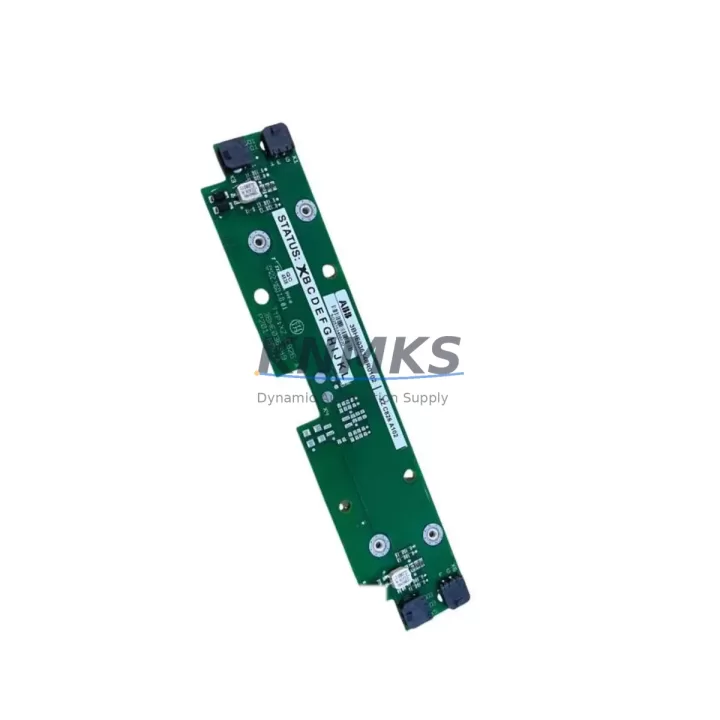
ABB XZC826A102 3BSE036348R0102 DCS Maintenance Spare: Proven Reliability for Factory Uptime
The ABB XZC826A102 (3BSE036348R0102) is a critical circuit board module within the ABB Symphony Plus distributed control system ecosystem — one of the most widely deployed DCS platforms in power generation, oil & gas, pulp & paper, and chemical processing facilities worldwide. Maintaining a verified spare of this board is a cornerstone of any proactive maintenance strategy for plants running Symphony Plus or its predecessor, Harmony/Infi90 architectures.
For maintenance engineers managing aging control infrastructure, the XZC826A102 represents a high-risk single point of failure. When this board fails in service, the consequences range from partial I/O loss to full controller shutdown — directly impacting production continuity. Sourcing a tested, original-specification replacement with confirmed firmware and hardware revision compatibility is non-negotiable for safe and rapid restoration.
At KNMKS, every XZC826A102 / 3BSE036348R0102 unit is individually inspected, function-tested, and shipped with a support terms confirmed by quotation. Our inventory is maintained across regional stock warehouses to support emergency dispatch and planned annual overhaul schedules alike.
Spare Maintenance Table
| Manufacturer | ABB |
| Part Number | XZC826A102 |
| Cross Reference | 3BSE036348R0102 |
| Series / Platform | ABB Symphony Plus (S+) |
| Module Type | DCS Circuit Board / Controller Module |
| Compatible Systems | Symphony Plus AC800M, S+ Operations, S+ Engineering |
| Predecessor Compatibility | Harmony / Infi90 migration-ready configurations |
| Operating Voltage | 24 VDC (nominal, via backplane bus) |
| Operating Temperature | 0°C to +55°C (standard industrial enclosure) |
| Mounting | DIN-rail / backplane slot insertion |
| Communication Interface | Internal backplane bus; PROFIBUS / Ethernet depending on configuration |
| Country of Origin | China (tested and verified) |
| Condition | Original spare — function-tested before dispatch |
| Support terms | 12 Months from date of shipment |
| Lead Time | availability confirmed by RFQ — typically ships within 3–5 business days |
| Application Sectors | Power Generation, Oil & Gas, Chemical, Pulp & Paper, Water Treatment |
Maintenance Planning for Continuous Operation
When scheduling replacement or inspection of the XZC826A102 / 3BSE036348R0102, experienced maintenance engineers treat this board as part of a broader control cabinet audit. Replacing this module in isolation without checking adjacent components is a common cause of repeat failures and extended downtime.
During a planned outage or emergency swap, the following components in the same Symphony Plus control cabinet should be inspected or held as co-spares:
- ABB PM866 / PM891 AC800M Controller Modules — the primary CPU modules that interface directly with the XZC826A102 via the backplane. Firmware version alignment between the controller and this board is critical; mismatched revisions can cause boot failures or I/O mapping errors after replacement.
- ABB TB820V2 / TB840A PROFIBUS Communication Modules — if the XZC826A102 is part of a PROFIBUS DP segment, the communication module and its termination resistors should be verified for continuity and correct addressing before the system is brought back online.
- ABB SD821 / SD822 Power Supply Modules — backplane power integrity is the most frequent root cause of board-level failures in Symphony Plus cabinets. A degraded 24 VDC rail or ripple exceeding specification can damage replacement boards within weeks of installation. Always measure rail voltage and ripple before inserting a new XZC826A102.
- ABB AI810 / AO810 Analog I/O Modules — in process control applications, the XZC826A102 typically operates alongside analog input and output modules sharing the same backplane segment. Verify signal loop integrity, 4–20 mA calibration, and channel isolation after any board replacement to confirm process variable accuracy.
- ABB CI854 / CI857 Industrial Ethernet Communication Interfaces — for plants using S+ Operations SCADA integration, the Ethernet communication interface module should be checked for correct IP configuration and network connectivity after a controller-side board swap.
- Backplane fuses and surge protection devices — inline fuses protecting the 24 VDC backplane feed and any transient voltage suppressors (TVS) on the I/O terminal blocks should be tested for continuity. A blown fuse is often the first indicator of an upstream fault that caused the original board failure.
Procurement engineers should note that the XZC826A102 and its associated co-spares are subject to ABB’s standard long-lead-time allocation constraints for legacy Symphony Plus hardware. Establishing a blanket stock agreement or holding a minimum of one board per critical controller segment is strongly recommended for plants with uptime SLAs exceeding 99.5%.
Site Replacement Workflow
Step 1 — Pre-replacement verification: Confirm the hardware revision (HW Rev) and firmware version of the installed XZC826A102 against the replacement unit. ABB Symphony Plus boards are revision-sensitive; installing an incompatible hardware revision can require a full controller re-download and may trigger safety interlock conditions.
Step 2 — Safe isolation: Follow your site’s Lockout/Tagout (LOTO) procedure. Place the affected controller in manual or fallback mode via the S+ Engineering workstation before removing the board. Do not hot-swap unless the specific backplane configuration has been validated for live insertion.
Step 3 — Backplane inspection: Before inserting the replacement board, visually inspect the backplane connector for bent pins, corrosion, or debris. Measure the 24 VDC supply rail at the backplane test points. Confirm voltage is within ±5% of nominal.
Step 4 — Board insertion and boot sequence: Insert the XZC826A102 firmly into the correct slot. Power on and observe the module status LEDs. A solid green RUN LED within 60 seconds indicates successful initialization. A flashing red FAULT LED indicates a firmware mismatch or configuration error — do not proceed to process reconnection until resolved.
Step 5 — I/O verification and loop check: After the controller confirms healthy status in S+ Engineering, perform a channel-by-channel loop check on all I/O connected to this board segment. Confirm analog signal values match field transmitter readings before returning the loop to automatic control.
Step 6 — Documentation: Record the replacement date, new board serial number, hardware revision, and firmware version in your plant CMMS. Schedule the next inspection interval per your preventive maintenance plan — typically 24–36 months for boards in climate-controlled cabinets.
Spare Parts Support FAQ
Q1: Is the XZC826A102 compatible with both Symphony Plus and legacy Harmony/Infi90 systems?
The XZC826A102 / 3BSE036348R0102 is a Symphony Plus generation board. Direct plug-in compatibility with Infi90 backplanes is not guaranteed without a migration adapter or system upgrade. For Harmony-to-Symphony Plus migration projects, consult the ABB migration guide or contact our technical team to confirm the correct replacement path for your specific backplane revision.
Q2: How do you verify the board before shipment?
Every XZC826A102 unit in our inventory undergoes a functional power-on test and visual inspection for component damage, corrosion, and connector integrity before dispatch. A test report is available upon request. Units are packed in anti-static ESD bags with foam cushioning to prevent transit damage.
Q3: What does the support terms confirmed by quotation cover?
The support terms confirmed by quotation cover manufacturing defects and functional failures under normal operating conditions from the date of shipment. It does not cover damage caused by incorrect installation, overvoltage events, or use outside the specified environmental parameters. Support requests are processed within 5 business days of receiving the returned unit.
Q4: Can you support long-term supply agreements for this board?
Yes. KNMKS supports blanket purchase orders and long-term supply agreements for the XZC826A102 and associated Symphony Plus co-spares. For plants managing multi-year maintenance contracts or facing ABB end-of-life notices on Symphony Plus hardware, we recommend establishing a dedicated stock reservation. Contact our procurement team to discuss volume pricing and guaranteed lead-time commitments.
© 2026 KNMKS. All rights reserved.
Original Source: https://knmks.com
Contact: admin@knmks.com | +86 18359268345
Product Identification
- Brand / Ecosystem
-
ABB
ABB - Model / Series
-
XZC826A102 3BSE036348R0102
AC800M Series - Product Family
- PLCs & Controllers
- Availability Status
- Available on request after model and quantity confirmation
- Inquiry Type
- B2B RFQ, replacement inquiry and project spare-part request
- Pre-Quote Check
- Exact SKU, brand, series, quantity, nameplate photos and destination country are checked before quotation
System Path
Where this product fits in the KNMKS automation structure.
Specification & Inquiry Focus
- Control platform
- PLC, PAC and modular controllers
- Common needs
- CPU, rack, power and I/O expansion
- Project support
- Replacement, cabinet build and maintenance
Buyer Confirmation
Information KNMKS checks before replying.
- Exact model
- XZC826A102 3BSE036348R0102
- Brand / ecosystem
- ABB
- Product family
- PLCs & Controllers
- Application note
- Replacement, maintenance, project build or spare-part list
- Useful photos
- Nameplate, installed unit, cabinet layout or connector side
- Delivery details
- Quantity, destination country and target schedule
Document Support
Files and notes can be confirmed during quotation.
- Product photos or nameplate confirmation when available
- Packing and delivery notes before quotation confirmation
- Support scope and delivery terms confirmed per inquiry
- Export document coordination for qualified B2B requests
Inquiry Support
- Model cross-checking before quotation
- CPU, power, rack and expansion module matching
- Support for replacement and project inquiry
What to Send Us
- Brand and exact model number: ABB XZC826A102 3BSE036348R0102
- Quantity and required delivery time
- Application, replacement requirement or nameplate photo
- Destination country and shipping preference
RFQ Preparation
This is a product inquiry page built for RFQ communication.
Fast Model Check
Send this model to KNMKS for confirmation.
Include quantity, destination country and photos if this is a maintenance replacement. The inquiry will be saved with a reference number after submission.
Brand & Compatibility Note
KNMKS displays automation product information for well-known industrial brand ecosystems and compatible replacement references. Brand names are used for product identification and compatibility reference only; final availability and commercial terms are confirmed per quotation.
 Manufacturing
 Machine Tools
 Packaging
 Energy & Power



 HMI & Displays
 Servo Systems
 Variable Frequency Drives
 Sensors