
Overview
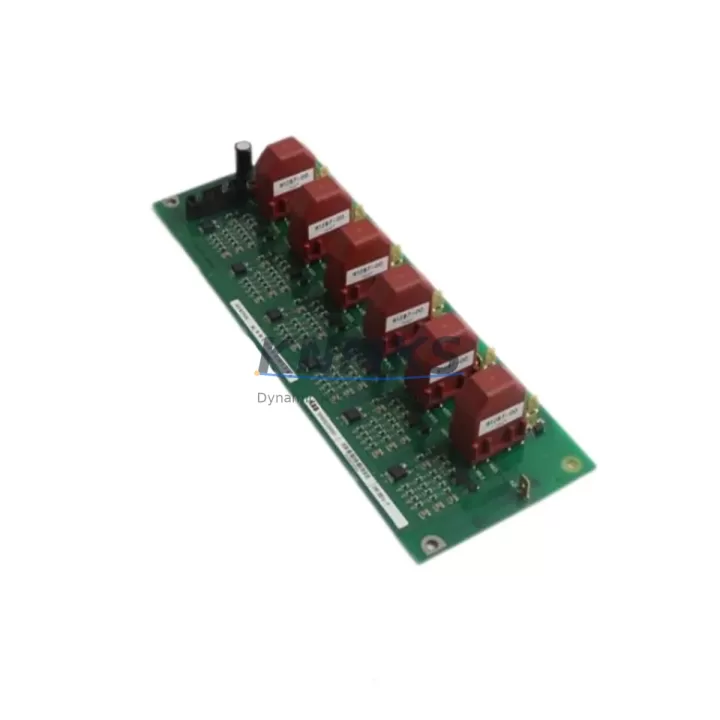
ABB VV01 Migration-Ready Control Module for Legacy Control Systems
The ABB VV01 (VV 01) is a migration-ready control module engineered for direct integration into H&B Contronic legacy distributed control systems. As process plants and manufacturing facilities face increasing pressure to modernize aging infrastructure, the VV01 serves as a proven, field-verified replacement for obsolete control modules that are no longer available through standard supply channels. Whether you are executing a phased retrofit, restoring a failed unit in an emergency shutdown scenario, or planning a full control cabinet upgrade, the ABB VV01 provides the functional and mechanical compatibility required to minimize engineering risk and reduce total downtime.
Before committing to a replacement, engineers must confirm several critical parameters: backplane interface compatibility, terminal wiring assignments, module address configuration, power rail capacity, and firmware version alignment with the host controller. The VV01 is designed to slot into existing Contronic rack assemblies without requiring structural modification to the control cabinet, provided that the backplane bus version and slot addressing scheme match the original installation. Field teams should verify the 24 VDC or 5 VDC power supply capacity on the relevant rack segment before insertion, as adding a replacement module to an aging power distribution rail can expose latent capacity deficits that were not apparent with the original unit.
Program logic compatibility is a frequent concern during Contronic module replacement. The VV01 does not require reprogramming of the host controller in most standard substitution scenarios, but engineers should validate function block assignments and I/O channel mappings against the original engineering documentation before powering up. Where HMI screens reference specific module addresses or tag names tied to the legacy unit, those references should be audited and updated in the SCADA or DCS configuration prior to commissioning. Communication link integrity — particularly for modules operating on PROFIBUS DP or proprietary H&B fieldbus segments — must be verified using a bus analyzer before the system is returned to automatic control.
Migration Compatibility Table
| Parameter | Detail |
|---|---|
| SKU / Part Number | VV01 / VV 01 |
| Brand | ABB (H&B Contronic Series) |
| Module Type | Control Module |
| Target Platform | H&B Contronic DCS / Legacy ABB Control Systems |
| Backplane Interface | Contronic standard backplane bus — verify slot version before installation |
| Communication Compatibility | PROFIBUS DP / Proprietary H&B fieldbus (confirm with site documentation) |
| Power Requirement | Confirm 24 VDC / 5 VDC rail capacity on target rack segment |
| Installation Footprint | Standard Contronic rack slot — no cabinet modification required in typical retrofit |
| Firmware Alignment | Verify firmware version compatibility with host controller before commissioning |
| Replacement Recommendation | Direct drop-in for obsolete VV01 units; confirm terminal wiring and module address |
| Commissioning Focus | I/O channel mapping, HMI tag audit, bus integrity check, program logic validation |
| Support terms | support terms confirmed by quotation — all units tested prior to shipment |
Retrofit Planning for Existing Automation Systems
A successful Contronic retrofit begins well before the replacement module arrives on site. The engineering team should pull the original rack layout drawing and confirm which adjacent modules — such as the ABB AI01 analog input module, DI01 digital input module, or DO01 digital output module — share the same backplane segment as the VV01. These neighboring I/O modules define the address space and power budget that the replacement unit must operate within. If the rack also houses a Contronic communication coupler or fieldbus gateway module, the bus termination and node address settings must be documented before any module is removed.
For control cabinets that include a Contronic power supply module (such as the NT01 or equivalent), the available current margin on the 5 VDC and 24 VDC rails should be calculated against the full rack load including the replacement VV01. Aging power supplies in legacy cabinets often operate near their rated capacity, and introducing a replacement module — even a functionally identical one — can trigger nuisance trips if the power budget is not re-evaluated. Where the existing power supply is found to be marginal, a parallel power supply or a dedicated rail segment for the replacement module may be required as part of the retrofit scope.
Signal isolation is another consideration in older Contronic installations. If the VV01 interfaces with field instruments through legacy terminal blocks or marshalling panels, the signal integrity of those wiring runs should be verified with a loop calibrator before the new module is commissioned. In some installations, signal isolator modules or Zener barrier assemblies are interposed between the field wiring and the module terminals; these components should be inspected and replaced if they show signs of degradation. Programming cables and engineering workstation software compatible with the Contronic platform should be on hand during commissioning to allow real-time diagnostics and, if necessary, parameter re-entry.
Downtime Control During System Migration
Minimizing unplanned downtime is the primary operational objective in any legacy control system replacement. For the ABB VV01, the recommended approach is a hot-swap preparation protocol: before the failed or end-of-life module is removed, the engineering team should export the current controller configuration, back up all program logic, and document the physical wiring terminations with photographs and a terminal schedule. This preparation ensures that if the replacement commissioning encounters an unexpected issue, the system can be restored to its previous state without loss of program integrity.
Where the process cannot tolerate a full shutdown, a partial bypass strategy may be applicable — routing critical I/O signals through a temporary hardwired interlock while the VV01 slot is serviced. This approach requires coordination with the process safety team and must be documented in the management of change (MOC) record. Once the replacement module is installed and the backplane connection is confirmed, the controller should be brought online in manual mode before transferring to automatic, allowing the field team to verify each I/O channel against the process values displayed on the HMI before releasing control.
Communication link restoration is typically the final step. After the VV01 is confirmed operational, the PROFIBUS or fieldbus segment should be scanned to verify that the module is recognized at its assigned node address and that no bus errors are present. Only after a clean bus diagnostic should the HMI operator screens be validated against live process data. This structured commissioning sequence — power confirmation, I/O verification, bus diagnostics, HMI validation — is the most reliable method for controlling downtime and protecting the integrity of the existing control system during a module-level retrofit.
Retrofit Support FAQ
Q1: Is the ABB VV01 a direct replacement for the original Contronic control module?
In most standard Contronic rack configurations, the VV01 is a direct mechanical and functional replacement. Engineers should confirm the backplane bus version, slot address, and terminal wiring assignments against the original module documentation before installation. No structural modification to the control cabinet is typically required.
Q2: What commissioning steps are required after installing the VV01?
After physical installation, verify power rail capacity, confirm module address configuration, validate I/O channel mapping against the controller program, audit HMI tag references, and perform a fieldbus bus scan to confirm node recognition. Bring the controller online in manual mode before transferring to automatic control.
Q3: How is the VV01 tested before shipment?
All ABB VV01 units supplied by KNMKS are functionally tested prior to dispatch. Testing covers power-on self-diagnostics, backplane interface verification, and I/O channel continuity checks. Each unit ships with a test record and is covered by a support terms confirmed by quotation from the date of delivery.
Q4: What is the typical lead time and stock availability?
KNMKS maintains inventory of the ABB VV01 to support emergency replacement and planned retrofit schedules. Standard orders are processed and dispatched within 1–3 business days. For urgent requirements, contact the sales team directly to confirm current stock status and expedited shipping options.
© 2026 KNMKS. All rights reserved.
Original Source: https://knmks.com
Contact: admin@knmks.com | +86 18359268345
Product Identification
- Brand / Ecosystem
-
ABB
ABB - Model / Series
-
VV01 VV 01
Legacy Series - Product Family
- PLCs & Controllers
- Availability Status
- Available on request after model and quantity confirmation
- Inquiry Type
- B2B RFQ, replacement inquiry and project spare-part request
- Pre-Quote Check
- Exact SKU, brand, series, quantity, nameplate photos and destination country are checked before quotation
System Path
Where this product fits in the KNMKS automation structure.
Specification & Inquiry Focus
- Control platform
- PLC, PAC and modular controllers
- Common needs
- CPU, rack, power and I/O expansion
- Project support
- Replacement, cabinet build and maintenance
Buyer Confirmation
Information KNMKS checks before replying.
- Exact model
- VV01 VV 01
- Brand / ecosystem
- ABB
- Product family
- PLCs & Controllers
- Application note
- Replacement, maintenance, project build or spare-part list
- Useful photos
- Nameplate, installed unit, cabinet layout or connector side
- Delivery details
- Quantity, destination country and target schedule
Document Support
Files and notes can be confirmed during quotation.
- Product photos or nameplate confirmation when available
- Packing and delivery notes before quotation confirmation
- Support scope and delivery terms confirmed per inquiry
- Export document coordination for qualified B2B requests
Inquiry Support
- Model cross-checking before quotation
- CPU, power, rack and expansion module matching
- Support for replacement and project inquiry
What to Send Us
- Brand and exact model number: ABB VV01 VV 01
- Quantity and required delivery time
- Application, replacement requirement or nameplate photo
- Destination country and shipping preference
RFQ Preparation
This is a product inquiry page built for RFQ communication.
Fast Model Check
Send this model to KNMKS for confirmation.
Include quantity, destination country and photos if this is a maintenance replacement. The inquiry will be saved with a reference number after submission.
Brand & Compatibility Note
KNMKS displays automation product information for well-known industrial brand ecosystems and compatible replacement references. Brand names are used for product identification and compatibility reference only; final availability and commercial terms are confirmed per quotation.
 Manufacturing
 Machine Tools
 Packaging
 Energy & Power



 HMI & Displays
 Servo Systems
 Variable Frequency Drives
 Sensors