
Overview
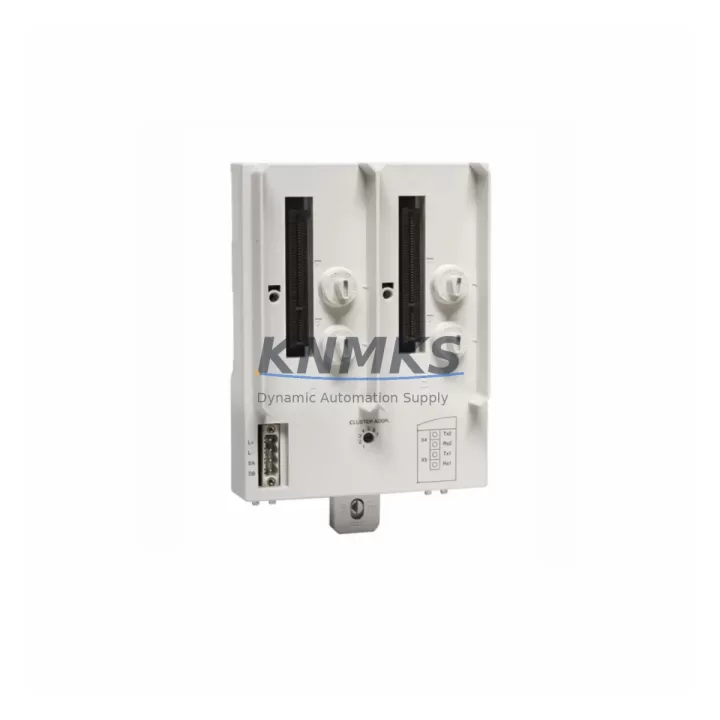
ABB TU849 Maintenance-Proven Spare Part for Factory Uptime
The ABB TU849 is an original S800 I/O Module Termination Unit designed for use within ABB’s AC800M Distributed Control System architecture. As a field-proven component in continuous process industries — including oil & gas, pulp & paper, power generation, and chemical processing — the TU849 serves as the critical wiring interface between field instrumentation and S800 I/O modules such as the AI810, AO810, DI810, and DO810 series. Maintaining a verified stock of TU849 units is a foundational element of any DCS spare parts strategy aimed at minimizing unplanned downtime and protecting production continuity.
For maintenance engineers managing AC800M-based control systems, the TU849 is not a peripheral component — it is a structural node in the I/O subsystem. Field wiring terminates directly at the TU849, and any degradation in terminal integrity, connector seating, or module alignment will manifest as signal anomalies, I/O faults, or complete channel loss. Procurement engineers sourcing replacement TU849 units should prioritize original ABB-sourced parts with traceable batch documentation to ensure full compatibility with existing S800 I/O modules and avoid field calibration rework.
This listing covers the ABB TU849 as a maintenance-grade spare part, supplied with a support terms confirmed by quotation, pre-shipment functional verification, and global express dispatch capability. Units are held in forward stock to support emergency replacement scenarios with lead times that protect production schedules.
Spare Maintenance Table
| Part Number | TU849 |
| Brand | ABB |
| Series | S800 I/O |
| Product Type | Module Termination Unit |
| Compatible System | AC800M DCS, S800 I/O Modules (AI810, AO810, DI810, DO810, DI811, DO811) |
| Mounting | DIN Rail / Backplane integrated mounting |
| Terminal Type | Screw-type field wiring terminals |
| Operating Temperature | 0°C to +55°C (storage: -40°C to +70°C) |
| Protection Class | IP20 |
| Power Supply | Powered via S800 I/O module — no independent supply required |
| Origin | Sweden (ABB) |
| Application Environment | Industrial control cabinets, DCS marshalling panels, process automation enclosures |
| Maintenance Recommendation | Inspect terminal torque and module seating annually; replace on first sign of contact oxidation or intermittent channel faults |
| Support terms | 12 Months from date of shipment |
| Pre-Shipment Test | Yes — functional verification performed before dispatch |
Maintenance Planning for Continuous Operation
A structured maintenance plan for AC800M-based systems should treat the TU849 not in isolation, but as part of an interconnected I/O subsystem. When a TU849 is flagged for replacement during a scheduled outage or emergency callout, the following components in the same electrical circuit and control cabinet should be inspected concurrently to prevent repeat failures and reduce future downtime risk.
The S800 I/O modules seated on the TU849 — such as the AI810 analog input module or DO810 digital output module — should be checked for firmware version alignment and channel diagnostics before the new TU849 is commissioned. A worn termination unit can mask underlying module degradation; replacing the TU849 without verifying the I/O module condition risks a second fault event within weeks.
Field signal cables and shielded instrumentation wiring connected to the TU849 terminals should be inspected for insulation integrity, terminal torque compliance, and shield grounding continuity. Loose or corroded terminals at the TU849 are a common root cause of intermittent analog signal drift in AI810 channels, which can trigger false process alarms or cause regulatory control instability.
The S800 I/O station power supply — typically an ABB SD821 or SD822 unit — should be load-tested during the same maintenance window. An aging power supply delivering marginal voltage to the I/O backplane can accelerate TU849 connector wear and cause sporadic module communication errors that are difficult to distinguish from termination unit faults.
For systems using PROFIBUS DP or MasterBus 300 communication modules (such as the CI854 or CI801) connected to the same AC800M controller, communication bus integrity should be verified after any I/O hardware replacement. Physical disturbance during TU849 swap-out can introduce bus termination issues or connector reseating errors that affect the entire I/O station.
Maintenance teams should also inspect fuse holders and circuit protection on the 24 VDC field supply rails feeding digital output channels through the TU849. Blown or degraded fuses are frequently overlooked during I/O fault diagnosis and can cause DO810 output channels to appear non-functional even after a successful TU849 replacement.
Finally, signal isolators and surge protection devices installed between field instruments and TU849 terminals in hazardous area applications should be tested for isolation resistance and response time. These components absorb transient energy that would otherwise damage TU849 terminals and I/O module input circuits, and their condition directly affects the service life of the replacement unit.
Site Replacement Workflow
Step 1 — Compatibility Verification: Confirm the replacement TU849 matches the existing module type designation and backplane slot configuration. Cross-reference the AC800M system documentation or the existing TU849 label for the correct variant. S800 I/O termination units are module-specific; installing an incompatible variant will prevent the I/O module from seating correctly.
Step 2 — Controlled Isolation: Place the affected I/O station in maintenance mode via the AC800M engineering workstation (typically ABB Automation Builder or Control Builder M). Isolate field power to the affected TU849 terminals before disconnecting field wiring. Document terminal assignments using the existing wiring schedule or photograph the terminal block before removal.
Step 3 — Module and Wiring Removal: Remove the seated S800 I/O module from the TU849 before unlatching the termination unit from the DIN rail or backplane. Retain all terminal screws and label field cables sequentially to ensure accurate reconnection.
Step 4 — Replacement Installation: Mount the new TU849, reconnect field wiring to the documented terminal assignments, and torque all screw terminals to the ABB-specified value (typically 0.5–0.6 Nm for standard signal terminals). Reseat the S800 I/O module and verify the module locking latch is fully engaged.
Step 5 — Commissioning and Verification: Restore field power and release the I/O station from maintenance mode. Verify all channels report healthy status in the AC800M diagnostic display. Perform a loop check on analog channels and a functional test on digital output channels before returning the system to automatic control.
This workflow supports a target replacement time of under 45 minutes for a single TU849 in a prepared maintenance environment, minimizing production impact during planned or emergency outages.
Spare Parts Support FAQ
Q: Is this TU849 an original ABB part or an aftermarket equivalent?
A: This is an original ABB TU849 sourced through authorized industrial supply channels. Each unit is supplied with batch traceability documentation and undergoes pre-shipment functional verification. No aftermarket or cloned variants are stocked or dispatched.
Q: What support terms coverage applies to this TU849 spare part?
A: A support terms confirmed by quotation is provided from the date of shipment, covering manufacturing defects and functional failures under normal operating conditions. Support requests are supported with direct technical assistance and priority replacement dispatch.
Q: Can this TU849 replace an older S800 I/O termination unit already installed in the field?
A: Yes, provided the module type designation matches. The TU849 is designed for direct field replacement within compatible S800 I/O stations. Compatibility should be confirmed against the existing system documentation or the part number label on the installed unit before ordering. Contact the sales team with your AC800M configuration details for pre-order compatibility confirmation.
Q: What is the typical lead time and dispatch process for emergency orders?
A: Units held in forward stock are dispatched within 24–48 hours of order confirmation via international express freight. Emergency orders are prioritized for same-day processing where stock is confirmed available. Long-term supply agreements and buffer stock programs are available for customers requiring guaranteed availability across multi-year maintenance contracts.
© 2026 KNMKS. All rights reserved.
Original Source: https://knmks.com
Contact: admin@knmks.com | +86 18359268345
Product Identification
- Brand / Ecosystem
-
ABB
ABB - Model / Series
-
TU849
AC800M Series - Product Family
- Other Components
- Availability Status
- Available on request after model and quantity confirmation
- Inquiry Type
- B2B RFQ, replacement inquiry and project spare-part request
- Pre-Quote Check
- Exact SKU, brand, series, quantity, nameplate photos and destination country are checked before quotation
System Path
Where this product fits in the KNMKS automation structure.
Specification & Inquiry Focus
- Component range
- Breakers, terminals and cabinet accessories
- Common needs
- Model, photo and installation requirement
- Project support
- Maintenance and mixed spare-part inquiry
Buyer Confirmation
Information KNMKS checks before replying.
- Exact model
- TU849
- Brand / ecosystem
- ABB
- Product family
- Other Components
- Application note
- Replacement, maintenance, project build or spare-part list
- Useful photos
- Nameplate, installed unit, cabinet layout or connector side
- Delivery details
- Quantity, destination country and target schedule
Document Support
Files and notes can be confirmed during quotation.
- Product photos or nameplate confirmation when available
- Packing and delivery notes before quotation confirmation
- Support scope and delivery terms confirmed per inquiry
- Export document coordination for qualified B2B requests
Inquiry Support
- Mixed automation spare parts inquiry
- Cabinet component and accessory support
- Model identification from photos or labels
What to Send Us
- Brand and exact model number: ABB TU849
- Quantity and required delivery time
- Application, replacement requirement or nameplate photo
- Destination country and shipping preference
RFQ Preparation
This is a product inquiry page built for RFQ communication.
Fast Model Check
Send this model to KNMKS for confirmation.
Include quantity, destination country and photos if this is a maintenance replacement. The inquiry will be saved with a reference number after submission.
Brand & Compatibility Note
KNMKS displays automation product information for well-known industrial brand ecosystems and compatible replacement references. Brand names are used for product identification and compatibility reference only; final availability and commercial terms are confirmed per quotation.
 Manufacturing
 Machine Tools
 Packaging
 Energy & Power
 PLCs & Controllers
 HMI & Displays
 Servo Systems
 Variable Frequency Drives