
Overview
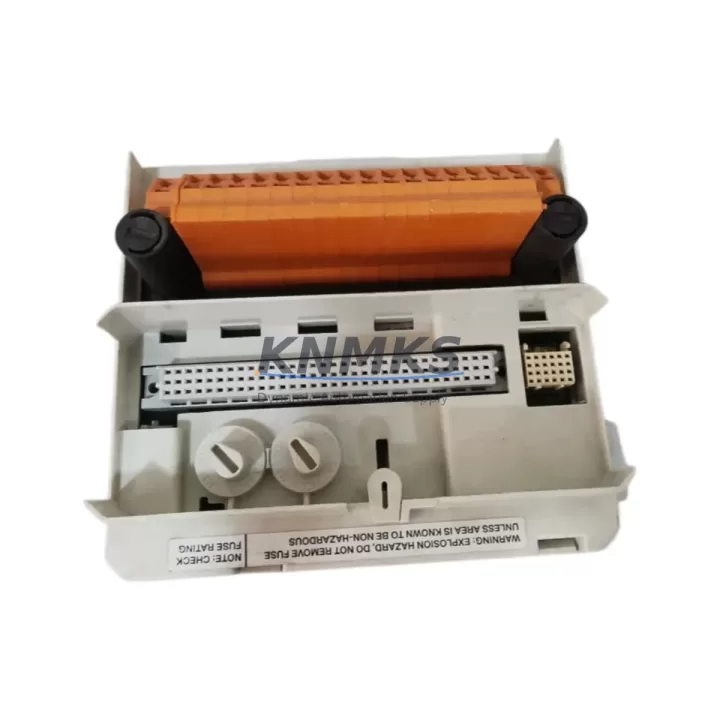
ABB TU833 3BSE038726R1 Migration-Ready Termination Unit: Legacy DCS Retrofit & Control System Upgrade
The ABB TU833 (3BSE038726R1) is a field-proven S800 I/O Termination Unit engineered for seamless integration into existing ABB Advant, MOD 300, and AC800M-based distributed control systems. As legacy DCS platforms approach end-of-life and spare part availability tightens, the TU833 serves as a critical migration component — enabling engineers to modernize I/O infrastructure without redesigning the entire control architecture. Whether you are replacing a failed unit on a live production line or executing a phased control cabinet upgrade, the TU833 delivers the dimensional compatibility, terminal pitch, and signal integrity required for zero-compromise retrofits.
Designed for DIN rail mounting within standard 19-inch control cabinets, the TU833 accepts direct field wiring termination and interfaces with ABB S800 I/O modules such as the AI810, AO810, DI810, and DO810 series. Its compact footprint and standardized backplane connector ensure that replacement projects can proceed without cabinet re-engineering or additional cable extensions. For sites running mixed-generation I/O racks, the TU833 can coexist with earlier termination units on the same rail, simplifying incremental migration strategies.
Migration Compatibility Table
| Parameter | Specification / Recommendation |
|---|---|
| Compatible I/O Modules | ABB S800 I/O series: AI810, AO810V2, DI810, DO810, DI811, AI820, AO820 |
| Backplane Interface | Standard S800 I/O module connector; verify slot address before installation |
| Mounting | DIN rail (35 mm); confirm available rail space and adjacent module clearance |
| Terminal Pitch | Matches legacy TU810/TU811 wiring pitch; direct re-termination supported |
| Communication Compatibility | PROFIBUS DP, Modulebus; confirm master controller firmware version ≥ required baseline |
| Power Supply Requirement | 24 VDC via S800 I/O bus; verify SA811 or SD821 power supply capacity before adding modules |
| Replacement Recommendation | Direct drop-in for TU810, TU811, TU812; verify field wiring polarity before energizing |
| Commissioning Focus | Module address configuration, I/O channel mapping in AC800M, HMI tag re-binding |
| Firmware Compatibility | Confirm AC800M controller firmware and Control Builder M project version compatibility |
| Support terms | support terms confirmed by quotation — covers manufacturing defects and functional failure under normal operating conditions |
Retrofit Planning for Existing Automation Systems
A successful TU833 retrofit begins well before the replacement window opens. Start by auditing the existing I/O rack layout: document each module’s slot position, channel assignment, and field wiring label. When the TU833 is installed in place of a legacy TU810 or TU811, the field cable bundle can typically be re-terminated directly — but engineers should verify terminal numbering against the original loop drawings to avoid signal inversion on analog channels.
Power budget verification is a non-negotiable pre-step. The ABB SA811 Field Power Distribution Unit or SD821 Power Supply feeding the I/O rack must have sufficient headroom to support the TU833 and its associated I/O module without tripping the bus voltage below the 18 VDC minimum threshold. If the existing power supply is already near capacity — common in aging cabinets where modules have been added incrementally — a parallel SD821 or SD822 unit should be provisioned before the cutover date.
For sites migrating from Advant OCS or MOD 300 architectures to AC800M-based control, the TU833 is frequently deployed alongside the ABB CI854 PROFIBUS DP Communication Interface to bridge legacy field devices into the new controller platform. The CI854 handles protocol translation at the rack level, allowing existing PROFIBUS slaves — including third-party drives, valve positioners, and remote I/O nodes — to remain online during the migration window. This approach eliminates the need to replace field instruments simultaneously, dramatically reducing project scope and risk.
HMI re-binding is another area that demands early planning. When the TU833 replaces a failed unit mid-project, the I/O channel addresses in the ABB Control Builder M application must be verified against the physical slot configuration. If the replacement unit occupies a different rack position than the original, all associated HMI tags — including alarm limits, engineering unit scaling, and historian links — must be updated before the system is returned to automatic control. Coordinate with the DCS programming team to prepare a pre-tested configuration backup that can be loaded within the maintenance window.
Where I/O expansion is part of the upgrade scope, the TU833 is often installed alongside additional ABB DI810 Digital Input Modules or AO810V2 Analog Output Modules to extend the control system’s field interface capacity. In these cases, confirm that the ABB TB820V2 ModuleBus Modem or equivalent optical bus extender is correctly configured to recognize the new module addresses before the rack is powered. Failure to update the bus topology in the controller project will result in module fault alarms that can delay startup.
Signal isolation requirements should also be reviewed during retrofit planning. On older installations where field wiring runs share conduit with power cables, adding a signal isolator or barrier module between the TU833 terminals and the field device can prevent ground loop interference from corrupting analog measurements. This is particularly relevant for 4–20 mA loops serving flow transmitters or pressure sensors in electrically noisy environments such as motor control centers or variable frequency drive panels.
Downtime Control During System Migration
Minimizing production downtime during a TU833 replacement requires a structured cutover plan that protects the existing control logic and maintains field device continuity throughout the maintenance window. The recommended approach is a hot-standby preparation strategy: before the scheduled outage, pre-configure the replacement TU833 with the correct module address and verify that the associated I/O module seats correctly on the new termination unit. Pre-label all field wiring according to the loop drawing before disconnecting any terminals.
During the cutover, work sequentially through the terminal block — disconnect, transfer, and verify each field wire before moving to the next. Use a continuity tester to confirm each circuit before re-energizing. Once all field wiring is transferred, power up the I/O rack and confirm that the AC800M controller recognizes the module without generating hardware fault codes. If the controller project was backed up prior to the outage, a forced download of the I/O configuration can resolve address conflicts within minutes rather than hours.
To protect the original program logic, ensure that a verified backup of the Control Builder M project — including all function block diagrams, sequential function charts, and I/O variable bindings — is stored on a local engineering workstation before any hardware is disturbed. If the replacement requires a controller restart, coordinate with the operations team to place all affected control loops in manual mode and confirm that field operators are stationed at critical process points. After the restart, perform a systematic loop check: verify each analog input reading against a calibrated reference, confirm digital output states match the expected process conditions, and clear any latched alarms before returning loops to automatic.
For multi-rack migrations where several TU833 units are being replaced across a control system upgrade project, a phased approach — replacing one rack section per maintenance window — limits the blast radius of any unexpected compatibility issue and allows the engineering team to refine the cutover procedure before tackling higher-criticality I/O groups.
Retrofit Support FAQ
Q1: Is the TU833 3BSE038726R1 a direct replacement for the TU810 and TU811 termination units?
Yes. The TU833 is dimensionally and electrically compatible with the TU810 and TU811 in standard S800 I/O rack configurations. Field wiring can be re-terminated directly using the existing cable bundle. Verify terminal numbering against loop drawings before energizing, particularly on analog channels where polarity reversal can affect measurement accuracy.
Q2: What commissioning steps are required after installing the TU833?
After physical installation and field wiring transfer, confirm the module address in the AC800M controller project matches the physical slot position. Perform a forced I/O scan to verify that all channels are recognized without fault codes. Re-bind any HMI tags that reference the replaced unit’s address, and conduct a full loop check before returning the associated control loops to automatic mode.
Q3: How is the TU833 tested before shipment?
Each TU833 unit undergoes functional verification prior to dispatch, including backplane connector integrity check, terminal block continuity test, and visual inspection for mechanical damage. Units are shipped in anti-static packaging with individual serial number documentation. A support terms confirmed by quotation cover manufacturing defects and functional failure under normal operating conditions from the date of delivery.
Q4: What is the typical lead time and stock availability?
The TU833 3BSE038726R1 is maintained availability confirmed by RFQ for immediate dispatch. Standard orders are processed within 1–2 business days. For urgent replacement requirements — including unplanned outages — contact the sales team directly to confirm real-time availability and expedited shipping options. Long-term supply commitments and blanket orders are available for maintenance programs requiring guaranteed stock over a 12-month horizon.
© 2026 KNMKS. All rights reserved.
Original Source: https://knmks.com
Contact: admin@knmks.com | +86 18359268345
Product Identification
- Brand / Ecosystem
-
ABB
ABB - Model / Series
-
TU833-3BSE038726R1
AC800M Series - Product Family
- PLCs & Controllers
- Availability Status
- Available on request after model and quantity confirmation
- Inquiry Type
- B2B RFQ, replacement inquiry and project spare-part request
- Pre-Quote Check
- Exact SKU, brand, series, quantity, nameplate photos and destination country are checked before quotation
System Path
Where this product fits in the KNMKS automation structure.
Specification & Inquiry Focus
- Control platform
- PLC, PAC and modular controllers
- Common needs
- CPU, rack, power and I/O expansion
- Project support
- Replacement, cabinet build and maintenance
Buyer Confirmation
Information KNMKS checks before replying.
- Exact model
- TU833-3BSE038726R1
- Brand / ecosystem
- ABB
- Product family
- PLCs & Controllers
- Application note
- Replacement, maintenance, project build or spare-part list
- Useful photos
- Nameplate, installed unit, cabinet layout or connector side
- Delivery details
- Quantity, destination country and target schedule
Document Support
Files and notes can be confirmed during quotation.
- Product photos or nameplate confirmation when available
- Packing and delivery notes before quotation confirmation
- Support scope and delivery terms confirmed per inquiry
- Export document coordination for qualified B2B requests
Inquiry Support
- Model cross-checking before quotation
- CPU, power, rack and expansion module matching
- Support for replacement and project inquiry
What to Send Us
- Brand and exact model number: ABB TU833-3BSE038726R1
- Quantity and required delivery time
- Application, replacement requirement or nameplate photo
- Destination country and shipping preference
RFQ Preparation
This is a product inquiry page built for RFQ communication.
Fast Model Check
Send this model to KNMKS for confirmation.
Include quantity, destination country and photos if this is a maintenance replacement. The inquiry will be saved with a reference number after submission.
Brand & Compatibility Note
KNMKS displays automation product information for well-known industrial brand ecosystems and compatible replacement references. Brand names are used for product identification and compatibility reference only; final availability and commercial terms are confirmed per quotation.
 Manufacturing
 Machine Tools
 Packaging
 Energy & Power



 HMI & Displays
 Servo Systems
 Variable Frequency Drives
 Sensors