
Overview
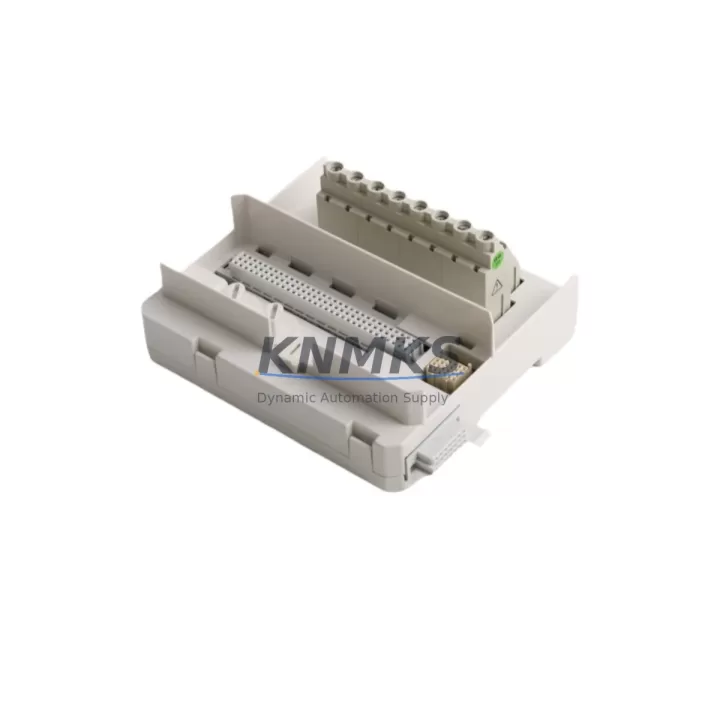
ABB TU831V1 3BSE013235R1 Migration-Ready MTU for Legacy S800 I/O Systems
The ABB TU831V1 (catalog number 3BSE013235R1) is a Module Termination Unit (MTU) designed for the S800 I/O platform, widely deployed across AC800M Distributed Control System architectures in process industries including oil & gas, power generation, pulp & paper, and chemical manufacturing. As legacy control infrastructure ages and OEM support windows close, the TU831V1 has become a critical component in retrofit projects, discontinued-model replacements, and control cabinet upgrades where maintaining field wiring continuity is essential.
KNMKS maintains verified in-stock inventory of the TU831V1 3BSE013235R1, sourced from authorized channels and subject to full functional testing prior to shipment. Each unit ships with a support terms confirmed by quotation covering manufacturing defects and operational failures under normal industrial service conditions.
Migration Compatibility Table
| Parameter | TU831V1 (3BSE013235R1) | Retrofit Notes |
|---|---|---|
| Compatible Platform | ABB S800 I/O, AC800M DCS | Verify backplane slot assignment before installation |
| Mounting Interface | DIN rail / S800 I/O rail | Confirm rail type matches existing cabinet layout |
| Field Wiring Termination | Screw-type terminal block | Re-use existing field cable looms where possible; verify terminal pitch |
| Communication Compatibility | PROFIBUS DP / Modulebus | Confirm protocol version with CI840A or CI854A communication interface |
| Power Supply Requirement | 24 VDC (via S800 I/O bus) | Validate SA811F or SD821 power supply capacity before adding modules |
| Replacement Scope | Direct drop-in for TU831V1 variants | Check firmware revision on paired I/O module for compatibility |
| Installation Space | Standard S800 module width | Measure cabinet DIN rail clearance; confirm adjacent module spacing |
| Commissioning Requirement | Address configuration via Control Builder M | Backup existing project before hardware swap |
| Support terms | 12 months from shipment date — covers manufacturing defects and operational failure under normal service conditions | |
Retrofit Planning for Existing Automation Systems
Successful integration of the TU831V1 3BSE013235R1 into an aging control system requires a structured approach that accounts for both hardware and software dependencies. In most AC800M-based installations, the MTU serves as the physical bridge between field instrumentation and the I/O module stack. When replacing a failed or end-of-life unit, engineers must first audit the existing terminal wiring against the TU831V1 terminal layout to confirm signal mapping before disconnecting any field cables.
Power budget verification is a mandatory pre-installation step. The S800 I/O bus draws power from dedicated supply modules such as the SA811F 24 VDC power supply or the SD821 redundant power unit. Adding or replacing an MTU changes the load profile on the bus, and an undersized supply can cause intermittent I/O faults or module resets that are difficult to diagnose under live plant conditions. Engineers should calculate the total current draw across all installed modules — including AI810 analog input modules, DI810 digital input modules, and AO810V2 analog output modules — before finalizing the retrofit bill of materials.
Communication link integrity must be confirmed at the protocol level. In systems using the CI840A PROFIBUS DP communication interface or the CI854A PROFIBUS DP redundant interface, the MTU’s node address and GSD file configuration must align with the existing network topology. Any mismatch between the hardware address set on the module and the address defined in the Control Builder M project will result in a communication fault that prevents the I/O from being recognized by the controller. Where the original system used an older Modulebus topology, engineers should verify whether a protocol migration to PROFIBUS DP is required as part of the broader upgrade scope.
HMI screen validation is often overlooked during hardware-focused retrofit projects. If the plant uses an ABB 800xA System or a third-party SCADA platform connected to the AC800M controller, any change in I/O module addressing or signal scaling must be reflected in the HMI faceplates and alarm configurations. A pre-commissioning simulation using the Control Builder M offline environment allows engineers to validate tag mapping and confirm that no process alarms are inadvertently masked during the cutover window.
Downtime Control During System Migration
Minimizing unplanned downtime is the primary operational constraint in any live-plant retrofit. For TU831V1 replacements in continuous process environments, the recommended approach is a pre-staged swap: the replacement MTU is configured, address-verified, and bench-tested before the maintenance window opens. This eliminates configuration errors as a source of extended downtime and allows the field team to focus exclusively on physical installation and wiring verification during the cutover.
Where the AC800M controller supports hot-standby redundancy, the I/O replacement can often be performed with the redundant controller path active, maintaining process control continuity throughout the hardware swap. Engineers should confirm the redundancy configuration in Control Builder M and verify that the standby controller has a current, synchronized program image before initiating the replacement sequence.
For non-redundant systems, a structured shutdown sequence is essential. The existing program logic should be exported and archived from Control Builder M before any hardware is disturbed. Field devices connected to the affected MTU should be placed in manual control mode at the DCS or local panel level to prevent process upsets during the disconnection and reconnection of field wiring. After the TU831V1 is installed and field cables are re-terminated, a point-by-point I/O check against the loop drawings confirms signal integrity before the controller is returned to automatic mode.
Firmware compatibility between the TU831V1 and the paired I/O module should be verified against the ABB S800 I/O compatibility matrix. In some legacy installations, older firmware versions on AI810 or DI810 modules may require an update before they will communicate correctly with a replacement MTU. KNMKS recommends requesting the firmware revision of the existing I/O modules before shipment so that any compatibility issues can be identified and resolved prior to the maintenance window.
Retrofit Support FAQ
Q: Is the TU831V1 3BSE013235R1 a direct replacement for all TU831V1 variants?
A: The 3BSE013235R1 is the standard catalog number for the TU831V1 MTU and is compatible with the full range of S800 I/O modules designed for this termination unit. However, engineers should verify the specific I/O module type (e.g., AI810, DI810, AO810V2) against the TU831V1 compatibility list in the S800 I/O Hardware Manual to confirm the pairing is supported before ordering.
Q: What commissioning steps are required after installing the replacement MTU?
A: After physical installation and field wiring re-termination, the module address must be confirmed against the Control Builder M project configuration. An I/O force test should be performed on each channel to verify signal continuity. Communication status on the CI840A or CI854A interface should be checked to confirm the module is recognized on the PROFIBUS DP network. Finally, process values should be compared against independent field measurements to validate signal scaling before returning the loop to automatic control.
Q: Does KNMKS provide pre-shipment testing for the TU831V1 3BSE013235R1?
A: Yes. All TU831V1 units are functionally tested prior to shipment. Testing covers power-up verification, terminal continuity, and visual inspection for physical damage. Units that do not pass testing are not shipped. A test report is available upon request for customers with quality documentation requirements.
Q: What is the support terms coverage and what does it include?
A: KNMKS provides a support terms confirmed by quotation from the date of shipment. The support terms covers manufacturing defects and operational failures under normal industrial service conditions. It does not cover damage resulting from incorrect installation, overvoltage events, or physical mishandling. In the event of a support terms claim, KNMKS will arrange for replacement or repair at no additional cost to the customer. Inventory is maintained to support rapid support terms replacements with minimal lead time.
© 2026 KNMKS. All rights reserved.
Original Source: https://knmks.com
Contact: admin@knmks.com | +86 18359268345
Product Identification
- Brand / Ecosystem
-
ABB
ABB - Model / Series
-
3BSE013235R1 TU831V1
AC800M Series - Product Family
- PLCs & Controllers
- Availability Status
- Available on request after model and quantity confirmation
- Inquiry Type
- B2B RFQ, replacement inquiry and project spare-part request
- Pre-Quote Check
- Exact SKU, brand, series, quantity, nameplate photos and destination country are checked before quotation
System Path
Where this product fits in the KNMKS automation structure.
Specification & Inquiry Focus
- Control platform
- PLC, PAC and modular controllers
- Common needs
- CPU, rack, power and I/O expansion
- Project support
- Replacement, cabinet build and maintenance
Buyer Confirmation
Information KNMKS checks before replying.
- Exact model
- 3BSE013235R1 TU831V1
- Brand / ecosystem
- ABB
- Product family
- PLCs & Controllers
- Application note
- Replacement, maintenance, project build or spare-part list
- Useful photos
- Nameplate, installed unit, cabinet layout or connector side
- Delivery details
- Quantity, destination country and target schedule
Document Support
Files and notes can be confirmed during quotation.
- Product photos or nameplate confirmation when available
- Packing and delivery notes before quotation confirmation
- Support scope and delivery terms confirmed per inquiry
- Export document coordination for qualified B2B requests
Inquiry Support
- Model cross-checking before quotation
- CPU, power, rack and expansion module matching
- Support for replacement and project inquiry
What to Send Us
- Brand and exact model number: ABB 3BSE013235R1 TU831V1
- Quantity and required delivery time
- Application, replacement requirement or nameplate photo
- Destination country and shipping preference
RFQ Preparation
This is a product inquiry page built for RFQ communication.
Fast Model Check
Send this model to KNMKS for confirmation.
Include quantity, destination country and photos if this is a maintenance replacement. The inquiry will be saved with a reference number after submission.
Brand & Compatibility Note
KNMKS displays automation product information for well-known industrial brand ecosystems and compatible replacement references. Brand names are used for product identification and compatibility reference only; final availability and commercial terms are confirmed per quotation.
 Manufacturing
 Machine Tools
 Packaging
 Energy & Power



 HMI & Displays
 Servo Systems
 Variable Frequency Drives
 Sensors