
Overview
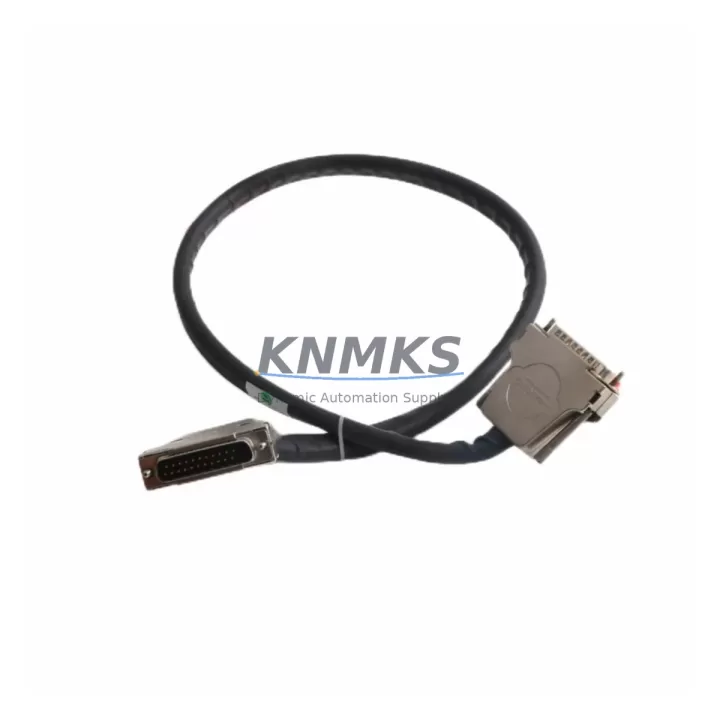
ABB TK850V007 Retrofit-Ready Bus Cable for AC500 Systems: Legacy Migration & Compatible Upgrade
The ABB TK850V007 (order reference 3BSC950192R1) is a 0.7-metre internal bus extension cable engineered for the ABB AC500 programmable logic controller platform. As legacy control architectures age and original bus cables reach end-of-life, the TK850V007 serves as a direct, drop-in replacement that preserves existing backplane topology, terminal wiring, and program logic without requiring hardware redesign. For maintenance engineers managing aging production lines, retrofitting a control cabinet, or sourcing discontinued spare parts under time pressure, this cable delivers verified compatibility, fast availability, and a support terms confirmed by quotation backed by pre-shipment functional testing.
The AC500 platform — spanning CPU modules such as the PM573, PM583, and PM595 — relies on a structured internal bus architecture to coordinate I/O expansion modules, communication interfaces, and power distribution across the rack. The TK850V007 connects adjacent modules within the same rack segment, maintaining the high-speed internal bus link that allows the CPU to address distributed I/O points, read analog signals, and execute scan cycles without latency. When this cable degrades or fails — often due to vibration fatigue, connector oxidation, or thermal cycling in harsh industrial environments — the entire rack segment may lose communication, triggering fault codes and unplanned downtime. Stocking a verified replacement such as the TK850V007 is a standard practice in preventive maintenance programs for AC500-based systems.
Migration Compatibility Table
| Parameter | Specification / Recommendation |
|---|---|
| Part Number | TK850V007 / 3BSC950192R1 |
| Cable Length | 0.7 m (700 mm) |
| Compatible Platform | ABB AC500 PLC Series (PM5xx CPU family) |
| Connector Interface | AC500 internal bus connector — direct plug-in, no adapter required |
| Installation Requirement | Power-off installation recommended; confirm rack slot alignment before seating |
| Communication Compatibility | Supports PROFIBUS, Modbus, CANopen, and Ethernet-based variants within AC500 architecture |
| Replacement Recommendation | Direct replacement for degraded or discontinued OEM bus cables in AC500 racks |
| Commissioning Notes | Re-scan I/O configuration after installation; verify module addresses in PS501 Control Builder |
| Firmware Compatibility | Compatible with all AC500 firmware versions; no firmware update required for cable replacement |
| Support terms | 12 months from shipment date; pre-shipment functional test included |
Retrofit Planning for Existing Automation Systems
A successful AC500 retrofit begins well before the replacement cable arrives on-site. Engineers should audit the full rack configuration, documenting the position of every installed module — including DC532 digital I/O modules, AX522 analog I/O modules, and any CM589 PROFIBUS communication modules — to confirm that the TK850V007’s 0.7-metre length is appropriate for the physical distance between the rack segments being bridged. If the cabinet layout has been modified since original commissioning, measure the actual routing path rather than relying on original drawings.
Power supply capacity is a critical pre-check. The PS501-PROC-1 power supply module feeding the rack must be verified to support the full load of all connected I/O and communication modules after the bus cable is replaced and the rack is re-energised. Undersized power supplies are a common root cause of intermittent bus faults that are misdiagnosed as cable failures. Confirm that the supply’s rated output current matches or exceeds the aggregate module demand listed in the AC500 system data sheet.
Terminal wiring on I/O modules does not need to be disturbed during a bus cable replacement, which significantly reduces retrofit risk. However, if the retrofit is part of a broader control cabinet upgrade — for example, migrating from an older S500 I/O generation to current AC500 I/O modules — terminal mapping must be re-verified against the updated I/O list. Signal isolators may be required where legacy field devices operate at voltage or current ranges outside the new module’s input specifications. In communication-intensive systems, the CM579 Ethernet/IP communication module should be re-addressed and its network parameters confirmed in the controller configuration after any rack hardware change.
HMI screens linked to AC500 tag databases should be reviewed for any address references that may shift if module slot positions change during the retrofit. Even a bus cable replacement that does not alter module positions should be followed by a full I/O force test to confirm that all field signals are correctly mapped before returning the system to automatic operation.
Downtime Control During System Migration
Minimising unplanned downtime during a bus cable replacement requires a structured approach to pre-staging, execution, and verification. Before taking the system offline, export a full backup of the AC500 program from PS501 Control Builder, including all task configurations, variable declarations, and communication settings. Store this backup on an isolated engineering laptop and a secondary USB drive — not on the plant network — to ensure it is available even if network infrastructure is affected during the cabinet work.
Schedule the replacement during a planned maintenance window and communicate the expected outage duration to production supervision. A straightforward bus cable swap on a well-documented AC500 rack typically requires 30 to 90 minutes, including power-down, cable replacement, power-up, I/O scan verification, and sign-off. If the retrofit involves additional module changes — such as adding an AX522 analog expansion module or reconfiguring a communication interface — budget additional time for address configuration and HMI tag verification.
During the power-down phase, photograph the existing cable routing and connector orientation before disconnecting anything. This reference is invaluable if the replacement cable needs to be routed differently or if a connector is damaged during removal. After installing the TK850V007, power up the rack in stages if the system architecture permits, observing the CPU’s diagnostic LEDs and the module status indicators before enabling field outputs. Use the controller’s online diagnostic view to confirm that all expected modules are visible on the internal bus before releasing the system to automatic control.
For systems where continuous operation is critical, consider staging a pre-configured spare rack with the replacement cable already installed and tested. This hot-swap approach reduces live intervention time to the duration of the rack changeover itself, with program restoration from the pre-verified backup completing the migration.
Retrofit Support FAQ
Q1: Is the TK850V007 a direct replacement for the original ABB AC500 bus cable, or does it require an adapter?
The TK850V007 is a direct, plug-in replacement for the original AC500 internal bus cable. No adapter, bracket modification, or firmware update is required. The connector interface is identical to the OEM specification, and the cable is fully compatible with all PM5xx CPU variants and standard AC500 I/O and communication modules.
Q2: What commissioning steps are required after replacing the bus cable?
After installation, power up the rack and perform an I/O configuration scan in PS501 Control Builder to confirm that all modules are detected at their expected addresses. Verify that no bus fault codes are active in the CPU diagnostic log. Conduct a full I/O force test to confirm field signal mapping before returning the system to automatic operation. If any module addresses have shifted, update the hardware configuration in the project and re-download to the CPU.
Q3: How is the TK850V007 tested before shipment, and what does the support terms confirmed by quotation cover?
Each TK850V007 unit undergoes a pre-shipment functional test to verify connector integrity, cable continuity, and bus signal transmission. The support terms confirmed by quotation cover manufacturing defects and verified functional failures under normal operating conditions. It does not cover damage resulting from incorrect installation, overvoltage, or physical mishandling. Support requests are supported with replacement or refund based on fault verification.
Q4: Is stock available for immediate shipment, and what are the lead times for larger quantities?
Stock is maintained for immediate dispatch. Single units and small quantities typically ship within 1–3 business days. For larger retrofit projects requiring multiple units or bundled orders with complementary components, contact the sales team to confirm availability and lead time. Pre-order arrangements are available for planned maintenance shutdowns requiring guaranteed stock reservation.
© 2026 KNMKS. All rights reserved.
Original Source: https://knmks.com
Contact: admin@knmks.com | +86 18359268345
Product Identification
- Brand / Ecosystem
-
ABB
ABB - Model / Series
-
TK850V007 3BSC950192R1
AC500 Series - Product Family
- Cables & Connectors
- Availability Status
- Available on request after model and quantity confirmation
- Inquiry Type
- B2B RFQ, replacement inquiry and project spare-part request
- Pre-Quote Check
- Exact SKU, brand, series, quantity, nameplate photos and destination country are checked before quotation
System Path
Where this product fits in the KNMKS automation structure.
Specification & Inquiry Focus
- Cable range
- Sensor, servo, network and circular connectors
- Common needs
- Length, pin count, shielding and plug type
- Project support
- Machine wiring and installation kits
Buyer Confirmation
Information KNMKS checks before replying.
- Exact model
- TK850V007 3BSC950192R1
- Brand / ecosystem
- ABB
- Product family
- Cables & Connectors
- Application note
- Replacement, maintenance, project build or spare-part list
- Useful photos
- Nameplate, installed unit, cabinet layout or connector side
- Delivery details
- Quantity, destination country and target schedule
Document Support
Files and notes can be confirmed during quotation.
- Product photos or nameplate confirmation when available
- Packing and delivery notes before quotation confirmation
- Support scope and delivery terms confirmed per inquiry
- Export document coordination for qualified B2B requests
Inquiry Support
- Cable length and connector type confirmation
- Servo, sensor and network cable inquiry
- Accessory kits for installation teams
What to Send Us
- Brand and exact model number: ABB TK850V007 3BSC950192R1
- Quantity and required delivery time
- Application, replacement requirement or nameplate photo
- Destination country and shipping preference
RFQ Preparation
This is a product inquiry page built for RFQ communication.
Fast Model Check
Send this model to KNMKS for confirmation.
Include quantity, destination country and photos if this is a maintenance replacement. The inquiry will be saved with a reference number after submission.
Brand & Compatibility Note
KNMKS displays automation product information for well-known industrial brand ecosystems and compatible replacement references. Brand names are used for product identification and compatibility reference only; final availability and commercial terms are confirmed per quotation.
 Manufacturing
 Machine Tools
 Packaging
 Energy & Power
 PLCs & Controllers
 HMI & Displays
 Servo Systems
 Variable Frequency Drives