
Overview
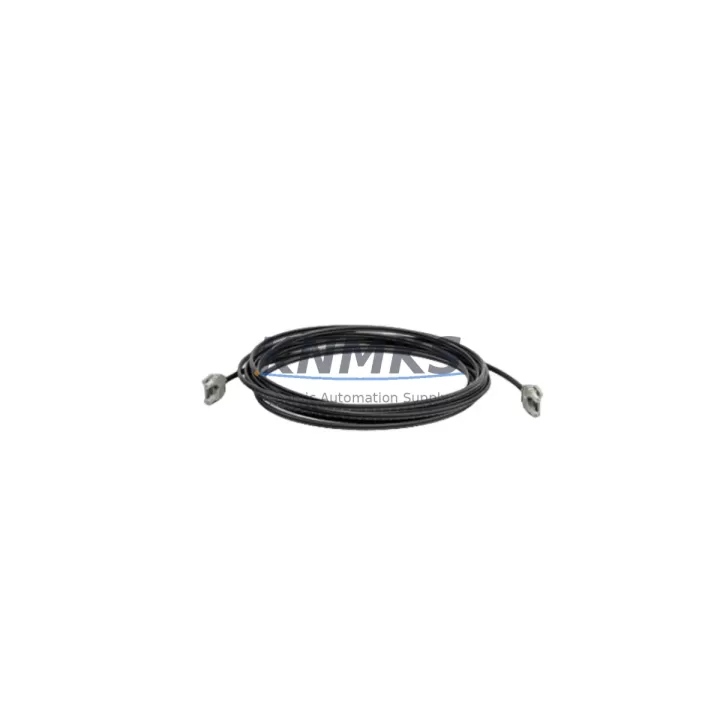
ABB TK811V050 Migration-Ready POF Cable for AC500: Legacy System Retrofit and Compatibility Upgrade
The ABB TK811V050 is a Plastic Optical Fiber (POF) communication cable engineered for the AC500 PLC platform, one of ABB’s most widely deployed modular control architectures in process automation, machine control, and infrastructure applications. As legacy AC500 installations approach end-of-service milestones, the TK811V050 has become a critical spare part for engineers managing system continuity, control cabinet upgrades, and phased migration projects. Whether you are replacing a degraded fiber link in an aging control panel, expanding an existing AC500 rack with additional I/O modules, or executing a full retrofit from an earlier generation controller, the TK811V050 provides a verified, drop-in compatible interconnect solution that eliminates the need for custom cabling or protocol bridging.
In retrofit scenarios, the TK811V050 is typically used to re-establish the high-speed optical communication link between the AC500 CPU module — such as the PM573, PM583, or PM595 — and peripheral expansion modules mounted on the same or adjacent racks. The cable connects directly to the standard POF ports on AC500 I/O modules including the DC532, DA501, and AX521 series, maintaining the internal CS31 bus topology without requiring firmware changes or address reassignment. This is particularly valuable when replacing a failed CPU or communication module mid-project, as the existing wiring harness and terminal assignments remain intact.
Before installing the TK811V050 in a live retrofit, engineers should verify several key parameters. First, confirm the fiber port type on both the CPU and the target I/O module — the TK811V050 uses the standard FSMA-style POF connector compatible with all AC500 V2 and V3 generation hardware. Second, check the rack backplane configuration: if the system uses a TB521 or TB541 expansion backplane, ensure the module slot addressing has not shifted due to hardware changes, as the AC500 CPU assigns logical I/O addresses based on physical slot position. Third, review the firmware version on the CPU module — ABB recommends aligning firmware across all modules in the rack before commissioning a replacement cable to avoid communication timeout errors during startup.
For installations migrating from older AC31 or Advant Controller platforms to the AC500 architecture, the TK811V050 plays a supporting role in the communication layer rebuild. The AC31 system used a different bus topology and connector standard, so direct cable reuse is not possible; however, the TK811V050 can be deployed as part of a structured migration where the new AC500 CPU takes over control logic previously handled by the AC31 processor, with the POF cable establishing the link to newly installed DC532 digital I/O modules or AX521 analog modules that replace legacy Advant I/O cards. In these projects, the HMI interface — often a CP600 or CP635 panel — may also require updated communication driver configuration to reflect the new CPU address and protocol settings.
Downtime management is a primary concern in any live system retrofit. The TK811V050’s plug-and-play compatibility with the AC500 platform means that cable replacement can typically be completed within a planned maintenance window without requiring a full system shutdown. Engineers should back up the existing CPU program using ABB Automation Builder before disconnecting any hardware, verify that the replacement cable passes a visual inspection for connector cleanliness and fiber integrity, and perform a cold-start sequence after installation to allow the CPU to re-enumerate all connected modules. If the system includes a CI590 PROFIBUS communication interface or a CI854 IEC 61850 module, confirm that these communication links are re-established and that the field device status is normal before returning the system to automatic mode.
Migration Compatibility Table
| Parameter | Detail |
|---|---|
| SKU | TK811V050 |
| Brand / Series | ABB / AC500 |
| Cable Type | Plastic Optical Fiber (POF), FSMA Connector |
| Compatible CPU Modules | PM573, PM583, PM591, PM595 (AC500 V2 & V3) |
| Compatible I/O Modules | DC532, DA501, AX521, DI524, DO526 series |
| Compatible Backplanes | TB521, TB541 expansion backplanes |
| Bus Protocol | CS31 internal optical bus |
| Installation Requirement | Clean FSMA port, firmware alignment recommended |
| Replaces / Substitutes | Degraded or failed OEM POF cables in AC500 racks |
| HMI Compatibility | CP600, CP635 panels (no driver change required) |
| Communication Module Note | Re-verify CI590 PROFIBUS / CI854 IEC 61850 links post-install |
| Origin | Germany (DE) |
| Support terms | support terms confirmed by quotation — Pre-shipment tested |
Retrofit Planning for Existing Automation Systems
A successful AC500 retrofit begins with a thorough audit of the existing control cabinet. In most legacy installations, the POF cable routing runs from the CPU module’s fiber port along the backplane to the first expansion module, with additional TK811V050 segments daisy-chaining through subsequent I/O modules. When planning a rack expansion — for example, adding a DC532 digital input module or an AX521 analog output module to an existing AC500 system — the engineer must account for the total fiber run length and ensure that each segment uses a correctly rated POF cable. The TK811V050 is rated for the standard inter-module distance within an AC500 rack and should not be substituted with generic fiber patch cables that may not meet ABB’s optical loss budget specifications.
Power supply capacity is another critical planning factor. When adding I/O modules to an existing rack, verify that the installed PS501 or PS560 power supply module can support the additional current draw. Each DC532 module draws approximately 80 mA from the backplane bus; adding multiple modules without a power audit can cause intermittent communication errors that are difficult to distinguish from cable faults. If the power budget is marginal, a TB541 expansion backplane with a dedicated power supply may be required, and the TK811V050 will be needed to bridge the optical link between the primary and expansion racks.
For projects involving protocol migration — for example, transitioning field devices from PROFIBUS DP to PROFINET or Modbus TCP — the CI590 PROFIBUS communication interface module and the CI854 IEC 61850 module are commonly encountered in the same control cabinet as the TK811V050. These modules communicate with the AC500 CPU via the internal CS31 bus, and the POF cable must be correctly seated and free of contamination to ensure reliable data exchange. A programming cable such as the TK503 USB-to-serial adapter may also be required during commissioning to access the CPU’s local programming port for firmware updates or program downloads via ABB Automation Builder.
Downtime Control During System Migration
Minimizing unplanned downtime is the primary objective in any live control system retrofit. The TK811V050’s direct compatibility with the AC500 platform eliminates the need for adapter hardware or protocol converters, which are common sources of commissioning delay. The recommended migration sequence is: (1) back up the existing CPU program and I/O configuration using ABB Automation Builder; (2) photograph the existing cable routing and terminal assignments for reference; (3) replace the POF cable during a planned maintenance window; (4) perform a cold-start and verify that all I/O modules are recognized by the CPU; (5) confirm field device status via the HMI panel before releasing the system to automatic control.
If the system cannot be taken fully offline, a hot-standby approach using a redundant CPU configuration — available on PM595-based systems — allows the TK811V050 to be replaced on the standby CPU while the primary remains in control. After the cable replacement is verified, a controlled switchover transfers control to the updated standby unit with minimal process interruption. This approach is particularly effective in continuous process applications where even a brief control gap is unacceptable.
All TK811V050 units supplied by KNMKS are pre-shipment tested for optical continuity and connector integrity before dispatch. Each unit ships with a support terms confirmed by quotation covering manufacturing defects and optical performance. In-stock inventory ensures rapid dispatch to support urgent maintenance and unplanned outage recovery scenarios globally.
Retrofit Support FAQ
Q1: Is the TK811V050 a direct replacement for the original ABB POF cable in my AC500 system?
Yes. The TK811V050 is a direct, drop-in replacement for the original ABB-supplied POF cable used in AC500 racks. No wiring modifications, address changes, or firmware updates are required solely for the cable replacement. Ensure the FSMA connectors are clean and fully seated before powering the system.
Q2: Can I use the TK811V050 when migrating from an AC31 or Advant Controller system to AC500?
The TK811V050 is specific to the AC500 platform’s CS31 optical bus and cannot be directly reused from an AC31 installation. However, it is the correct cable to deploy when building the new AC500 communication backbone as part of a migration project. The AC31-to-AC500 migration requires new I/O modules and a new fiber cable set, of which the TK811V050 is a standard component.
Q3: What pre-shipment testing is performed on the TK811V050?
Every TK811V050 unit supplied by KNMKS undergoes optical continuity testing and connector inspection before dispatch. Units that do not meet ABB’s optical loss specifications are rejected. A support terms confirmed by quotation is provided on all units, covering manufacturing defects and optical performance degradation under normal operating conditions.
Q4: How quickly can the TK811V050 be delivered for an urgent maintenance situation?
KNMKS maintains in-stock inventory of the TK811V050 to support urgent dispatch requirements. Orders placed before the daily cut-off are typically shipped the same business day. Global shipping options are available to support maintenance teams in Europe, Asia, the Middle East, and the Americas. Contact admin@knmks.com or +86 18359268345 for expedited order processing.
© 2026 KNMKS. All rights reserved.
Original Source: https://knmks.com
Contact: admin@knmks.com | +86 18359268345
Product Identification
- Brand / Ecosystem
-
ABB
ABB - Model / Series
-
TK811V050
AC500 Series - Product Family
- Cables & Connectors
- Availability Status
- Available on request after model and quantity confirmation
- Inquiry Type
- B2B RFQ, replacement inquiry and project spare-part request
- Pre-Quote Check
- Exact SKU, brand, series, quantity, nameplate photos and destination country are checked before quotation
System Path
Where this product fits in the KNMKS automation structure.
Specification & Inquiry Focus
- Cable range
- Sensor, servo, network and circular connectors
- Common needs
- Length, pin count, shielding and plug type
- Project support
- Machine wiring and installation kits
Buyer Confirmation
Information KNMKS checks before replying.
- Exact model
- TK811V050
- Brand / ecosystem
- ABB
- Product family
- Cables & Connectors
- Application note
- Replacement, maintenance, project build or spare-part list
- Useful photos
- Nameplate, installed unit, cabinet layout or connector side
- Delivery details
- Quantity, destination country and target schedule
Document Support
Files and notes can be confirmed during quotation.
- Product photos or nameplate confirmation when available
- Packing and delivery notes before quotation confirmation
- Support scope and delivery terms confirmed per inquiry
- Export document coordination for qualified B2B requests
Inquiry Support
- Cable length and connector type confirmation
- Servo, sensor and network cable inquiry
- Accessory kits for installation teams
What to Send Us
- Brand and exact model number: ABB TK811V050
- Quantity and required delivery time
- Application, replacement requirement or nameplate photo
- Destination country and shipping preference
RFQ Preparation
This is a product inquiry page built for RFQ communication.
Fast Model Check
Send this model to KNMKS for confirmation.
Include quantity, destination country and photos if this is a maintenance replacement. The inquiry will be saved with a reference number after submission.
Brand & Compatibility Note
KNMKS displays automation product information for well-known industrial brand ecosystems and compatible replacement references. Brand names are used for product identification and compatibility reference only; final availability and commercial terms are confirmed per quotation.
 Manufacturing
 Machine Tools
 Packaging
 Energy & Power
 PLCs & Controllers
 HMI & Displays
 Servo Systems
 Variable Frequency Drives