
Overview
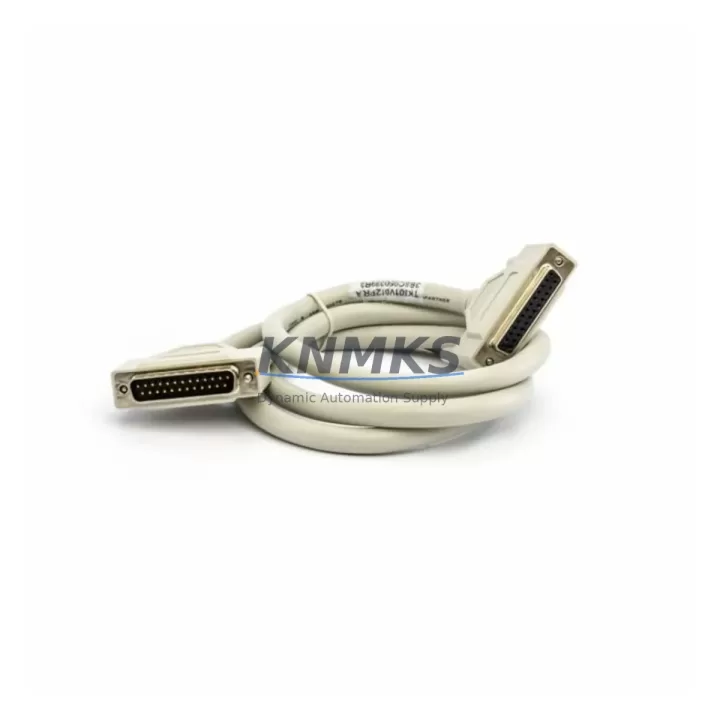
ABB TK801V012 Migration-Ready Modulebus Cable for Legacy Control Systems
The ABB TK801V012 is a 0.12-metre shielded Modulebus extension cable engineered for the AC500 PLC platform. As legacy control architectures reach end-of-life and plant engineers face mounting pressure to modernise distributed I/O networks, the TK801V012 provides a direct, verified replacement path that eliminates the need for full rack redesign. Whether you are migrating from an older AC500 V1 configuration to AC500 V2, consolidating control cabinets, or extending an existing Modulebus segment to accommodate additional I/O modules, this cable delivers the signal integrity and mechanical compatibility required for reliable industrial operation.
In retrofit projects, the TK801V012 is most commonly deployed alongside the PM573-ETH or PM591-ETH central processing units, where Modulebus topology must be preserved while new communication layers — including PROFINET or Modbus TCP — are introduced in parallel. Engineers replacing discontinued I/O modules such as the DC532 or AI523 will find that the TK801V012 maintains correct bus termination and module addressing without requiring firmware changes to the CPU. This is critical in environments where the original IEC 61131-3 program logic must be retained intact and re-validated only at the I/O mapping level.
For control cabinet upgrades involving the TB723 or TB724 terminal base units, the 0.12-metre cable length is specifically suited to tight backplane spacing where longer cables introduce unnecessary loop and EMI risk. When planning rack layout changes, confirm that the Modulebus segment does not exceed the maximum node count for your CPU variant, and verify that each replacement module’s station address is set correctly via DIP switch or software configuration tool before powering the rack. The TK801V012’s shielded construction supports installations in high-noise environments typical of motor drive cabinets housing ACS580 or ACS880 series variable frequency drives on the same panel.
Communication protocol migration is a key risk area in legacy system upgrades. If your existing AC500 installation uses PROFIBUS DP via the CI502-PNIO or CI504-PNIO coupler modules, and you are transitioning to PROFINET, the Modulebus internal cabling — including the TK801V012 — remains unchanged. This means your I/O expansion modules continue to communicate with the CPU over the same physical Modulebus backbone, while only the fieldbus coupler is swapped. This staged migration approach significantly reduces downtime and allows the new network to be commissioned and tested before the legacy fieldbus is decommissioned.
All units are pre-shipment tested for continuity, shielding integrity, and connector seating. Stock is maintained for immediate dispatch with a support terms confirmed by quotation covering manufacturing defects and connector failure under normal operating conditions.
Migration Compatibility Table
| Parameter | Specification / Recommendation |
|---|---|
| Cable Length | 0.12 m (120 mm) |
| Cable Type | Shielded Modulebus extension cable |
| Compatible Platform | ABB AC500 PLC (V1 and V2 generations) |
| Compatible CPUs | PM573-ETH, PM591-ETH, PM592-ETH, PM595-ETH |
| Compatible I/O Modules | DC532, AI523, AO523, DI524, DC523 and AC500 I/O series |
| Compatible Terminal Bases | TB723, TB724, TB726 |
| Connector Interface | Modulebus proprietary — no adapter required |
| Installation Requirement | Confirm rack slot sequence and module station address before power-on |
| Firmware Compatibility | No firmware change required; CPU firmware ≥ V2.x recommended for V2 I/O |
| Communication Compatibility | PROFIBUS DP, PROFINET, Modbus TCP (fieldbus coupler dependent) |
| Replacement Recommendation | Direct drop-in replacement; verify cable orientation and locking tab engagement |
| Commissioning Note | Use Automation Builder or PS501 to verify I/O mapping post-installation |
| Support terms | 12 months from dispatch date |
Retrofit Planning for Existing Automation Systems
A successful retrofit begins with a complete audit of the existing Modulebus segment. Document the physical position of each I/O module, its station address, and the terminal wiring on each TB723 or TB724 base. When replacing a failed or discontinued module such as the DC532 digital combined I/O module, the TK801V012 cable must be re-seated at both the CPU backplane port and the first I/O module connector to ensure bus continuity. If the retrofit scope includes adding new I/O capacity — for example, inserting an AI523 analogue input module into an existing rack — confirm that the total Modulebus segment length remains within specification and that the new module’s address does not conflict with existing assignments.
For projects that also involve upgrading the communication layer, the CI502-PNIO PROFINET coupler can be introduced into the rack without disturbing the Modulebus cabling. The TK801V012 continues to serve the internal I/O bus while the coupler handles external network traffic. If the legacy system used a CI504-PNIO or an older PROFIBUS coupler, the swap can be performed module-by-module, allowing partial system operation to be maintained during the transition window. Power supply capacity must be recalculated when adding modules; the PS501 or PS502 power supply modules should be verified against the updated load profile before commissioning.
Where HMI screens reference specific I/O addresses, coordinate with the programming team to confirm that address remapping in the IEC 61131-3 project is completed and downloaded before the new hardware is energised. Signal isolators may be required at analogue input channels if the new I/O module’s input impedance differs from the legacy unit. Programming cables such as the TK503 USB-to-serial adapter are recommended for on-site firmware verification and project download during commissioning.
Downtime Control During System Migration
Minimising unplanned downtime during a Modulebus cable replacement or rack upgrade requires preparation at three levels: hardware staging, program backup, and commissioning sequencing. Before any physical work begins, export a full backup of the AC500 project from Automation Builder, including all hardware configuration files and variable tables. This backup serves as the recovery baseline if commissioning reveals unexpected I/O mapping discrepancies.
Hardware staging involves pre-assembling the replacement rack or module set — including the TK801V012 cable, replacement I/O modules, and terminal bases — and verifying all connector engagements on the bench before the planned maintenance window. During the window, the sequence should follow: power down the rack, remove the legacy cable, install the TK801V012, seat the replacement modules, restore power, and verify bus communication via the CPU diagnostic LEDs before re-enabling field outputs. This sequence typically allows a single Modulebus segment replacement to be completed within a 30-to-60-minute window, depending on terminal rewiring scope.
For systems where continuous process control is required, consider a parallel commissioning approach: install the new rack alongside the existing one, verify I/O operation under live conditions, then cut over at a scheduled low-production interval. This approach is particularly effective when the upgrade also involves introducing a new communication coupler or expanding I/O capacity, as it allows the new configuration to be validated without interrupting the running process.
Retrofit Support FAQ
Q: Is the TK801V012 a direct replacement for the cable supplied with my existing AC500 rack?
A: Yes. The TK801V012 is the standard ABB Modulebus extension cable for AC500 I/O expansion. It is a direct replacement for the same part number and is compatible with all AC500 CPU and I/O module generations. No adapters or wiring modifications are required.
Q: Do I need to change my PLC program after replacing the Modulebus cable?
A: No program changes are required for a like-for-like cable replacement. If you are simultaneously replacing an I/O module with a different type, verify the I/O channel mapping in your Automation Builder project and update variable assignments as needed before downloading to the CPU.
Q: What pre-shipment testing is performed on the TK801V012?
A: Each unit is tested for conductor continuity, shield integrity, and connector mechanical engagement before dispatch. Units that do not pass all checks are not shipped. A support terms confirmed by quotation cover manufacturing defects and connector failure under normal operating conditions from the date of dispatch.
Q: What is the lead time and stock availability?
A: Stock is maintained for immediate dispatch. Orders confirmed before the daily cut-off are typically shipped the same business day. For bulk retrofit project quantities, contact our sales team to confirm allocation and arrange staged delivery aligned with your project schedule.
© 2026 KNMKS. All rights reserved.
Original Source: https://knmks.com
Contact: admin@knmks.com | +86 18359268345
Product Identification
- Brand / Ecosystem
-
ABB
ABB - Model / Series
-
TK801V012
AC500 Series - Product Family
- Cables & Connectors
- Availability Status
- Available on request after model and quantity confirmation
- Inquiry Type
- B2B RFQ, replacement inquiry and project spare-part request
- Pre-Quote Check
- Exact SKU, brand, series, quantity, nameplate photos and destination country are checked before quotation
System Path
Where this product fits in the KNMKS automation structure.
Specification & Inquiry Focus
- Cable range
- Sensor, servo, network and circular connectors
- Common needs
- Length, pin count, shielding and plug type
- Project support
- Machine wiring and installation kits
Buyer Confirmation
Information KNMKS checks before replying.
- Exact model
- TK801V012
- Brand / ecosystem
- ABB
- Product family
- Cables & Connectors
- Application note
- Replacement, maintenance, project build or spare-part list
- Useful photos
- Nameplate, installed unit, cabinet layout or connector side
- Delivery details
- Quantity, destination country and target schedule
Document Support
Files and notes can be confirmed during quotation.
- Product photos or nameplate confirmation when available
- Packing and delivery notes before quotation confirmation
- Support scope and delivery terms confirmed per inquiry
- Export document coordination for qualified B2B requests
Inquiry Support
- Cable length and connector type confirmation
- Servo, sensor and network cable inquiry
- Accessory kits for installation teams
What to Send Us
- Brand and exact model number: ABB TK801V012
- Quantity and required delivery time
- Application, replacement requirement or nameplate photo
- Destination country and shipping preference
RFQ Preparation
This is a product inquiry page built for RFQ communication.
Fast Model Check
Send this model to KNMKS for confirmation.
Include quantity, destination country and photos if this is a maintenance replacement. The inquiry will be saved with a reference number after submission.
Brand & Compatibility Note
KNMKS displays automation product information for well-known industrial brand ecosystems and compatible replacement references. Brand names are used for product identification and compatibility reference only; final availability and commercial terms are confirmed per quotation.
 Manufacturing
 Machine Tools
 Packaging
 Energy & Power
 PLCs & Controllers
 HMI & Displays
 Servo Systems
 Variable Frequency Drives