
Overview
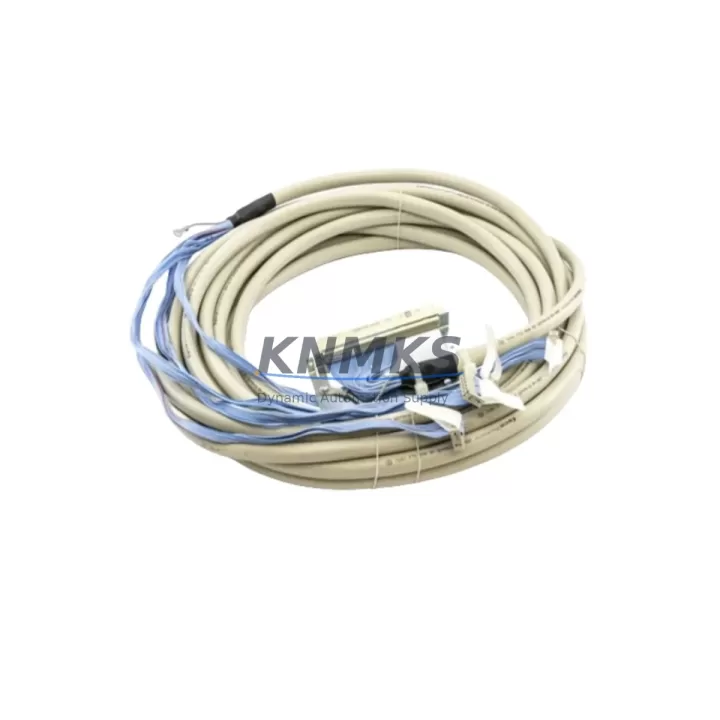
ABB TK801V006 Migration-Ready Modulebus Cable for AC500: Legacy System Retrofit and Compatibility Upgrade
The ABB TK801V006 is a 0.6-meter shielded Modulebus cable engineered for the ABB AC500 programmable logic controller platform. As industrial facilities worldwide accelerate the retirement of aging control architectures, the TK801V006 plays a critical role in maintaining communication integrity between CPU modules, I/O expansion units, and communication interfaces during system migration, rack reconfiguration, and cabinet-level upgrades. Whether you are replacing a failed cable in a live production environment or rebuilding a control cabinet around a modernized AC500 CPU, the TK801V006 delivers the signal reliability and mechanical compatibility required for uninterrupted automation continuity.
The Modulebus is the proprietary backplane communication protocol used across the ABB AC500 family, linking the central processing unit to local I/O modules such as the DC532, DA501, and AX522 series. The TK801V006 supports this protocol natively, making it a direct drop-in replacement for original factory-installed cables without requiring firmware changes, address reassignment, or modifications to the existing PLC program logic. This is particularly valuable in retrofit scenarios where minimizing engineering rework is a priority and where the original cable has degraded due to vibration, heat cycling, or connector fatigue over years of continuous operation.
When planning a retrofit or spare parts replenishment for an AC500-based system, engineers must verify several key parameters before installation. Power supply capacity at the rack level — typically provided by an ABB PS501 or PS502 power supply module — must be confirmed to support the full I/O load after any module additions or substitutions. Terminal wiring on adjacent I/O modules should be inspected and documented before disconnecting the Modulebus cable, as connector orientation and locking tab condition directly affect reassembly accuracy. Backplane interface alignment on the CPU module and the first downstream I/O module must be confirmed to match the 0.6-meter cable reach of the TK801V006; for longer inter-module distances, the TK801V012 or TK801V025 variants should be evaluated instead.
Module addressing within the AC500 configuration tool (Automation Builder) does not require reconfiguration when replacing a like-for-like Modulebus cable, provided the physical slot positions of all I/O modules remain unchanged. However, if the retrofit involves relocating modules within the rack or migrating from an older S500 I/O architecture to the newer AC500 I/O platform, address mapping must be reviewed and updated in the project file before downloading to the CPU. HMI screens connected via CP600 or CP400 operator panels that reference I/O addresses should also be validated against the updated configuration to prevent display errors or alarm mismatches after the migration.
Communication link integrity between the AC500 CPU and any upstream SCADA or DCS system — whether via PROFIBUS DP using the CM572-DP communication module, Modbus TCP through the onboard Ethernet port, or EtherNet/IP via the CM589-PNIO adapter — is not affected by Modulebus cable replacement, as these protocols operate on separate physical and logical layers. Nevertheless, a full communication diagnostic should be performed after any rack-level intervention to confirm that all network nodes are responding correctly and that no watchdog timeouts have been introduced.
Installation space confirmation is essential before ordering. The TK801V006 at 0.6 meters is designed for adjacent or near-adjacent module connections within a single rack or between two closely mounted racks. Cabinet depth, cable routing clearance, and bend radius constraints imposed by the shielded construction must all be accounted for in the physical layout review. Where space is constrained, the cable should be routed with a minimum bend radius of 5x the cable diameter to preserve shielding continuity and prevent signal degradation.
Firmware compatibility between the AC500 CPU and connected I/O modules is maintained across the Modulebus interface regardless of cable revision, as the TK801V006 is a passive interconnect with no embedded firmware. However, if the retrofit involves upgrading the CPU from an older PM571 or PM581 to a current-generation PM5630 or PM5650, the I/O module firmware versions should be checked against the Automation Builder project compatibility matrix to ensure all modules are supported under the new CPU firmware baseline.
Field commissioning after Modulebus cable replacement should follow a structured sequence: power down the rack, replace the cable, verify connector seating on both ends, restore power, confirm CPU boot status via the onboard LED indicators, and perform a full I/O force test to validate signal continuity across all connected modules. This sequence minimizes the risk of introducing configuration errors and ensures that the system returns to normal operation within the shortest possible downtime window.
KNMKS maintains verified stock of the ABB TK801V006 with pre-shipment functional testing and a support terms confirmed by quotation covering manufacturing defects and connector integrity. Orders are processed with same-day dispatch for in-stock quantities, supporting urgent maintenance and unplanned breakdown scenarios where cable failure has caused a production stoppage.
Migration Compatibility Table
| Parameter | TK801V006 Specification | Retrofit Notes |
|---|---|---|
| Cable Length | 0.6 m (600 mm) | For longer runs, use TK801V012 (1.2m) or TK801V025 (2.5m) |
| Protocol | ABB Modulebus (proprietary) | Direct replacement; no protocol reconfiguration required |
| Compatible CPUs | PM571, PM581, PM591, PM5630, PM5650 | Verify CPU firmware version against I/O module compatibility matrix |
| Compatible I/O | DC532, DA501, AX522, DI524, DO526 series | Slot positions must remain unchanged to avoid address remapping |
| Connector Type | Proprietary Modulebus plug, locking tab | Inspect locking tabs on existing connectors before reassembly |
| Shielding | Foil + braid, grounded at rack end | Maintain minimum 5x cable diameter bend radius |
| Installation Space | Adjacent rack or near-adjacent mounting | Confirm cabinet depth and cable routing clearance before installation |
| Firmware Dependency | None (passive interconnect) | CPU and I/O firmware compatibility check required if CPU is upgraded |
| Communication Impact | No effect on PROFIBUS, Modbus TCP, EtherNet/IP | Full network diagnostic recommended post-installation |
| Support terms | 12 Months | Covers manufacturing defects and connector integrity; pre-shipment tested |
Retrofit Planning for Existing Automation Systems
A successful AC500 retrofit begins well before the maintenance window opens. The TK801V006 Modulebus cable is typically one component in a broader parts list that includes the ABB PS501 or PS502 rack power supply, replacement I/O modules from the DC532 digital input or AX522 analog output families, and in some cases a CM572-DP PROFIBUS communication module where the legacy fieldbus network must be preserved alongside the upgraded CPU. For systems migrating from the older S500 I/O platform, the TB521 terminal base units and corresponding I/O modules must be sourced as a matched set to ensure correct signal mapping and mechanical fit within the existing DIN rail layout.
Where the retrofit involves expanding I/O capacity — a common requirement when adding new machine axes, sensor inputs, or actuator outputs to an upgraded production line — the TK801V006 provides the inter-module link that allows the AC500 CPU to address the expanded I/O map without additional communication hardware. The cable’s 0.6-meter reach is well suited to standard 19-inch rack configurations where modules are mounted in adjacent slots. For distributed I/O architectures where remote I/O stations are connected via PROFIBUS or EtherNet/IP, the Modulebus cable handles only the local rack communication, while the CM589-PNIO or CM572-DP modules manage the fieldbus link to remote stations.
Signal isolation requirements should also be reviewed during retrofit planning. Where analog signals from legacy sensors are routed through the control cabinet, signal isolators or barriers may be required between the field wiring terminals and the AX522 analog input modules to prevent ground loops and ensure measurement accuracy after the upgrade. Programming cable access — typically via the USB port on the AC500 CPU or through the onboard Ethernet interface using Automation Builder — should be confirmed as part of the pre-commissioning checklist to ensure that program downloads and online monitoring can be performed without additional adapters or drivers.
Downtime Control During System Migration
Minimizing production downtime during a Modulebus cable replacement or broader AC500 retrofit requires a disciplined pre-outage preparation process. Before the maintenance window begins, the existing PLC program should be uploaded from the CPU and archived with a version-stamped backup, ensuring that the original logic can be restored immediately if the retrofit encounters an unexpected compatibility issue. I/O force tables and HMI screen configurations should be documented and exported from Automation Builder and the CP600 or CP400 operator panel project files respectively.
During the outage, the replacement sequence should follow a module-by-module approach: disconnect the TK801V006 from the first downstream I/O module, install the new cable, verify connector seating, and restore power to that segment before proceeding to the next module. This staged approach allows the commissioning engineer to confirm signal continuity at each step rather than discovering wiring errors only after the full system is powered up. Where the retrofit involves replacing multiple I/O modules simultaneously, pre-labeling all terminal wiring before disconnection is essential to prevent cross-wiring errors during reassembly.
Post-retrofit, a structured commissioning sequence — CPU boot confirmation, I/O force test, HMI communication verification, and fieldbus network diagnostic — should be completed before returning the system to automatic mode. KNMKS provides pre-shipment functional testing on all TK801V006 cables to eliminate the risk of receiving a defective component, and the support terms confirmed by quotation ensures that any latent manufacturing defect discovered during commissioning or early operation is covered without additional cost to the end user.
Retrofit Support FAQ
Q: Is the ABB TK801V006 a direct replacement for the original factory-installed Modulebus cable in AC500 systems?
A: Yes. The TK801V006 is a direct drop-in replacement for the original Modulebus cable in ABB AC500 racks. No firmware changes, address reconfiguration, or program modifications are required when replacing a like-for-like cable with all I/O modules remaining in their original slot positions.
Q: What commissioning steps are required after replacing the TK801V006 in a live production environment?
A: After installation, power up the rack and confirm CPU boot status via the onboard LED indicators. Perform a full I/O force test across all connected modules to verify signal continuity. Run a communication diagnostic to confirm that all PROFIBUS, Modbus TCP, or EtherNet/IP nodes are responding correctly. Validate HMI screen data against live I/O values before returning the system to automatic mode.
Q: Does KNMKS provide pre-shipment testing on the TK801V006, and what does the support terms confirmed by quotation cover?
A: Yes. All TK801V006 cables shipped by KNMKS undergo pre-shipment functional testing to verify connector integrity and shielding continuity. The support terms confirmed by quotation cover manufacturing defects and connector failures under normal operating conditions. Support requests are processed directly through KNMKS with replacement dispatch within 48 hours of claim confirmation.
Q: What are the key compatibility checks before ordering the TK801V006 for a retrofit project?
A: Confirm that the cable length (0.6m) is sufficient for the inter-module distance in your rack layout. Verify that the CPU model (PM571 through PM5650) and I/O modules (DC532, DA501, AX522, DI524, DO526 series) are within the AC500 compatibility matrix. Check that the locking tab connectors on the existing rack interfaces are undamaged and will accept the new cable without modification. For longer inter-module distances, evaluate the TK801V012 or TK801V025 variants.
© 2026 KNMKS. All rights reserved.
Original Source: https://knmks.com
Contact: admin@knmks.com | +86 18359268345
Product Identification
- Brand / Ecosystem
-
ABB
ABB - Model / Series
-
TK801V006
AC500 Series - Product Family
- Cables & Connectors
- Availability Status
- Available on request after model and quantity confirmation
- Inquiry Type
- B2B RFQ, replacement inquiry and project spare-part request
- Pre-Quote Check
- Exact SKU, brand, series, quantity, nameplate photos and destination country are checked before quotation
System Path
Where this product fits in the KNMKS automation structure.
Specification & Inquiry Focus
- Cable range
- Sensor, servo, network and circular connectors
- Common needs
- Length, pin count, shielding and plug type
- Project support
- Machine wiring and installation kits
Buyer Confirmation
Information KNMKS checks before replying.
- Exact model
- TK801V006
- Brand / ecosystem
- ABB
- Product family
- Cables & Connectors
- Application note
- Replacement, maintenance, project build or spare-part list
- Useful photos
- Nameplate, installed unit, cabinet layout or connector side
- Delivery details
- Quantity, destination country and target schedule
Document Support
Files and notes can be confirmed during quotation.
- Product photos or nameplate confirmation when available
- Packing and delivery notes before quotation confirmation
- Support scope and delivery terms confirmed per inquiry
- Export document coordination for qualified B2B requests
Inquiry Support
- Cable length and connector type confirmation
- Servo, sensor and network cable inquiry
- Accessory kits for installation teams
What to Send Us
- Brand and exact model number: ABB TK801V006
- Quantity and required delivery time
- Application, replacement requirement or nameplate photo
- Destination country and shipping preference
RFQ Preparation
This is a product inquiry page built for RFQ communication.
Fast Model Check
Send this model to KNMKS for confirmation.
Include quantity, destination country and photos if this is a maintenance replacement. The inquiry will be saved with a reference number after submission.
Brand & Compatibility Note
KNMKS displays automation product information for well-known industrial brand ecosystems and compatible replacement references. Brand names are used for product identification and compatibility reference only; final availability and commercial terms are confirmed per quotation.
 Manufacturing
 Machine Tools
 Packaging
 Energy & Power
 PLCs & Controllers
 HMI & Displays
 Servo Systems
 Variable Frequency Drives