
Overview
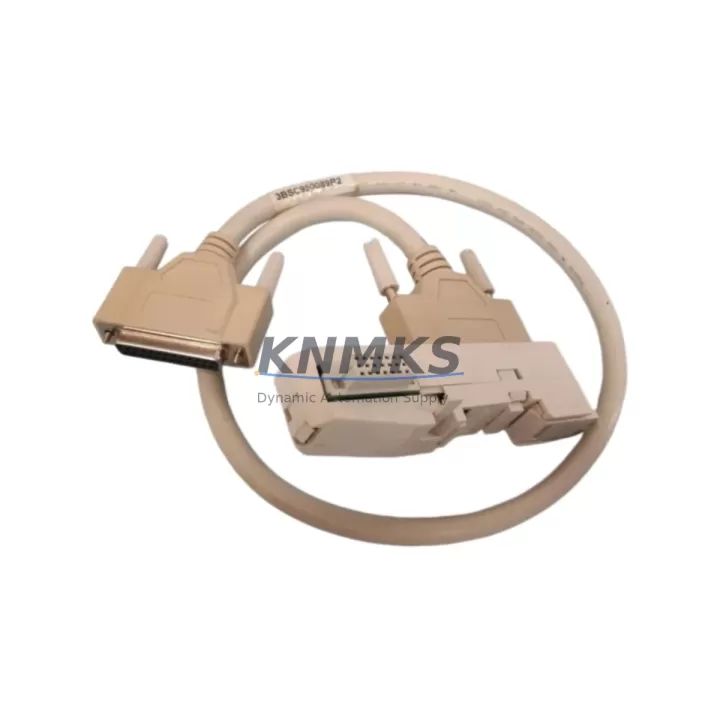
ABB TK801V006 Migration-Ready ModuleBus Cable for AC500: Legacy System Retrofit and I/O Expansion
The ABB TK801V006 (OEM reference: 3BSC950089R2) is a ModuleBus communication cable engineered for the AC500 PLC platform and its associated S500 distributed I/O modules. As legacy control architectures age and original cabling reaches end-of-service life, the TK801V006 serves as a direct, migration-ready replacement that preserves existing wiring topology, module addressing, and program logic without requiring panel redesign or controller substitution. For maintenance engineers managing aging automation infrastructure in energy, petrochemical, water treatment, and discrete manufacturing environments, this cable represents a low-risk, high-reliability path to extending system uptime.
The TK801V006 connects AC500 CPUs — including the PM571, PM581, PM591, and PM595 series — to S500 I/O expansion modules such as the DC532, AI523, AO523, and DI524 via the ModuleBus backplane interface. Its standardized connector geometry and shielded construction ensure signal integrity across the full operating temperature range, making it suitable for both cabinet-mounted and field-distributed I/O configurations. When replacing a failed or degraded cable in an existing installation, engineers should verify the cable length variant against the physical rack spacing and confirm that the ModuleBus segment address assignments remain consistent with the original system configuration file.
Migration Compatibility Table
| Parameter | Details |
|---|---|
| SKU | TK801V006 / 3BSC950089R2 |
| Compatible Platform | ABB AC500 PLC (PM571 / PM581 / PM591 / PM595) |
| Compatible I/O Series | ABB S500 (DC532, AI523, AO523, DI524, DO531) |
| Interface Type | ModuleBus (proprietary ABB backplane bus) |
| Communication Protocol | ModuleBus (synchronous serial, ABB AC500 native) |
| Installation Requirement | DIN rail or panel mount; verify rack slot spacing before installation |
| Replacement for | 3BSC950089R2 (OEM), legacy TK801 series variants |
| Retrofit Recommendation | Direct drop-in replacement; no firmware update required |
| Commissioning Note | Confirm ModuleBus node address and I/O mapping in PS501 Control Builder |
| Support terms | 12 Months — covers manufacturing defects and signal integrity |
Retrofit Planning for Existing Automation Systems
Successful integration of the TK801V006 into a retrofit project begins well before the cable is physically installed. Engineers should extract the current hardware configuration from ABB PS501 Control Builder and document the ModuleBus segment topology, including the number of S500 I/O stations, their node addresses, and the cable lengths between each station. In multi-rack configurations where the AC500 CPU communicates with remote I/O via a TB521-ETH or TB511 communication interface module, the ModuleBus segment must be re-validated after cable replacement to confirm that all downstream modules — including analog input modules such as the AI523 and thermocouple input modules such as the AI531 — are correctly enumerated.
Power budget verification is equally critical. The S500 I/O bus draws supply from the PS501 or PS502 power supply module mounted in the same rack. Before replacing the TK801V006, confirm that the total current draw of all connected I/O modules does not exceed the rated output of the installed power supply. If the retrofit involves adding new I/O stations — for example, expanding digital output capacity with additional DO531 modules — a supplementary PS502 power supply may be required to maintain stable bus operation.
Terminal wiring should be photographed and documented before any module or cable is removed. In installations where the S500 I/O modules interface with field instruments via screw-terminal or spring-clamp terminal blocks, the wiring sequence must be preserved exactly. Any deviation in terminal assignment will cause I/O mapping errors that propagate into the PLC program and may trigger process alarms or safety interlocks. Where the control system includes an HMI panel — such as an ABB CP600 or a third-party SCADA workstation connected via Modbus TCP or PROFINET — the HMI tag database should be backed up before the retrofit commences to allow rapid restoration if communication is interrupted during the cable swap.
For installations that include a programming cable such as the TK501 USB-to-serial adapter, engineers should confirm that the laptop or engineering workstation running PS501 Control Builder can establish an online connection to the CPU before and after the cable replacement. This allows the program logic, force tables, and retain variable values to be verified without a full cold restart of the controller.
Downtime Control During System Migration
Minimizing unplanned downtime during a ModuleBus cable replacement requires a structured pre-outage checklist. Before the planned maintenance window, upload the current PLC program — including all function block instances, data blocks, and retain variable values — to the engineering workstation. If the AC500 CPU supports online program backup via the SD card slot, use this feature to create a local copy of the application that can be restored within minutes in the event of an unexpected fault during the cable swap.
During the outage window, power down the S500 I/O rack in the correct sequence: first disable field outputs by forcing all digital output modules to the safe state via the PLC program, then remove power from the I/O bus before disconnecting the TK801V006. Install the replacement cable, verify connector seating, and restore bus power before bringing the CPU back online. The ModuleBus enumeration process is automatic on power-up; however, if any I/O module fails to appear in the hardware configuration tree within PS501 Control Builder, check the cable connector orientation and confirm that the module’s rotary address switch matches the configured node address.
For critical processes where even a brief interruption is unacceptable, consider staging the replacement during a scheduled process hold or shift changeover. If the control system architecture permits, a hot-standby AC500 redundancy configuration using a paired PM595 CPU can maintain process control continuity while the primary rack undergoes maintenance. After the cable is replaced and the system is back online, run a full I/O force test to confirm that all field signals are correctly mapped before returning the process to automatic control.
Retrofit Support FAQ
Q1: Is the TK801V006 a direct replacement for the 3BSC950089R2?
Yes. The TK801V006 and 3BSC950089R2 are the same component referenced under different ABB catalog numbering conventions. No firmware update, hardware modification, or configuration change is required for a direct swap in an existing AC500 / S500 installation.
Q2: Will I need to re-download the PLC program after replacing the cable?
In most cases, no. The AC500 CPU retains its application program and retain variable values in non-volatile memory during a power cycle. However, if the CPU enters a fault state during the cable replacement — for example, due to a ModuleBus communication error — a warm restart from PS501 Control Builder may be required. Always back up the program before beginning the replacement.
Q3: How do I verify wiring and signal integrity after installation?
After restoring power, use the online monitoring function in PS501 Control Builder to confirm that all S500 I/O modules are visible in the hardware configuration tree and that their status LEDs indicate normal operation. Force individual I/O channels to known states and verify the corresponding field signals at the terminal blocks. For analog modules such as the AI523, check that the engineering unit values displayed in the HMI match the expected process values from the field instruments.
Q4: What is the support terms coverage and how is stock availability managed?
All TK801V006 units supplied by KNMKS carry a support terms confirmed by quotation covering manufacturing defects and signal integrity failures under normal operating conditions. Stock is maintained for immediate dispatch; lead times for bulk orders are confirmed at the time of inquiry. For critical spares programs or long-term supply agreements, contact the KNMKS sales team to discuss inventory reservation and scheduled delivery options.
© 2026 KNMKS. All rights reserved.
Original Source: https://knmks.com
Contact: admin@knmks.com | +86 18359268345
Product Identification
- Brand / Ecosystem
-
ABB
ABB - Model / Series
-
TK801V006-3BSC950089R2
AC500 Series - Product Family
- Cables & Connectors
- Availability Status
- Available on request after model and quantity confirmation
- Inquiry Type
- B2B RFQ, replacement inquiry and project spare-part request
- Pre-Quote Check
- Exact SKU, brand, series, quantity, nameplate photos and destination country are checked before quotation
System Path
Where this product fits in the KNMKS automation structure.
Specification & Inquiry Focus
- Cable range
- Sensor, servo, network and circular connectors
- Common needs
- Length, pin count, shielding and plug type
- Project support
- Machine wiring and installation kits
Buyer Confirmation
Information KNMKS checks before replying.
- Exact model
- TK801V006-3BSC950089R2
- Brand / ecosystem
- ABB
- Product family
- Cables & Connectors
- Application note
- Replacement, maintenance, project build or spare-part list
- Useful photos
- Nameplate, installed unit, cabinet layout or connector side
- Delivery details
- Quantity, destination country and target schedule
Document Support
Files and notes can be confirmed during quotation.
- Product photos or nameplate confirmation when available
- Packing and delivery notes before quotation confirmation
- Support scope and delivery terms confirmed per inquiry
- Export document coordination for qualified B2B requests
Inquiry Support
- Cable length and connector type confirmation
- Servo, sensor and network cable inquiry
- Accessory kits for installation teams
What to Send Us
- Brand and exact model number: ABB TK801V006-3BSC950089R2
- Quantity and required delivery time
- Application, replacement requirement or nameplate photo
- Destination country and shipping preference
RFQ Preparation
This is a product inquiry page built for RFQ communication.
Fast Model Check
Send this model to KNMKS for confirmation.
Include quantity, destination country and photos if this is a maintenance replacement. The inquiry will be saved with a reference number after submission.
Brand & Compatibility Note
KNMKS displays automation product information for well-known industrial brand ecosystems and compatible replacement references. Brand names are used for product identification and compatibility reference only; final availability and commercial terms are confirmed per quotation.
 Manufacturing
 Machine Tools
 Packaging
 Energy & Power
 PLCs & Controllers
 HMI & Displays
 Servo Systems
 Variable Frequency Drives