
Overview
ABB TK801V003 Migration-Ready Modulebus Cable for Legacy PLC: Retrofit and Compatibility Upgrade Guide
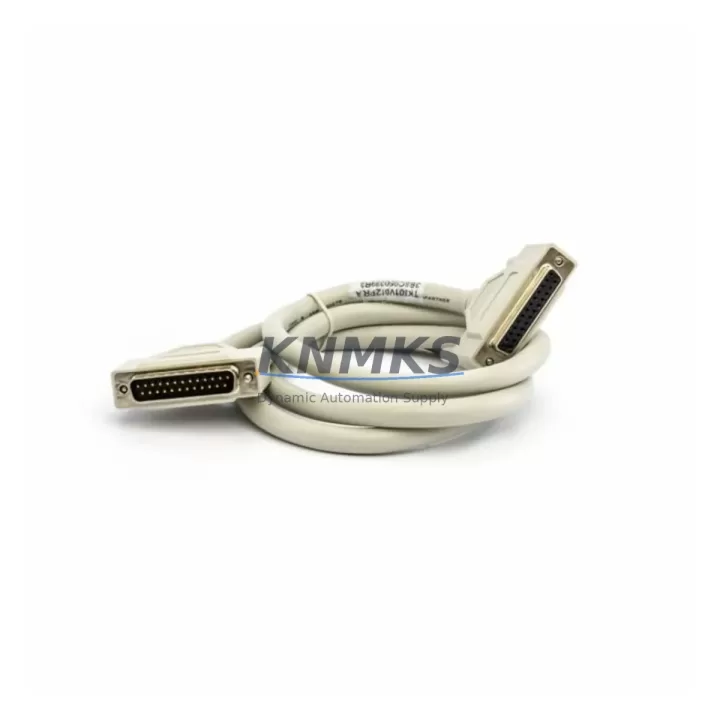
The ABB TK801V003 is a Modulebus Extension Cable engineered for the AC500 PLC platform, providing a direct, wiring-compatible interconnect between CPU modules, I/O expansion units, and communication processors mounted on the same or adjacent racks. As legacy AC500 installations approach end-of-service milestones, the TK801V003 has become a critical component in retrofit projects where the original cable has degraded, been discontinued from local distributor stock, or where the control cabinet is being restructured to accommodate new I/O density requirements. Its standardized Modulebus interface ensures that replacement does not require firmware changes or address remapping, making it one of the lowest-risk substitutions in an AC500 modernization project.
In retrofit scenarios, engineers frequently encounter situations where the existing TK801V003 cable has been routed through conduit runs that no longer meet updated cabinet thermal or EMC standards. Replacing the cable during a planned maintenance window — rather than waiting for an unplanned failure — allows the team to simultaneously verify terminal block integrity, inspect the PM573 or PM591 CPU module connector pins, and confirm that the CI590-CS31-HA communication interface module is seated correctly. This proactive approach is central to downtime control strategies in facilities running continuous process lines.
When integrating the TK801V003 into an upgraded control cabinet, installers should confirm that the Modulebus segment length does not exceed the rated specification for the installed CPU variant. The cable is compatible across the AC500 V2 and V3 CPU families, including the PM554, PM564, PM573, PM583, and PM591 series, which means a single stock of TK801V003 cables can serve multiple machine types within the same plant — simplifying spare parts inventory management and reducing the number of line items in a 12-month buffer stock program.
Migration Compatibility Table
| Parameter | TK801V003 Specification | Retrofit / Replacement Notes |
|---|---|---|
| Interface Type | Modulebus (ABB AC500 proprietary) | Direct drop-in; no protocol conversion required |
| Compatible CPU Series | PM554, PM564, PM573, PM583, PM591 (AC500 V2/V3) | Verify CPU firmware ≥ V2.x for V3 rack compatibility |
| Connector Type | Proprietary Modulebus plug (keyed) | No re-termination needed; plug-and-replace |
| Max Segment Length | Per ABB AC500 system manual (model-dependent) | Measure existing run before ordering extended length variants |
| Communication Protocol | Modulebus (internal AC500 backplane bus) | No impact on CS31, PROFIBUS, or Modbus TCP links |
| Installation Space | Standard DIN rail cabinet routing | Confirm bend radius clearance in retrofitted cabinet layouts |
| Firmware Compatibility | No firmware dependency | No CPU re-flash required after cable replacement |
| Address Remapping Required | No | I/O module addresses retained after replacement |
| Pre-Shipment Testing | Yes — continuity and signal integrity verified | Each unit tested before dispatch |
| Support terms | 12 Months | Covers manufacturing defects from date of shipment |
Retrofit Planning for Existing Automation Systems
A successful AC500 retrofit begins well before the maintenance window opens. The TK801V003 replacement is typically one step within a broader cabinet upgrade that may also involve swapping aging TB521 or TB541 terminal base units, adding a new DA501 digital input module to expand I/O capacity, or installing a CI501-PNIO PROFINET communication module to bridge the legacy CS31 field bus to a modern Ethernet-based SCADA network. Each of these components shares the same Modulebus backbone that the TK801V003 interconnects, so cable integrity is foundational to the entire upgrade.
During the planning phase, the retrofit team should document the current rack layout — specifically the slot positions of all I/O modules relative to the CPU — because the TK801V003 cable length must accommodate the physical distance between the CPU module and the first expansion unit. If the cabinet is being reconfigured to add a second rack, a TK801V003 of the appropriate length must be selected before the cutover date. Simultaneously, the team should verify that the existing PS501 or PS502 power supply module has sufficient capacity to support any additional I/O modules being added, since undersized power supply capacity is a common cause of intermittent faults after retrofit.
Signal isolation requirements should also be reviewed at this stage. In plants where the AC500 controls both analog process signals and digital safety interlocks, adding signal isolators between field devices and the new DA501 or AX521 analog I/O modules can prevent ground loop interference that would otherwise appear as spurious faults after the retrofit is complete. Addressing this during the planned outage avoids a second unplanned shutdown for troubleshooting.
Downtime Control During System Migration
Minimizing production downtime during an AC500 cable replacement or broader retrofit requires a structured pre-outage preparation protocol. Before the maintenance window begins, the engineering team should export a full backup of the CPU program using Automation Builder, confirm that the backup restores correctly on a test CPU if one is available, and photograph the existing wiring and module layout for reference during reassembly. The TK801V003 replacement itself takes only minutes once the CPU and adjacent I/O module are powered down, but the surrounding verification steps — checking module LEDs, confirming Modulebus communication status in the Automation Builder diagnostic view, and validating I/O signal states against the HMI display — typically account for the majority of the outage duration.
To protect original program logic, engineers should avoid making any changes to the CPU project file during the hardware replacement. If the retrofit also involves adding new I/O modules, those additions should be staged in the Automation Builder project offline and downloaded as a single update after the hardware is confirmed operational. This approach preserves the existing control logic, keeps HMI tag mappings intact, and ensures that the SCADA historian does not record false process values during the transition. Communication links to upstream DCS systems or MES platforms via Modbus TCP or PROFINET should be monitored during the first production cycle after restart to confirm that all data exchange is functioning correctly before the maintenance team leaves the site.
Retrofit Support FAQ
Q1: Is the TK801V003 a direct replacement for the original ABB Modulebus cable in my AC500 system?
Yes. The TK801V003 uses the same keyed Modulebus connector and is electrically identical to the original factory-installed cable. No wiring modifications, address changes, or firmware updates are required. The replacement is plug-and-play within the AC500 rack architecture.
Q2: What pre-shipment testing is performed on each TK801V003 unit?
Each cable undergoes continuity testing and signal integrity verification before dispatch. Units that do not meet specification are rejected. A support terms confirmed by quotation covering manufacturing defects is included from the date of shipment, providing assurance for planned maintenance stock and emergency replacement orders alike.
Q3: Can I use the TK801V003 when upgrading from an AC500 V2 rack to a V3 rack configuration?
The TK801V003 is compatible with both AC500 V2 and V3 CPU families. When migrating between generations, confirm that the CPU firmware version meets the minimum requirement for the target rack configuration as specified in the ABB AC500 system manual. No cable-side changes are needed.
Q4: What is the typical lead time and stock availability?
The TK801V003 is maintained in forward stock to support urgent retrofit and breakdown replacement requirements. Standard orders are dispatched within 1–3 business days. For projects requiring multiple units or scheduled maintenance programs, contact our sales team to confirm bulk availability and reserve stock against your planned outage date.
© 2026 KNMKS. All rights reserved.
Original Source: https://knmks.com
Contact: admin@knmks.com | +86 18359268345
Product Identification
- Brand / Ecosystem
-
ABB
ABB - Model / Series
-
TK801V003
AC500 Series - Product Family
- Cables & Connectors
- Availability Status
- Available on request after model and quantity confirmation
- Inquiry Type
- B2B RFQ, replacement inquiry and project spare-part request
- Pre-Quote Check
- Exact SKU, brand, series, quantity, nameplate photos and destination country are checked before quotation
System Path
Where this product fits in the KNMKS automation structure.
Specification & Inquiry Focus
- Cable range
- Sensor, servo, network and circular connectors
- Common needs
- Length, pin count, shielding and plug type
- Project support
- Machine wiring and installation kits
Buyer Confirmation
Information KNMKS checks before replying.
- Exact model
- TK801V003
- Brand / ecosystem
- ABB
- Product family
- Cables & Connectors
- Application note
- Replacement, maintenance, project build or spare-part list
- Useful photos
- Nameplate, installed unit, cabinet layout or connector side
- Delivery details
- Quantity, destination country and target schedule
Document Support
Files and notes can be confirmed during quotation.
- Product photos or nameplate confirmation when available
- Packing and delivery notes before quotation confirmation
- Support scope and delivery terms confirmed per inquiry
- Export document coordination for qualified B2B requests
Inquiry Support
- Cable length and connector type confirmation
- Servo, sensor and network cable inquiry
- Accessory kits for installation teams
What to Send Us
- Brand and exact model number: ABB TK801V003
- Quantity and required delivery time
- Application, replacement requirement or nameplate photo
- Destination country and shipping preference
RFQ Preparation
This is a product inquiry page built for RFQ communication.
Fast Model Check
Send this model to KNMKS for confirmation.
Include quantity, destination country and photos if this is a maintenance replacement. The inquiry will be saved with a reference number after submission.
Brand & Compatibility Note
KNMKS displays automation product information for well-known industrial brand ecosystems and compatible replacement references. Brand names are used for product identification and compatibility reference only; final availability and commercial terms are confirmed per quotation.
 Manufacturing
 Machine Tools
 Packaging
 Energy & Power
 PLCs & Controllers
 HMI & Displays
 Servo Systems
 Variable Frequency Drives