
Overview
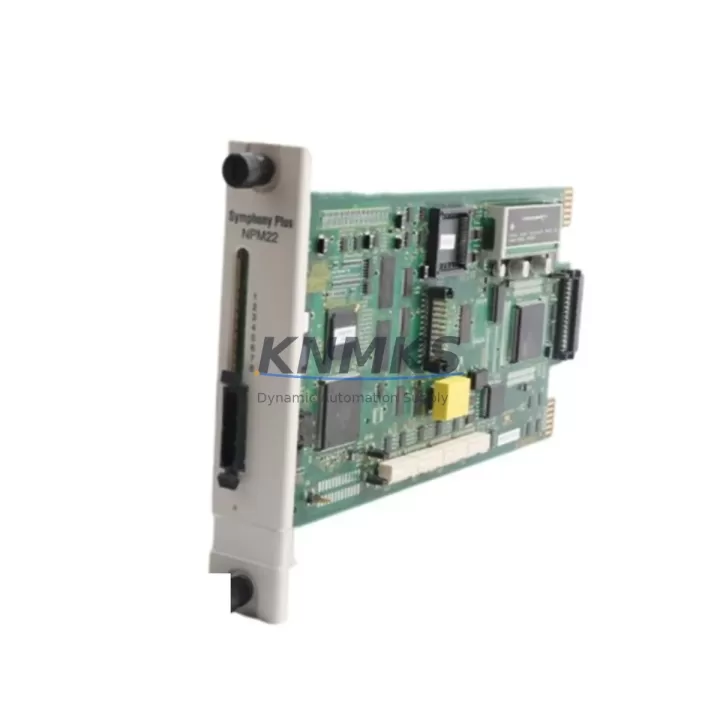
ABB SPNPM22 Maintenance-Proven Spare Part for Factory Uptime
The ABB SPNPM22 is a Network Process Module designed for the AC800M Distributed Control System platform — one of ABB’s most widely deployed DCS architectures in power generation, oil & gas, chemical processing, and pulp & paper industries. As a critical communication and process coordination component within the AC800M controller cabinet, the SPNPM22 manages real-time data exchange between the controller CPU and field I/O networks. When this module fails or degrades, the consequences can range from intermittent process alarms to complete controller isolation and unplanned production shutdown.
Sourcing a verified, original SPNPM22 spare is the single most effective step a maintenance team can take to reduce mean time to repair (MTTR) for AC800M-based control systems. KNMKS maintains in-stock inventory of the SPNPM22 with full pre-shipment functional testing, ensuring that every unit dispatched is ready for immediate installation without additional bench verification on site.
Spare Maintenance Table
| Parameter | Specification |
|---|---|
| Part Number / SKU | SPNPM22 |
| Manufacturer | ABB |
| Compatible Platform | AC800M DCS (PM861, PM864, PM866 series controllers) |
| Module Function | Network Process Module — real-time I/O network communication |
| Communication Interface | PROFIBUS DP / Modulebus (series-dependent) |
| Supply Voltage | 24 VDC (via backplane) |
| Operating Temperature | 0°C to +55°C |
| Mounting | AC800M controller backplane slot |
| Origin | Germany |
| Condition | Original, new or refurbished-to-spec |
| Pre-Shipment Test | Yes — functional verification before dispatch |
| Support terms | 12 Months |
| Lead Time | availability confirmed by RFQ — ships within 1–3 business days |
| Long-Term Supply | Yes — ongoing procurement support available |
Maintenance Planning for Continuous Operation
The SPNPM22 does not operate in isolation. Within a typical AC800M control cabinet, it works in close coordination with the controller CPU module (such as the PM864A or PM866K01), the backplane power supply unit, and the field I/O communication infrastructure. When a maintenance engineer suspects SPNPM22 degradation — evidenced by network timeout alarms, loss of I/O communication, or controller redundancy faults — a structured cabinet inspection is essential before and after module replacement.
Begin by verifying the SD821 or SD822 power supply module output voltage and ripple. An unstable 24 VDC rail is a common root cause of intermittent network module faults that are misdiagnosed as SPNPM22 failures. Next, inspect the TB820 or TB840 Modulebus Modem if the system uses Modulebus topology — a degraded modem will cause persistent communication errors even after a new SPNPM22 is installed. Check all PROFIBUS DP trunk cables and connectors for continuity and termination resistance (should read approximately 220 Ω end-to-end with both terminators active).
For systems with redundant I/O, confirm that the CI854 or CI858 PROFIBUS communication interface modules are operating without fault flags. These modules sit upstream of the SPNPM22 in the signal chain and can mask or amplify network process module errors. Additionally, inspect the AI810, AO810, or DI810 I/O modules connected to the affected PROFIBUS segment — a shorted or overloaded I/O module can pull down the entire network and trigger false SPNPM22 fault indications.
For sites running older AC800M firmware, confirm that the replacement SPNPM22 firmware version is compatible with the installed controller software revision before powering up. ABB’s Control Builder M software provides firmware version readback tools that should be used during commissioning of any replacement module. Maintaining a documented spare parts list that includes the SPNPM22 alongside the PM864A CPU, SD822 power supply, and TB820 modem is considered best practice for AC800M sites targeting 99.9%+ system availability.
Site Replacement Workflow
Replacing the SPNPM22 on a live AC800M system requires careful sequencing to minimize process impact. For redundant controller configurations, initiate a controlled switchover to the backup controller before removing the faulty module — this eliminates process interruption entirely. For simplex (non-redundant) installations, coordinate with operations to place the affected process loop in manual mode before proceeding.
Step 1 — Isolate and document: Record the current module LED status, firmware version (via Control Builder M), and any active alarms. Photograph the wiring and connector positions before disconnection.
Step 2 — Power-down sequence: Follow ABB’s recommended hot-swap procedure if supported by your firmware version. For older firmware, a controlled controller shutdown may be required. Confirm with your site safety procedure.
Step 3 — Module swap: Remove the SPNPM22 by releasing the front locking lever and sliding the module out of the backplane slot. Insert the replacement unit and secure the locking lever. The module will self-initialize upon backplane power restoration.
Step 4 — Commissioning verification: Use Control Builder M to confirm the module is recognized, firmware version matches site requirements, and all PROFIBUS or Modulebus nodes are communicating without errors. Clear any latched alarms and return the process loop to automatic control.
Step 5 — Documentation update: Log the replacement in your CMMS, update the spare parts inventory, and order a replacement SPNPM22 to restore your on-site buffer stock. KNMKS supports standing purchase orders and long-term supply agreements for sites requiring guaranteed availability of critical AC800M spares.
Spare Parts Support FAQ
Q1: Is this SPNPM22 an original ABB part or a third-party replacement?
All SPNPM22 units supplied by KNMKS are original ABB-manufactured components. We do not supply counterfeit, cloned, or third-party substitute modules. Each unit undergoes functional verification prior to shipment, and a support terms confirmed by quotation is provided from the date of delivery.
Q2: How do I confirm compatibility with my specific AC800M controller version?
The SPNPM22 is compatible with the AC800M controller family including PM861, PM864, PM864A, PM866, and PM866K01 variants. Compatibility also depends on your installed Control Builder M software version and backplane hardware revision. If you are uncertain, provide your controller part number and firmware version to our technical team at admin@knmks.com and we will confirm compatibility before shipment.
Q3: What is your lead time and can you support emergency orders?
The SPNPM22 is maintained availability confirmed by RFQ for immediate dispatch. Standard lead time is 1–3 business days. For emergency plant-down situations, contact us directly at +86 18359268345 to arrange priority shipment. We support DHL Express, FedEx International Priority, and air freight for time-critical deliveries.
Q4: Do you offer long-term supply agreements for AC800M spare parts?
Yes. KNMKS supports standing purchase orders, annual blanket contracts, and consignment stock arrangements for customers with ongoing AC800M maintenance programs. This is particularly valuable for sites managing aging DCS infrastructure where OEM supply continuity is uncertain. Contact admin@knmks.com to discuss a tailored supply agreement.
© 2026 KNMKS. All rights reserved.
Original Source: https://knmks.com
Contact: admin@knmks.com | +86 18359268345
Product Identification
- Brand / Ecosystem
-
ABB
ABB - Model / Series
-
SPNPM22
AC800M Series - Product Family
- PLCs & Controllers
- Availability Status
- Available on request after model and quantity confirmation
- Inquiry Type
- B2B RFQ, replacement inquiry and project spare-part request
- Pre-Quote Check
- Exact SKU, brand, series, quantity, nameplate photos and destination country are checked before quotation
System Path
Where this product fits in the KNMKS automation structure.
Specification & Inquiry Focus
- Control platform
- PLC, PAC and modular controllers
- Common needs
- CPU, rack, power and I/O expansion
- Project support
- Replacement, cabinet build and maintenance
Buyer Confirmation
Information KNMKS checks before replying.
- Exact model
- SPNPM22
- Brand / ecosystem
- ABB
- Product family
- PLCs & Controllers
- Application note
- Replacement, maintenance, project build or spare-part list
- Useful photos
- Nameplate, installed unit, cabinet layout or connector side
- Delivery details
- Quantity, destination country and target schedule
Document Support
Files and notes can be confirmed during quotation.
- Product photos or nameplate confirmation when available
- Packing and delivery notes before quotation confirmation
- Support scope and delivery terms confirmed per inquiry
- Export document coordination for qualified B2B requests
Inquiry Support
- Model cross-checking before quotation
- CPU, power, rack and expansion module matching
- Support for replacement and project inquiry
What to Send Us
- Brand and exact model number: ABB SPNPM22
- Quantity and required delivery time
- Application, replacement requirement or nameplate photo
- Destination country and shipping preference
RFQ Preparation
This is a product inquiry page built for RFQ communication.
Fast Model Check
Send this model to KNMKS for confirmation.
Include quantity, destination country and photos if this is a maintenance replacement. The inquiry will be saved with a reference number after submission.
Brand & Compatibility Note
KNMKS displays automation product information for well-known industrial brand ecosystems and compatible replacement references. Brand names are used for product identification and compatibility reference only; final availability and commercial terms are confirmed per quotation.
 Manufacturing
 Machine Tools
 Packaging
 Energy & Power



 HMI & Displays
 Servo Systems
 Variable Frequency Drives
 Sensors