
Overview
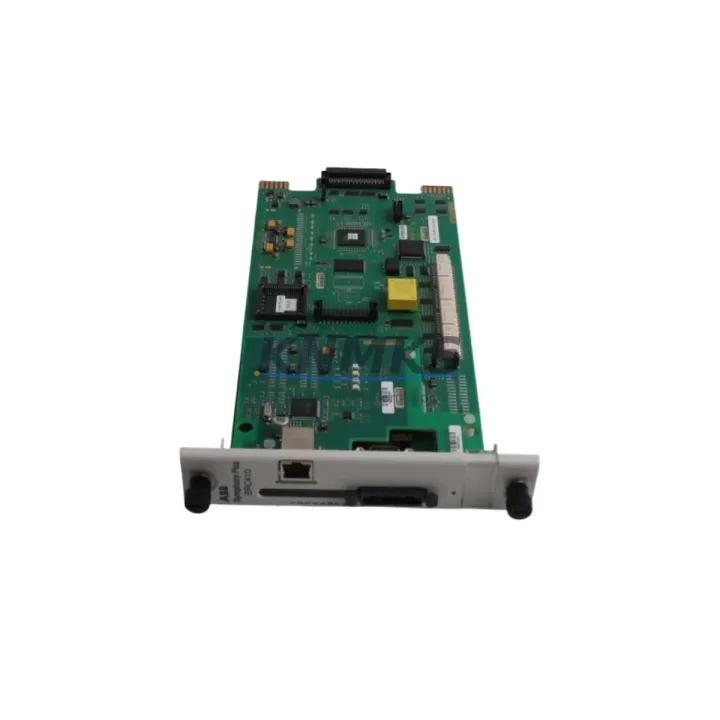
ABB SPBRC410 Migration-Ready CPU for Legacy DCS: AC800M System Retrofit & Upgrade
The ABB SPBRC410 is a high-availability CPU module engineered for the AC800M Distributed Control System platform. As legacy DCS installations approach end-of-support milestones, the SPBRC410 serves as the primary migration-ready replacement for discontinued controller modules within the AC800M family. Whether you are executing a planned control system upgrade, recovering from an unplanned CPU failure, or extending the operational life of an existing process automation cabinet, the SPBRC410 delivers the processing capacity, communication compatibility, and firmware continuity required to maintain production uptime with minimal disruption.
Before committing to a replacement, engineers should verify the following against the existing installation: available backplane slot width and depth clearance, 24 VDC power rail capacity from the PM891 or PM865 power supply module, CEX-Bus or PROFIBUS DP port assignments, module address configuration in Control Builder M, and the firmware revision currently loaded on the active controller. The SPBRC410 is compatible with AC800M firmware versions 5.x and 6.x; installations running earlier 4.x firmware may require a staged upgrade of the CI854 or CI857 communication interface modules prior to CPU swap to avoid protocol handshake failures on the Fieldbus HSE or FOUNDATION Fieldbus segments.
Migration Compatibility Table
| Parameter | SPBRC410 (Replacement) | Legacy Reference (e.g. PM864A / PM891) | Retrofit Notes |
|---|---|---|---|
| Backplane Interface | CEX-Bus (AC800M standard) | CEX-Bus | Direct slot-compatible; no adapter required |
| Power Requirement | 24 VDC, ≤ 4.5 W | 24 VDC, ≤ 5.0 W | Verify PM891 rail headroom before swap |
| Communication Ports | Ethernet (2×), RS-232 | Ethernet (2×), RS-232 | IP address and subnet must be re-entered post-swap |
| Firmware Compatibility | AC800M FW 5.x / 6.x | FW 4.x – 6.x (model-dependent) | Upgrade CI854/CI857 if running FW 4.x |
| Program Memory | 64 MB Flash | 32–64 MB (model-dependent) | Verify application size before download |
| Module Address | Configurable via DIP switch | DIP switch | Match existing address to avoid bus conflict |
| HMI Compatibility | 800xA / Operate IT | 800xA / Operate IT | No HMI screen rebuild required for like-for-like swap |
| Installation Footprint | Standard AC800M single-width slot | Single-width slot | Confirm rail depth ≥ 130 mm in control cabinet |
| Pre-Shipment Testing | Yes — functional burn-in | N/A | Each unit tested before dispatch |
| Support terms | 12 Months | N/A | Covers defects in materials and workmanship |
Retrofit Planning for Existing Automation Systems
A successful AC800M retrofit begins well before the physical module swap. The SPBRC410 typically operates alongside a suite of supporting hardware that must be assessed as part of the migration plan. The PM891 power supply module should be load-tested to confirm it can sustain the SPBRC410 alongside any co-installed I/O modules such as the AI810 analog input or DI810 digital input cards. If the existing cabinet uses an S800 I/O cluster connected via an AF100 fieldbus, the CI854A communication interface module must be confirmed at firmware revision 5.2 or later to maintain transparent data exchange after the CPU upgrade.
For installations where the legacy controller managed PROFIBUS DP device networks — including variable frequency drives, valve positioners, or remote I/O stations — the CI857 PROFIBUS DP interface module should be inspected for GSD file compatibility with the new CPU’s Control Builder M project. In multi-controller architectures, the TB840A termination unit and associated cable harnesses should be documented before removal to ensure correct re-termination during commissioning. Where the control system interfaces with an 800xA HMI environment, the aspect system database should be backed up and the OPC server connection string verified against the SPBRC410’s new IP address assignment prior to cutover.
Signal isolation requirements should also be reviewed: where legacy wiring runs exceed 50 metres or cross electrical noise boundaries, the addition of a signal isolator or surge protection barrier on analog I/O channels is recommended to protect the new CPU’s input circuitry during the transition period.
Downtime Control During System Migration
Minimising production downtime during a CPU migration on an AC800M system requires a structured pre-outage preparation sequence. At least 48 hours before the scheduled maintenance window, the full Control Builder M application — including all function block libraries, hardware configuration, and communication topology — should be exported and stored on an offline engineering workstation. A second backup copy should be retained on removable media held separately from the control room.
During the outage window, the recommended sequence is: (1) place all field devices in manual or safe-state mode via the 800xA operator station; (2) record all current process values and setpoints for post-restart verification; (3) power down the AC800M controller cabinet following the PM891 shutdown procedure; (4) remove the legacy CPU module and install the SPBRC410, confirming DIP switch address settings match the original configuration; (5) restore power and allow the module to complete its self-diagnostic cycle; (6) download the application from Control Builder M and verify all I/O channel assignments; (7) confirm communication link status on the CI854A or CI857 interface; (8) perform a controlled return-to-auto sequence for each process loop before releasing the system to operations.
Where a redundant CPU configuration is in place, the SPBRC410 supports bumpless switchover, allowing the standby unit to assume control while the primary is replaced — reducing the effective process interruption to under two minutes in most installations. This capability is particularly valuable in continuous process environments where even brief control gaps carry significant production or safety risk.
Retrofit Support FAQ
Q1: Is the SPBRC410 a direct drop-in replacement for the PM864A or PM891 CPU modules?
The SPBRC410 occupies the same CEX-Bus backplane slot as other AC800M CPU modules and uses the same 24 VDC power rail. It is mechanically and electrically compatible with the AC800M rack. However, the application program must be re-downloaded from Control Builder M after installation, and the module IP address must be reconfigured. It is not a plug-and-play swap without engineering involvement.
Q2: What commissioning steps are required after installing the SPBRC410?
After physical installation, the engineer must: set the DIP switch module address to match the original; assign the IP address via the front-panel Ethernet port; download the Control Builder M application; verify all I/O module communication on the CEX-Bus; confirm fieldbus link status on any CI854A or CI857 communication modules; and perform a loop check on critical analog and digital channels before returning the system to automatic control.
Q3: Can the SPBRC410 be used with existing wiring and terminal blocks without modification?
Yes. The SPBRC410 connects to the AC800M backplane via the CEX-Bus connector and does not require changes to field wiring, terminal blocks, or I/O module cabling. All field connections remain at the S800 I/O modules or TB840A termination units. Only the CPU slot is affected by the replacement.
Q4: What support terms and pre-shipment testing does this unit include?
Each SPBRC410 unit supplied by KNMKS undergoes functional burn-in testing prior to dispatch, verifying power-on self-test completion, Ethernet port activity, and CEX-Bus communication readiness. A support terms confirmed by quotation covering defects in materials and workmanship is included from the date of shipment. In-stock units are available for same-day or next-business-day dispatch to support urgent maintenance and unplanned outage recovery scenarios.
© 2026 KNMKS. All rights reserved.
Original Source: https://knmks.com
Contact: admin@knmks.com | +86 18359268345
Product Identification
- Brand / Ecosystem
-
ABB
ABB - Model / Series
-
SPBRC410
AC800M Series - Product Family
- PLCs & Controllers
- Availability Status
- Available on request after model and quantity confirmation
- Inquiry Type
- B2B RFQ, replacement inquiry and project spare-part request
- Pre-Quote Check
- Exact SKU, brand, series, quantity, nameplate photos and destination country are checked before quotation
System Path
Where this product fits in the KNMKS automation structure.
Specification & Inquiry Focus
- Control platform
- PLC, PAC and modular controllers
- Common needs
- CPU, rack, power and I/O expansion
- Project support
- Replacement, cabinet build and maintenance
Buyer Confirmation
Information KNMKS checks before replying.
- Exact model
- SPBRC410
- Brand / ecosystem
- ABB
- Product family
- PLCs & Controllers
- Application note
- Replacement, maintenance, project build or spare-part list
- Useful photos
- Nameplate, installed unit, cabinet layout or connector side
- Delivery details
- Quantity, destination country and target schedule
Document Support
Files and notes can be confirmed during quotation.
- Product photos or nameplate confirmation when available
- Packing and delivery notes before quotation confirmation
- Support scope and delivery terms confirmed per inquiry
- Export document coordination for qualified B2B requests
Inquiry Support
- Model cross-checking before quotation
- CPU, power, rack and expansion module matching
- Support for replacement and project inquiry
What to Send Us
- Brand and exact model number: ABB SPBRC410
- Quantity and required delivery time
- Application, replacement requirement or nameplate photo
- Destination country and shipping preference
RFQ Preparation
This is a product inquiry page built for RFQ communication.
Fast Model Check
Send this model to KNMKS for confirmation.
Include quantity, destination country and photos if this is a maintenance replacement. The inquiry will be saved with a reference number after submission.
Brand & Compatibility Note
KNMKS displays automation product information for well-known industrial brand ecosystems and compatible replacement references. Brand names are used for product identification and compatibility reference only; final availability and commercial terms are confirmed per quotation.
 Manufacturing
 Machine Tools
 Packaging
 Energy & Power



 HMI & Displays
 Servo Systems
 Variable Frequency Drives
 Sensors