
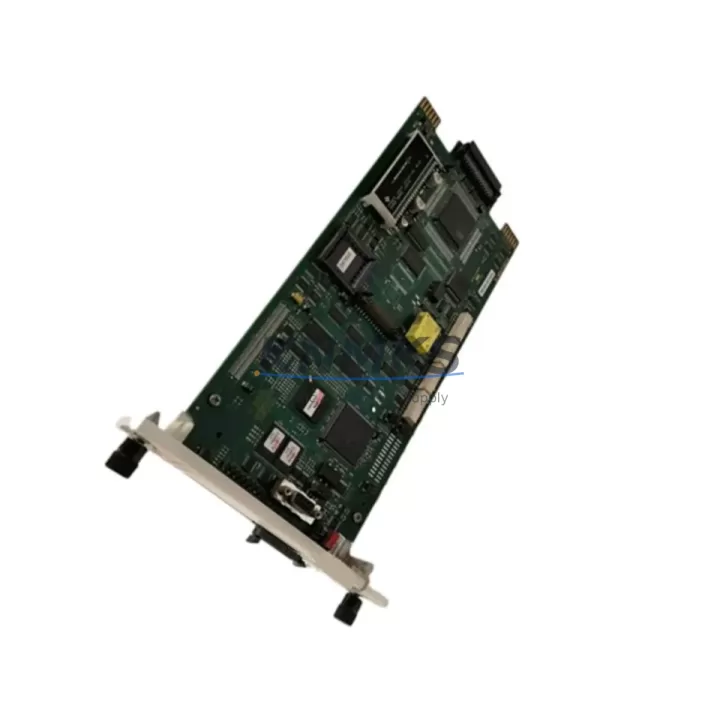
Overview
ABB SPBRC400 Migration-Ready Bridge Controller for Legacy Control Systems
The ABB SPBRC400 is a bridge controller module designed for integration within ABB’s AC800M Distributed Control System (DCS) platform. As legacy Freelance DCS and early AC800M installations approach end-of-life, the SPBRC400 serves as a critical migration component — enabling engineers to extend system life, replace discontinued bridge modules, and maintain communication continuity between field devices and the central control layer without a full platform overhaul.
For facilities operating aging ABB Freelance 2000, AC800F, or early-generation AC800M controllers, the SPBRC400 provides a validated upgrade path. It bridges PROFIBUS DP, Modbus RTU, and proprietary ABB communication links, allowing existing field wiring, I/O termination assemblies, and HMI configurations to remain largely intact during the transition. This significantly reduces retrofit engineering hours and minimizes the risk of introducing new wiring errors during cutover.
Before installing the SPBRC400 as a replacement, engineers should verify the following: backplane slot compatibility with the existing AC800M rack (PM865, PM866, or PM891 controller chassis), power rail capacity on the local power supply module (typically the SD821 or SD822), and module address configuration via the rotary switch or software-defined node addressing in Control Builder M. If the legacy system used a SPBRC300 or earlier bridge variant, terminal block pinout differences must be reviewed — in most cases, the existing CI854 or CI857 communication interface modules remain compatible and do not require replacement.
Program logic compatibility is a key concern during any bridge controller swap. The SPBRC400 supports the same function block library structure used in AC800M Control Builder M projects, meaning existing POU (Program Organization Unit) structures, variable mappings, and alarm configurations can typically be retained. However, firmware version alignment between the SPBRC400 and the host PM8xx controller must be confirmed prior to commissioning — mismatched firmware revisions can cause communication timeouts or module recognition failures on startup.
HMI screen updates are often minimal when replacing a bridge controller of the same series. If the plant uses ABB System 800xA or a third-party SCADA connected via OPC DA/UA, the tag database linked to the SPBRC400’s I/O map should be exported and validated before the cutover window begins. This prevents tag loss or address remapping errors that could affect operator visibility during the first hours of post-retrofit operation.
Physical installation space should also be confirmed. The SPBRC400 occupies a standard AC800M module slot and follows the same DIN rail and backplane mounting convention as other modules in the S800 I/O family. If the control cabinet is densely populated, verify that adjacent modules — such as the TB820 Modulebus Modem or AI810/AO810 analog I/O modules — have adequate clearance for heat dissipation and cable routing after the new module is seated.
Migration Compatibility Table
| Parameter | SPBRC400 (This Unit) | Legacy / Predecessor | Notes |
|---|---|---|---|
| Platform | ABB AC800M | AC800F / Freelance 2000 | Rack and backplane must match AC800M standard |
| Communication Protocols | PROFIBUS DP, Modbus RTU, ABB Modulebus | PROFIBUS DP, proprietary serial | Verify CI854/CI857 interface module compatibility |
| Backplane Interface | AC800M standard module slot | AC800F proprietary slot | Direct slot swap within AC800M chassis only |
| Terminal Wiring | Compatible with S800 I/O TB820 modem bus | May differ on AC800F variants | Confirm TB820 modem bus wiring before cutover |
| Power Requirement | Supplied via AC800M backplane (SD821/SD822) | Separate 24VDC on some legacy units | Verify power rail load capacity before installation |
| Firmware Compatibility | Requires matching PM8xx firmware revision | Firmware-locked on legacy units | Align firmware versions in Control Builder M before download |
| Installation Space | Standard AC800M module width | Same form factor within AC800M | Confirm cabinet clearance for adjacent AI810/AO810 modules |
| Commissioning Tool | ABB Control Builder M | Control Builder F (AC800F) | Project migration required if moving from AC800F platform |
| Support terms | support terms confirmed by quotation — covers hardware defects, DOA replacement, and pre-shipment functional testing | ||
Retrofit Planning for Existing Automation Systems
A successful SPBRC400 retrofit begins well before the scheduled maintenance window. The first step is a full audit of the existing control cabinet: document every module in the AC800M rack, including the PM865 or PM866 controller, the TB820 Modulebus Modem connecting the S800 I/O clusters, and any CI854 PROFIBUS DP communication interface modules linking field instruments. This audit forms the baseline for your replacement bill of materials and helps identify any modules that may need simultaneous replacement due to age or compatibility constraints.
Power budget verification is non-negotiable. The SD821 or SD822 power supply module feeding the AC800M backplane must have sufficient headroom to support the SPBRC400 alongside existing modules. If the power supply is already near capacity — a common situation in legacy cabinets where modules have been added incrementally over years — a parallel SD822 or a cabinet power audit may be required before the retrofit proceeds.
For systems with extensive analog I/O, the AI810 and AO810 modules connected via the S800 I/O bus should be tested for signal integrity before and after the bridge controller swap. Any signal isolation requirements — particularly for thermocouple or 4–20 mA loops running through signal isolators — should be documented and verified against the new module’s input specifications. In some legacy installations, signal isolators between field transmitters and the I/O bus were added as workarounds for ground loop issues; these should be retained during the retrofit to avoid reintroducing noise problems.
If the plant uses an ABB Panel 800 HMI or a third-party operator panel connected via Modbus TCP, the communication link configuration in the SPBRC400 must be validated against the existing HMI tag database. Operators should not experience any change in screen behavior or alarm response after the retrofit — if tag remapping is required, this should be completed and tested in a simulation environment before the live cutover.
Programming cable and laptop readiness is a practical but often overlooked step. Ensure the Control Builder M engineering station has the correct USB-to-serial or Ethernet programming cable for the PM8xx controller, and that the project backup from the legacy system is accessible and version-controlled. A clean project backup is your primary recovery tool if the commissioning encounters unexpected issues.
Downtime Control During System Migration
Minimizing downtime during a bridge controller replacement requires a structured cutover plan. The recommended approach is a hot-standby preparation strategy: configure and test the SPBRC400 offline using a bench rack or spare AC800M chassis before the scheduled maintenance window. This allows firmware alignment, address configuration, and basic communication testing to be completed without touching the live system.
During the cutover window, the sequence should follow: (1) export and archive the current Control Builder M project, (2) place the AC800M controller in manual/safe state and notify field operators, (3) power down the affected rack section, (4) swap the bridge controller module, (5) restore power and download the pre-validated project, (6) verify communication links to all connected CI854/CI857 interface modules and downstream PROFIBUS devices, and (7) confirm HMI tag response before returning to automatic control.
Original program logic — including PID loop tuning parameters, interlock conditions, and alarm setpoints — should be preserved exactly from the archived project. Do not attempt to optimize or restructure the control logic during the same maintenance window as the hardware swap. Separating hardware replacement from software optimization reduces the risk of introducing compounding faults that are difficult to diagnose under time pressure.
Field control continuity can be maintained by pre-positioning operators at critical manual control stations during the cutover. For processes where even brief interruptions are unacceptable, consider a phased migration approach: replace the bridge controller during a planned low-production period and run parallel verification for 24–48 hours before fully decommissioning the legacy module.
All units supplied are pre-shipment tested for basic power-on and communication response. The support terms confirmed by quotation cover hardware defects identified after installation, with DOA (Dead on Arrival) replacement processed within the confirmed support period. Retain the original packaging and test documentation for support requests.
Retrofit Support FAQ
Q1: Is the SPBRC400 a direct drop-in replacement for the SPBRC300?
The SPBRC400 occupies the same AC800M module slot as the SPBRC300 and is compatible with the same backplane interface. However, terminal block pinout and firmware requirements should be verified before installation. In most AC800M installations, the existing wiring and CI854 communication interface modules can be retained without modification.
Q2: What commissioning steps are required after installing the SPBRC400?
After physical installation, download the pre-validated Control Builder M project to the PM8xx controller, verify module recognition in the hardware configuration tree, confirm PROFIBUS DP or Modbus communication links to all connected field devices, and validate HMI tag response. Firmware version alignment between the SPBRC400 and the host controller should be confirmed before the project download.
Q3: Can the SPBRC400 be used in an AC800F system?
No. The SPBRC400 is designed for the AC800M platform and is not compatible with AC800F backplane architecture. Facilities migrating from AC800F to AC800M will require a full platform migration, including replacement of the PM8xx controller, rack, and associated I/O modules. The SPBRC400 is applicable after the AC800M platform is in place.
Q4: What is the support terms coverage and how is stock availability managed?
All SPBRC400 units carry a support terms confirmed by quotation covering hardware defects and DOA replacement. Units are held in inventory and subject to pre-shipment functional testing before dispatch. For time-sensitive retrofit projects, confirm stock availability and lead time with the sales team before scheduling your maintenance window. Contact: admin@knmks.com | +86 18359268345.
© 2026 KNMKS. All rights reserved. Original Source: https://knmks.com | Contact: admin@knmks.com | +86 18359268345
Product Identification
- Brand / Ecosystem
-
ABB
ABB - Model / Series
-
SPBRC400
AC800M Series - Product Family
- PLCs & Controllers
- Availability Status
- Available on request after model and quantity confirmation
- Inquiry Type
- B2B RFQ, replacement inquiry and project spare-part request
- Pre-Quote Check
- Exact SKU, brand, series, quantity, nameplate photos and destination country are checked before quotation
System Path
Where this product fits in the KNMKS automation structure.
Specification & Inquiry Focus
- Control platform
- PLC, PAC and modular controllers
- Common needs
- CPU, rack, power and I/O expansion
- Project support
- Replacement, cabinet build and maintenance
Buyer Confirmation
Information KNMKS checks before replying.
- Exact model
- SPBRC400
- Brand / ecosystem
- ABB
- Product family
- PLCs & Controllers
- Application note
- Replacement, maintenance, project build or spare-part list
- Useful photos
- Nameplate, installed unit, cabinet layout or connector side
- Delivery details
- Quantity, destination country and target schedule
Document Support
Files and notes can be confirmed during quotation.
- Product photos or nameplate confirmation when available
- Packing and delivery notes before quotation confirmation
- Support scope and delivery terms confirmed per inquiry
- Export document coordination for qualified B2B requests
Inquiry Support
- Model cross-checking before quotation
- CPU, power, rack and expansion module matching
- Support for replacement and project inquiry
What to Send Us
- Brand and exact model number: ABB SPBRC400
- Quantity and required delivery time
- Application, replacement requirement or nameplate photo
- Destination country and shipping preference
RFQ Preparation
This is a product inquiry page built for RFQ communication.
Fast Model Check
Send this model to KNMKS for confirmation.
Include quantity, destination country and photos if this is a maintenance replacement. The inquiry will be saved with a reference number after submission.
Brand & Compatibility Note
KNMKS displays automation product information for well-known industrial brand ecosystems and compatible replacement references. Brand names are used for product identification and compatibility reference only; final availability and commercial terms are confirmed per quotation.
 Manufacturing
 Machine Tools
 Packaging
 Energy & Power



 HMI & Displays
 Servo Systems
 Variable Frequency Drives
 Sensors