
Overview
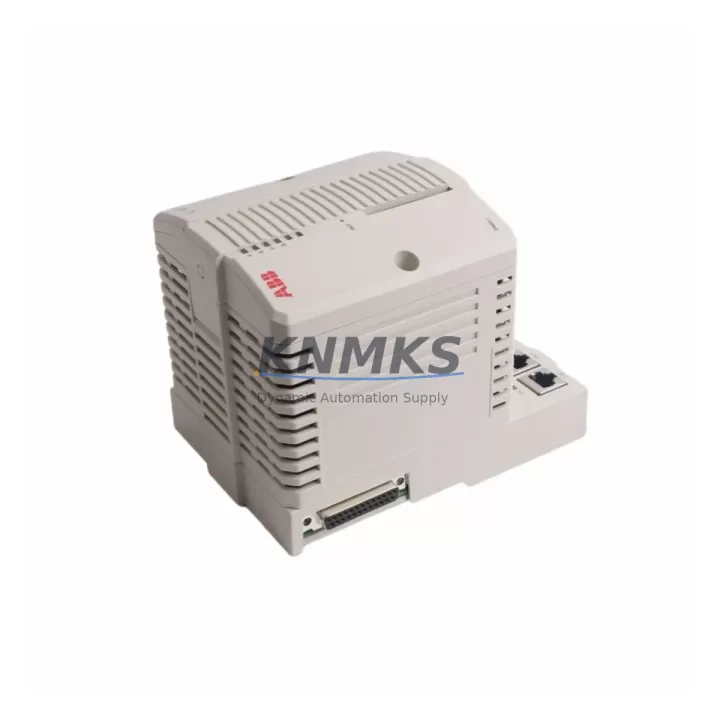
ABB SM811K01 3BSE018173R1 Migration-Ready Safety CPU for Legacy Control Systems
The ABB SM811K01 (part number 3BSE018173R1) is a Safety CPU module designed for the AC800M High Integrity (HI) controller platform. As legacy DCS and safety instrumented systems reach end-of-life, the SM811K01 has become a critical spare part and drop-in replacement for facilities operating aging AC800M HI architectures in petrochemical plants, power generation stations, offshore platforms, and water treatment facilities. This module supports redundant CPU configurations and is fully compatible with the AC800M HI backplane, making it an ideal candidate for phased system modernization without requiring a full control system overhaul.
Whether you are replacing a failed unit, building a strategic spare parts inventory, or executing a planned control system upgrade, the SM811K01 provides the processing power and safety certification required to maintain SIL 2/SIL 3 loop integrity. Each unit shipped from our inventory undergoes pre-shipment functional verification, including power-on testing, communication link validation, and firmware version confirmation, ensuring the module is field-ready upon arrival.
Migration Compatibility Table
| Parameter | Details |
|---|---|
| Replaces / Compatible With | ABB SM811K01 (3BSE018173R1), AC800M HI Safety CPU variants |
| Controller Platform | ABB AC800M High Integrity (HI) |
| Backplane Interface | AC800M HI backplane — direct slot-in replacement, no adapter required |
| Communication Protocols | PROFIBUS DP, MMS (IEC 61850), OPC, Modbus TCP (via gateway) |
| Safety Integrity Level | SIL 2 / SIL 3 capable (IEC 61508 certified) |
| Redundancy Support | Hot-standby CPU redundancy supported |
| Firmware Compatibility | Compatible with AC800M HI firmware versions — confirm revision with engineering team prior to swap |
| Installation Requirement | Standard AC800M HI rack slot; no mechanical modification required |
| Programming Environment | ABB Control Builder M (CBM) — existing application programs transferable |
| Retrofit Recommendation | Verify firmware revision, backup application program, confirm I/O module addressing before hot-swap |
| Commissioning Focus | CPU-to-I/O communication scan, safety loop validation, HMI tag re-mapping if firmware delta exists |
| Support terms | support terms confirmed by quotation — covers manufacturing defects and functional failure under normal operating conditions |
Retrofit Planning for Existing Automation Systems
Replacing the SM811K01 in an operating AC800M HI system requires careful pre-engineering to avoid unplanned shutdowns and protect existing control logic. Before initiating the swap, engineers should export and archive the full application program from ABB Control Builder M, document all I/O module addresses on the active backplane, and confirm that the replacement CPU carries a compatible firmware revision. In many legacy installations, the SM811K01 operates alongside the PM865K01 process controller module and the CI854AK01 PROFIBUS DP communication interface, both of which must remain online during the CPU transition to preserve field device communication continuity.
For facilities running redundant CPU pairs, the standby SM811K01 should be swapped first, with a full synchronization cycle completed before touching the active unit. The SD821 and SD822 power supply modules feeding the AC800M HI rack must be verified for adequate current capacity to support the replacement CPU, particularly if the retrofit is part of a broader I/O expansion that adds AI810 analog input modules or DI810 digital input modules to the existing rack configuration.
HMI systems connected via OPC or MMS should be reviewed for tag database alignment. If the replacement CPU introduces a firmware delta, HMI graphic screens referencing internal CPU variables may require re-mapping in the SCADA or DCS historian. Communication links to remote I/O panels, marshalling cabinets, and field junction boxes should be tested end-to-end after the CPU swap, with particular attention to PROFIBUS segment termination and bus address conflicts that can arise when a new CPU initializes its DP master configuration. Programming cables and diagnostic tools such as the TK212A serial cable or USB-to-serial adapters should be on-site during commissioning to allow direct CPU console access if network-based programming is unavailable.
Downtime Control During System Migration
Minimizing production downtime during an SM811K01 replacement begins with a structured pre-outage checklist. The existing application program must be backed up to a secure engineering workstation, and a full I/O force table review should be completed to identify any forced outputs that could create unsafe conditions during the CPU offline window. Where process conditions allow, safety loops should be placed in manual bypass or inhibit mode in coordination with the site safety officer before the CPU is removed from the rack.
For hot-standby redundant systems, the switchover sequence should be tested in simulation before the maintenance window. The standby CPU should be confirmed as fully synchronized — indicated by the SYNC LED status on the AC800M HI front panel — before the active CPU is taken offline. This approach reduces the effective control interruption to the duration of the automatic switchover, typically under 100 milliseconds, preserving field device states and preventing spurious trips on connected safety instrumented functions.
After the replacement CPU is installed and powered, the application program download should be performed via Control Builder M with the CPU in STOP mode. Following a successful download, a controlled WARM START allows the CPU to initialize I/O communication, re-establish PROFIBUS DP master-slave relationships, and synchronize with the redundant partner before returning to RUN mode. Field technicians should monitor the first 30 minutes of operation closely, verifying analog input scaling, digital output states, and safety loop status against the pre-outage baseline to confirm that no configuration drift occurred during the swap.
Retrofit Support FAQ
Q1: Is the SM811K01 (3BSE018173R1) a direct drop-in replacement for an existing AC800M HI Safety CPU?
Yes. The SM811K01 is designed for direct installation into the AC800M HI backplane without mechanical modification. However, firmware revision compatibility must be confirmed before installation. If the replacement unit carries a different firmware version than the original, a Control Builder M application re-download may be required to ensure full functional equivalence.
Q2: What commissioning steps are required after installing the replacement SM811K01?
After physical installation, download the archived application program via Control Builder M, perform a WARM START, and validate all I/O communication channels. Confirm PROFIBUS DP slave device status, verify analog input scaling against field transmitter readings, and test all safety loop outputs against the pre-outage baseline. HMI tag connectivity should be confirmed via OPC or MMS client before returning the system to automatic control.
Q3: How do I verify that the replacement unit is compatible with my existing backplane and I/O modules?
Check the AC800M HI system revision documentation and compare the firmware version label on the replacement SM811K01 against the version recorded in your last Control Builder M project backup. Compatibility with AI810, DI810, DO810, and AO810 I/O modules is maintained across standard SM811K01 revisions. If uncertainty exists, contact our technical team with your existing CPU serial number and firmware label for pre-shipment compatibility confirmation.
Q4: What support terms and pre-shipment testing does this unit include?
Every SM811K01 unit shipped from our inventory is covered by a support terms confirmed by quotation against manufacturing defects and functional failure under normal operating conditions. Pre-shipment testing includes power-on verification, communication port functional check, and firmware version confirmation. A test report is available upon request. Units are packaged in anti-static ESD-safe materials with protective foam inserts to prevent transit damage.
© 2026 KNMKS. All rights reserved.
Original Source: https://knmks.com
Contact: admin@knmks.com | +86 18359268345
Product Identification
- Brand / Ecosystem
-
ABB
ABB - Model / Series
-
SM811K01 3BSE018173R1
AC800M Series - Product Family
- PLCs & Controllers
- Availability Status
- Available on request after model and quantity confirmation
- Inquiry Type
- B2B RFQ, replacement inquiry and project spare-part request
- Pre-Quote Check
- Exact SKU, brand, series, quantity, nameplate photos and destination country are checked before quotation
System Path
Where this product fits in the KNMKS automation structure.
Specification & Inquiry Focus
- Control platform
- PLC, PAC and modular controllers
- Common needs
- CPU, rack, power and I/O expansion
- Project support
- Replacement, cabinet build and maintenance
Buyer Confirmation
Information KNMKS checks before replying.
- Exact model
- SM811K01 3BSE018173R1
- Brand / ecosystem
- ABB
- Product family
- PLCs & Controllers
- Application note
- Replacement, maintenance, project build or spare-part list
- Useful photos
- Nameplate, installed unit, cabinet layout or connector side
- Delivery details
- Quantity, destination country and target schedule
Document Support
Files and notes can be confirmed during quotation.
- Product photos or nameplate confirmation when available
- Packing and delivery notes before quotation confirmation
- Support scope and delivery terms confirmed per inquiry
- Export document coordination for qualified B2B requests
Inquiry Support
- Model cross-checking before quotation
- CPU, power, rack and expansion module matching
- Support for replacement and project inquiry
What to Send Us
- Brand and exact model number: ABB SM811K01 3BSE018173R1
- Quantity and required delivery time
- Application, replacement requirement or nameplate photo
- Destination country and shipping preference
RFQ Preparation
This is a product inquiry page built for RFQ communication.
Fast Model Check
Send this model to KNMKS for confirmation.
Include quantity, destination country and photos if this is a maintenance replacement. The inquiry will be saved with a reference number after submission.
Brand & Compatibility Note
KNMKS displays automation product information for well-known industrial brand ecosystems and compatible replacement references. Brand names are used for product identification and compatibility reference only; final availability and commercial terms are confirmed per quotation.
 Manufacturing
 Machine Tools
 Packaging
 Energy & Power



 HMI & Displays
 Servo Systems
 Variable Frequency Drives
 Sensors