
Overview
ABB SD812V1 3BSC610045R2 Migration-Ready Power Supply: Legacy S800 I/O System Upgrade & Retrofit
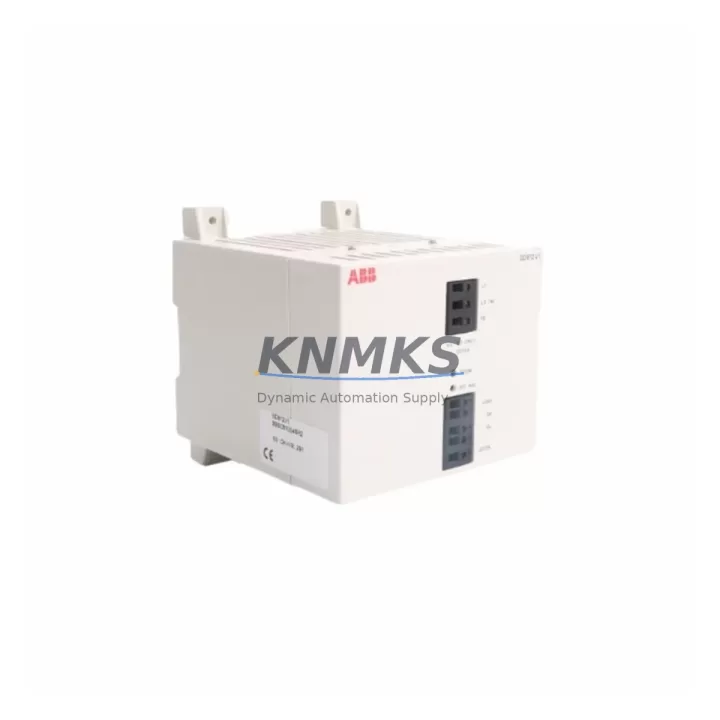
The ABB SD812V1 (catalog reference 3BSC610045R2) is a 24 VDC field-side power supply module purpose-built for the ABB S800 I/O platform. As ABB progressively phases out first-generation S800 hardware, engineering teams managing Freelance, Symphony Plus, and AC 800M-based control architectures face increasing pressure to source drop-in replacements that preserve existing wiring, rack geometry, and program logic. The SD812V1 addresses that need directly: it slots into the standard S800 ModuleBus carrier without mechanical modification, accepts the same 24 VDC supply rail, and delivers regulated field-side power to connected I/O modules without requiring changes to the controller configuration or HMI tag database.
KNMKS maintains verified stock of the SD812V1 / 3BSC610045R2 with pre-shipment functional testing, a support terms confirmed by quotation, and multi-region dispatch capability to support both emergency outage recovery and scheduled turnaround maintenance windows. Every unit is inspected against ABB’s original hardware specification before dispatch, ensuring that firmware revision, terminal block torque rating, and LED diagnostic behavior match the module being replaced.
Migration Compatibility Table
| Parameter | SD812V1 / 3BSC610045R2 | Retrofit Notes |
|---|---|---|
| Platform | ABB S800 I/O (ModuleBus) | Compatible with TB820V2, TB840A, TB845 carrier bases |
| Supply Voltage | 24 VDC (field side) | Verify PSU capacity before hot-swap; allow 10% headroom |
| Mounting | DIN rail / S800 carrier snap-fit | No panel drilling required; reuse existing carrier |
| Communication | ModuleBus (optical) | No protocol reconfiguration needed on AC 800M or Freelance |
| Terminal Wiring | Screw-clamp, 0.5–2.5 mm² | Reuse existing field cables; confirm torque to 0.5 Nm |
| Backplane Interface | S800 ModuleBus connector | Inspect connector pins for oxidation before insertion |
| Module Address | Set via DIP switch on carrier | Record existing address before removal; restore on replacement |
| Firmware | Factory-loaded, no field update required | Confirm AC 800M firmware ≥ 5.1 for full diagnostic support |
| Installation Space | Single-slot S800 module width | No adjacent module relocation required |
| Commissioning | Plug-and-play after address restore | Verify LED status: green = healthy; red = fault; amber = warning |
| Support terms | 12 months from dispatch — covers manufacturing defects and functional failure under normal operating conditions | |
Retrofit Planning for Existing Automation Systems
A successful SD812V1 retrofit begins well before the maintenance window opens. The first step is a full audit of the S800 I/O station: document the carrier type (TB820V2 or TB840A are the most common in legacy Freelance and AC 800M installations), record the DIP-switch address of the outgoing module, and photograph the terminal wiring before disconnection. Field cables on aging installations often carry hand-written labels that no longer match the as-built drawings, so a wiring photograph is the fastest way to recover from a labeling discrepancy during reassembly.
Power budget verification is critical. The SD812V1 supplies field-side 24 VDC to the I/O modules on its carrier segment. If the upstream power supply — commonly an ABB SD831 or SD832 system-side power supply — is already running near capacity due to added I/O expansion, the additional load from a replacement module must be calculated before the swap. A 10% headroom margin is the recommended minimum. Where the existing SD831 is also approaching end-of-life, a parallel replacement of both the SD812V1 and the SD831 during the same outage window eliminates a second unplanned shutdown.
Communication link integrity should be confirmed after module insertion. The S800 ModuleBus uses optical fiber segments between carriers; inspect the fiber connectors for contamination and verify that the AC 800M controller — or the Freelance DFE32 fieldbus interface — re-establishes the I/O station within the expected scan cycle. If the control system includes a CI854A PROFIBUS interface or a CI873 PROFINET interface for third-party device integration, confirm that the I/O station address map has not shifted following the replacement, as address conflicts can cause silent data errors that are difficult to trace during post-commissioning verification.
For installations where the S800 rack also houses analog input modules such as the AI810 or AI820, verify that the field-side power restored by the SD812V1 is within the input module’s specified supply range. Analog signal quality is directly affected by power rail stability, and a marginal supply voltage can introduce offset errors that only appear under full process load. Where HMI faceplates reference live I/O tags from the replaced carrier, a forced-value test on each tag after commissioning confirms that the HMI display, the controller logic, and the physical field signal are all aligned before the process is returned to automatic control.
Downtime Control During System Migration
Minimizing downtime during an SD812V1 replacement requires a structured pre-outage preparation protocol. Before the control system is taken offline, export the current AC 800M application project from Control Builder M and store a timestamped backup on an isolated engineering workstation. This preserves the exact program revision, function block parameters, and I/O channel assignments that were running at the time of the outage, providing a verified restore point if the commissioning sequence encounters an unexpected fault.
Where process continuity is a priority — for example, in continuous chemical dosing or temperature-controlled manufacturing lines — consider placing the affected I/O station in manual override before the module swap. This holds the last known output states at the field devices while the carrier is de-energized, preventing uncontrolled actuator movement during the replacement interval. The override should be documented in the shift log and cleared only after the replacement SD812V1 has been confirmed healthy via LED status and the controller has re-established full I/O communication.
Post-replacement commissioning should follow a structured sequence: power-on the carrier, confirm the SD812V1 green LED, verify the I/O station appears in the AC 800M hardware tree without fault flags, perform a forced-value cycle on at least one digital output and one analog input per carrier segment, then release the station to automatic control. Total elapsed time for a prepared team with a pre-tested replacement module is typically under 30 minutes, keeping the maintenance window within a single shift and avoiding overtime exposure.
Retrofit Support FAQ
Q1: Is the SD812V1 a direct drop-in replacement for the original ABB S800 field-side power supply?
Yes. The SD812V1 / 3BSC610045R2 is mechanically and electrically compatible with the standard S800 ModuleBus carrier. No wiring changes, no carrier modifications, and no controller reconfiguration are required, provided the DIP-switch address is restored to the original setting before power-up.
Q2: What pre-shipment testing does KNMKS perform on the SD812V1?
Every SD812V1 unit dispatched by KNMKS undergoes functional power-on verification, output voltage measurement under load, and LED diagnostic confirmation before packaging. Units that do not meet ABB’s original specification are quarantined and not dispatched. A support terms confirmed by quotation cover manufacturing defects and functional failure under normal operating conditions from the date of dispatch.
Q3: How do I confirm firmware compatibility between the replacement SD812V1 and my existing AC 800M controller?
The SD812V1 does not require a field firmware update — the module firmware is factory-loaded and version-locked. Compatibility is determined by the AC 800M controller firmware version: ABB recommends firmware 5.1 or later for full S800 I/O diagnostic support. Check the controller firmware version in Control Builder M under the hardware configuration tree before the replacement window.
Q4: What is the lead time and stock availability for the SD812V1 / 3BSC610045R2?
KNMKS maintains multi-region stock of the SD812V1 to support both emergency replacement and scheduled maintenance demand. Standard dispatch is within 1–3 business days for in-stock units. For large-quantity orders or long-term supply agreements covering multiple planned outages, contact the sales team to discuss reserved stock arrangements and volume pricing.
© 2026 KNMKS. All rights reserved.
Original Source: https://knmks.com
Contact: admin@knmks.com | +86 18359268345
Product Identification
- Brand / Ecosystem
-
ABB
ABB - Model / Series
-
SD812V1-3BSC610045R2
S800 Series - Product Family
- Power Supplies
- Availability Status
- Available on request after model and quantity confirmation
- Inquiry Type
- B2B RFQ, replacement inquiry and project spare-part request
- Pre-Quote Check
- Exact SKU, brand, series, quantity, nameplate photos and destination country are checked before quotation
System Path
Where this product fits in the KNMKS automation structure.
Specification & Inquiry Focus
- Power range
- DIN rail and switching power supplies
- Common needs
- Voltage, current and mounting style
- Project support
- Control cabinet and panel-builder inquiries
Buyer Confirmation
Information KNMKS checks before replying.
- Exact model
- SD812V1-3BSC610045R2
- Brand / ecosystem
- ABB
- Product family
- Power Supplies
- Application note
- Replacement, maintenance, project build or spare-part list
- Useful photos
- Nameplate, installed unit, cabinet layout or connector side
- Delivery details
- Quantity, destination country and target schedule
Document Support
Files and notes can be confirmed during quotation.
- Product photos or nameplate confirmation when available
- Packing and delivery notes before quotation confirmation
- Support scope and delivery terms confirmed per inquiry
- Export document coordination for qualified B2B requests
Inquiry Support
- 24VDC and cabinet power selection support
- Stable power support for PLC and HMI systems
- Batch inquiry support for panel builders
What to Send Us
- Brand and exact model number: ABB SD812V1-3BSC610045R2
- Quantity and required delivery time
- Application, replacement requirement or nameplate photo
- Destination country and shipping preference
RFQ Preparation
This is a product inquiry page built for RFQ communication.
Fast Model Check
Send this model to KNMKS for confirmation.
Include quantity, destination country and photos if this is a maintenance replacement. The inquiry will be saved with a reference number after submission.
Brand & Compatibility Note
KNMKS displays automation product information for well-known industrial brand ecosystems and compatible replacement references. Brand names are used for product identification and compatibility reference only; final availability and commercial terms are confirmed per quotation.
 Manufacturing
 Machine Tools
 Packaging
 Energy & Power
 PLCs & Controllers
 HMI & Displays
 Servo Systems
 Variable Frequency Drives