
Overview
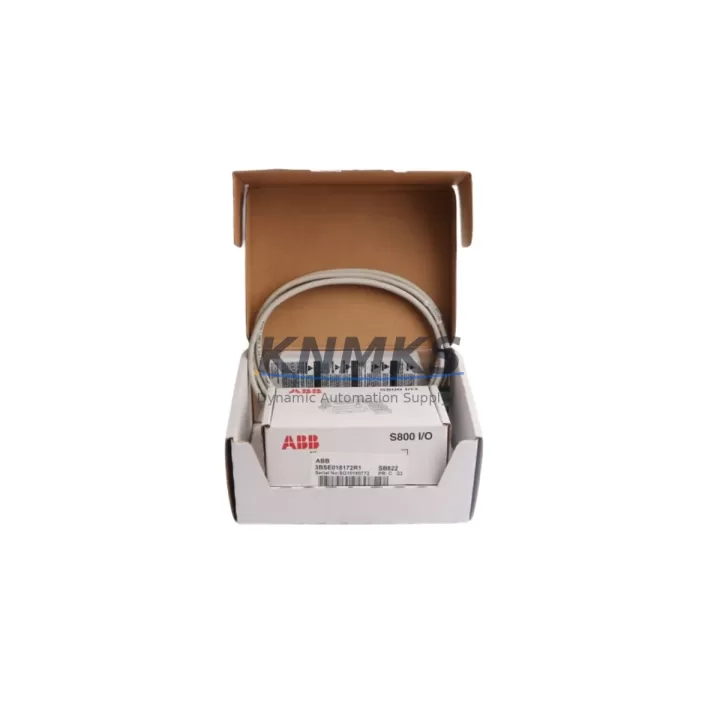
ABB SB822 3BSE018172R1 Migration-Ready Battery Backup for Legacy Control Systems
The ABB SB822 (3BSE018172R1) is a dedicated battery backup module engineered for the ABB AC800M Distributed Control System platform. As legacy DCS installations approach end-of-life or face spare parts shortages, the SB822 serves as a critical component in maintaining system continuity during power interruptions, planned shutdowns, and control cabinet upgrades. Whether you are replacing a failed unit in an existing rack or executing a phased migration from an older AC800 generation, the SB822 provides the power buffering necessary to protect volatile memory, preserve program logic, and maintain real-time clock integrity across the controller backplane.
For facilities managing long-running automation systems in oil and gas, pulp and paper, chemical processing, or power generation, the SB822 is a proven retrofit solution. Its form factor and connector interface are compatible with the standard AC800M rack assembly, eliminating the need for backplane modifications or custom wiring harnesses. Engineers planning a control system upgrade should verify the existing battery holder condition, terminal block torque specifications, and module slot assignment before installation. The SB822 slots directly into the designated battery position on the PM861, PM864, or PM866 processor module rack, and no firmware update is required on the controller side for basic backup functionality.
When integrating the SB822 into a retrofit project, it is common to simultaneously address adjacent components in the same control cabinet. The ABB PM864A (3BSE018161R1) processor module, for example, is frequently replaced alongside the SB822 when the original processor shows memory fault alarms or fails to retain configuration after power cycling. Similarly, the ABB CI854A (3BSE025255R1) PROFIBUS DP communication interface module may require re-addressing if the backplane slot configuration changes during the retrofit. Technicians should document the existing module address settings and communication link parameters before removing any hardware.
I/O expansion during the same maintenance window is also common. The ABB AI810 (3BSE008516R1) analog input module and the ABB DO810 (3BSE008510R1) digital output module are typical candidates for simultaneous replacement when the control cabinet is already open and the process is in a safe shutdown state. Replacing these modules at the same time as the SB822 reduces total downtime and avoids a second planned outage. Ensure that the I/O module channel assignments and signal scaling parameters are backed up from the Control Builder M engineering tool before any hardware swap.
For sites migrating from older AC800 hardware to a current-generation AC800M architecture, the SB822 is compatible with the updated rack and power supply configuration. The ABB SD821 (3BSC610037R1) power supply module should be inspected for output voltage stability and load capacity before commissioning the new battery backup. An undersized or aging power supply is a common root cause of premature battery backup failure and should be replaced as part of any comprehensive retrofit plan.
Migration Compatibility Table
| Parameter | Details |
|---|---|
| Part Number | SB822 / 3BSE018172R1 |
| Compatible Platform | ABB AC800M DCS (PM861, PM864, PM864A, PM866) |
| Replaces / Supersedes | SB821, earlier SB8xx series battery backup units |
| Backplane Interface | Standard AC800M module slot — no backplane modification required |
| Communication Compatibility | Passive power module — no protocol configuration required |
| Installation Requirement | Verify slot position per PM8xx processor documentation; no firmware update needed |
| Wiring / Terminal | Direct plug-in; confirm terminal block condition and torque spec before installation |
| Retrofit Recommendation | Replace simultaneously with PM8xx processor if memory fault alarms are present |
| Commissioning Note | Perform full power cycle test post-installation; verify RTC retention after 30-minute backup test |
| Origin | Germany |
| Support terms | support terms confirmed by quotation — all units pre-tested before shipment |
Retrofit Planning for Existing Automation Systems
A successful SB822 retrofit begins with a thorough audit of the existing control cabinet. Before ordering replacement hardware, document the current rack layout, module slot assignments, and power distribution configuration. The AC800M rack typically accommodates the processor module, communication interfaces, and the battery backup in fixed positions — any deviation from the original layout must be reflected in the Control Builder M project configuration before the new hardware is commissioned.
During the retrofit planning phase, assess whether the existing ABB SD821 or SD822 power supply module can support the full load of the upgraded rack. If the power supply is original equipment from the initial installation, it may be approaching the end of its rated service life and should be replaced proactively. A stable DC bus is essential for reliable battery backup charging and discharge performance.
Communication continuity is another critical planning element. If the control system uses a CI854A PROFIBUS DP interface or a CI857 PROFINET interface, verify that the network topology and device addresses are fully documented before the maintenance window begins. Any change to the backplane slot configuration can affect the module’s logical address, which must be updated in both the DCS engineering tool and the field device configuration. HMI screens connected to the AC800M via OPC or direct Ethernet should be tested for tag mapping integrity after the retrofit is complete.
For sites using ABB Freelance or Symphony Plus alongside AC800M hardware, confirm cross-platform compatibility of any shared I/O or communication links before proceeding. Signal isolators installed between legacy field devices and the new I/O modules may require recalibration if the input impedance or signal range of the replacement module differs from the original specification.
Downtime Control During System Migration
Minimizing unplanned downtime during a battery backup replacement requires careful pre-staging of all replacement hardware, tools, and documentation. The SB822 should be bench-tested for charge acceptance before it is brought to the installation site. A simple bench test using a compatible AC800M test rack or a known-good processor module confirms that the battery cell is healthy and the module connector is undamaged.
On the day of the planned maintenance window, ensure that the Control Builder M project file is backed up to a secure engineering workstation and that a printed copy of the rack layout and I/O assignment table is available at the cabinet. If the processor module must be powered down to replace the battery backup, the existing program logic will be retained in non-volatile flash memory on the PM8xx processor — however, the real-time clock will reset if the battery is fully discharged. Confirm the RTC setting procedure with the site automation engineer before the outage begins.
After installing the SB822, perform a controlled power restoration sequence: energize the power supply first, allow the processor to complete its self-test and boot sequence, then verify communication link status on all CI8xx interface modules. Confirm that all I/O modules report healthy status in the Control Builder M online view before releasing the system to process control. A post-installation backup test — deliberately interrupting main power for 30 minutes while monitoring the processor status — is strongly recommended before closing the maintenance work order.
Retrofit Support FAQ
Q1: Is the SB822 3BSE018172R1 a direct replacement for the SB821?
Yes. The SB822 is the current-generation replacement for the SB821 and earlier SB8xx series battery backup modules. The connector interface and slot position are compatible with all standard AC800M racks. No backplane modification or firmware update is required for the substitution.
Q2: What commissioning steps are required after installing the SB822?
After physical installation, perform a full power cycle on the processor module and verify that the battery backup indicator on the PM8xx front panel shows a healthy charge status. Conduct a 30-minute backup test by interrupting main power and confirming that the processor remains operational. Check the real-time clock setting and update if necessary. Document the installation date for support terms tracking purposes.
Q3: How do I verify wiring and terminal compatibility before installation?
The SB822 uses a direct plug-in connector — no field wiring is required. However, inspect the module slot connector on the processor module for bent pins, corrosion, or debris before inserting the new battery backup. Confirm that the slot is the designated battery position per the PM8xx hardware manual. If the original SB821 was secured with a retention screw, use the same torque specification for the SB822.
Q4: What are the stock availability and support terms terms?
The SB822 3BSE018172R1 is held availability confirmed by RFQ for immediate dispatch. All units undergo pre-shipment functional testing to verify battery cell integrity and connector condition. A support terms confirmed by quotation is provided from the date of shipment, covering manufacturing defects and premature battery failure under normal operating conditions. Global shipping is available with standard lead times of 3–7 business days depending on destination.
© 2026 KNMKS. All rights reserved.
Original Source: https://knmks.com
Contact: admin@knmks.com | +86 18359268345
Product Identification
- Brand / Ecosystem
-
ABB
ABB - Model / Series
-
SB822 3BSE018172R1
AC800M Series - Product Family
- Other Components
- Availability Status
- Available on request after model and quantity confirmation
- Inquiry Type
- B2B RFQ, replacement inquiry and project spare-part request
- Pre-Quote Check
- Exact SKU, brand, series, quantity, nameplate photos and destination country are checked before quotation
System Path
Where this product fits in the KNMKS automation structure.
Specification & Inquiry Focus
- Component range
- Breakers, terminals and cabinet accessories
- Common needs
- Model, photo and installation requirement
- Project support
- Maintenance and mixed spare-part inquiry
Buyer Confirmation
Information KNMKS checks before replying.
- Exact model
- SB822 3BSE018172R1
- Brand / ecosystem
- ABB
- Product family
- Other Components
- Application note
- Replacement, maintenance, project build or spare-part list
- Useful photos
- Nameplate, installed unit, cabinet layout or connector side
- Delivery details
- Quantity, destination country and target schedule
Document Support
Files and notes can be confirmed during quotation.
- Product photos or nameplate confirmation when available
- Packing and delivery notes before quotation confirmation
- Support scope and delivery terms confirmed per inquiry
- Export document coordination for qualified B2B requests
Inquiry Support
- Mixed automation spare parts inquiry
- Cabinet component and accessory support
- Model identification from photos or labels
What to Send Us
- Brand and exact model number: ABB SB822 3BSE018172R1
- Quantity and required delivery time
- Application, replacement requirement or nameplate photo
- Destination country and shipping preference
RFQ Preparation
This is a product inquiry page built for RFQ communication.
Fast Model Check
Send this model to KNMKS for confirmation.
Include quantity, destination country and photos if this is a maintenance replacement. The inquiry will be saved with a reference number after submission.
Brand & Compatibility Note
KNMKS displays automation product information for well-known industrial brand ecosystems and compatible replacement references. Brand names are used for product identification and compatibility reference only; final availability and commercial terms are confirmed per quotation.
 Manufacturing
 Machine Tools
 Packaging
 Energy & Power
 PLCs & Controllers
 HMI & Displays
 Servo Systems
 Variable Frequency Drives