
Overview
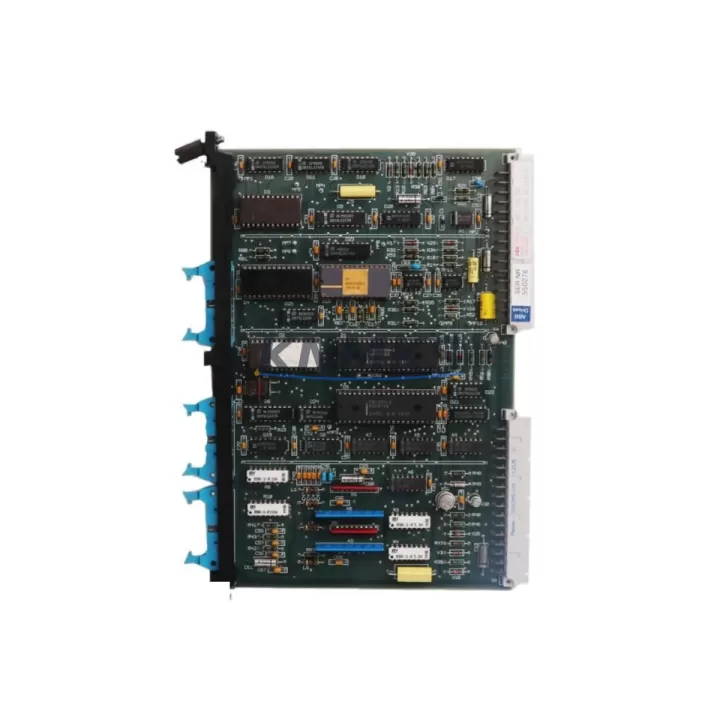
ABB SAFT185TBC Migration-Ready Thyristor Board for Legacy DCS Control Systems
The ABB SAFT185TBC is a thyristor control board engineered for DC drive systems within ABB’s DCS series control architecture. As legacy automation infrastructure reaches end-of-life, the SAFT185TBC has become a critical retrofit component for engineers tasked with modernizing aging drive cabinets, extending the operational life of existing control panels, and maintaining production continuity without a full platform migration. Whether you are replacing a failed board in a running line or proactively stocking spares ahead of a planned shutdown, the SAFT185TBC delivers the electrical and mechanical compatibility required for a reliable, low-risk swap.
Before committing to a replacement, engineers should verify several key parameters against the existing installation. Power supply capacity at the drive cabinet level must be confirmed — the SAFT185TBC operates within the DC drive’s internal bus voltage range, and any deviation in the upstream power module, such as the SDCS-POW-1 or SDCS-POW-4 power supply boards used in ABB DCS550 and DCS800 platforms, can affect gate firing stability. Terminal wiring assignments on the thyristor board must be cross-referenced with the original schematic; while the SAFT185TBC maintains backward-compatible pinouts for most DCS series installations, field engineers should confirm armature feedback, field current, and firing pulse connections before energizing. Backplane interface compatibility with the drive’s main control board — typically the SDCS-CON-2 or SDCS-CON-4 — should also be validated, as firmware revision mismatches between the control board and the thyristor firing circuit can produce nuisance trips or asymmetric firing faults.
Module addressing and parameter configuration are equally important steps in the retrofit process. After physical installation, the drive’s parameter set — including current regulator gains, speed feedback scaling, and field weakening curves — must be restored from a backup or re-commissioned from the original documentation. If the site uses a DDCS fiber-optic communication link to a higher-level controller or a PROFIBUS DP adapter module such as the RDCO-02 or RPBA-01, the communication node address and baud rate settings must be re-entered and verified against the master PLC or DCS configuration. HMI screens tied to drive status signals should be tested for correct analog and digital I/O mapping after the board swap, particularly where the SAFT185TBC interfaces with external signal isolators or relay output modules in the control cabinet.
Installation space confirmation is straightforward for most DCS series cabinets, as the SAFT185TBC occupies a standard slot position within the drive’s power stack. However, in retrofit scenarios where the original drive chassis has been modified or where a third-party mounting adapter is in use, physical clearance around the thyristor heatsink and gate lead routing should be inspected before final assembly. Firmware version compatibility between the SAFT185TBC and the drive’s control board should be confirmed with the drive’s nameplate data or commissioning records; in some DCS550 installations, a control board firmware update may be required to support the thyristor board’s gate timing parameters correctly.
Migration Compatibility Table
| Parameter | SAFT185TBC Specification | Retrofit Notes |
|---|---|---|
| Compatible Platforms | ABB DCS series DC drives (DCS400, DCS550, DCS800) | Confirm drive series and frame size before ordering |
| Backplane Interface | Compatible with SDCS-CON-2 / SDCS-CON-4 control boards | Verify firmware revision on control board |
| Power Supply Compatibility | Works with SDCS-POW-1 / SDCS-POW-4 internal power modules | Check bus voltage tolerance before energizing |
| Communication Modules | DDCS fiber link; RDCO-02 / RPBA-01 fieldbus adapters | Re-enter node address and baud rate after swap |
| Terminal Wiring | Backward-compatible pinout for DCS series installations | Cross-reference armature, field, and firing pulse terminals |
| Installation Dimensions | Standard DCS series power stack slot | Inspect clearance if chassis has been modified |
| Firmware Requirement | Matched to drive control board firmware version | Update SDCS-CON firmware if required for gate timing |
| Support terms | support terms confirmed by quotation — covers manufacturing defects and functional failure under normal operating conditions | |
Retrofit Planning for Existing Automation Systems
A successful SAFT185TBC retrofit begins with a thorough audit of the existing drive cabinet. Engineers should document the current SDCS-CON control board firmware version, the SDCS-POW power supply output voltages, and the parameter backup from the drive’s memory before any hardware is disturbed. In multi-drive installations where several DCS550 or DCS800 units share a common DC bus, the thyristor firing synchronization across drives must be re-verified after any board replacement to prevent circulating currents or phase imbalance on the shared bus.
Signal isolation between the SAFT185TBC’s gate firing outputs and the plant’s field wiring is a common retrofit consideration. Where the original installation used external signal isolators between the drive and field devices — particularly for analog speed references or encoder feedback signals — these isolators should be tested for correct output scaling after the board swap. In cabinets where the drive communicates with a Siemens S7 or Rockwell ControlLogix PLC via a PROFIBUS or DeviceNet gateway, the gateway’s I/O mapping tables should be reviewed to confirm that drive status words and control words are correctly interpreted after the SAFT185TBC replacement.
For sites using ABB’s DriveWindow or DriveStudio commissioning software, a full parameter upload from the drive after board replacement is recommended to confirm that all regulator settings, protection thresholds, and I/O configurations have been correctly restored. Programming cables such as the OPFA-02 fiber adapter or a standard USB-to-RS232 converter with the appropriate drive communication protocol should be prepared in advance to minimize commissioning time during the maintenance window.
Downtime Control During System Migration
Minimizing production downtime during a SAFT185TBC replacement requires advance preparation at every stage of the retrofit. Before the maintenance window opens, engineers should complete a full parameter backup from the drive, prepare a tested replacement board, and stage all required tools, wiring diagrams, and commissioning software at the work site. Where possible, a cold swap — replacing the board with the drive de-energized and locked out — is strongly preferred over a hot swap to protect both personnel and the drive’s control electronics.
To protect the original program logic, the drive’s parameter set should be saved to both the commissioning PC and a removable storage medium before the board is removed. If the drive is integrated into a larger control loop — for example, as a tension drive in a winding line or as a positioning drive in a crane or hoist application — the upstream PLC or DCS should be placed in manual mode or a safe hold state before the drive is taken offline. This prevents the control system from generating fault alarms or initiating automatic restart sequences while the drive is being serviced.
After the SAFT185TBC is installed and the drive is re-energized, a staged commissioning sequence is recommended: first verify the power supply voltages and gate firing signals at no load, then restore the parameter set and confirm regulator response at reduced speed before returning the drive to full production speed. This approach allows engineers to identify and correct any wiring or configuration issues before the drive is placed under full load, reducing the risk of a second unplanned outage. All SAFT185TBC units supplied by KNMKS are tested prior to shipment to confirm gate firing function and electrical integrity, supporting a faster and more confident on-site commissioning process.
Retrofit Support FAQ
Q: Is the SAFT185TBC a direct drop-in replacement for the original thyristor board in my DCS550 drive?
A: In most DCS series installations, the SAFT185TBC is a direct replacement with no mechanical or electrical modifications required. However, we recommend confirming the drive’s frame size, control board firmware version, and power supply type before installation. Our technical team can assist with compatibility verification based on your drive’s nameplate data.
Q: What commissioning steps are required after installing the SAFT185TBC?
A: After physical installation, restore the drive’s parameter set from your backup, verify power supply voltages, and confirm gate firing signals at no load. Re-enter any communication node addresses if the drive uses a DDCS or fieldbus adapter. Run the drive at reduced speed to confirm regulator response before returning to full production.
Q: How do I confirm terminal wiring compatibility before installation?
A: Cross-reference the SAFT185TBC terminal assignments against your existing wiring diagram, paying particular attention to armature feedback, field current, and firing pulse connections. If your original schematic is unavailable, our team can provide reference documentation based on the drive series and frame size.
Q: What support terms and stock availability does KNMKS offer for the SAFT185TBC?
A: All SAFT185TBC units are covered by a support terms confirmed by quotation against manufacturing defects and functional failure under normal operating conditions. Units are tested prior to shipment. We maintain in-stock inventory for immediate dispatch, with global shipping available. Contact our sales team for lead time and quantity availability.
© 2026 KNMKS. All rights reserved.
Original Source: https://knmks.com
Contact: admin@knmks.com | +86 18359268345
Product Identification
- Brand / Ecosystem
-
ABB
ABB - Model / Series
-
SAFT185TBC SAFT 185 TBC
Legacy Series - Product Family
- Variable Frequency Drives
- Availability Status
- Available on request after model and quantity confirmation
- Inquiry Type
- B2B RFQ, replacement inquiry and project spare-part request
- Pre-Quote Check
- Exact SKU, brand, series, quantity, nameplate photos and destination country are checked before quotation
System Path
Where this product fits in the KNMKS automation structure.
Specification & Inquiry Focus
- Drive range
- AC drives, VFDs and accessories
- Common needs
- Voltage, kW/HP and load type
- Project support
- Motor control, energy saving and spares
Buyer Confirmation
Information KNMKS checks before replying.
- Exact model
- SAFT185TBC SAFT 185 TBC
- Brand / ecosystem
- ABB
- Product family
- Variable Frequency Drives
- Application note
- Replacement, maintenance, project build or spare-part list
- Useful photos
- Nameplate, installed unit, cabinet layout or connector side
- Delivery details
- Quantity, destination country and target schedule
Document Support
Files and notes can be confirmed during quotation.
- Product photos or nameplate confirmation when available
- Packing and delivery notes before quotation confirmation
- Support scope and delivery terms confirmed per inquiry
- Export document coordination for qualified B2B requests
Inquiry Support
- Input/output voltage and kW/HP confirmation
- Energy-saving motor control inquiry
- Accessory and spare-unit support
What to Send Us
- Brand and exact model number: ABB SAFT185TBC SAFT 185 TBC
- Quantity and required delivery time
- Application, replacement requirement or nameplate photo
- Destination country and shipping preference
RFQ Preparation
This is a product inquiry page built for RFQ communication.
Fast Model Check
Send this model to KNMKS for confirmation.
Include quantity, destination country and photos if this is a maintenance replacement. The inquiry will be saved with a reference number after submission.
Brand & Compatibility Note
KNMKS displays automation product information for well-known industrial brand ecosystems and compatible replacement references. Brand names are used for product identification and compatibility reference only; final availability and commercial terms are confirmed per quotation.
 Manufacturing
 Machine Tools
 Packaging
 Energy & Power
 PLCs & Controllers
 HMI & Displays
 Servo Systems
 Sensors