
Overview
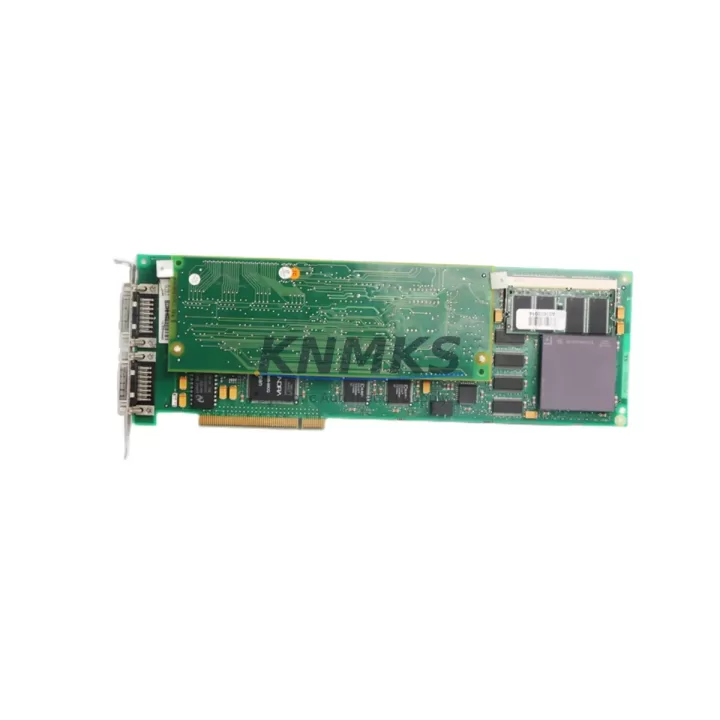
ABB PU516 3BSE013064R1 Migration-Ready CPU for Legacy DCS: Retrofit and Upgrade for AC800M Control Systems
The ABB PU516 (3BSE013064R1) is a high-performance CPU module designed for the ABB AC800M Distributed Control System platform. As legacy DCS installations built around the PU513 and PU515 processors reach end-of-life, the PU516 provides a validated, drop-in migration path that preserves existing control logic, I/O wiring infrastructure, and communication architecture. Whether you are managing a planned upgrade cycle or responding to an unplanned failure in a critical production environment, the PU516 delivers the processing headroom and protocol compatibility required to restore and extend system operation with minimal disruption.
The PU516 operates within the standard AC800M rack and backplane architecture, accepting the same S800 I/O modules, TB820 Modulebus Modem communication links, and CI854 PROFIBUS interfaces that are already installed in your control cabinet. This means that in most retrofit scenarios, the physical I/O wiring, terminal blocks, and field cable routing do not require modification. Engineers can focus migration effort on firmware verification, controller application download, and communication link re-establishment rather than mechanical rework.
Migration Compatibility Table
| Parameter | PU513 (Legacy) | PU515 (Legacy) | PU516 3BSE013064R1 (Replacement) |
|---|---|---|---|
| Backplane Interface | AC800M Standard | AC800M Standard | AC800M Standard — Direct Compatible |
| Rack Slot Requirement | CPU Slot 1 | CPU Slot 1 | CPU Slot 1 — No Mechanical Change |
| Communication Ports | 2× Ethernet, 1× Serial | 2× Ethernet, 1× Serial | 2× Ethernet, 1× Serial — Pin-Compatible |
| Modulebus Support | TB820 Compatible | TB820 Compatible | TB820 Compatible — No Reconfiguration |
| PROFIBUS DP | Via CI854 | Via CI854 | Via CI854 — Retained |
| Application Download | Control Builder M | Control Builder M | Control Builder M — Same Toolchain |
| Firmware Version | Legacy baseline | Intermediate | Current — Verify compatibility before download |
| HMI Connectivity | 800xA / Operate IT | 800xA / Operate IT | 800xA / Operate IT — No screen rebuild required |
| Redundancy Support | Optional | Optional | Supported — Redundant CPU pair available |
| Support terms | — | — | support terms confirmed by quotation Included |
| Retrofit Recommendation | End-of-Life — Replace Immediately | Validated Direct Replacement | |
Retrofit Planning for Existing Automation Systems
A successful PU516 retrofit begins with a thorough audit of the existing control cabinet. Before removing the legacy CPU, engineers should document the current rack layout, confirm the power supply capacity of the installed PM861 or PM865 power module, and verify that available rail current is sufficient to support the PU516’s operating load alongside all connected S800 I/O modules. Insufficient power headroom is one of the most common causes of unexpected behavior after a CPU swap and should be resolved before the replacement module is installed.
Terminal wiring connected to the existing I/O modules — including AI810 analog input modules, DI810 digital input modules, and DO810 digital output modules — does not need to be disturbed during a CPU-only replacement. The S800 I/O bus remains active through the TB820 Modulebus Modem, and module addresses assigned in the original Control Builder M project are preserved in the application file. Engineers should confirm that the module address configuration in the downloaded application matches the physical slot assignments in the rack before initiating a cold start.
For systems using PROFIBUS DP field devices connected through a CI854 interface module, the network configuration — including device addresses, baud rate settings, and GSD file assignments — is stored in the controller application rather than in the CI854 hardware itself. This means that after the PU516 is installed and the application is downloaded, PROFIBUS communication is typically restored without requiring re-parameterization of field instruments. However, engineers should verify that all slave devices acknowledge the master after the first scan cycle and that no address conflicts exist on the network segment.
HMI screens built in ABB System 800xA or the legacy Operate IT environment reference tag names and OPC data paths defined in the controller application. Because the PU516 uses the same Control Builder M project structure as its predecessors, existing HMI graphics, alarm configurations, and trend displays remain valid after the upgrade. No screen rebuilding is required, though a full HMI connectivity test should be performed after the controller is back online to confirm that all dynamic elements are updating correctly.
Where the installation includes a redundant CPU pair, the second processor slot should be populated with a matching PU516 unit to maintain hot-standby capability. Redundancy synchronization is established automatically once both modules are powered and the application is loaded, but the synchronization status should be confirmed in the Control Builder M online view before returning the system to automatic control.
Downtime Control During System Migration
Minimizing production downtime during a CPU migration requires preparation that begins well before the maintenance window opens. The existing controller application — including all function block diagrams, sequential function charts, signal lists, and hardware configuration — should be exported from Control Builder M and archived to a secure location. This backup serves as the recovery baseline if the migration encounters an unexpected issue and a rollback to the original hardware is required.
Before the PU516 is installed, the replacement module should be powered on a bench test rack and the target firmware version confirmed. If the firmware on the replacement unit does not match the version required by the application, the update should be applied and verified offline rather than during the live migration window. This eliminates one of the most common sources of extended downtime in CPU replacement projects.
During the physical swap, the control system should be placed in manual mode at the field level wherever process safety permits. Operators should be briefed on the expected outage duration and the manual control procedures for critical loops. Once the PU516 is seated in the rack and powered, the application download from Control Builder M typically completes within minutes. The controller then performs a self-test, establishes I/O communication with the S800 modules, and re-establishes Ethernet and PROFIBUS links before transitioning to run mode.
Post-migration verification should include a point-by-point I/O check for critical signals, confirmation that all communication links — including the TB820 Modulebus and any CI854 PROFIBUS segments — are reporting healthy status, and a review of the alarm log to confirm that no unexpected process deviations occurred during the transition. With proper preparation, most PU516 CPU replacements can be completed within a two-to-four hour maintenance window, including bench testing, physical installation, application download, and post-migration verification.
Retrofit Support FAQ
Q: Is the PU516 3BSE013064R1 a direct replacement for the PU513 and PU515?
A: Yes. The PU516 is mechanically and electrically compatible with the AC800M rack and backplane used by the PU513 and PU515. The same Control Builder M application can be downloaded to the PU516 without structural modification, provided the firmware version requirements are met. Terminal wiring and I/O module assignments are unaffected by the CPU swap.
Q: What firmware version does the PU516 ship with, and how do I verify compatibility?
A: Each unit is shipped with the firmware version confirmed at the time of dispatch. Before installation, compare the firmware version on the module against the minimum version specified in your Control Builder M project properties. If an update is required, it should be applied using the ABB firmware update tool in a bench environment before the module is installed in the live rack.
Q: Does the PU516 support redundant CPU configuration?
A: Yes. The PU516 supports hot-standby redundancy when a second PU516 unit is installed in the redundant CPU slot of the AC800M rack. Synchronization is automatic once both modules are powered and the application is loaded. Redundancy status can be monitored in real time through Control Builder M or the System 800xA operator interface.
Q: What does the support terms confirmed by quotation cover, and what pre-shipment testing is performed?
A: Every PU516 3BSE013064R1 unit undergoes functional verification prior to dispatch, including power-on self-test, communication port validation, and firmware confirmation. The support terms confirmed by quotation cover manufacturing defects and functional failures under normal operating conditions. Units are shipped with anti-static packaging and documentation confirming the test results. In-stock units are available for same-week dispatch to minimize lead time in urgent replacement scenarios.
© 2026 KNMKS. All rights reserved.
Original Source: https://knmks.com
Contact: admin@knmks.com | +86 18359268345
Product Identification
- Brand / Ecosystem
-
ABB
ABB - Model / Series
-
PU516 3BSE013064R1
AC800M Series - Product Family
- PLCs & Controllers
- Availability Status
- Available on request after model and quantity confirmation
- Inquiry Type
- B2B RFQ, replacement inquiry and project spare-part request
- Pre-Quote Check
- Exact SKU, brand, series, quantity, nameplate photos and destination country are checked before quotation
System Path
Where this product fits in the KNMKS automation structure.
Specification & Inquiry Focus
- Control platform
- PLC, PAC and modular controllers
- Common needs
- CPU, rack, power and I/O expansion
- Project support
- Replacement, cabinet build and maintenance
Buyer Confirmation
Information KNMKS checks before replying.
- Exact model
- PU516 3BSE013064R1
- Brand / ecosystem
- ABB
- Product family
- PLCs & Controllers
- Application note
- Replacement, maintenance, project build or spare-part list
- Useful photos
- Nameplate, installed unit, cabinet layout or connector side
- Delivery details
- Quantity, destination country and target schedule
Document Support
Files and notes can be confirmed during quotation.
- Product photos or nameplate confirmation when available
- Packing and delivery notes before quotation confirmation
- Support scope and delivery terms confirmed per inquiry
- Export document coordination for qualified B2B requests
Inquiry Support
- Model cross-checking before quotation
- CPU, power, rack and expansion module matching
- Support for replacement and project inquiry
What to Send Us
- Brand and exact model number: ABB PU516 3BSE013064R1
- Quantity and required delivery time
- Application, replacement requirement or nameplate photo
- Destination country and shipping preference
RFQ Preparation
This is a product inquiry page built for RFQ communication.
Fast Model Check
Send this model to KNMKS for confirmation.
Include quantity, destination country and photos if this is a maintenance replacement. The inquiry will be saved with a reference number after submission.
Brand & Compatibility Note
KNMKS displays automation product information for well-known industrial brand ecosystems and compatible replacement references. Brand names are used for product identification and compatibility reference only; final availability and commercial terms are confirmed per quotation.
 Manufacturing
 Machine Tools
 Packaging
 Energy & Power



 HMI & Displays
 Servo Systems
 Variable Frequency Drives
 Sensors