
Overview
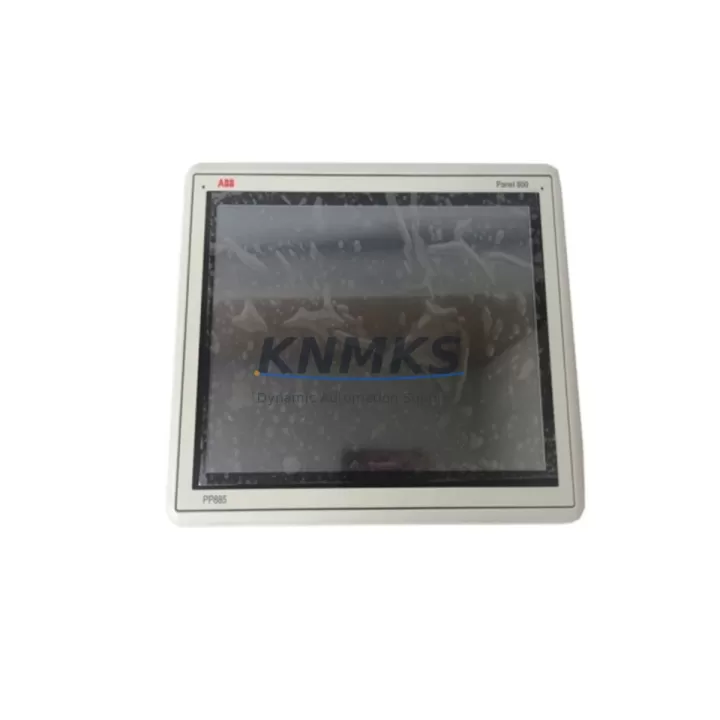
ABB PP885 3BSE069276R1 Maintenance-Proven Spare Part for Factory Uptime
The ABB PP885 (part number 3BSE069276R1) is a high-performance operator panel designed for the ABB Panel 800 series and AC800M Distributed Control Systems. As a critical HMI component in continuous process industries — including pulp and paper, oil and gas, power generation, and chemical manufacturing — the PP885 serves as the primary human-machine interface for real-time process visualization, alarm management, and operator control. Maintaining a verified original spare in your inventory is the single most effective strategy for minimizing unplanned downtime when the primary unit fails.
Every PP885 3BSE069276R1 unit supplied by KNMKS is sourced as an original ABB component, fully tested prior to shipment, and backed by a support terms confirmed by quotation. Our stock is maintained to support both emergency replacement orders and planned annual maintenance cycles, ensuring your facility can restore panel operation within the shortest possible timeframe.
Spare Maintenance Table
| Part Number | 3BSE069276R1 |
| Model | PP885 |
| Brand | ABB |
| Series | Panel 800 / AC800M DCS |
| Product Type | HMI Operator Panel |
| Display | 15″ TFT Color Touch Screen (XGA 1024×768) |
| Operating System | Windows CE / Embedded |
| Communication Interfaces | Ethernet (RJ45), USB, RS-232/485, PROFIBUS DP |
| Supply Voltage | 24 VDC (nominal) |
| Power Consumption | Approx. 30–50 W (typical operating load) |
| Operating Temperature | 0°C to +55°C |
| Protection Rating | IP65 (front panel) |
| Weight | 1.64 kg |
| Country of Origin | Germany |
| Compatibility | ABB Panel 800 series, AC800M, AC800F, Symphony Plus |
| Installation | Panel cutout mount; direct replacement for existing PP885 installations |
| Maintenance Recommendation | Inspect display backlight, touch calibration, and communication ports annually; replace proactively at first sign of display degradation or communication errors |
| Support terms | 12 Months — tested before shipment |
Maintenance Planning for Continuous Operation
When a PP885 3BSE069276R1 operator panel is flagged for replacement during a scheduled shutdown or emergency callout, experienced maintenance engineers know that the panel itself is rarely the only component requiring attention. A systematic inspection of the surrounding control cabinet and electrical circuit is essential to prevent repeat failures and ensure the replacement unit operates reliably from day one.
Begin by verifying the 24 VDC power supply module feeding the PP885. Voltage ripple, insufficient current capacity, or aging capacitors in the power supply are common root causes of HMI instability and premature panel failure. If the power supply is original to the installation and has not been replaced within the last five to seven years, proactive replacement alongside the PP885 is strongly recommended.
Next, inspect all Ethernet and communication cables connecting the PP885 to the AC800M controller and plant network. Damaged shielding, loose RJ45 connectors, or degraded cable runs in high-vibration environments can cause intermittent communication faults that are difficult to diagnose after the new panel is installed. Replace any suspect cables before commissioning the new unit.
The AC800M CPU module (such as the PM866 or PM891 series) should be checked for firmware compatibility with the replacement PP885. Mismatched firmware versions between the HMI and the controller are a known source of post-replacement communication errors. Confirm the firmware revision matrix in the ABB Panel 800 engineering documentation before proceeding.
Inspect the I/O modules and terminal blocks in the same cabinet section. Loose terminal connections, corroded I/O module contacts, or failed signal isolators can generate spurious alarms that appear on the new HMI immediately after startup, creating unnecessary diagnostic confusion. Clean and re-torque all terminal connections as part of the replacement workflow.
If the PP885 communicates via PROFIBUS DP, verify the bus termination resistors and cable segment lengths. A degraded PROFIBUS segment can cause the new panel to report communication faults even when the hardware itself is fully functional. Check the PROFIBUS repeater or DP/PA coupler if the segment spans multiple cabinet sections or field junction boxes.
Finally, review the status of any UPS (uninterruptible power supply) protecting the control cabinet. A failing UPS battery that allows momentary voltage dips during panel startup can corrupt the PP885 operating system or configuration data, leading to extended commissioning time. Battery replacement is a low-cost insurance measure that protects the investment in the new HMI spare.
Site Replacement Workflow
Step 1 — Pre-replacement verification: Confirm the replacement unit part number (3BSE069276R1) matches the installed panel label. Photograph the existing wiring, connector positions, and cable routing before disconnection.
Step 2 — Safe isolation: Follow your site’s lockout/tagout (LOTO) procedure. Isolate the 24 VDC supply to the panel section. Do not rely solely on software shutdown — physically disconnect the power feed at the terminal block.
Step 3 — Configuration backup: If the existing PP885 is still partially functional, export the Panel Builder 800 project file and any local configuration data to a USB drive or network share before removal. This eliminates the risk of losing the HMI application during the swap.
Step 4 — Physical replacement: Remove the panel from the cutout, disconnect all cables in the documented sequence, and install the replacement PP885 3BSE069276R1. Reconnect cables in reverse order, verifying connector seating and locking mechanisms.
Step 5 — Firmware and project restore: Load the backed-up Panel Builder 800 project onto the new unit. Verify firmware version compatibility with the AC800M controller. Apply any required firmware updates before going live.
Step 6 — Functional test: Restore power and perform a full functional test: display calibration, alarm acknowledgment, process value display, and communication link verification with the AC800M. Document the test results before returning the system to production.
This structured workflow reduces average replacement time and eliminates the most common causes of post-swap commissioning failures, helping your team restore factory uptime with confidence.
Spare Parts Support FAQ
Q1: Is the PP885 3BSE069276R1 an original ABB component or a compatible substitute?
Every unit supplied by KNMKS is an original ABB PP885 with part number 3BSE069276R1. We do not supply compatible substitutes or rebranded alternatives. Each unit is individually tested before shipment to verify display function, communication interfaces, and power input performance.
Q2: How long can I expect delivery, and do you maintain stock for emergency orders?
KNMKS maintains ready stock of the PP885 3BSE069276R1 to support both planned procurement and emergency replacement orders. Standard delivery timelines and express shipping options are available — contact admin@knmks.com or call +86 18359268345 to confirm current stock status and lead time for your location.
Q3: What does the support terms confirmed by quotation cover, and how is it handled?
The support terms confirmed by quotation cover manufacturing defects and functional failures under normal operating conditions. Each unit is tested before shipment; if a fault is identified within the confirmed support period, KNMKS will arrange replacement or repair. Support requests caused by installation errors, overvoltage events, or physical damage are assessed on a case-by-case basis.
Q4: Can the PP885 3BSE069276R1 replace older Panel 800 HMI models in legacy AC800M systems?
The PP885 is designed as a direct replacement within the ABB Panel 800 family and is compatible with AC800M, AC800F, and Symphony Plus control systems. For legacy installations using earlier Panel 800 variants, firmware alignment between the HMI and the controller is required. KNMKS technical support can assist with compatibility verification before purchase to eliminate procurement risk.
© 2026 KNMKS. All rights reserved.
Original Source: https://knmks.com
Contact: admin@knmks.com | +86 18359268345
Product Identification
- Brand / Ecosystem
-
ABB
ABB - Model / Series
-
PP885 3BSE069276R1
AC800M Series - Product Family
- HMI & Displays
- Availability Status
- Available on request after model and quantity confirmation
- Inquiry Type
- B2B RFQ, replacement inquiry and project spare-part request
- Pre-Quote Check
- Exact SKU, brand, series, quantity, nameplate photos and destination country are checked before quotation
System Path
Where this product fits in the KNMKS automation structure.
Specification & Inquiry Focus
- Display range
- Operator panels and touch screens
- Common needs
- Screen size, interface and version matching
- Project support
- Retrofit, spare unit and panel replacement
Buyer Confirmation
Information KNMKS checks before replying.
- Exact model
- PP885 3BSE069276R1
- Brand / ecosystem
- ABB
- Product family
- HMI & Displays
- Application note
- Replacement, maintenance, project build or spare-part list
- Useful photos
- Nameplate, installed unit, cabinet layout or connector side
- Delivery details
- Quantity, destination country and target schedule
Document Support
Files and notes can be confirmed during quotation.
- Product photos or nameplate confirmation when available
- Packing and delivery notes before quotation confirmation
- Support scope and delivery terms confirmed per inquiry
- Export document coordination for qualified B2B requests
Inquiry Support
- Panel size and interface confirmation
- Replacement unit inquiry for discontinued HMIs
- Protective packaging for display shipment
What to Send Us
- Brand and exact model number: ABB PP885 3BSE069276R1
- Quantity and required delivery time
- Application, replacement requirement or nameplate photo
- Destination country and shipping preference
RFQ Preparation
This is a product inquiry page built for RFQ communication.
Fast Model Check
Send this model to KNMKS for confirmation.
Include quantity, destination country and photos if this is a maintenance replacement. The inquiry will be saved with a reference number after submission.
Brand & Compatibility Note
KNMKS displays automation product information for well-known industrial brand ecosystems and compatible replacement references. Brand names are used for product identification and compatibility reference only; final availability and commercial terms are confirmed per quotation.
 Manufacturing
 Machine Tools
 Packaging
 Energy & Power
 PLCs & Controllers
 Servo Systems
 Variable Frequency Drives
 Sensors