
Overview
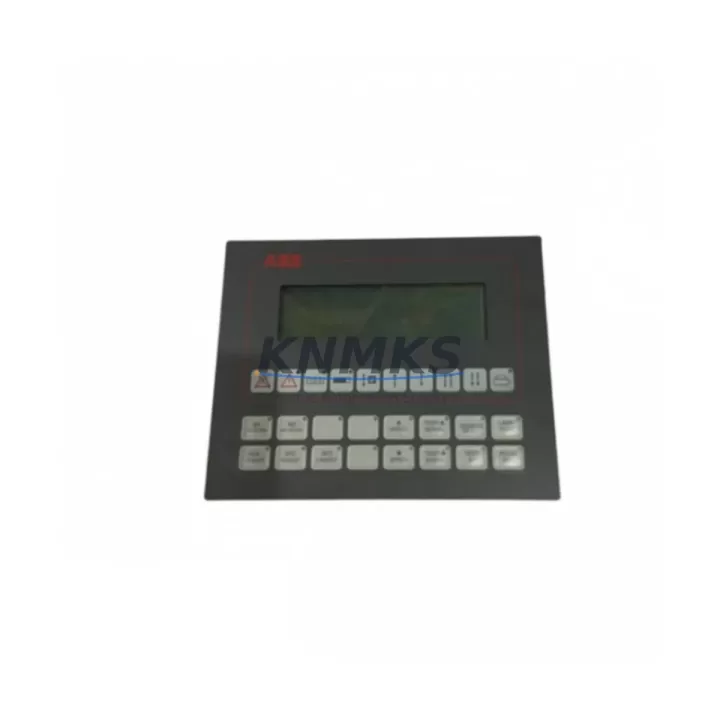
ABB HIEE200130R0002 AFC094AE02 Migration-Ready Operator Panel: Legacy System Migration and Compatible Upgrade
The ABB HIEE200130R0002 AFC094AE02 is a DCS operator panel engineered for the AC800M control platform, widely deployed in process automation, power generation, oil and gas, and chemical plant environments. As legacy AC800M installations age and original operator panels reach end-of-life, sourcing a verified replacement that maintains full compatibility with existing wiring, communication links, and HMI configurations becomes a critical priority for maintenance engineers and system integrators. This unit is available as a tested, ready-to-ship replacement with a support terms confirmed by quotation, supporting both direct swap-out and broader control system modernization projects.
Whether your facility is managing a planned retrofit, responding to an unplanned panel failure, or executing a phased migration from an older DCS generation, the HIEE200130R0002 AFC094AE02 provides a reliable, specification-matched solution. Its compatibility with the AC800M backplane architecture means that terminal wiring, module addressing, and communication protocol assignments can be preserved without requiring reprogramming of the base controller logic.
Migration Compatibility Table
| Parameter | Details |
|---|---|
| Compatible Platform | ABB AC800M DCS |
| SKU / Part Number | HIEE200130R0002 AFC094AE02 |
| Product Series | AFC094 Operator Panel Series |
| Installation Type | Rack-mount / Backplane integrated |
| Communication Compatibility | AC800M native communication bus; compatible with existing PROFIBUS and Ethernet-based HMI links |
| Terminal Wiring | Direct replacement; existing terminal assignments retained |
| Replacement Recommendation | Drop-in replacement for discontinued HIEE200130R0002 variants; verify firmware revision before commissioning |
| Commissioning Notes | Confirm module address settings, HMI screen mapping, and communication link parameters prior to power-up |
| Support terms | 12 months from date of shipment |
| Condition | New / Tested surplus; full functional verification |
| Origin | Germany |
Retrofit Planning for Existing Automation Systems
Successful integration of the HIEE200130R0002 AFC094AE02 into an existing AC800M installation requires a structured pre-replacement assessment. Engineers should begin by auditing the power supply capacity of the control cabinet — the AC800M platform typically relies on dedicated 24 VDC power modules such as the SD821 or SD822 series, and any increase in panel load must be verified against available headroom before the new operator panel is energized.
Terminal block wiring should be documented and photographed prior to removal of the legacy panel. The AFC094AE02 retains the same connector footprint as earlier HIEE200130R0002 revisions, but field wiring labels and signal assignments should be cross-checked against the original I/O list to prevent miswiring during reinstallation. Where signal isolation is required between the operator panel and field instruments, inline signal isolators or barriers should be confirmed as compatible with the new panel’s input impedance specifications.
Backplane slot assignment and module addressing are critical steps that are frequently overlooked during rushed replacements. The AC800M controller — typically an PM861, PM864, or PM866 processor module — must recognize the new operator panel at the correct rack position. If the system uses a CI854 or CI858 communication interface module for PROFIBUS DP connectivity, the GSD file and node address configuration should be verified to ensure the HMI screens and alarm displays continue to map correctly after the panel swap.
For facilities running Freelance or System 800xA as the supervisory layer, the HMI graphic pages linked to the operator panel should be tested in simulation mode before live commissioning. Any changes to the panel’s firmware version may affect the rendering of faceplate elements or trend displays, and a backup of the existing HMI project should be taken before any firmware update is applied. Programming cables and configuration tools compatible with the AC800M platform should be on-site during commissioning to allow rapid parameter adjustment if required.
Where the retrofit scope extends beyond a single panel replacement — for example, when upgrading an entire control cabinet or migrating from an older Advant OCS or MOD 300 platform — additional components such as TB820 I/O terminal units, AI810 analog input modules, or DI810 digital input modules may need to be evaluated for compatibility with the new operator panel’s data exchange requirements.
Downtime Control During System Migration
Minimizing unplanned downtime is the primary operational concern when replacing a DCS operator panel in a live production environment. A structured migration approach begins with a complete backup of the AC800M controller program, including all function block diagrams, structured text routines, and parameter datasets. This backup should be stored on an offline engineering workstation and verified for integrity before the physical replacement begins.
Where process conditions permit, the replacement should be scheduled during a planned maintenance window. If an emergency replacement is required, the existing panel should be powered down in a controlled sequence — disabling communication links before removing backplane connections — to prevent spurious signals from reaching field devices or triggering interlock conditions. The new HIEE200130R0002 AFC094AE02 should be bench-tested for basic power-up and display functionality before installation to confirm it is free of transit damage.
After physical installation, the commissioning sequence should follow the original system documentation: restore communication links in order, verify module recognition by the AC800M processor, confirm HMI screen navigation and alarm acknowledgment functions, and perform a loop check on critical I/O channels before returning the system to automatic control. Maintaining a detailed commissioning log — including firmware versions, address settings, and any parameter changes made during startup — provides a reference baseline for future maintenance and reduces diagnostic time in the event of subsequent faults.
Keeping a verified spare of the HIEE200130R0002 AFC094AE02 in local inventory is strongly recommended for facilities where this panel is a single point of failure. With original ABB production of this model discontinued, lead times for sourcing replacement units from the open market can be unpredictable. Holding a tested spare eliminates this risk and supports a mean-time-to-repair target of under four hours for panel-related failures.
Retrofit Support FAQ
Q: Is the HIEE200130R0002 AFC094AE02 a direct replacement for all AFC094AE02 variants?
A: The HIEE200130R0002 AFC094AE02 is compatible with the standard AC800M rack and backplane interface. Minor hardware revisions may exist between production batches; customers should confirm the firmware revision of the installed unit and compare it with the replacement before commissioning. Our technical team can assist with revision verification prior to shipment.
Q: What commissioning steps are required after installation?
A: After physical installation, verify module address settings match the original configuration, confirm communication link parameters (node address, baud rate, protocol), check HMI screen mapping for correct display of process values and alarms, and perform a functional I/O loop check on critical channels. A full system backup should be taken after successful commissioning.
Q: Can the existing terminal wiring be reused without modification?
A: In most cases, yes. The AFC094AE02 connector layout is consistent across HIEE200130R0002 production revisions. However, field wiring should be documented before removal and verified against the replacement unit’s terminal diagram. Any signal conditioning or isolation components in the wiring path should also be confirmed as compatible.
Q: What support terms and testing does this unit carry?
A: Every HIEE200130R0002 AFC094AE02 unit shipped by KNMKS carries a support terms confirmed by quotation from the date of shipment. Units undergo functional power-up and communication verification testing prior to dispatch. In-stock units are available for same-week shipment, and expedited delivery options are available for urgent replacement requirements.
© 2026 KNMKS. All rights reserved.
Original Source: https://knmks.com
Contact: admin@knmks.com | +86 18359268345
Product Identification
- Brand / Ecosystem
-
ABB
ABB - Model / Series
-
HIEE200130R0002 AFC094AE02
AC800M Series - Product Family
- HMI & Displays
- Availability Status
- Available on request after model and quantity confirmation
- Inquiry Type
- B2B RFQ, replacement inquiry and project spare-part request
- Pre-Quote Check
- Exact SKU, brand, series, quantity, nameplate photos and destination country are checked before quotation
System Path
Where this product fits in the KNMKS automation structure.
Specification & Inquiry Focus
- Display range
- Operator panels and touch screens
- Common needs
- Screen size, interface and version matching
- Project support
- Retrofit, spare unit and panel replacement
Buyer Confirmation
Information KNMKS checks before replying.
- Exact model
- HIEE200130R0002 AFC094AE02
- Brand / ecosystem
- ABB
- Product family
- HMI & Displays
- Application note
- Replacement, maintenance, project build or spare-part list
- Useful photos
- Nameplate, installed unit, cabinet layout or connector side
- Delivery details
- Quantity, destination country and target schedule
Document Support
Files and notes can be confirmed during quotation.
- Product photos or nameplate confirmation when available
- Packing and delivery notes before quotation confirmation
- Support scope and delivery terms confirmed per inquiry
- Export document coordination for qualified B2B requests
Inquiry Support
- Panel size and interface confirmation
- Replacement unit inquiry for discontinued HMIs
- Protective packaging for display shipment
What to Send Us
- Brand and exact model number: ABB HIEE200130R0002 AFC094AE02
- Quantity and required delivery time
- Application, replacement requirement or nameplate photo
- Destination country and shipping preference
RFQ Preparation
This is a product inquiry page built for RFQ communication.
Fast Model Check
Send this model to KNMKS for confirmation.
Include quantity, destination country and photos if this is a maintenance replacement. The inquiry will be saved with a reference number after submission.
Brand & Compatibility Note
KNMKS displays automation product information for well-known industrial brand ecosystems and compatible replacement references. Brand names are used for product identification and compatibility reference only; final availability and commercial terms are confirmed per quotation.
 Manufacturing
 Machine Tools
 Packaging
 Energy & Power
 PLCs & Controllers
 Servo Systems
 Variable Frequency Drives
 Sensors