
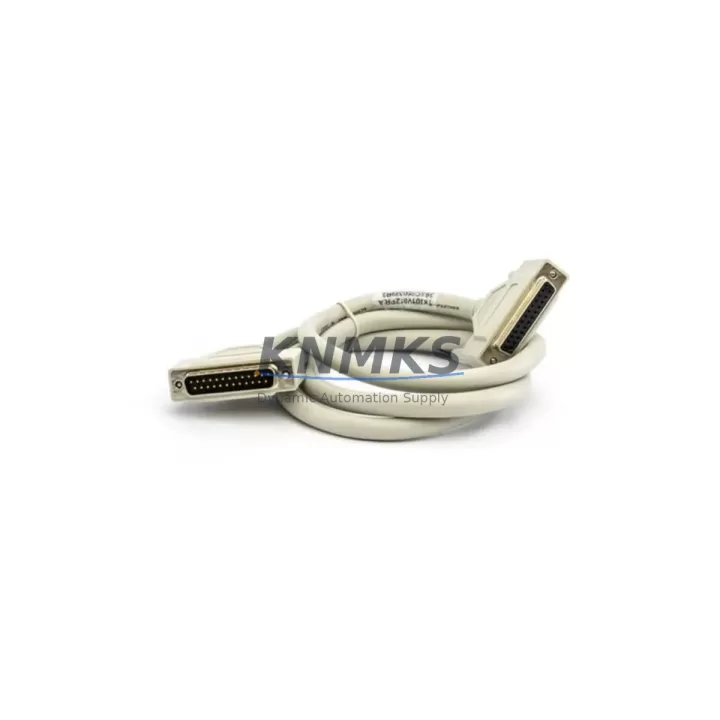
Overview
ABB PMSI121 3BSE005669R1 Maintenance-Proven Spare for Uptime
The ABB PMSI121 (3BSE005669R1) is an original ModuleBus extension cable engineered for ABB S800 I/O systems and AC800M distributed control platforms. In process industries where continuous operation is non-negotiable — refining, pulp and paper, power generation, and chemical processing — this cable forms the physical communication backbone between S800 I/O clusters and the AC800M controller. A degraded or failed PMSI121 can silently disrupt I/O polling cycles, trigger nuisance alarms, or cause complete loss of field signal visibility. Stocking a verified original replacement is a fundamental element of any responsible maintenance strategy.
This listing supplies the genuine ABB PMSI121 3BSE005669R1, sourced from authorized channels, individually inspected, and dispatched with a support terms confirmed by quotation covering manufacturing defects and functional integrity. Each unit undergoes pre-shipment continuity and connector verification before leaving our facility.
Spare Maintenance Table
| Parameter | Specification |
|---|---|
| Part Number | PMSI121 |
| Order Code | 3BSE005669R1 |
| Manufacturer | ABB |
| Series | S800 I/O / AC800M |
| Function | ModuleBus Extension Cable — connects S800 I/O clusters to AC800M controller |
| Interface | ModuleBus (proprietary ABB S800 backplane bus) |
| Compatible Controllers | AC800M (PM851, PM856, PM860, PM861, PM864, PM866 series) |
| Compatible I/O Bases | TB820, TB840, TB842 and associated S800 I/O module bases |
| Country of Origin | Sweden |
| Weight | 580 g |
| Application Environment | Industrial control cabinets, DCS marshalling panels, process automation enclosures |
| Installation | Direct plug-in to ModuleBus port; no tools required; observe ESD precautions |
| Maintenance Interval | Inspect connectors annually; replace on any sign of physical damage or intermittent I/O faults |
| Support terms | 12 Months — manufacturing defects and functional performance |
| Pre-Shipment Test | Continuity check, connector integrity, visual inspection |
Maintenance Planning for Continuous Operation
When a PMSI121 3BSE005669R1 replacement is scheduled — whether during a planned annual shutdown or an emergency callout — experienced maintenance engineers treat the cable swap as an opportunity to audit the surrounding S800 I/O infrastructure. The ModuleBus cable does not operate in isolation; its reliability depends on the health of every component in the same communication chain.
Begin with the AC800M controller module (PM856 or PM864 are common pairings): verify firmware revision, check for active diagnostic alarms, and confirm the ModuleBus port shows no physical damage. Next, inspect the S800 I/O base units (TB820V2 or TB840A) for bent connector pins, corrosion, or heat discoloration — these bases carry both power and ModuleBus signals and are frequent sources of intermittent faults that are misdiagnosed as cable failures.
Power quality at the I/O cluster is equally critical. The SD821 or SD822 power supply modules feeding the S800 rack should be load-tested; an aging power supply with marginal output voltage will cause erratic ModuleBus communication that mimics a faulty extension cable. If the cabinet also houses AI810, AO810, DI810, or DO810 I/O modules, pull each module and inspect the backplane contacts — oxidized contacts are a common root cause of signal dropout in high-humidity environments.
For cabinets with communication-intensive configurations, check the CI854 PROFIBUS DP communication interface or CI857 PROFINET interface if present. These modules share the same AC800M backplane and a loose or damaged ModuleBus cable can corrupt fieldbus polling cycles, producing faults that appear in the PROFIBUS or PROFINET layer rather than the I/O layer — a diagnostic trap that costs hours of troubleshooting time.
Finally, review the TB807 or TB811 terminal bases and associated field wiring terminations. Loose terminal screws and degraded cable shields are the most common field-side contributors to signal noise that stresses the ModuleBus communication layer. Addressing these during the same maintenance window eliminates the risk of a repeat callout within weeks of the cable replacement.
Site Replacement Workflow
Step 1 — Preparation: Download the current AC800M controller configuration backup via Control Builder M before any hardware intervention. Confirm the replacement PMSI121 3BSE005669R1 part number matches the installed cable exactly — length variants exist within the PMSI series and substituting an incorrect length can stress connectors or create cable management problems inside the cabinet.
Step 2 — Safe Isolation: Place the AC800M controller in manual or safe state per your site’s MOC procedure. The S800 I/O system supports hot-swap of I/O modules, but ModuleBus cable replacement requires the communication link to be taken offline. Coordinate with the control room to confirm all affected loops are in manual hold.
Step 3 — Cable Removal: Disconnect the PMSI121 from both the controller ModuleBus port and the I/O base ModuleBus connector. Inspect both mating connectors for bent pins, debris, or corrosion before installing the replacement. Clean with dry compressed air if required.
Step 4 — Installation and Verification: Seat the replacement PMSI121 3BSE005669R1 firmly at both ends. Restore the controller to online mode and monitor the ModuleBus status in Control Builder M or System 800xA. All I/O modules should return to active status within the normal initialization cycle (typically under 30 seconds). Verify field signal values against known references before returning loops to automatic.
Step 5 — Documentation: Record the replacement in the equipment maintenance log with the new part serial number, date, and technician ID. Update the spare parts inventory to trigger reorder of a replacement PMSI121 — maintaining at least one unit on the shelf is the minimum recommended stock level for any site running AC800M-based control.
Spare Parts Support FAQ
Q1: Is this PMSI121 3BSE005669R1 an original ABB part or a compatible substitute?
This is an original ABB PMSI121 3BSE005669R1 ModuleBus extension cable. We do not supply aftermarket or compatible substitutes for safety-critical DCS communication components. Each unit is traceable to authorized supply channels and ships with a support terms confirmed by quotation.
Q2: How do I confirm compatibility with my specific AC800M controller version?
The PMSI121 3BSE005669R1 is compatible with all AC800M controller variants (PM851 through PM866 series) and all S800 I/O base units using the standard ModuleBus interface. If your installation uses an older S800 I/O generation or a non-standard cabinet layout, contact us with your controller firmware version and I/O base model numbers before ordering — we will confirm fit before shipment.
Q3: What is your lead time and do you support emergency orders?
Standard orders ship within 2–5 business days following payment confirmation and pre-shipment inspection. Emergency orders with expedited dispatch are available — contact admin@knmks.com or call +86 18359268345 to confirm current stock status and arrange priority handling. We maintain forward stock of high-demand ABB S800 spare parts to support unplanned outage recovery.
Q4: What does the support terms confirmed by quotation cover and how is a claim processed?
The support terms confirmed by quotation cover manufacturing defects and functional failure under normal operating conditions. It does not cover damage resulting from incorrect installation, overvoltage events, or physical mishandling. To initiate a support terms claim, contact admin@knmks.com with your order number, a description of the fault, and photographic evidence of the defect. We will arrange replacement or credit within 5 business days of claim verification.
© 2026 KNMKS. All rights reserved.
Original Source: https://knmks.com
Contact: admin@knmks.com | +86 18359268345
Product Identification
- Brand / Ecosystem
-
ABB
ABB - Model / Series
-
PMSI121 3BSE005669R1
AC800M Series - Product Family
- PLCs & Controllers
- Availability Status
- Available on request after model and quantity confirmation
- Inquiry Type
- B2B RFQ, replacement inquiry and project spare-part request
- Pre-Quote Check
- Exact SKU, brand, series, quantity, nameplate photos and destination country are checked before quotation
System Path
Where this product fits in the KNMKS automation structure.
Specification & Inquiry Focus
- Control platform
- PLC, PAC and modular controllers
- Common needs
- CPU, rack, power and I/O expansion
- Project support
- Replacement, cabinet build and maintenance
Buyer Confirmation
Information KNMKS checks before replying.
- Exact model
- PMSI121 3BSE005669R1
- Brand / ecosystem
- ABB
- Product family
- PLCs & Controllers
- Application note
- Replacement, maintenance, project build or spare-part list
- Useful photos
- Nameplate, installed unit, cabinet layout or connector side
- Delivery details
- Quantity, destination country and target schedule
Document Support
Files and notes can be confirmed during quotation.
- Product photos or nameplate confirmation when available
- Packing and delivery notes before quotation confirmation
- Support scope and delivery terms confirmed per inquiry
- Export document coordination for qualified B2B requests
Inquiry Support
- Model cross-checking before quotation
- CPU, power, rack and expansion module matching
- Support for replacement and project inquiry
What to Send Us
- Brand and exact model number: ABB PMSI121 3BSE005669R1
- Quantity and required delivery time
- Application, replacement requirement or nameplate photo
- Destination country and shipping preference
RFQ Preparation
This is a product inquiry page built for RFQ communication.
Fast Model Check
Send this model to KNMKS for confirmation.
Include quantity, destination country and photos if this is a maintenance replacement. The inquiry will be saved with a reference number after submission.
Brand & Compatibility Note
KNMKS displays automation product information for well-known industrial brand ecosystems and compatible replacement references. Brand names are used for product identification and compatibility reference only; final availability and commercial terms are confirmed per quotation.
 Manufacturing
 Machine Tools
 Packaging
 Energy & Power



 HMI & Displays
 Servo Systems
 Variable Frequency Drives
 Sensors