
Overview
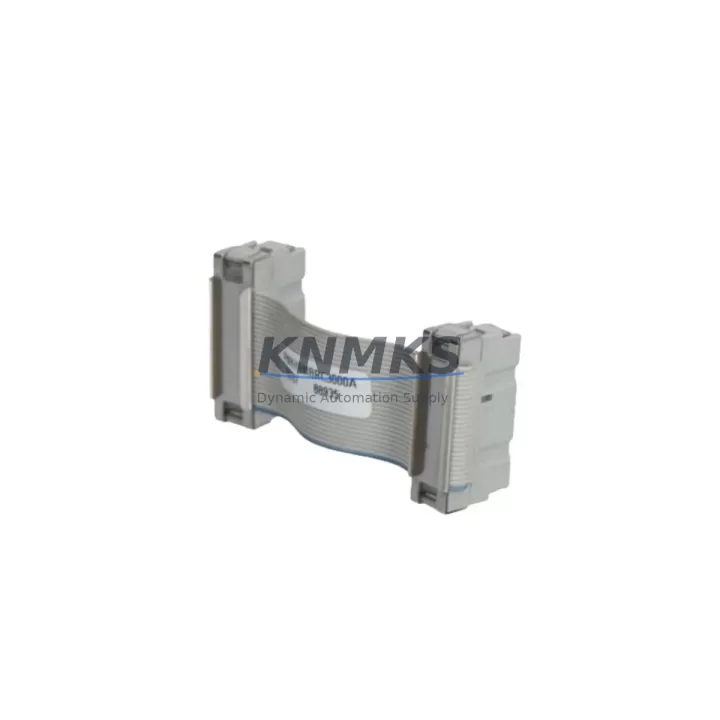
ABB PMKHRMBRC3000A Migration-Ready Redundancy Cable for Legacy Control Systems
The ABB PMKHRMBRC3000A is a dedicated redundancy synchronization cable engineered for the AC500 PLC platform, providing a direct, migration-ready replacement path for aging or discontinued control system infrastructure. As industrial facilities face increasing pressure to extend the operational life of legacy automation systems while minimizing unplanned downtime, the PMKHRMBRC3000A delivers a reliable, pre-tested interconnect solution that bridges existing hardware with modern redundancy architectures.
Designed specifically for use between redundant AC500 CPU modules — including the PM573, PM583, and PM595 series — this cable ensures continuous synchronization of program states, I/O data, and communication status between the active and standby controllers. When retrofitting an existing control cabinet that previously relied on an older or non-redundant AC500 configuration, the PMKHRMBRC3000A allows engineers to introduce hot-standby redundancy without replacing the entire backplane or rack assembly. This is particularly valuable in process industries where control continuity is non-negotiable and cabinet space is constrained.
Before installation, retrofit planners should verify several critical parameters: confirm that both CPU modules share the same firmware version to ensure synchronization compatibility; check that the backplane slot assignments align with the redundancy port mapping defined in the AC500 system configuration; and validate that the existing power supply module — such as the PS501 or PS502 — provides sufficient current headroom to support dual-CPU operation. Terminal wiring on the I/O modules should remain undisturbed during the cable swap, as the PMKHRMBRC3000A connects exclusively at the CPU-to-CPU interface and does not affect field wiring or signal conditioning.
In retrofit scenarios involving communication protocol migration — for example, transitioning from PROFIBUS DP to PROFINET or Modbus TCP — the redundancy cable installation is typically performed in parallel with the communication module upgrade. Engineers replacing a CI590-CS31-HA or CI501-PNIO communication module should complete the protocol reconfiguration in the AC500 engineering tool (Automation Builder) before activating the redundancy link, ensuring that both CPUs boot with identical program images and network parameters. HMI screens connected via OPC-UA or Modbus should be re-mapped to the new IP addressing scheme prior to live switchover.
For systems undergoing I/O expansion as part of the modernization project, the PMKHRMBRC3000A is fully compatible with existing TB511, TB521, and TB541 terminal base assemblies. Adding digital or analog I/O modules to the rack does not require recabling the redundancy link, provided the total backplane current draw remains within the rated capacity of the installed power supply. Installation space confirmation is straightforward: the cable routes between the two CPU modules on the same rack and requires no additional DIN rail or panel cutout.
Every PMKHRMBRC3000A unit shipped by KNMKS undergoes pre-shipment functional testing to verify connector integrity, cable continuity, and shielding performance. Units are supplied with a support terms confirmed by quotation covering manufacturing defects and connector failure under normal operating conditions. Stock is maintained to support both emergency replacement orders and planned maintenance schedules, with same-day dispatch available for in-stock quantities.
Migration Compatibility Table
| Parameter | Details |
|---|---|
| Compatible CPU Modules | AC500 PM573, PM583, PM595 (redundancy-capable variants) |
| Interface Type | Dedicated CPU-to-CPU redundancy sync port |
| Installation Requirement | Same rack / backplane; no additional hardware required |
| Communication Compatibility | Compatible with PROFIBUS DP, PROFINET, Modbus TCP configurations |
| Firmware Requirement | Both CPUs must run identical firmware versions |
| Replacement Recommendation | Direct drop-in for worn, damaged, or missing OEM redundancy cables |
| Commissioning Note | Activate redundancy link after program synchronization is confirmed in Automation Builder |
| Support terms | support terms confirmed by quotation — covers manufacturing defects and connector failure |
Retrofit Planning for Existing Automation Systems
A successful AC500 redundancy retrofit typically involves coordinating several interdependent components. Beyond the PMKHRMBRC3000A cable itself, engineers should audit the condition of the existing TB511 or TB541 terminal bases, verify that the CI590 or CI501 communication modules are firmware-current, and confirm that the PS501 power supply module is rated for the expanded load. In cabinets where space is limited, the compact form factor of the AC500 rack system allows the redundancy cable to be routed without displacing existing wiring ducts or signal isolators. For systems that include remote I/O over CS31 or PROFIBUS, the redundancy configuration in Automation Builder must explicitly define the I/O update cycle to prevent data inconsistency between the active and standby CPUs during switchover events.
Downtime Control During System Migration
Minimizing production interruption during a redundancy cable replacement or initial redundancy commissioning requires a structured approach. The recommended sequence is: (1) back up the current CPU program and configuration from the active controller using Automation Builder; (2) power down only the standby CPU slot while the active CPU maintains process control; (3) install the PMKHRMBRC3000A and restore power to the standby CPU; (4) allow the synchronization cycle to complete before transferring control. This procedure preserves the original program logic, maintains field I/O continuity, and limits the control interruption window to the brief synchronization handshake period — typically under 30 seconds on a healthy AC500 system. HMI displays connected via PROFINET or Modbus TCP remain live throughout the process, and no re-download of the user program is required on the active CPU.
Retrofit Support FAQ
Q: Is the PMKHRMBRC3000A a direct replacement for the original ABB redundancy cable?
A: Yes. The PMKHRMBRC3000A is the OEM-specified redundancy sync cable for AC500 redundant CPU configurations. It is a direct drop-in replacement requiring no modification to the rack, backplane, or field wiring.
Q: What commissioning steps are required after installing the cable?
A: After physical installation, open Automation Builder, navigate to the redundancy configuration tab, and initiate a synchronization check. Both CPUs must display “Synchronized” status before the redundancy link is considered active. No program re-download is required if the standby CPU was previously configured.
Q: Can this cable be used if the two CPUs are running different firmware versions?
A: No. ABB requires both redundant CPUs to run identical firmware versions for the synchronization protocol to function correctly. Update both CPUs to the same firmware release before activating the redundancy link.
Q: What support terms and testing does KNMKS provide?
A: Every unit is pre-tested for connector integrity and cable continuity before dispatch. KNMKS provides a support terms confirmed by quotation on all PMKHRMBRC3000A units, covering manufacturing defects and connector failure under normal operating conditions. In-stock units are available for same-day dispatch to support urgent maintenance requirements.
© 2026 KNMKS. All rights reserved.
Original Source: https://knmks.com
Contact: admin@knmks.com | +86 18359268345
Product Identification
- Brand / Ecosystem
-
ABB
ABB - Model / Series
-
PMKHRMBRC3000A
AC500 Series - Product Family
- Cables & Connectors
- Availability Status
- Available on request after model and quantity confirmation
- Inquiry Type
- B2B RFQ, replacement inquiry and project spare-part request
- Pre-Quote Check
- Exact SKU, brand, series, quantity, nameplate photos and destination country are checked before quotation
System Path
Where this product fits in the KNMKS automation structure.
Specification & Inquiry Focus
- Cable range
- Sensor, servo, network and circular connectors
- Common needs
- Length, pin count, shielding and plug type
- Project support
- Machine wiring and installation kits
Buyer Confirmation
Information KNMKS checks before replying.
- Exact model
- PMKHRMBRC3000A
- Brand / ecosystem
- ABB
- Product family
- Cables & Connectors
- Application note
- Replacement, maintenance, project build or spare-part list
- Useful photos
- Nameplate, installed unit, cabinet layout or connector side
- Delivery details
- Quantity, destination country and target schedule
Document Support
Files and notes can be confirmed during quotation.
- Product photos or nameplate confirmation when available
- Packing and delivery notes before quotation confirmation
- Support scope and delivery terms confirmed per inquiry
- Export document coordination for qualified B2B requests
Inquiry Support
- Cable length and connector type confirmation
- Servo, sensor and network cable inquiry
- Accessory kits for installation teams
What to Send Us
- Brand and exact model number: ABB PMKHRMBRC3000A
- Quantity and required delivery time
- Application, replacement requirement or nameplate photo
- Destination country and shipping preference
RFQ Preparation
This is a product inquiry page built for RFQ communication.
Fast Model Check
Send this model to KNMKS for confirmation.
Include quantity, destination country and photos if this is a maintenance replacement. The inquiry will be saved with a reference number after submission.
Brand & Compatibility Note
KNMKS displays automation product information for well-known industrial brand ecosystems and compatible replacement references. Brand names are used for product identification and compatibility reference only; final availability and commercial terms are confirmed per quotation.
 Manufacturing
 Machine Tools
 Packaging
 Energy & Power
 PLCs & Controllers
 HMI & Displays
 Servo Systems
 Variable Frequency Drives