
Overview
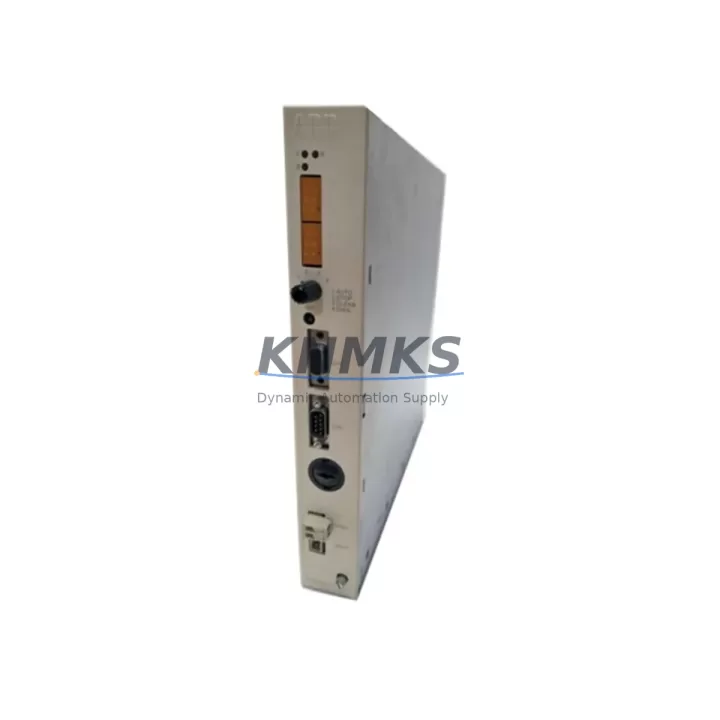
ABB PM633 3BSE008062R1 Migration-Ready CPU for Legacy Control Systems
The ABB PM633 (part number 3BSE008062R1) is a central processing unit designed for the ABB AC800M Distributed Control System platform. As legacy DCS installations age and OEM support windows close, the PM633 has become one of the most sought-after retrofit and replacement modules for engineers managing aging process control infrastructure. Whether you are executing a like-for-like spare replacement, a phased control system upgrade, or a full migration from an earlier ABB Advant or MOD 300 platform, the PM633 3BSE008062R1 provides the processing backbone required to maintain system continuity while modernizing control logic execution.
KNMKS maintains verified stock of the ABB PM633 3BSE008062R1, sourced from decommissioned systems and authorized surplus channels. Every unit undergoes functional testing prior to shipment, and all modules are covered by a support terms confirmed by quotation against manufacturing defects and operational failure.
Migration Compatibility Table
| Parameter | Detail |
|---|---|
| Module Type | DCS Central Processing Unit (CPU) |
| Part Number | 3BSE008062R1 |
| Platform | ABB AC800M |
| Backplane Interface | AC800M S800 I/O bus compatible |
| Communication Ports | Ethernet (CEX bus), RS-232 service port |
| Redundancy Support | Hot standby CPU redundancy via PM633 pair |
| Power Supply Compatibility | 24 VDC via AC800M controller chassis |
| Firmware Compatibility | Compatible with Control Builder M Professional |
| Replaces / Upgrades From | PM630, PM632, earlier AC800M CPU revisions |
| Installation Form Factor | Mounts in standard AC800M controller unit chassis |
| Commissioning Tool | ABB Control Builder M (CBM) |
| Support terms | 12 months from date of shipment |
| Pre-shipment Testing | Full functional test performed on every unit |
| Origin | China (sourced and tested) |
Retrofit Planning for Existing Automation Systems
Replacing a CPU module in an operating DCS environment requires careful pre-migration planning. Before removing the existing processor, engineers should document the current firmware version running on the PM633 or its predecessor, and confirm that the replacement unit carries a compatible or higher firmware revision. Mismatched firmware between a redundant CPU pair — for example, between a primary PM633 and a standby PM633 — can prevent hot-standby synchronization and trigger unplanned switchovers.
Terminal wiring on the AC800M platform is handled at the S800 I/O module level rather than directly at the CPU, which simplifies CPU swaps considerably. However, engineers must verify that all S800 I/O modules — including AI810 analog input modules, DO810 digital output modules, and AO810 analog output modules — are correctly addressed and that module addressing has not been altered in the Control Builder M project file. Any address conflict introduced during a CPU swap will cause I/O communication faults that may not be immediately visible at the HMI level.
The AC800M chassis backplane accommodates the PM633 in a defined slot position. Before installation, confirm that the chassis has adequate physical space and that adjacent modules — such as the TP830 communication interface or the SM811 serial communication module — are not obstructing the CPU slot. The CEX bus connection between the PM633 and communication modules must be verified after seating the new CPU, as a loose CEX bus connector is a common source of post-replacement communication faults.
For sites running PROFIBUS DP fieldbus networks, the PM633 communicates with field devices through dedicated PROFIBUS interface modules such as the CI854 or CI855. These modules retain their configuration independently of the CPU, but engineers should confirm that the PROFIBUS master configuration stored in the Control Builder M project is consistent with the physical network topology before bringing the new CPU online. Similarly, for sites using FOUNDATION Fieldbus or Modbus TCP, the respective communication modules should be verified for correct parameter mapping after the CPU replacement.
HMI screens connected to the AC800M via OPC DA or OPC UA servers should be tested for tag resolution after the CPU swap. In some configurations, the OPC server address table is tied to the CPU’s network identity, and a replacement CPU with a different MAC address may require an OPC server reconfiguration to restore full HMI visibility. Coordinating with the SCADA or DCS historian team before the migration window begins will prevent data gaps in process trend records.
Power budget verification is essential when adding or reconfiguring modules in the same chassis as the PM633. The AC800M power supply module — typically a PS701 or PS702 — must have sufficient headroom to support the CPU plus all installed I/O and communication modules. Overloaded power supplies are a leading cause of intermittent CPU resets in retrofit projects where additional modules have been added without recalculating the chassis power budget.
Downtime Control During System Migration
Minimizing process downtime during a CPU replacement is the primary operational concern for most plant engineers. The PM633 supports hot-standby redundancy when deployed in a redundant CPU pair configuration. In a properly configured redundant system, the standby PM633 can assume control within milliseconds of a primary CPU failure or a planned switchover, allowing the CPU swap to be performed on the standby unit without interrupting the process. This approach is strongly recommended for continuous process industries where even brief control interruptions carry significant production or safety consequences.
For non-redundant installations, the migration window should be planned during a scheduled maintenance shutdown. Before powering down the controller, the current Control Builder M project should be exported and archived, including all function block diagrams, structured text programs, and I/O configuration files. This backup serves as the recovery baseline if the replacement CPU encounters any initialization issues. The project download to the new PM633 should be performed with the I/O bus in a safe state, with field devices placed in manual or local control mode where process safety permits.
After the new PM633 is installed and the project has been downloaded, a systematic I/O verification scan should be performed before returning the system to automatic control. This involves confirming that each S800 I/O module is communicating correctly, that analog signal scaling is intact, and that all digital output states match the expected safe state defined in the control logic. Any discrepancies should be resolved before the process is returned to automatic mode.
KNMKS ships the ABB PM633 3BSE008062R1 with full functional test documentation. Units are packaged in anti-static enclosures with foam protection to prevent transit damage. Standard lead time from order confirmation to shipment is 1–3 business days for in-stock units, supporting tight maintenance windows where procurement lead time is a critical constraint.
Retrofit Support FAQ
Q: Is the ABB PM633 3BSE008062R1 a direct drop-in replacement for the PM632?
A: The PM633 is the successor to the PM632 within the AC800M platform. While the physical form factor and backplane interface are compatible, engineers should verify firmware compatibility using Control Builder M before deployment, as some older PM632 projects may require a project migration step to run correctly on the PM633.
Q: What commissioning steps are required after installing a replacement PM633?
A: After physical installation, connect the service laptop running Control Builder M to the PM633 via the RS-232 service port or Ethernet. Download the archived project file, verify I/O module communication status, confirm CEX bus integrity, and perform a full I/O scan before enabling automatic control. For redundant systems, synchronize the standby PM633 and verify switchover behavior before returning to normal operations.
Q: Does KNMKS test the PM633 3BSE008062R1 before shipment?
A: Yes. Every PM633 unit is powered up and functionally tested prior to shipment. Test records are available upon request. All units are covered by a support terms confirmed by quotation from the date of shipment, covering operational failure and manufacturing defects.
Q: Can the PM633 be used in a system that also has older S800 I/O modules?
A: Yes. The PM633 is compatible with the full range of S800 I/O modules, including legacy variants. Engineers should confirm that the I/O module firmware versions are supported by the Control Builder M version in use, as very early S800 module revisions may require firmware updates to communicate correctly with the PM633 under newer CBM project configurations.
© 2026 KNMKS. All rights reserved.
Original Source: https://knmks.com
Contact: admin@knmks.com | +86 18359268345
Product Identification
- Brand / Ecosystem
-
ABB
ABB - Model / Series
-
PM633 3BSE008062R1
AC800M Series - Product Family
- PLCs & Controllers
- Availability Status
- Available on request after model and quantity confirmation
- Inquiry Type
- B2B RFQ, replacement inquiry and project spare-part request
- Pre-Quote Check
- Exact SKU, brand, series, quantity, nameplate photos and destination country are checked before quotation
System Path
Where this product fits in the KNMKS automation structure.
Specification & Inquiry Focus
- Control platform
- PLC, PAC and modular controllers
- Common needs
- CPU, rack, power and I/O expansion
- Project support
- Replacement, cabinet build and maintenance
Buyer Confirmation
Information KNMKS checks before replying.
- Exact model
- PM633 3BSE008062R1
- Brand / ecosystem
- ABB
- Product family
- PLCs & Controllers
- Application note
- Replacement, maintenance, project build or spare-part list
- Useful photos
- Nameplate, installed unit, cabinet layout or connector side
- Delivery details
- Quantity, destination country and target schedule
Document Support
Files and notes can be confirmed during quotation.
- Product photos or nameplate confirmation when available
- Packing and delivery notes before quotation confirmation
- Support scope and delivery terms confirmed per inquiry
- Export document coordination for qualified B2B requests
Inquiry Support
- Model cross-checking before quotation
- CPU, power, rack and expansion module matching
- Support for replacement and project inquiry
What to Send Us
- Brand and exact model number: ABB PM633 3BSE008062R1
- Quantity and required delivery time
- Application, replacement requirement or nameplate photo
- Destination country and shipping preference
RFQ Preparation
This is a product inquiry page built for RFQ communication.
Fast Model Check
Send this model to KNMKS for confirmation.
Include quantity, destination country and photos if this is a maintenance replacement. The inquiry will be saved with a reference number after submission.
Brand & Compatibility Note
KNMKS displays automation product information for well-known industrial brand ecosystems and compatible replacement references. Brand names are used for product identification and compatibility reference only; final availability and commercial terms are confirmed per quotation.
 Manufacturing
 Machine Tools
 Packaging
 Energy & Power



 HMI & Displays
 Servo Systems
 Variable Frequency Drives
 Sensors