
Overview
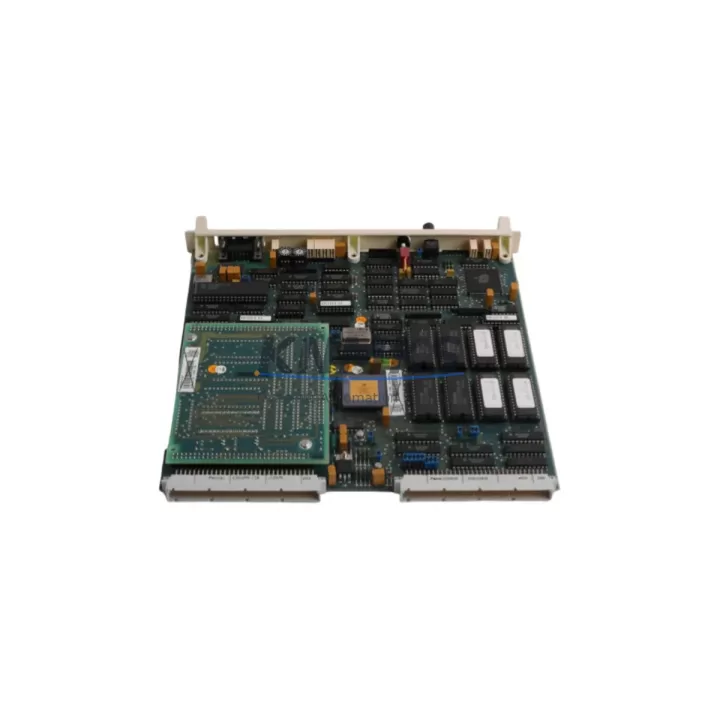
ABB PFSK130 3BSE002616R1 Maintenance-Proven Spare Part for Factory Uptime
The ABB PFSK130 (3BSE002616R1) is a critical communication interface module within the ABB AC800M Distributed Control System (DCS) platform. Designed for high-availability process automation environments — including oil & gas, pulp & paper, power generation, and chemical processing — this module serves as the backbone of controller-to-fieldbus communication. When a PFSK130 fails or degrades, the consequences extend beyond a single I/O channel: the entire controller segment may lose supervisory visibility, triggering unplanned shutdowns and costly production losses.
Maintaining a verified spare of the PFSK130 3BSE002616R1 in your on-site inventory is not optional for facilities running AC800M-based control architectures — it is a fundamental element of any credible maintenance strategy. Our stock is sourced from authorized supply chains, subjected to pre-shipment functional testing, and dispatched with a support terms confirmed by quotation covering manufacturing defects and operational integrity.
Spare Maintenance Table
| Parameter | Specification |
|---|---|
| Part Number | PFSK130 |
| ABB Reference | 3BSE002616R1 |
| Compatible Platform | ABB AC800M DCS (PM851, PM858, PM860, PM861, PM864, PM866) |
| Module Function | S100 I/O Communication Interface / Fieldbus Link Module |
| Communication Bus | S100 I/O Bus (internal backplane communication) |
| Operating Voltage | 24 VDC (supplied via backplane) |
| Operating Temperature | 0°C to +55°C |
| Storage Temperature | -40°C to +70°C |
| Humidity | 5–95% RH, non-condensing |
| Mounting | S100 I/O backplane slot (hot-swap capable in supported configurations) |
| Weight | Approx. 580 g |
| Origin | Sweden (ABB Automation Products) |
| Certifications | CE, UL, cUL (per AC800M system certification) |
| Support terms | 12 Months — covers manufacturing defects and functional integrity |
| Pre-Shipment Test | Yes — functional verification prior to dispatch |
| Typical Lead Time | availability confirmed by RFQ — same-day or next-business-day dispatch available |
Maintenance Planning for Continuous Operation
When a PFSK130 3BSE002616R1 is flagged during routine inspection or fails under load, the replacement workflow should not begin and end with the module itself. Experienced maintenance engineers understand that communication faults in AC800M systems are rarely isolated events. A thorough site assessment should accompany every PFSK130 swap.
Begin by verifying the integrity of the PM860 or PM864 controller module seated in the same rack. Communication errors logged against the PFSK130 may originate from controller-side firmware faults or degraded backplane connectors rather than the module itself. Inspect the TB820V2 or TB840A Profibus DP communication module if the affected segment includes field device loops — a failing Profibus interface can generate upstream errors that appear as PFSK130 faults in the system event log.
Check the SD821 or SD822 power supply module supplying the affected I/O rack. Undervoltage conditions — even transient ones — are a leading cause of communication module resets and false fault indications. Measure rail voltage under load before condemning the PFSK130. Similarly, inspect the SS822 or SS823 power supply supervision module for any latched fault states that may have preceded the communication failure.
For facilities using CI854 or CI857 PROFIBUS/PROFINET interface modules in adjacent controller segments, verify that fieldbus topology and termination resistors remain intact. A missing or degraded terminator on a shared bus segment can propagate communication instability across multiple modules. Review the NTAI05 or NTAI09 analog input termination units connected downstream — loose terminal connections or corroded field wiring at the termination unit level frequently manifest as I/O communication errors attributed to the PFSK130.
Finally, confirm that the AC800M system software (Control Builder M) firmware version is compatible with the replacement PFSK130 hardware revision. ABB has issued firmware advisories for specific hardware revision combinations; cross-reference the module’s revision label against the site’s approved hardware matrix before energizing the replacement unit.
Site Replacement Workflow
Step 1 — Pre-Replacement Verification: Download and archive the current AC800M project from Control Builder M. Confirm the PFSK130 slot address and I/O configuration. Note any active alarms or suppressed diagnostics associated with the module.
Step 2 — Safe Isolation: Where hot-swap is not supported or not approved by site procedure, initiate a controlled shutdown of the affected controller segment. Follow site-specific LOTO (Lockout/Tagout) procedures. Discharge any residual backplane voltage before handling the module.
Step 3 — Physical Replacement: Remove the faulty PFSK130 by releasing the front-panel locking lever. Insert the replacement 3BSE002616R1 into the same backplane slot. Ensure the module seats fully and the locking lever engages. Do not force the module — misalignment will damage backplane connectors.
Step 4 — System Restart and Verification: Power up the controller segment. Monitor the AC800M diagnostic display and Control Builder M for module recognition and I/O communication restoration. Confirm all downstream I/O channels report correctly. Clear any latched alarms and verify process values against field instrumentation.
Step 5 — Documentation: Record the replacement in the site maintenance log. Note the failed module’s serial number, replacement date, and any associated fault codes. Retain the failed module for root cause analysis if required by site quality procedures.
This workflow supports rapid recovery from unplanned outages and is equally applicable to planned annual maintenance windows. Facilities that pre-stage a tested PFSK130 3BSE002616R1 spare reduce mean time to repair (MTTR) by eliminating procurement lead time from the recovery critical path.
Spare Parts Support FAQ
Q1: Is the PFSK130 3BSE002616R1 compatible with all AC800M controller variants?
The PFSK130 is designed for use with the ABB AC800M controller family, including PM851, PM858, PM860, PM861, PM864, and PM866 variants. Compatibility depends on the specific S100 I/O backplane configuration and firmware revision. We recommend cross-referencing the module hardware revision against your site’s approved hardware matrix or ABB system documentation before installation.
Q2: What does the support terms confirmed by quotation cover?
Our support terms confirmed by quotation cover manufacturing defects and functional integrity from the date of dispatch. Each unit undergoes pre-shipment functional testing. The support terms does not cover damage resulting from incorrect installation, overvoltage events, or unauthorized modification. Support requests are processed directly through our technical support team.
Q3: How quickly can a replacement PFSK130 be dispatched?
Units held availability confirmed by RFQ are available for same-day or next-business-day dispatch depending on order confirmation time. We maintain forward stock specifically to support emergency maintenance scenarios where production continuity is at risk. Contact our sales team for real-time stock confirmation and expedited shipping options.
Q4: What is the recommended spare parts inventory strategy for AC800M systems?
For facilities operating AC800M-based control systems in continuous process environments, we recommend maintaining a minimum of one PFSK130 3BSE002616R1 per controller segment as a cold standby spare. High-criticality installations — where a single controller segment failure would trigger a full plant shutdown — should consider a 1:1 hot spare ratio. Annual review of spare parts inventory against system age and module failure history is recommended to ensure coverage remains aligned with operational risk.
© 2026 KNMKS. All rights reserved.
Original Source: https://knmks.com
Contact: admin@knmks.com | +86 18359268345
Product Identification
- Brand / Ecosystem
-
ABB
ABB - Model / Series
-
PFSK130-3BSE002616R1
AC800M Series - Product Family
- Communication Modules
- Availability Status
- Available on request after model and quantity confirmation
- Inquiry Type
- B2B RFQ, replacement inquiry and project spare-part request
- Pre-Quote Check
- Exact SKU, brand, series, quantity, nameplate photos and destination country are checked before quotation
System Path
Where this product fits in the KNMKS automation structure.
Specification & Inquiry Focus
- Network range
- Ethernet, fieldbus and gateway modules
- Common needs
- Protocol, port and controller family
- Project support
- Machine networking and data integration
Buyer Confirmation
Information KNMKS checks before replying.
- Exact model
- PFSK130-3BSE002616R1
- Brand / ecosystem
- ABB
- Product family
- Communication Modules
- Application note
- Replacement, maintenance, project build or spare-part list
- Useful photos
- Nameplate, installed unit, cabinet layout or connector side
- Delivery details
- Quantity, destination country and target schedule
Document Support
Files and notes can be confirmed during quotation.
- Product photos or nameplate confirmation when available
- Packing and delivery notes before quotation confirmation
- Support scope and delivery terms confirmed per inquiry
- Export document coordination for qualified B2B requests
Inquiry Support
- Industrial Ethernet and fieldbus module inquiry
- Protocol compatibility review
- Integration project inquiry support
What to Send Us
- Brand and exact model number: ABB PFSK130-3BSE002616R1
- Quantity and required delivery time
- Application, replacement requirement or nameplate photo
- Destination country and shipping preference
RFQ Preparation
This is a product inquiry page built for RFQ communication.
Fast Model Check
Send this model to KNMKS for confirmation.
Include quantity, destination country and photos if this is a maintenance replacement. The inquiry will be saved with a reference number after submission.
Brand & Compatibility Note
KNMKS displays automation product information for well-known industrial brand ecosystems and compatible replacement references. Brand names are used for product identification and compatibility reference only; final availability and commercial terms are confirmed per quotation.
 Manufacturing
 Machine Tools
 Packaging
 Energy & Power
 PLCs & Controllers
 HMI & Displays
 Servo Systems
 Variable Frequency Drives