
Overview
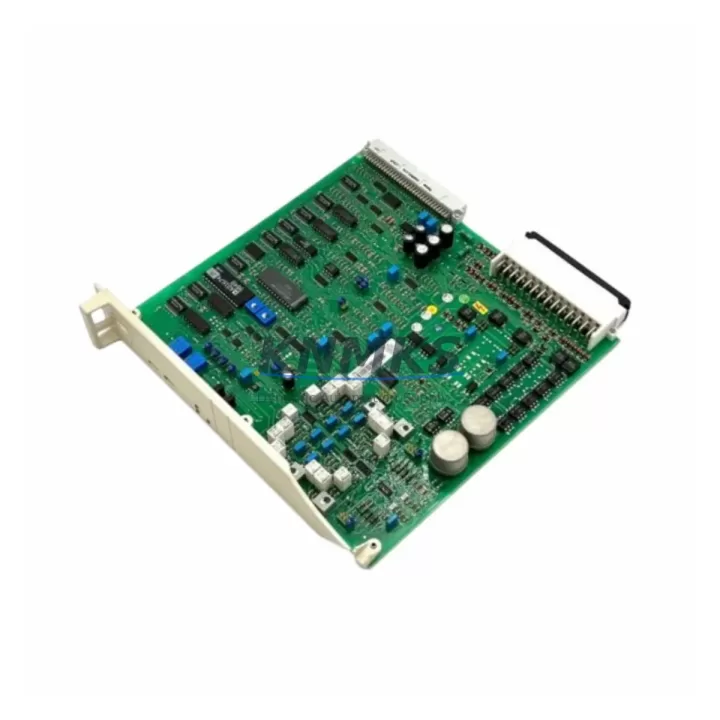
ABB PFBK164 3BSE000469R1 Migration-Ready Signal Card for Legacy Control Systems
The ABB PFBK164 (3BSE000469R1) is a proven signal card designed for the AC800M and Advant OCS control platforms. As legacy DCS and PLC installations age beyond their original design life, plant engineers and system integrators increasingly rely on verified drop-in replacements to extend operational continuity without committing to a full platform migration. The PFBK164 addresses exactly this need: it slots into existing backplane positions, retains original terminal wiring, and maintains compatibility with established control logic — reducing retrofit risk and minimizing unplanned downtime.
Whether you are replacing a failed card in a running production line, building a critical-spare inventory for a remote facility, or executing a phased control-cabinet upgrade, the PFBK164 3BSE000469R1 delivers the electrical and functional equivalence your maintenance team requires. Each unit supplied by KNMKS is individually tested prior to shipment and covered by a support terms confirmed by quotation.
Migration Compatibility Table
| Parameter | Detail |
|---|---|
| Compatible Platform | ABB AC800M, Advant OCS (MOD 300 / Master) |
| Module Type | Signal Card / I/O Interface Card |
| Part Number | PFBK164 / 3BSE000469R1 |
| Backplane Interface | ABB S800 / AC800M standard backplane slot |
| Terminal Wiring | Retains original field-wiring termination; no rewiring required for direct replacement |
| Communication Compatibility | Compatible with PROFIBUS DP, MMS, and internal AC800M communication links |
| Firmware Compatibility | Compatible with existing AC800M firmware versions; verify controller firmware revision before installation |
| Installation Space | Standard single-slot module; fits existing cabinet rail and backplane without mechanical modification |
| Replacement Recommendation | Direct drop-in for failed or end-of-life PFBK164 units; no program re-compilation required in most configurations |
| Commissioning Focus | Verify module address assignment, I/O channel mapping, and HMI tag binding after installation |
| Support terms | 12 months from date of shipment — covers manufacturing defects and functional failure under normal operating conditions |
Retrofit Planning for Existing Automation Systems
A successful retrofit begins well before the replacement card arrives on site. When integrating the PFBK164 3BSE000469R1 into an aging control cabinet, engineers should first audit the PM864A or PM865A processor module firmware version to confirm it supports the signal card’s I/O configuration without requiring a controller software update. In multi-rack installations, the CI854 PROFIBUS DP communication interface should be checked for address conflicts, particularly when the failed card occupied a shared bus segment.
Terminal block continuity is the next critical checkpoint. The PFBK164 connects to field instruments through the standard TB820 or TB840 terminal unit, and verifying that the terminal unit’s mechanical condition and wiring labels are intact before card removal prevents mis-termination errors during reinsertion. Where signal isolation is required — common in mixed AC/DC field environments — a PXAH401 or equivalent signal isolator in the signal path should be inspected and replaced if degraded, since a failing isolator can mask the root cause of the original card failure.
Power budget verification is equally important. The AC800M backplane distributes 24 VDC to installed modules, and adding a replacement card to a cabinet that is already near its power supply capacity can trigger nuisance trips. Confirm that the installed SD821 or SD822 power supply module has sufficient headroom before energizing the replacement. In cabinets where the power supply itself is approaching end-of-life, a concurrent power supply replacement is strongly recommended to avoid a second unplanned outage shortly after the signal card retrofit.
For facilities running Advant OCS Master legacy configurations alongside newer AC800M nodes, the PFBK164 retrofit may also involve updating the Control Builder M project to reflect the new module’s hardware configuration object. This step is straightforward but must be completed before downloading the updated project to the controller, as a mismatch between the hardware configuration and the physical module will prevent the controller from entering RUN mode. HMI screens connected via OPC DA or OPC UA should be validated post-commissioning to confirm that all signal tags are resolving correctly against the replacement card’s channel assignments.
Downtime Control During System Migration
Minimizing production interruption during a signal card replacement requires a structured approach to pre-staging, execution, and verification. Before taking the system offline, export a full backup of the AC800M controller project — including hardware configuration, function block diagrams, and I/O lists — using Control Builder M. This backup serves as both a recovery point and a reference document for post-replacement verification.
Where process conditions allow, place the affected control loop in manual mode at the DCS operator station before removing the failed card. This preserves field actuator positions and prevents uncontrolled process excursions during the card swap. In continuous-process environments where manual mode is not feasible, coordinate with the operations team to identify a planned maintenance window — even a 15-minute window is sufficient for a direct card replacement if all pre-staging steps have been completed.
Physical replacement of the PFBK164 is a hot-swap-capable operation on most AC800M backplane configurations, but confirm this with the site’s system documentation before proceeding without a full controller shutdown. After reinsertion, allow the module to complete its self-test sequence — indicated by the module’s status LED transitioning from red to green — before returning the control loop to automatic mode. Conduct a point-by-point I/O verification against the pre-replacement baseline to confirm signal integrity across all channels before releasing the system to operations.
Maintaining a pre-tested spare PFBK164 3BSE000469R1 in the site’s critical-spare inventory is the single most effective measure for controlling future downtime. KNMKS maintains stock of this module and can support emergency shipment requirements with short lead times.
Retrofit Support FAQ
Q1: Is the PFBK164 3BSE000469R1 a direct replacement for all PFBK164 variants?
The 3BSE000469R1 is the primary revision of the PFBK164 signal card. In most AC800M and Advant OCS installations, it is a direct functional replacement for earlier revisions. However, if your existing installation uses a specific firmware-locked configuration, confirm the revision compatibility with your system documentation or contact KNMKS technical support before ordering.
Q2: What commissioning steps are required after installing the replacement card?
After physical installation, verify the module address in the AC800M hardware configuration, confirm I/O channel mapping in Control Builder M, check HMI tag bindings, and validate communication link status on the PROFIBUS segment. A full I/O loop check against the pre-replacement baseline is recommended before returning the system to automatic control.
Q3: Does KNMKS test the PFBK164 before shipment?
Yes. Every PFBK164 3BSE000469R1 unit supplied by KNMKS undergoes functional testing prior to shipment. Units are verified for signal integrity, backplane communication, and power consumption within specification. Each unit is shipped with a support terms confirmed by quotation covering manufacturing defects and functional failure under normal operating conditions.
Q4: What is the typical lead time and stock availability?
KNMKS maintains inventory of the PFBK164 3BSE000469R1 to support both planned procurement and emergency replacement requirements. Standard lead time for in-stock units is 3–7 business days for international shipment. Contact admin@knmks.com or +86 18359268345 for real-time stock confirmation and expedited shipping options.
© 2026 KNMKS. All rights reserved.
Original Source: https://knmks.com
Contact: admin@knmks.com | +86 18359268345
Product Identification
- Brand / Ecosystem
-
ABB
ABB - Model / Series
-
PFBK164 3BSE000469R1
AC800M Series - Product Family
- PLCs & Controllers
- Availability Status
- Available on request after model and quantity confirmation
- Inquiry Type
- B2B RFQ, replacement inquiry and project spare-part request
- Pre-Quote Check
- Exact SKU, brand, series, quantity, nameplate photos and destination country are checked before quotation
System Path
Where this product fits in the KNMKS automation structure.
Specification & Inquiry Focus
- Control platform
- PLC, PAC and modular controllers
- Common needs
- CPU, rack, power and I/O expansion
- Project support
- Replacement, cabinet build and maintenance
Buyer Confirmation
Information KNMKS checks before replying.
- Exact model
- PFBK164 3BSE000469R1
- Brand / ecosystem
- ABB
- Product family
- PLCs & Controllers
- Application note
- Replacement, maintenance, project build or spare-part list
- Useful photos
- Nameplate, installed unit, cabinet layout or connector side
- Delivery details
- Quantity, destination country and target schedule
Document Support
Files and notes can be confirmed during quotation.
- Product photos or nameplate confirmation when available
- Packing and delivery notes before quotation confirmation
- Support scope and delivery terms confirmed per inquiry
- Export document coordination for qualified B2B requests
Inquiry Support
- Model cross-checking before quotation
- CPU, power, rack and expansion module matching
- Support for replacement and project inquiry
What to Send Us
- Brand and exact model number: ABB PFBK164 3BSE000469R1
- Quantity and required delivery time
- Application, replacement requirement or nameplate photo
- Destination country and shipping preference
RFQ Preparation
This is a product inquiry page built for RFQ communication.
Fast Model Check
Send this model to KNMKS for confirmation.
Include quantity, destination country and photos if this is a maintenance replacement. The inquiry will be saved with a reference number after submission.
Brand & Compatibility Note
KNMKS displays automation product information for well-known industrial brand ecosystems and compatible replacement references. Brand names are used for product identification and compatibility reference only; final availability and commercial terms are confirmed per quotation.
 Manufacturing
 Machine Tools
 Packaging
 Energy & Power



 HMI & Displays
 Servo Systems
 Variable Frequency Drives
 Sensors