
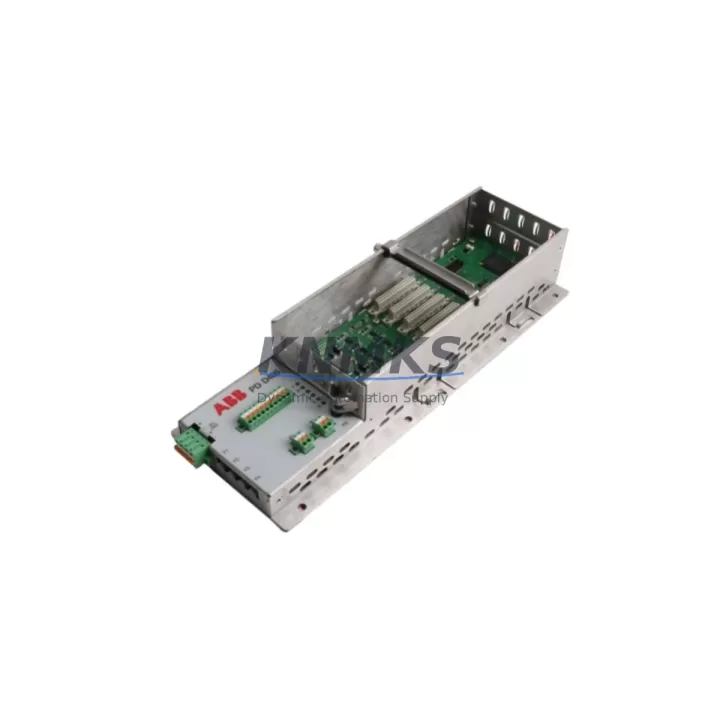
Overview
ABB PDD405A101 Migration-Ready DCS Module for Legacy Control Systems
The ABB PDD405A101 (part number 3BHE041626R0101) is a processor and communication module designed for the ABB AC800M distributed control system platform. As legacy AC800M installations approach end-of-support milestones, plant engineers and automation integrators increasingly rely on verified replacement units to sustain production continuity without committing to a full platform migration. The PDD405A101 addresses this need directly: it is a drop-in compatible module that preserves existing rack geometry, backplane pinout, and firmware communication protocols, enabling controlled, low-risk modernization of aging DCS architectures.
Whether the objective is to replace a failed module under emergency conditions, build a strategic spare buffer ahead of OEM discontinuation, or execute a phased control system upgrade, the PDD405A101 provides a reliable, pre-tested solution. Each unit shipped by KNMKS undergoes pre-shipment functional verification, and is covered by a support terms confirmed by quotation from the date of dispatch.
Migration Compatibility Table
| Parameter | Specification / Retrofit Guidance |
|---|---|
| Part Number | PDD405A101 / 3BHE041626R0101 |
| Platform Compatibility | ABB AC800M DCS (PM860, PM861, PM864, PM866 controller families) |
| Backplane Interface | AC800M S800 I/O backplane; verify slot address assignment before installation |
| Communication Protocol | PROFIBUS DP, Modbus RTU/TCP, IEC 61850 (firmware-dependent); confirm active protocol stack with existing controller configuration |
| Power Supply Requirement | 24 VDC nominal; verify rack PSU capacity (SD821, SD822, or SD823) before hot-swap or cold replacement |
| Installation Footprint | Standard AC800M module width; confirm cabinet rail space and adjacent module clearance |
| Firmware Compatibility | Compatible with Control Builder M (CBM) project files; validate firmware revision against CBM version in use |
| Program Logic Retention | Application logic resides in controller (PM8xx); module swap does not overwrite PLC program |
| HMI Integration | 800xA System or third-party SCADA; verify OPC DA/UA tag mapping after module replacement |
| Pre-Shipment Testing | Functional power-on and communication link verification performed on each unit |
| Support terms | 12 months from dispatch date |
| Lead Time | In-stock units available for same-day or next-business-day dispatch |
Retrofit Planning for Existing Automation Systems
Successful integration of the PDD405A101 into an operating plant environment requires systematic pre-installation planning. The following workflow reflects best practices for AC800M-based control cabinet upgrades and legacy DCS modernization projects.
Power Budget Verification: Before removing the existing module, confirm that the rack power supply — typically an ABB SD821 or SD822 24 VDC unit — has sufficient headroom to support the replacement module under full I/O load. Overloaded PSUs are a common root cause of intermittent faults following module swaps.
Backplane and Slot Address Confirmation: The AC800M backplane assigns logical addresses to each slot. Document the current slot configuration using Control Builder M before removal. If the PDD405A101 is replacing a module in a non-default slot position, update the hardware configuration file accordingly and download the revised configuration to the controller (PM860 or PM864 series) prior to inserting the new module.
I/O Module Continuity: In multi-rack configurations, S800 I/O modules — including AI810 analog input, DI810 digital input, and AO810 analog output units — communicate through the backplane. Verify that I/O module addressing is not disrupted by the replacement. If the control cabinet includes CI854 or CI857 PROFIBUS communication interface modules, confirm that the DP master configuration remains intact after the swap.
Communication Link Validation: For installations using Modbus TCP or IEC 61850 GOOSE messaging, validate that the Ethernet port configuration on the replacement PDD405A101 matches the IP addressing scheme of the existing network segment. Update the 800xA System topology if the module’s MAC address changes.
HMI and SCADA Screen Integrity: After module replacement, perform a full scan of 800xA operator workplace faceplates or third-party SCADA screens to confirm that all process variable tags are resolving correctly. Pay particular attention to alarm setpoints and interlock logic that reference the replaced module’s I/O channels.
Programming Cable and Diagnostic Access: Retain access to a TK212A or equivalent USB-to-serial programming cable during commissioning. This allows direct connection to the controller’s service port for firmware version verification and diagnostic log retrieval without disrupting the live network.
Downtime Control During System Migration
Minimizing unplanned downtime is the primary operational constraint in any DCS module replacement project. The following measures are recommended when integrating the PDD405A101 into a running production environment.
Pre-Staged Configuration: Download the existing Control Builder M project to a laptop before the maintenance window begins. Pre-configure the replacement module offline where possible, so that the live installation step is limited to physical insertion and communication link verification rather than full configuration download.
Cold Swap Protocol: For installations where hot-swap is not supported or where the risk of transient faults is unacceptable, coordinate a controlled shutdown of the affected control loop. Use the AC800M’s built-in redundancy features — where a redundant PM8xx controller pair is installed — to transfer control to the standby controller before removing the primary module. This approach reduces process impact to a brief bumpless transfer rather than a full shutdown.
Program Logic Protection: The PDD405A101 does not store application logic internally; the PLC program resides in the AC800M controller module (PM860, PM861, PM864, or PM866). This architecture means that a module swap carries no risk of program loss, provided the controller itself remains powered and operational during the exchange.
Field Continuity Checks: After insertion, verify that all field device signals — including 4–20 mA analog loops, discrete I/O, and thermocouple inputs routed through TB820 or TB840 terminal base units — are reading correctly in the 800xA System before releasing the loop back to automatic control.
Post-Commissioning Documentation: Update the as-built cabinet drawing and the spare parts register to reflect the installed PDD405A101 serial number and firmware revision. This record supports future maintenance planning and support terms claim processing.
Retrofit Support FAQ
Q1: Is the PDD405A101 a direct replacement for the original ABB module with the same part number?
Yes. The PDD405A101 (3BHE041626R0101) is a form-fit-function compatible replacement for the original ABB production unit. No hardware modification to the rack, backplane, or field wiring is required. Firmware revision should be verified against the Control Builder M project version in use at the site.
Q2: What pre-shipment testing is performed on each unit?
Each PDD405A101 unit undergoes a functional power-on test and communication interface verification before dispatch. Units that do not pass the test protocol are not shipped. A support terms confirmed by quotation is provided from the date of dispatch, covering manufacturing defects and functional failures under normal operating conditions.
Q3: How do I confirm wiring compatibility before installation?
The PDD405A101 connects to the AC800M backplane via the module’s rear connector — no field wiring terminates directly on this module. Field signals are wired to S800 I/O terminal base units (TB820, TB840, or TB845 series). Confirm that the terminal base units and their associated I/O modules are correctly addressed in the Control Builder M hardware configuration before proceeding.
Q4: What is the typical lead time and are units held availability confirmed by RFQ?
KNMKS maintains forward stock of the PDD405A101 to support emergency replacement and planned maintenance scenarios. In-stock units are available for same-day or next-business-day dispatch. Contact the sales team to confirm current inventory levels and shipping options for your region.
© 2026 KNMKS. All rights reserved.
Original Source: https://knmks.com
Contact: admin@knmks.com | +86 18359268345
Product Identification
- Brand / Ecosystem
-
ABB
ABB - Model / Series
-
PDD405A101
AC800M Series - Product Family
- PLCs & Controllers
- Availability Status
- Available on request after model and quantity confirmation
- Inquiry Type
- B2B RFQ, replacement inquiry and project spare-part request
- Pre-Quote Check
- Exact SKU, brand, series, quantity, nameplate photos and destination country are checked before quotation
System Path
Where this product fits in the KNMKS automation structure.
Specification & Inquiry Focus
- Control platform
- PLC, PAC and modular controllers
- Common needs
- CPU, rack, power and I/O expansion
- Project support
- Replacement, cabinet build and maintenance
Buyer Confirmation
Information KNMKS checks before replying.
- Exact model
- PDD405A101
- Brand / ecosystem
- ABB
- Product family
- PLCs & Controllers
- Application note
- Replacement, maintenance, project build or spare-part list
- Useful photos
- Nameplate, installed unit, cabinet layout or connector side
- Delivery details
- Quantity, destination country and target schedule
Document Support
Files and notes can be confirmed during quotation.
- Product photos or nameplate confirmation when available
- Packing and delivery notes before quotation confirmation
- Support scope and delivery terms confirmed per inquiry
- Export document coordination for qualified B2B requests
Inquiry Support
- Model cross-checking before quotation
- CPU, power, rack and expansion module matching
- Support for replacement and project inquiry
What to Send Us
- Brand and exact model number: ABB PDD405A101
- Quantity and required delivery time
- Application, replacement requirement or nameplate photo
- Destination country and shipping preference
RFQ Preparation
This is a product inquiry page built for RFQ communication.
Fast Model Check
Send this model to KNMKS for confirmation.
Include quantity, destination country and photos if this is a maintenance replacement. The inquiry will be saved with a reference number after submission.
Brand & Compatibility Note
KNMKS displays automation product information for well-known industrial brand ecosystems and compatible replacement references. Brand names are used for product identification and compatibility reference only; final availability and commercial terms are confirmed per quotation.
 Manufacturing
 Machine Tools
 Packaging
 Energy & Power



 HMI & Displays
 Servo Systems
 Variable Frequency Drives
 Sensors