
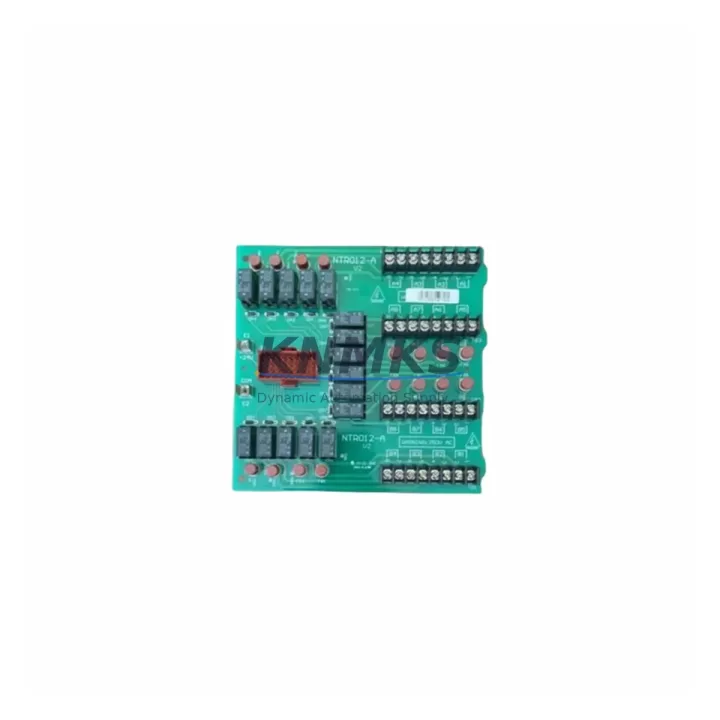
Overview
ABB NTRO12-A Migration-Ready Analog Input for Legacy DCS: Advant MOD 300 Retrofit and Upgrade Guide
The ABB NTRO12-A is a field-proven analog input terminal board designed for the Advant MOD 300 Distributed Control System. As ABB progressively phases out legacy Advant hardware, engineering teams managing aging process control infrastructure face increasing pressure to source reliable, wiring-compatible replacements that minimize retrofit risk and protect existing program logic. The NTRO12-A addresses this challenge directly: it is a migration-ready, pre-tested analog input module that slots into existing MOD 300 rack positions without requiring rewiring of field terminations or modification of controller configuration files.
For plants running continuous processes — refining, petrochemical, pulp and paper, power generation — the NTRO12-A provides a dependable path to extend the operational life of the MOD 300 platform while a full migration to ABB System 800xA or a third-party DCS is planned and budgeted. Its compatibility with the standard MOD 300 backplane interface means that replacement can be executed during a scheduled maintenance window, with no changes to the AMPL (Advant Master Programming Language) application or the HMI graphic displays connected to the controller.
Migration Compatibility Table
| Parameter | Detail |
|---|---|
| SKU / Part Number | NTRO12-A |
| Brand / Manufacturer | ABB |
| Series / Platform | Advant MOD 300 DCS |
| Module Function | Analog Input Terminal Board |
| Backplane Interface | MOD 300 standard rack backplane — direct plug-in replacement |
| Field Wiring Compatibility | Wiring-compatible with existing MOD 300 terminal assignments; no rewiring required |
| Signal Type | Analog input (4–20 mA / 0–10 V field signals, per MOD 300 channel configuration) |
| Installation Requirement | Confirm rack slot address and channel mapping before insertion; verify no address conflict with NTRO01 or NTRO02 modules in adjacent slots |
| Communication Compatibility | Compatible with MOD 300 internal bus; no protocol conversion required |
| Firmware / Software | No firmware update required; recognized automatically by MOD 300 controller on power-up |
| HMI Impact | No HMI graphic changes required; existing tag references remain valid |
| Replacement Recommendation | Direct drop-in for end-of-life NTRO12-A units; verify channel count and I/O list before ordering |
| Pre-Shipment Testing | Yes — each unit tested against MOD 300 signal specifications before dispatch |
| Support terms | 12 months from date of shipment |
| Origin | Germany (DE) |
| Stock Status | Multi-region stock available; fast global dispatch |
Retrofit Planning for Existing Automation Systems
A successful NTRO12-A replacement begins well before the maintenance window opens. The first step is a full audit of the MOD 300 I/O list to confirm which rack slots are occupied by analog input terminal boards and whether any adjacent slots carry NTRO01 (digital input) or NTRO02 (digital output) modules that share backplane address space. Slot address conflicts are the most common cause of post-replacement faults in MOD 300 retrofits and must be resolved in the engineering documentation before the new board is installed.
Power supply capacity is the second critical check. The MOD 300 rack power supply — typically an NPSB01 or NPSB02 unit — must have sufficient headroom to support the NTRO12-A alongside all other installed modules. If the rack is near its rated load, a power budget calculation should be completed and, if necessary, a spare NPSB module staged for parallel installation. Field wiring connected to the terminal board should be verified against the original loop drawings: signal polarity, shield grounding, and cable routing all affect analog signal quality after replacement.
For plants that also operate NKTU01 or NKTU02 communication modules on the same MOD 300 controller, it is important to confirm that the analog input channel data is correctly mapped in the AMPL application before the replacement board goes live. If the plant uses an Advant OCS (Operator Console Station) or a third-party SCADA system connected via the MOD 300 MasterBus 300 network, the engineering team should verify that the OPC server tag list does not require updating after the swap. In most cases, a direct NTRO12-A replacement requires no changes to the communication layer, but this should be confirmed against the site-specific system architecture drawing.
Where the retrofit scope extends beyond a single board replacement — for example, when upgrading an entire MOD 300 cabinet to improve I/O density or add redundancy — the NTRO12-A is often installed alongside NKTU01 communication modules, NTRO01 digital input boards, and NPSB power supply units as part of a coordinated cabinet upgrade. In these cases, a staged replacement plan that sequences module swaps by rack and by process area reduces the risk of simultaneous faults and allows the control room team to verify each section before proceeding to the next.
Downtime Control During System Migration
Minimizing unplanned downtime during an NTRO12-A replacement requires a structured approach to pre-work, execution, and post-installation verification. The recommended sequence is: (1) complete all engineering checks and documentation review offline; (2) stage the replacement NTRO12-A and all required tools at the cabinet before the maintenance window begins; (3) power down only the affected rack section, not the entire MOD 300 controller, where the system architecture permits partial rack isolation; (4) remove the failed or end-of-life board, insert the replacement, and restore rack power; (5) verify channel status in the MOD 300 engineering workstation before returning the loop to automatic control.
For processes where even a brief interruption to analog input signals is unacceptable, the engineering team should consider placing the affected control loops in manual mode at the DCS operator station before the swap begins. This protects the process from spurious control actions triggered by the momentary loss of input signal during board removal. Once the replacement NTRO12-A is confirmed online and all channel readings are within expected range, the loops can be returned to automatic control in a controlled sequence.
Post-installation, a 30-minute observation period is recommended to confirm signal stability across all channels on the new board. Any channel showing unexpected drift or noise should be investigated at the field terminal level before the maintenance window closes. All replacement activities should be documented in the site change management system, including the serial number of the removed board, the serial number of the installed NTRO12-A, and the date and time of the swap. This record supports the support terms confirmed by quotation claim process if a defect is identified after installation.
Retrofit Support FAQ
Q1: Is the NTRO12-A a direct replacement for the original ABB MOD 300 analog input terminal board?
Yes. The NTRO12-A is a direct, wiring-compatible replacement for the original MOD 300 analog input terminal board. No rewiring of field cables, no changes to the AMPL application, and no HMI graphic updates are required. The replacement board is recognized automatically by the MOD 300 controller on power-up.
Q2: What pre-shipment testing is performed on each NTRO12-A unit?
Each NTRO12-A is tested against MOD 300 analog input signal specifications before dispatch. Testing covers channel signal integrity, backplane interface continuity, and power consumption within rated limits. A test record is available on request. All units are covered by a support terms confirmed by quotation from the date of shipment.
Q3: How do I confirm the correct slot address before installing the replacement board?
The slot address is determined by the rack position and the MOD 300 I/O configuration file. Before installation, open the MOD 300 engineering workstation, navigate to the I/O configuration for the affected controller, and confirm the slot number assigned to the NTRO12-A channel group. Cross-reference this against the cabinet layout drawing to ensure the physical slot matches the configured address. If there is a discrepancy, resolve it in the engineering documentation before proceeding.
Q4: What is the lead time and stock availability for the NTRO12-A?
The NTRO12-A is held in multi-region stock to support emergency replacements and scheduled outages. Standard dispatch is within 1–3 business days from order confirmation. For large-quantity orders or long-term supply agreements, contact the sales team to discuss stock reservation and priority dispatch arrangements.
© 2026 KNMKS. All rights reserved.
Original Source: https://knmks.com
Contact: admin@knmks.com | +86 18359268345
Product Identification
- Brand / Ecosystem
-
ABB
ABB - Model / Series
-
NTRO12-A
Legacy Series - Product Family
- PLCs & Controllers
- Availability Status
- Available on request after model and quantity confirmation
- Inquiry Type
- B2B RFQ, replacement inquiry and project spare-part request
- Pre-Quote Check
- Exact SKU, brand, series, quantity, nameplate photos and destination country are checked before quotation
System Path
Where this product fits in the KNMKS automation structure.
Specification & Inquiry Focus
- Control platform
- PLC, PAC and modular controllers
- Common needs
- CPU, rack, power and I/O expansion
- Project support
- Replacement, cabinet build and maintenance
Buyer Confirmation
Information KNMKS checks before replying.
- Exact model
- NTRO12-A
- Brand / ecosystem
- ABB
- Product family
- PLCs & Controllers
- Application note
- Replacement, maintenance, project build or spare-part list
- Useful photos
- Nameplate, installed unit, cabinet layout or connector side
- Delivery details
- Quantity, destination country and target schedule
Document Support
Files and notes can be confirmed during quotation.
- Product photos or nameplate confirmation when available
- Packing and delivery notes before quotation confirmation
- Support scope and delivery terms confirmed per inquiry
- Export document coordination for qualified B2B requests
Inquiry Support
- Model cross-checking before quotation
- CPU, power, rack and expansion module matching
- Support for replacement and project inquiry
What to Send Us
- Brand and exact model number: ABB NTRO12-A
- Quantity and required delivery time
- Application, replacement requirement or nameplate photo
- Destination country and shipping preference
RFQ Preparation
This is a product inquiry page built for RFQ communication.
Fast Model Check
Send this model to KNMKS for confirmation.
Include quantity, destination country and photos if this is a maintenance replacement. The inquiry will be saved with a reference number after submission.
Brand & Compatibility Note
KNMKS displays automation product information for well-known industrial brand ecosystems and compatible replacement references. Brand names are used for product identification and compatibility reference only; final availability and commercial terms are confirmed per quotation.
 Manufacturing
 Machine Tools
 Packaging
 Energy & Power



 HMI & Displays
 Servo Systems
 Variable Frequency Drives
 Sensors