
Overview
ABB NKST11-15 Migration-Ready Termination Cable for Legacy Control Systems
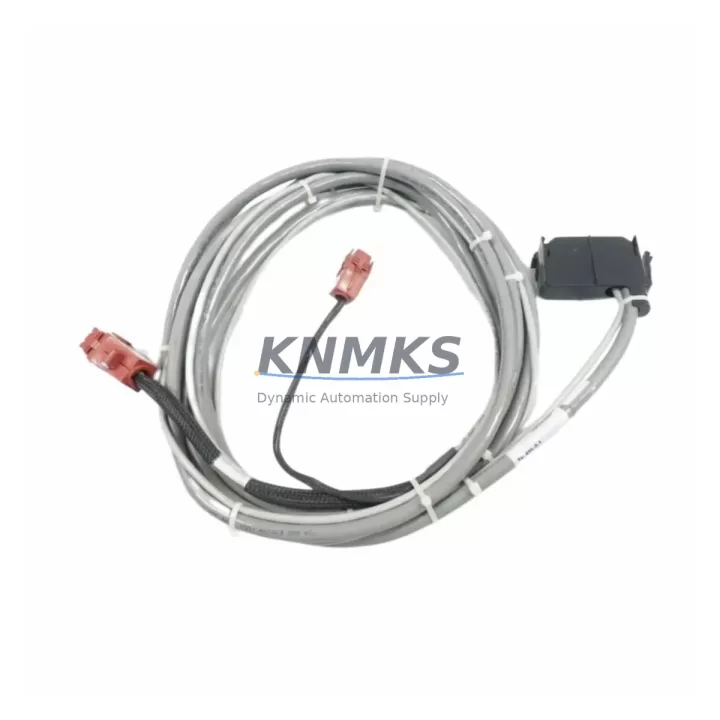
The ABB NKST11-15 is a pre-wired termination cable designed for use with ABB AC500 S500 distributed I/O modules. As legacy control architectures age and original wiring assemblies reach end-of-life, the NKST11-15 provides a direct, drop-in interface between field terminal blocks and S500 I/O modules — eliminating the need for custom cable fabrication during panel retrofits and system migrations.
In modernization projects where engineers are replacing discontinued Modicon TSX, Siemens S5, or early-generation ABB Advant OCS controllers with current AC500 platforms, the NKST11-15 becomes a critical bridging component. It preserves existing field wiring layouts, reduces re-termination labor, and shortens overall commissioning time. The cable is compatible with the full range of ABB S500 digital and analog I/O modules, including the DC532 (32-channel digital input), DC522 (16-channel digital I/O), and DA501 (analog input) families, making it a versatile asset across mixed I/O configurations in a single control cabinet.
For sites running aging DIN-rail panels with hand-wired terminal strips, the NKST11-15 allows engineers to standardize the I/O interface layer without disturbing field cable home runs. This is especially valuable when the retrofit scope includes replacing the TB521-ETH or TB511 communication interface modules, where maintaining signal continuity during cutover is essential to protecting process uptime.
Migration Compatibility Table
| Parameter | Detail |
|---|---|
| SKU / Part Number | NKST11-15 |
| Brand | ABB |
| Series | AC500 / S500 I/O |
| Compatible Modules | ABB S500 digital and analog I/O modules (DC532, DC522, DA501, etc.) |
| Connector Interface | 40-pin flat ribbon / sub-D style termination (verify against target module) |
| Cable Length | 15 cm (standard); confirm rack depth and DIN-rail clearance before installation |
| Installation Requirement | No tools required; plug-and-play into S500 module front connector |
| Communication Compatibility | Passive wiring interface; compatible with PROFIBUS, Modbus RTU, and CS31 bus topologies via host module |
| Replacement Recommendation | Direct replacement for worn, corroded, or discontinued OEM termination cables in AC500 panels |
| Commissioning Notes | Verify module address DIP switches, I/O channel mapping in PS501 Control Builder, and HMI tag assignments before live cutover |
| Support terms | 12 months from date of shipment |
| Origin | CN |
| Stock Status | availability confirmed by RFQ — available for immediate dispatch |
Retrofit Planning for Existing Automation Systems
A successful retrofit using the NKST11-15 begins well before the maintenance window opens. Engineers should audit the existing control cabinet to confirm available backplane slots on the AC500 CPU rack (such as the PM573-ETH or PM591 CPU modules), verify that the S500 I/O bus coupler — typically a DC505-FBP or DC551-CS31 — is firmware-compatible with the replacement I/O modules being introduced, and document all existing terminal block wiring before disconnecting any field cables.
When the retrofit involves expanding I/O capacity alongside the cable replacement, the NKST11-15 can be used in conjunction with newly added DC532 digital input modules or AX521 analog I/O modules without requiring changes to the existing field wiring harness. This is particularly useful in partial-upgrade scenarios where only selected I/O cards are being swapped while the rest of the panel remains operational.
Power budget verification is mandatory before commissioning. Confirm that the PS501 or PS560 power supply module in the rack can support the additional current draw from any new I/O modules added during the retrofit. Overloading the 24 VDC bus is a common cause of intermittent faults in post-retrofit systems and can be avoided with a simple load calculation prior to energizing the panel.
For panels that include signal isolation requirements — particularly in environments with high electromagnetic interference from variable frequency drives or motor starters — consider adding signal isolators between the field terminal strip and the S500 I/O module. The NKST11-15 termination cable is fully compatible with this configuration and does not introduce additional signal attenuation.
HMI screen updates should be planned in parallel with the I/O retrofit. If the existing HMI is communicating via a CP600 panel or a third-party SCADA system using OPC-DA, verify that all I/O tag addresses remain consistent after the module replacement. Mismatched tag addresses are the most frequent source of post-retrofit alarm floods and require careful cross-referencing against the PS501 Control Builder variable list.
Downtime Control During System Migration
Minimizing unplanned downtime during a control system migration requires a structured cutover strategy. For panels using the NKST11-15 as part of an S500 I/O replacement, the recommended approach is a staged swap: replace one I/O module at a time, verify channel-by-channel signal integrity using the AC500 diagnostic tools in PS501 Control Builder, and only proceed to the next module after confirming correct operation.
Before the maintenance window begins, export a full backup of the AC500 CPU program, including all variable declarations, task configurations, and communication settings. Store this backup on an offline engineering workstation and verify it can be restored cleanly to a spare CPU module if needed. This protects the original program logic and ensures that a rollback path exists if the retrofit encounters unexpected hardware incompatibilities.
Field wiring should be photographed and labeled before any termination cables are disconnected. The NKST11-15’s plug-in design allows it to be pre-installed on the replacement I/O module on the bench, tested for continuity, and then connected to the field terminal block in a single step — reducing the time the field circuit is open and minimizing the risk of wiring errors during reconnection.
For critical process loops — such as emergency shutdown inputs, motor interlock circuits, or analog control signals — consider using temporary bypass jumpers at the terminal block to maintain signal continuity while the I/O module is being swapped. This technique is widely used in chemical, oil and gas, and power generation facilities to achieve hot-swap-equivalent behavior on non-redundant I/O systems.
After reconnection, perform a full I/O force test from the PS501 Control Builder before returning the system to automatic mode. Confirm that all HMI displays reflect correct process values, all alarms are in their expected states, and communication links to upstream SCADA or DCS systems are re-established. Document the as-built configuration and update the panel wiring diagram to reflect the new module and cable layout.
Retrofit Support FAQ
Q1: Is the NKST11-15 a direct replacement for the original ABB termination cable in my AC500 panel?
Yes. The NKST11-15 is designed as a direct replacement for the standard S500 I/O module termination cable. It uses the same connector interface and pinout as the original OEM cable. Before installation, confirm the cable length (15 cm) is compatible with your panel’s DIN-rail depth and module mounting position.
Q2: What commissioning steps are required after replacing the termination cable?
After installing the NKST11-15, verify the following: (1) I/O module address DIP switches match the PS501 Control Builder configuration; (2) all field signal channels read correctly in the diagnostic view; (3) HMI tag assignments reflect the correct I/O addresses; and (4) communication links on the CS31 or PROFIBUS segment are re-established without bus errors. A channel-by-channel force test is recommended before returning to automatic operation.
Q3: Can the NKST11-15 be used with both digital and analog S500 I/O modules?
Yes. The NKST11-15 is compatible with the full range of ABB S500 I/O modules, including digital input, digital output, and analog I/O variants. Confirm the specific module type (e.g., DC532, DA501) against the cable’s connector pinout to ensure correct channel-to-terminal mapping before wiring field devices.
Q4: What support terms and stock availability does KNMKS offer for the NKST11-15?
All NKST11-15 units shipped by KNMKS carry a support terms confirmed by quotation from the date of shipment, covering manufacturing defects and functional failures under normal operating conditions. Units are availability confirmed by RFQ and available for immediate dispatch. Pre-shipment functional testing is performed on all units. Contact admin@knmks.com for volume pricing, lead time confirmation, and expedited shipping options.
© 2026 KNMKS. All rights reserved.
Original Source: https://knmks.com
Contact: admin@knmks.com | +86 18359268345
Product Identification
- Brand / Ecosystem
-
ABB
ABB - Model / Series
-
NKST11-15
AC500 Series - Product Family
- Cables & Connectors
- Availability Status
- Available on request after model and quantity confirmation
- Inquiry Type
- B2B RFQ, replacement inquiry and project spare-part request
- Pre-Quote Check
- Exact SKU, brand, series, quantity, nameplate photos and destination country are checked before quotation
System Path
Where this product fits in the KNMKS automation structure.
Specification & Inquiry Focus
- Cable range
- Sensor, servo, network and circular connectors
- Common needs
- Length, pin count, shielding and plug type
- Project support
- Machine wiring and installation kits
Buyer Confirmation
Information KNMKS checks before replying.
- Exact model
- NKST11-15
- Brand / ecosystem
- ABB
- Product family
- Cables & Connectors
- Application note
- Replacement, maintenance, project build or spare-part list
- Useful photos
- Nameplate, installed unit, cabinet layout or connector side
- Delivery details
- Quantity, destination country and target schedule
Document Support
Files and notes can be confirmed during quotation.
- Product photos or nameplate confirmation when available
- Packing and delivery notes before quotation confirmation
- Support scope and delivery terms confirmed per inquiry
- Export document coordination for qualified B2B requests
Inquiry Support
- Cable length and connector type confirmation
- Servo, sensor and network cable inquiry
- Accessory kits for installation teams
What to Send Us
- Brand and exact model number: ABB NKST11-15
- Quantity and required delivery time
- Application, replacement requirement or nameplate photo
- Destination country and shipping preference
RFQ Preparation
This is a product inquiry page built for RFQ communication.
Fast Model Check
Send this model to KNMKS for confirmation.
Include quantity, destination country and photos if this is a maintenance replacement. The inquiry will be saved with a reference number after submission.
Brand & Compatibility Note
KNMKS displays automation product information for well-known industrial brand ecosystems and compatible replacement references. Brand names are used for product identification and compatibility reference only; final availability and commercial terms are confirmed per quotation.
 Manufacturing
 Machine Tools
 Packaging
 Energy & Power
 PLCs & Controllers
 HMI & Displays
 Servo Systems
 Variable Frequency Drives