
Overview
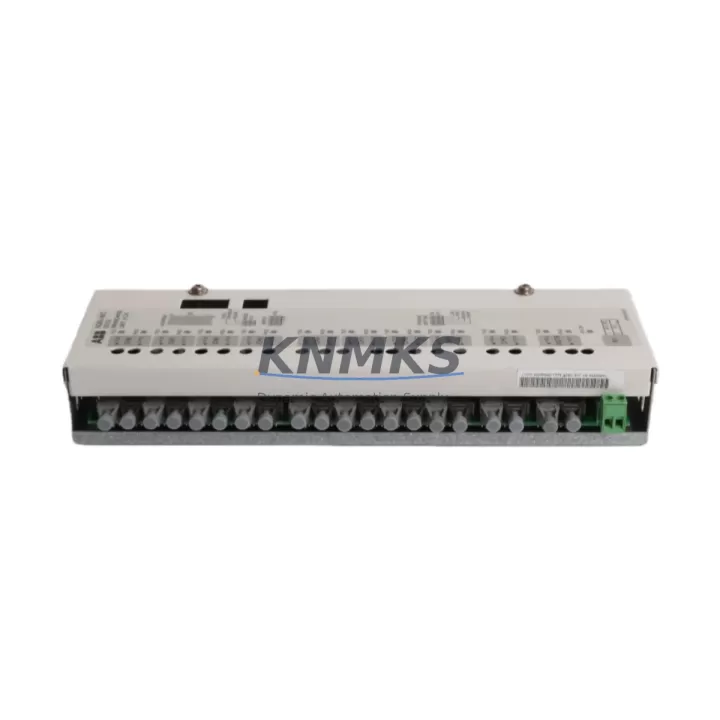
ABB NDBU-95C 64008366 Maintenance-Proven Spare Part for Factory Uptime
The ABB NDBU-95C (catalog reference 64008366) is an original 9-channel DDCS (Distributed Drive Control System) fiber optic branching unit designed for high-reliability industrial automation environments. Manufactured in Finland to ABB’s stringent quality standards, this module serves as the critical fiber optic communication backbone between AC800M process controllers, ACS800 industrial drives, and DCS800 DC drive systems. Sourced as a genuine OEM spare, each unit is pre-tested prior to dispatch and backed by a support terms confirmed by quotation, ensuring maintenance engineers can restore drive communication links with confidence and minimal downtime.
For maintenance planners and procurement engineers managing aging ABB drive systems, securing a verified NDBU-95C spare is a proactive measure that directly protects production continuity. Fiber optic branching unit failures are among the most disruptive faults in DDCS-based control architectures — a single degraded channel can isolate an entire drive string from the controller, triggering unplanned shutdowns across energy, petrochemical, paper, and heavy manufacturing lines. Stocking a tested replacement eliminates the lead-time risk associated with sourcing this component reactively during an emergency.
Spare Maintenance Table
| Parameter | Specification |
|---|---|
| Part Number / SKU | NDBU-95C / 64008366 |
| Brand | ABB |
| Series Compatibility | AC800M, ACS800, DCS800, NDBU Series |
| Communication Protocol | DDCS (Distributed Drive Control System) Fiber Optic |
| Channels | 9-channel fiber optic branching |
| Fiber Type | Plastic optical fiber (POF), compatible with standard DDCS links |
| Mounting | DIN rail / panel mount, standard ABB drive cabinet footprint |
| Operating Temperature | 0°C to +55°C (storage: -40°C to +70°C) |
| Origin | Finland (OEM) |
| Product Condition | Original spare, pre-tested before dispatch |
| Support terms | 12 months from date of shipment |
| Application Environment | Industrial drives, process automation, energy, petrochemical, manufacturing |
| Maintenance Recommendation | Inspect fiber connectors and channel integrity during annual drive cabinet overhaul; replace proactively if DDCS link errors are logged |
Maintenance Planning for Continuous Operation
When scheduling a replacement of the NDBU-95C within an AC800M or ACS800 control cabinet, a thorough site inspection of the surrounding electrical environment is essential to prevent repeat faults and ensure a clean restoration of the DDCS communication ring. Maintenance engineers should begin by verifying the integrity of the DDCS fiber optic cables connecting the branching unit to each drive node — degraded or bent plastic optical fiber links are a common root cause of intermittent channel errors that can be misdiagnosed as a branching unit failure.
The 24 VDC auxiliary power supply feeding the NDBU-95C and associated RDCO-0x drive communication option boards should be checked for voltage stability and ripple, as power quality issues frequently accelerate fiber optic transceiver degradation. If the cabinet houses an NPOW-41C or similar ABB auxiliary power module, confirm its output is within specification before commissioning the replacement unit.
I/O integrity across the drive string should be validated after restoring the DDCS link. Any RDIO or RAIO I/O extension modules connected downstream of the branching unit should be polled to confirm correct node addressing and signal response. Simultaneously, inspect the RMIO-11C or RMIO-02C main control boards in each ACS800 drive for firmware compatibility with the restored communication topology — mismatched firmware versions can cause node enumeration failures even when the hardware is fully functional.
Terminal blocks and cable shields within the fiber optic wiring harness should be inspected for mechanical damage, particularly in high-vibration environments such as compressor drives or rolling mill applications. Loose or corroded shield terminations on signal cables running alongside the fiber harness can introduce EMI that degrades DDCS link quality. Where applicable, verify that surge protection devices and fuse protection on the 24 VDC rail are intact and correctly rated.
For systems integrating HMI panels such as the ABB CP600 series or third-party SCADA interfaces via Profibus or Modbus, confirm that the communication gateway module — typically an RPBA-01 Profibus adapter or RCAN-01 CANopen module — re-establishes its polling cycle correctly after the DDCS ring is restored. A full functional test of the drive string under no-load conditions prior to returning the line to production is strongly recommended.
Site Replacement Workflow
Step 1 — Isolation and Lockout: Follow site LOTO procedures. De-energize the AC800M controller rack and all associated ACS800 or DCS800 drives. Allow DC bus capacitors to fully discharge before opening the cabinet.
Step 2 — Document Existing Configuration: Photograph or record the fiber optic channel assignments on the existing NDBU-95C. Note which drive nodes are connected to which channels to ensure identical restoration. Export the current AC800M project backup if accessible.
Step 3 — Remove Faulty Unit: Disconnect all fiber optic connectors carefully — avoid bending plastic optical fiber below the minimum bend radius. Remove the branching unit from its mounting position. Inspect the fiber connector receptacles on the removed unit for contamination or physical damage to confirm the fault diagnosis.
Step 4 — Install Replacement NDBU-95C (64008366): Mount the new unit in the same position. Reconnect fiber optic links in the documented channel order. Ensure connectors are fully seated and locking clips are engaged.
Step 5 — Power-Up and Verification: Restore auxiliary 24 VDC power first. Observe the NDBU-95C status LEDs — all active channels should indicate a valid link. Power up the AC800M controller and confirm DDCS node enumeration completes without fault codes. Restore drive power and perform a no-load functional test of each drive in the string.
Step 6 — Return to Service: Document the replacement in the site maintenance log. Update the spare parts inventory and initiate a reorder to maintain buffer stock. Retain the replaced unit for failure analysis if required by site quality procedures.
This workflow is compatible with direct replacement of earlier NDBU-95 variants and supports system life extension for legacy AC800M and ACS800 installations without requiring controller reconfiguration.
Spare Parts Support FAQ
Q1: Is the NDBU-95C 64008366 a direct drop-in replacement for earlier NDBU-95 variants?
Yes. The NDBU-95C is the current production revision of the NDBU-95 series and is mechanically and electrically compatible with earlier variants used in AC800M and ACS800 installations. No firmware changes to the controller are required for a like-for-like swap. Always verify channel count and fiber connector type against your existing installation before dispatch.
Q2: How is each unit tested before shipment?
Every NDBU-95C 64008366 unit is functionally tested prior to dispatch to verify DDCS channel integrity and power input performance. Units that do not pass testing are not shipped. A support terms confirmed by quotation from the date of shipment covers any defects in materials or workmanship under normal operating conditions.
Q3: Can you support long-term supply commitments for annual maintenance programs?
Yes. We support blanket purchase orders and scheduled delivery agreements for maintenance teams managing multi-site ABB drive installations. Long-term supply commitments help lock in availability and pricing for critical spare parts such as the NDBU-95C, reducing procurement risk during ABB product lifecycle transitions. Contact our sales team to discuss volume and scheduling requirements.
Q4: What should I check if the DDCS link does not restore after installing the replacement unit?
First, verify that all fiber optic connectors are fully seated and that the plastic optical fiber is not kinked or damaged. Confirm the 24 VDC auxiliary supply is within specification. Check that the AC800M controller project is loaded and that DDCS node addresses match the original configuration. If individual channels remain inactive, inspect the RDCO communication option boards in the connected drives for independent faults. Contact our technical support team with the fault code log from the AC800M for further diagnosis.
© 2026 KNMKS. All rights reserved.
Original Source: https://knmks.com
Contact: admin@knmks.com | +86 18359268345
Product Identification
- Brand / Ecosystem
-
ABB
ABB - Model / Series
-
NDBU-95C-64008366
AC800M Series - Product Family
- PLCs & Controllers
- Availability Status
- Available on request after model and quantity confirmation
- Inquiry Type
- B2B RFQ, replacement inquiry and project spare-part request
- Pre-Quote Check
- Exact SKU, brand, series, quantity, nameplate photos and destination country are checked before quotation
System Path
Where this product fits in the KNMKS automation structure.
Specification & Inquiry Focus
- Control platform
- PLC, PAC and modular controllers
- Common needs
- CPU, rack, power and I/O expansion
- Project support
- Replacement, cabinet build and maintenance
Buyer Confirmation
Information KNMKS checks before replying.
- Exact model
- NDBU-95C-64008366
- Brand / ecosystem
- ABB
- Product family
- PLCs & Controllers
- Application note
- Replacement, maintenance, project build or spare-part list
- Useful photos
- Nameplate, installed unit, cabinet layout or connector side
- Delivery details
- Quantity, destination country and target schedule
Document Support
Files and notes can be confirmed during quotation.
- Product photos or nameplate confirmation when available
- Packing and delivery notes before quotation confirmation
- Support scope and delivery terms confirmed per inquiry
- Export document coordination for qualified B2B requests
Inquiry Support
- Model cross-checking before quotation
- CPU, power, rack and expansion module matching
- Support for replacement and project inquiry
What to Send Us
- Brand and exact model number: ABB NDBU-95C-64008366
- Quantity and required delivery time
- Application, replacement requirement or nameplate photo
- Destination country and shipping preference
RFQ Preparation
This is a product inquiry page built for RFQ communication.
Fast Model Check
Send this model to KNMKS for confirmation.
Include quantity, destination country and photos if this is a maintenance replacement. The inquiry will be saved with a reference number after submission.
Brand & Compatibility Note
KNMKS displays automation product information for well-known industrial brand ecosystems and compatible replacement references. Brand names are used for product identification and compatibility reference only; final availability and commercial terms are confirmed per quotation.
 Manufacturing
 Machine Tools
 Packaging
 Energy & Power



 HMI & Displays
 Servo Systems
 Variable Frequency Drives
 Sensors