
Overview
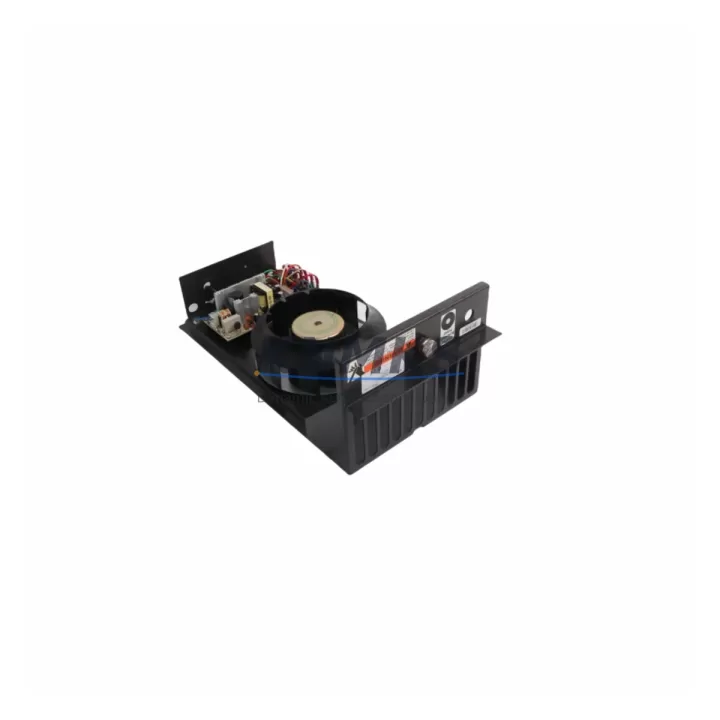
ABB IPFAN14 Maintenance-Proven Spare Part for Factory Uptime
The ABB IPFAN14 is a dedicated cooling fan module engineered for the AC800M Distributed Control System (DCS) platform — one of ABB’s most widely deployed process automation architectures across oil & gas, power generation, pulp & paper, and chemical processing industries. As thermal management is critical to the continuous operation of any DCS controller cabinet, the IPFAN14 plays a non-negotiable role in maintaining safe operating temperatures for the PM891, PM865, and PM864 processor modules housed within the AC800M rack. A failed or degraded cooling fan is one of the most common root causes of unplanned controller shutdowns, making the IPFAN14 a high-priority item in any proactive spare parts inventory strategy.
This listing covers an original ABB IPFAN14 cooling fan module, sourced from verified supply channels, pre-shipment tested for rotational speed, bearing integrity, and connector continuity, and backed by a support terms confirmed by quotation. Units are dispatched from multi-region stock to support emergency replacement timelines across Asia-Pacific, Europe, and the Americas.
Spare Maintenance Table
| SKU / Part Number | IPFAN14 |
| Brand | ABB |
| Series / Platform | AC800M DCS |
| Module Type | DCS Cooling Fan Module |
| Compatible Controllers | PM891, PM865, PM864, PM866 (AC800M series) |
| Compatible Racks | AC800M standard and extended controller racks |
| Rated Voltage | 24 VDC (nominal, rack-supplied) |
| Fan Speed | Approx. 3,000–4,500 RPM (model-dependent) |
| Connector Type | Proprietary ABB rack connector (keyed, tool-free insertion) |
| Operating Temperature | 0°C to +55°C ambient |
| Ingress Protection | IP20 (cabinet-mounted) |
| Country of Origin | Germany |
| Installation | Hot-swap capable; no rack power-down required in most configurations |
| Pre-Shipment Testing | Rotational speed, bearing noise, connector continuity verified |
| Support terms | 12 Months |
| Dispatch | Multi-region stock; express global shipping available |
Maintenance Planning for Continuous Operation
When scheduling replacement of the IPFAN14 cooling fan module, maintenance engineers should treat the intervention as an opportunity for a broader AC800M cabinet health check. Thermal events caused by fan failure rarely occur in isolation — they are frequently accompanied by degraded performance in adjacent components that share the same power rail or thermal envelope.
Begin by verifying the cabinet’s 24 VDC power supply rail, typically sourced from an SD831 or SD832 power supply module. A marginal power supply operating near its rated output can cause intermittent fan stalls that are misdiagnosed as fan bearing failures. Inspect the power supply output voltage under load before committing to a fan-only replacement.
Next, review the status of the PM891 or PM865 processor module itself. Elevated CPU temperatures logged in the AC800M diagnostic history (accessible via ABB Control Builder M) may indicate that the fan degradation has been ongoing for weeks before the fault alarm triggered. If processor temperature logs show sustained readings above 50°C, consider scheduling a processor module inspection alongside the fan replacement.
The TB840A PROFIBUS DP communication module and any installed CI854B or CI857 fieldbus communication interfaces should also be inspected for heat-related connector oxidation or intermittent communication faults. High-temperature exposure accelerates connector degradation on these modules, and a cabinet thermal event is the ideal trigger for a full communication module audit.
For sites running S800 I/O modules (such as the AI810, AO810, or DI810) connected to the AC800M rack via the ModuleBus, verify that the I/O module status LEDs show no fault conditions post-fan replacement. Thermal stress can cause transient I/O faults that clear after the cabinet returns to normal operating temperature, but persistent faults may indicate a module requiring replacement.
Finally, inspect the rack backplane connector and any installed TP830 or TP854 termination panels for signs of heat discoloration or connector pin damage. Backplane integrity is foundational to AC800M system reliability, and a fan replacement event is the right time to confirm that no secondary thermal damage has occurred.
Maintaining a minimum of two IPFAN14 units in on-site spare stock is recommended for any facility operating more than three AC800M controller racks. Fan modules are wear items with a finite bearing lifespan, and lead times for original ABB spare parts can extend to 4–8 weeks through standard distribution channels. Holding local stock eliminates this risk entirely.
Site Replacement Workflow
The IPFAN14 is designed for field replacement without requiring a full controller shutdown in most AC800M configurations, provided the system is operating in redundant controller mode. The following workflow is recommended for maintenance engineers performing an on-site swap:
Step 1 — Pre-Replacement Verification: Confirm the replacement IPFAN14 part number matches the installed unit. Cross-reference the label on the existing fan module with the ABB spare parts catalog. Verify that the replacement unit has passed pre-shipment testing (rotational speed and connector continuity certificate should accompany the shipment).
Step 2 — Cabinet Preparation: Open the AC800M controller cabinet and allow 5 minutes for ambient airflow assessment. Confirm that no other fault alarms are active on the processor or I/O modules before proceeding. Document the current cabinet temperature using a calibrated IR thermometer.
Step 3 — Fan Module Extraction: The IPFAN14 uses a tool-free, keyed connector system. Grip the fan module handle firmly, press the release tab, and withdraw the module horizontally from the rack slot. Avoid tilting the module during extraction to prevent connector pin damage.
Step 4 — Replacement Installation: Align the new IPFAN14 with the rack guide rails and slide firmly until the connector seats fully. Confirm the fan begins rotating within 3 seconds of insertion. Verify the fan status indicator (if present) shows normal operation in the AC800M diagnostic interface.
Step 5 — Post-Replacement Audit: Monitor cabinet temperature for 15 minutes post-replacement. Confirm all processor, I/O, and communication module status LEDs return to normal. Log the replacement in the site maintenance record with the new unit’s serial number and support terms start date.
This workflow supports a target replacement time of under 20 minutes for a trained maintenance technician, minimizing production impact even in non-redundant controller configurations where a brief controller restart may be required.
Spare Parts Support FAQ
Q1: Is the IPFAN14 compatible with all AC800M controller variants?
The IPFAN14 is compatible with the standard AC800M controller rack family, including configurations using PM891, PM865, PM864, and PM866 processor modules. Compatibility should be verified against the specific rack hardware revision using the ABB spare parts catalog or by contacting our technical support team with your existing unit’s label information before ordering.
Q2: What pre-shipment testing is performed on each IPFAN14 unit?
Every IPFAN14 unit dispatched from our stock undergoes rotational speed verification, bearing noise assessment, and connector continuity testing prior to shipment. A test record is available upon request. Units that do not meet ABB’s original performance specifications are not dispatched.
Q3: What is the support terms coverage and what does it include?
All IPFAN14 units are covered by a support terms confirmed by quotation from the date of dispatch. The support terms covers manufacturing defects, premature bearing failure, and connector integrity issues under normal operating conditions. Support requests are supported with direct replacement or documented resolution support, subject to fault verification. Contact admin@knmks.com to initiate a support terms claim.
Q4: Can you support long-term or scheduled procurement for multiple IPFAN14 units?
Yes. We support blanket purchase orders, scheduled delivery programs, and multi-site procurement for maintenance teams managing large AC800M installations. Multi-region stock availability allows us to commit to consistent lead times for planned maintenance programs. Contact our procurement team at admin@knmks.com or +86 18359268345 to discuss volume pricing and delivery scheduling.
© 2026 KNMKS. All rights reserved.
Original Source: https://knmks.com
Contact: admin@knmks.com | +86 18359268345
Product Identification
- Brand / Ecosystem
-
ABB
ABB - Model / Series
-
IPFAN14
AC800M Series - Product Family
- PLCs & Controllers
- Availability Status
- Available on request after model and quantity confirmation
- Inquiry Type
- B2B RFQ, replacement inquiry and project spare-part request
- Pre-Quote Check
- Exact SKU, brand, series, quantity, nameplate photos and destination country are checked before quotation
System Path
Where this product fits in the KNMKS automation structure.
Specification & Inquiry Focus
- Control platform
- PLC, PAC and modular controllers
- Common needs
- CPU, rack, power and I/O expansion
- Project support
- Replacement, cabinet build and maintenance
Buyer Confirmation
Information KNMKS checks before replying.
- Exact model
- IPFAN14
- Brand / ecosystem
- ABB
- Product family
- PLCs & Controllers
- Application note
- Replacement, maintenance, project build or spare-part list
- Useful photos
- Nameplate, installed unit, cabinet layout or connector side
- Delivery details
- Quantity, destination country and target schedule
Document Support
Files and notes can be confirmed during quotation.
- Product photos or nameplate confirmation when available
- Packing and delivery notes before quotation confirmation
- Support scope and delivery terms confirmed per inquiry
- Export document coordination for qualified B2B requests
Inquiry Support
- Model cross-checking before quotation
- CPU, power, rack and expansion module matching
- Support for replacement and project inquiry
What to Send Us
- Brand and exact model number: ABB IPFAN14
- Quantity and required delivery time
- Application, replacement requirement or nameplate photo
- Destination country and shipping preference
RFQ Preparation
This is a product inquiry page built for RFQ communication.
Fast Model Check
Send this model to KNMKS for confirmation.
Include quantity, destination country and photos if this is a maintenance replacement. The inquiry will be saved with a reference number after submission.
Brand & Compatibility Note
KNMKS displays automation product information for well-known industrial brand ecosystems and compatible replacement references. Brand names are used for product identification and compatibility reference only; final availability and commercial terms are confirmed per quotation.
 Manufacturing
 Machine Tools
 Packaging
 Energy & Power



 HMI & Displays
 Servo Systems
 Variable Frequency Drives
 Sensors