
Overview
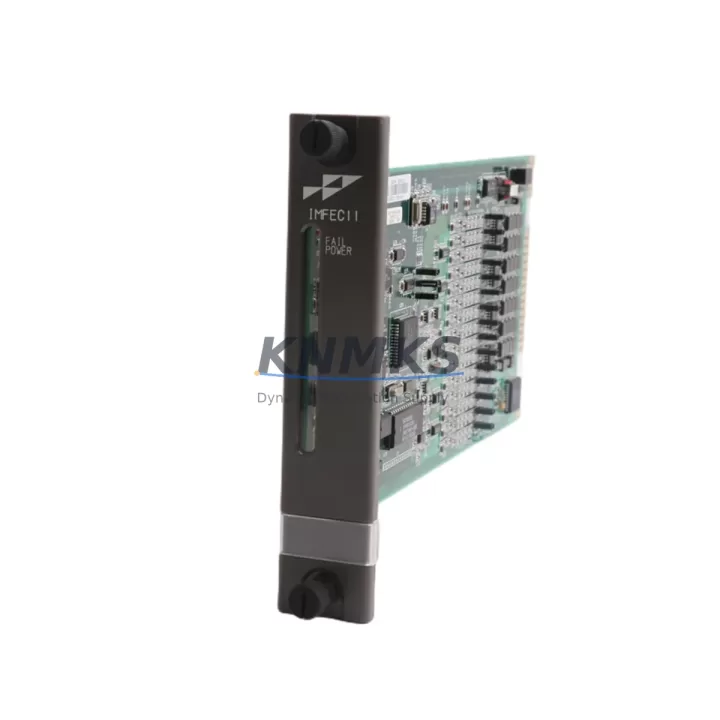
ABB IMFEC11 Migration-Ready Analog Input for Legacy DCS
The ABB IMFEC11 is an 8-channel, 4–20 mA, 16-bit resolution analog input module engineered for the ABB Freelance DCS platform. As legacy Freelance systems approach end-of-life and original spare inventories thin out, the IMFEC11 has become a critical migration component for process plants, chemical facilities, power generation sites, and water treatment operations that depend on continuous analog signal acquisition. Whether you are executing a planned system upgrade, replacing a failed module during an unplanned shutdown, or building a strategic spare parts buffer ahead of a major turnaround, the IMFEC11 delivers verified compatibility with the Freelance controller architecture and the signal integrity required for reliable process control.
Every IMFEC11 unit supplied by KNMKS is sourced from authorized distribution channels or verified surplus stock, subjected to pre-shipment functional testing, and backed by a support terms confirmed by quotation. Our inventory is maintained to support both urgent single-unit emergency orders and bulk procurement for multi-site retrofit programs.
Migration Compatibility Table
| Parameter | Specification / Recommendation |
|---|---|
| SKU / Part Number | IMFEC11 |
| Brand / Manufacturer | ABB |
| Series / Platform | ABB Freelance DCS |
| Module Function | 8-Channel Analog Input (4–20 mA, 16-bit resolution) |
| Signal Type | Current input, 4–20 mA |
| Resolution | 16-bit |
| Backplane Interface | Freelance DCS rack / carrier compatible |
| Communication Protocol | Internal Freelance DCS bus |
| Power Supply Requirement | Supplied via Freelance backplane (verify rack PSU capacity before installation) |
| Legacy Replacement Compatibility | Direct slot-compatible replacement for IMFEC11 in existing Freelance racks |
| Firmware Compatibility | Confirm Freelance controller firmware version supports module revision |
| Installation Space | Standard Freelance single-slot module form factor |
| Origin | Germany (DE) |
| Weight | 220 g |
| Pre-Shipment Test | Functional test performed on every unit |
| Support terms | 12 Months |
Retrofit Planning for Existing Automation Systems
Replacing the IMFEC11 in a live Freelance DCS environment requires a structured approach that goes beyond swapping the module. Maintenance and automation engineers should treat the replacement as a mini-retrofit project, verifying every layer of the signal chain before and after installation.
Rack and backplane integrity is the first checkpoint. Before inserting the replacement IMFEC11, inspect the Freelance rack backplane connectors for corrosion, bent pins, or heat damage. A faulty backplane will cause the new module to report communication errors even if the module itself is fully functional. If the rack is aging, consider sourcing a spare Freelance rack carrier or backplane termination assembly as a contingency.
Power supply capacity must be confirmed. The Freelance DCS power supply module — such as the IMFED11 or equivalent Freelance PSU — must have sufficient headroom to support the IMFEC11’s current draw alongside all other installed modules. Overloaded power rails are a common root cause of intermittent analog signal errors that are frequently misdiagnosed as module faults.
Field wiring and terminal connections should be inspected at the marshalling cabinet. Each of the eight analog input channels connects to field instruments — typically 4–20 mA transmitters for pressure, temperature, flow, or level measurement. Verify that terminal blocks, cable shields, and grounding connections are intact. Corroded or loose terminals on the Freelance field termination unit or marshalling panel can introduce signal noise that degrades 16-bit measurement accuracy.
Module addressing and configuration must be preserved during the swap. Export the existing Freelance Control Builder project before removing the old module. Confirm that the replacement IMFEC11 carries the same hardware revision as the original, or verify that the Freelance controller firmware version supports the new revision. Mismatched revisions can prevent the module from being recognized by the controller, requiring a firmware update or configuration adjustment.
Communication link continuity should be validated after module insertion. The Freelance DCS internal bus — and any associated Freelance communication module or redundant controller pair — should show the IMFEC11 as online within the Control Builder diagnostic view. If the module does not appear, check slot assignment, rack addressing, and bus termination settings.
HMI and SCADA signal mapping is the final validation step. After the module comes online, verify that all eight analog input channels are reading correctly in the Freelance HMI or connected SCADA system. Compare live readings against field instrument local indicators to confirm signal scaling, engineering unit conversion, and alarm setpoints are intact. If the plant uses a signal isolator or loop-powered barrier between the field transmitter and the IMFEC11 input, confirm that the isolator output range matches the module’s input specification.
For sites running extended Freelance DCS installations, it is advisable to maintain a minimum stock of one to two IMFEC11 units alongside related spares such as the IMFED11 power supply module, Freelance digital output modules, and Freelance communication interface modules to ensure rapid recovery from any single-point failure across the control system.
Downtime Control During System Migration
Unplanned downtime caused by a failed analog input module can halt production lines, trigger safety system responses, and generate significant financial losses in process-intensive industries. A disciplined migration workflow minimizes exposure.
Pre-migration preparation: Before the maintenance window, back up the full Freelance Control Builder project, document all channel assignments and scaling parameters, and photograph the existing wiring at the field termination unit. Label all field cables before disconnection to eliminate re-wiring errors.
Hot-swap considerations: The Freelance DCS supports module replacement with the rack powered in some configurations, but this must be confirmed against the specific Freelance version and site safety procedures. In most process plant environments, the affected rack section will be de-energized and the associated field loops placed in manual control or bypassed at the DCS before the module is removed.
Commissioning sequence: After installing the replacement IMFEC11, power up the rack, confirm module recognition in Control Builder, verify all eight channel readings, check alarm states, and release the loops from manual control in a controlled sequence — starting with the least critical process variable and progressing to the most critical. This staged release approach limits the risk of a process upset caused by a misconfigured channel.
Post-replacement documentation: Update the plant’s spare parts register, record the replacement date and module serial number, and file the support terms confirmed by quotation documentation. Schedule a follow-up inspection of the replaced module’s field wiring at the next planned maintenance interval.
Retrofit Support FAQ
Q1: Is the IMFEC11 a direct drop-in replacement for the existing module in my Freelance DCS rack?
Yes, the IMFEC11 is slot-compatible with the ABB Freelance DCS rack architecture. However, you should confirm the hardware revision of the replacement unit against your Freelance controller firmware version using ABB’s compatibility matrix or by consulting your Freelance system documentation before installation.
Q2: How do I verify compatibility before committing to a purchase?
Provide your Freelance controller model, firmware version, and existing IMFEC11 hardware revision to our technical team at admin@knmks.com. We will confirm compatibility and, where applicable, advise on any firmware update requirements before shipment.
Q3: What pre-shipment testing is performed on each IMFEC11 unit?
Every IMFEC11 supplied by KNMKS undergoes functional testing to verify channel integrity, communication bus response, and signal accuracy across all eight analog input channels. A test report is available upon request. All units are shipped with a support terms confirmed by quotation covering manufacturing defects and functional failures under normal operating conditions.
Q4: Can KNMKS support long-term supply for multi-site Freelance DCS retrofit programs?
Yes. KNMKS maintains standing inventory of the IMFEC11 and related Freelance DCS modules to support both emergency single-unit orders and scheduled bulk procurement for multi-site upgrade programs. Contact us to discuss volume pricing, lead times, and consignment stock arrangements for your facility.
© 2026 KNMKS. All rights reserved.
Original Source: https://knmks.com
Contact: admin@knmks.com | +86 18359268345
Product Identification
- Brand / Ecosystem
-
ABB
ABB - Model / Series
-
IMFEC11
Legacy Series - Product Family
- PLCs & Controllers
- Availability Status
- Available on request after model and quantity confirmation
- Inquiry Type
- B2B RFQ, replacement inquiry and project spare-part request
- Pre-Quote Check
- Exact SKU, brand, series, quantity, nameplate photos and destination country are checked before quotation
System Path
Where this product fits in the KNMKS automation structure.
Specification & Inquiry Focus
- Control platform
- PLC, PAC and modular controllers
- Common needs
- CPU, rack, power and I/O expansion
- Project support
- Replacement, cabinet build and maintenance
Buyer Confirmation
Information KNMKS checks before replying.
- Exact model
- IMFEC11
- Brand / ecosystem
- ABB
- Product family
- PLCs & Controllers
- Application note
- Replacement, maintenance, project build or spare-part list
- Useful photos
- Nameplate, installed unit, cabinet layout or connector side
- Delivery details
- Quantity, destination country and target schedule
Document Support
Files and notes can be confirmed during quotation.
- Product photos or nameplate confirmation when available
- Packing and delivery notes before quotation confirmation
- Support scope and delivery terms confirmed per inquiry
- Export document coordination for qualified B2B requests
Inquiry Support
- Model cross-checking before quotation
- CPU, power, rack and expansion module matching
- Support for replacement and project inquiry
What to Send Us
- Brand and exact model number: ABB IMFEC11
- Quantity and required delivery time
- Application, replacement requirement or nameplate photo
- Destination country and shipping preference
RFQ Preparation
This is a product inquiry page built for RFQ communication.
Fast Model Check
Send this model to KNMKS for confirmation.
Include quantity, destination country and photos if this is a maintenance replacement. The inquiry will be saved with a reference number after submission.
Brand & Compatibility Note
KNMKS displays automation product information for well-known industrial brand ecosystems and compatible replacement references. Brand names are used for product identification and compatibility reference only; final availability and commercial terms are confirmed per quotation.
 Manufacturing
 Machine Tools
 Packaging
 Energy & Power



 HMI & Displays
 Servo Systems
 Variable Frequency Drives
 Sensors