
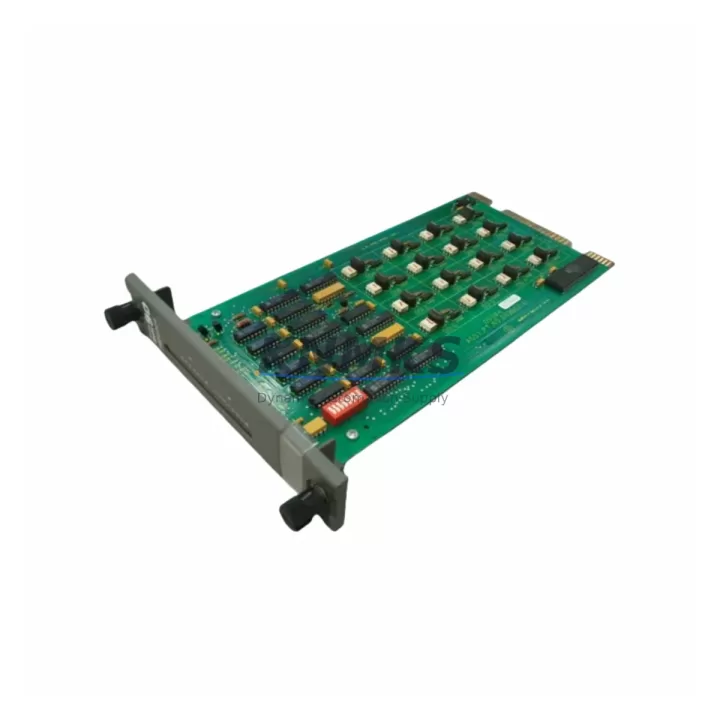
Overview
ABB IMDSO04 Migration-Ready Digital Output Module: Legacy S800 System Retrofit & Compatibility Upgrade
The ABB IMDSO04 is an 8-channel 24 VDC digital output module designed for the S800 I/O platform, widely deployed across AC800M and AC800F distributed control systems in power generation, oil & gas, pulp & paper, and process automation industries. As ABB progressively phases out legacy S800 I/O variants, engineering teams managing aging control cabinets face increasing pressure to source verified replacement modules before scheduled outages or unplanned failures force extended downtime. The IMDSO04 remains one of the most commonly requested discontinued DO modules in the S800 family, and KNMKS maintains multi-region stock to support both emergency dispatch and planned maintenance windows.
Replacing an IMDSO04 in an existing S800 rack requires careful pre-migration verification across several dimensions. First, confirm that the target backplane slot supports 24 VDC digital output addressing — the S800 I/O bus assigns module addresses based on physical slot position, and any mismatch between the original module address and the replacement will require a corresponding update in the AC800M controller configuration or Control Builder M project. Second, verify terminal wiring compatibility: the IMDSO04 uses a standard S800 I/O terminal unit (such as the TU810V1 or TU812V1), and the field wiring connected to the existing terminal unit can typically remain undisturbed during module swap, significantly reducing rewiring risk and cabinet downtime. Third, check that the firmware version running on the AC800M processor module (PM860, PM861, or PM864) is compatible with the IMDSO04 hardware revision being installed — ABB has issued several hardware revisions over the product lifecycle, and older firmware builds may not enumerate newer hardware revisions correctly.
For sites running mixed S800 I/O racks that include both digital and analog I/O, the IMDSO04 replacement is typically performed alongside related modules such as the IMASI03 analog input module or the IMDSI02 digital input module, which share the same backplane bus architecture and terminal unit form factor. In multi-rack configurations connected via the S800 I/O bus extender, it is important to confirm that the replacement module is installed in the correct rack segment and that the bus termination resistors remain properly seated after the swap. Failure to verify bus termination is a common cause of communication faults following module replacement in extended S800 racks.
Sites migrating from older AC800F or Freelance 800F control platforms to AC800M may encounter IMDSO04 modules installed in legacy Fieldbus configurations. In these cases, the migration path typically involves reconfiguring the S800 I/O station from Fieldbus Module (FBM) addressing to ModuleBus addressing, which requires updates to both the hardware configuration in Control Builder M and the corresponding HMI faceplates in ABB’s 800xA System or Freelance Engineering Studio. KNMKS recommends completing a full I/O list audit and HMI tag cross-reference before initiating any protocol migration involving IMDSO04 modules to avoid tag mapping errors that can persist undetected until commissioning.
Power budget verification is another critical step often overlooked during S800 I/O retrofit planning. Each IMDSO04 module draws current from the S800 I/O power supply unit (PSU), and in densely populated racks, adding or replacing output modules can push the rack’s total current draw close to or beyond the PSU’s rated capacity. Before installing the replacement IMDSO04, calculate the total current consumption of all modules in the rack and confirm that the existing PSU — typically an SD821 or SD822 — has sufficient headroom. If the power budget is marginal, a PSU upgrade or rack load redistribution may be required as part of the retrofit plan.
All IMDSO04 units supplied by KNMKS are pre-shipment tested under simulated S800 I/O bus conditions, with output channel continuity, load switching, and diagnostic LED behavior verified prior to dispatch. Each unit ships with a support terms confirmed by quotation covering manufacturing defects and functional failures under normal operating conditions. KNMKS maintains stock across multiple regional warehouses to support fast dispatch for both scheduled maintenance and emergency replacement scenarios.
Migration Compatibility Table
| Parameter | Specification / Recommendation |
|---|---|
| Module SKU | IMDSO04 |
| Brand / Series | ABB / S800 I/O |
| Output Channels | 8 x 24 VDC Digital Output |
| Compatible Controllers | AC800M (PM860, PM861, PM864), AC800F / Freelance 800F |
| Terminal Unit Compatibility | TU810V1, TU812V1 (field wiring retained during swap) |
| Backplane / Bus Interface | S800 I/O ModuleBus; slot address must match original configuration |
| Communication Protocol | S800 ModuleBus (Fieldbus Module addressing also supported for AC800F) |
| Firmware Compatibility | Verify AC800M firmware revision against IMDSO04 hardware revision before installation |
| Power Consumption | Verify rack PSU (SD821 / SD822) current budget before installation |
| Installation Space | Standard S800 I/O rack slot; no mechanical modification required |
| HMI / SCADA Impact | Tag remapping required if migrating from AC800F to AC800M; verify 800xA faceplates |
| Pre-Shipment Testing | Output channel continuity, load switching, diagnostic LED verification |
| Support terms | 12 Months — manufacturing defects and functional failures under normal operation |
| Dispatch | Multi-region stock; emergency and scheduled maintenance supply available |
Retrofit Planning for Existing Automation Systems
A successful IMDSO04 retrofit begins with a structured pre-migration checklist that covers every interface between the replacement module and the surrounding control system. In a typical S800 I/O cabinet, the IMDSO04 sits alongside a mix of analog and digital I/O modules sharing a common backplane. Related modules commonly encountered in the same retrofit scope include the IMASI03 (8-channel analog input), the IMDSI02 (8-channel 24 VDC digital input), and the IMFEC12 fieldbus communication module, which manages the ModuleBus segment connecting the I/O rack to the AC800M controller. In larger installations, the S800 I/O rack may also include an SD821 or SD822 power supply module and a TB820V2 ModuleBus modem for extended rack communication — both of which must be confirmed operational before and after the IMDSO04 swap.
For sites where the IMDSO04 is part of a control cabinet that also houses an AC800M processor module and an associated CI854 PROFIBUS communication interface, the retrofit plan must account for the PROFIBUS segment configuration. If the IMDSO04’s output channels are mapped to PROFIBUS slave devices downstream, any interruption to the ModuleBus during module replacement can trigger PROFIBUS watchdog timeouts, which may require a controlled restart of the PROFIBUS segment after the swap is complete. Coordinating the module replacement with the PROFIBUS segment restart minimizes the risk of cascading faults in connected field devices.
Terminal wiring documentation is essential before any S800 I/O module replacement. KNMKS recommends photographing the existing terminal unit wiring and cross-referencing it against the as-built I/O list before removing the original IMDSO04. This step is particularly important in older installations where field modifications may not have been captured in the current revision of the engineering drawings. Once the replacement module is seated and the terminal unit reconnected, a channel-by-channel output verification using the AC800M’s online diagnostic tools confirms that all eight output channels are responding correctly before the system is returned to automatic control.
Downtime Control During System Migration
Minimizing downtime during an IMDSO04 replacement requires a phased approach that preserves the original control logic and field device states throughout the swap. Where the process permits, the affected output channels should be placed in manual override or forced output mode via the AC800M’s online control tools before the module is removed. This approach keeps field devices — such as solenoid valves, motor starters, or indicator lamps — in their last commanded state during the brief period when the module is physically absent from the rack, preventing unintended process upsets caused by output de-energization.
The AC800M controller’s hot-swap capability for S800 I/O modules allows the IMDSO04 to be replaced without a full controller restart in most configurations, provided that the replacement module is of the same hardware type and the slot address is unchanged. After the new module is inserted, the controller automatically re-enumerates the module and restores the output channel states from the last known configuration. However, if the hardware revision of the replacement module differs from the original, the controller may generate a hardware mismatch alarm that requires acknowledgment before normal operation resumes — this is a known behavior that should be communicated to the site operations team in advance to avoid unnecessary escalation during the commissioning phase.
Post-replacement commissioning should include a full functional test of all eight output channels under live process conditions, with confirmation that the AC800M’s diagnostic display shows no active faults for the IMDSO04 slot. Any residual alarms related to the module replacement should be cleared and documented in the site’s maintenance log before the system is handed back to the operations team. KNMKS provides pre-shipment test documentation for each IMDSO04 unit, which can be used as a baseline reference during site commissioning to confirm that the module’s behavior matches the factory-verified specification.
Retrofit Support FAQ
Q1: Is the IMDSO04 a direct drop-in replacement for all S800 digital output module variants?
The IMDSO04 is compatible with standard S800 I/O racks using TU810V1 or TU812V1 terminal units. It is a direct functional replacement for other 8-channel 24 VDC DO modules in the S800 family. Verify the hardware revision and firmware compatibility with your AC800M processor before installation. KNMKS can provide hardware revision details for each unit upon request.
Q2: Can the IMDSO04 be replaced without stopping the AC800M controller?
In most AC800M configurations, the S800 I/O supports hot-swap replacement of I/O modules without a full controller restart. The controller re-enumerates the replacement module automatically after insertion. If the hardware revision differs from the original, a hardware mismatch alarm may appear and must be acknowledged. Always confirm hot-swap support with your site’s control system documentation before proceeding.
Q3: What wiring changes are required when replacing the IMDSO04?
No field wiring changes are required if the replacement IMDSO04 uses the same terminal unit (TU810V1 or TU812V1) as the original. The terminal unit remains in place and the field cables stay connected throughout the module swap. Only the module itself is removed and replaced. Photograph the terminal unit wiring before removal as a precaution and verify channel assignments against the as-built I/O list after installation.
Q4: What does the support terms confirmed by quotation cover, and how is pre-shipment testing performed?
All IMDSO04 units supplied by KNMKS carry a support terms confirmed by quotation covering manufacturing defects and functional failures under normal operating conditions. Pre-shipment testing includes output channel continuity verification, load switching tests across all eight channels, and diagnostic LED behavior confirmation under simulated S800 I/O bus conditions. Test documentation is available upon request and can be used as a commissioning baseline at the installation site.
© 2026 KNMKS. All rights reserved.
Original Source: https://knmks.com
Contact: admin@knmks.com | +86 18359268345
Product Identification
- Brand / Ecosystem
-
ABB
ABB - Model / Series
-
IMDSO04
AC800M Series - Product Family
- PLCs & Controllers
- Availability Status
- Available on request after model and quantity confirmation
- Inquiry Type
- B2B RFQ, replacement inquiry and project spare-part request
- Pre-Quote Check
- Exact SKU, brand, series, quantity, nameplate photos and destination country are checked before quotation
System Path
Where this product fits in the KNMKS automation structure.
Specification & Inquiry Focus
- Control platform
- PLC, PAC and modular controllers
- Common needs
- CPU, rack, power and I/O expansion
- Project support
- Replacement, cabinet build and maintenance
Buyer Confirmation
Information KNMKS checks before replying.
- Exact model
- IMDSO04
- Brand / ecosystem
- ABB
- Product family
- PLCs & Controllers
- Application note
- Replacement, maintenance, project build or spare-part list
- Useful photos
- Nameplate, installed unit, cabinet layout or connector side
- Delivery details
- Quantity, destination country and target schedule
Document Support
Files and notes can be confirmed during quotation.
- Product photos or nameplate confirmation when available
- Packing and delivery notes before quotation confirmation
- Support scope and delivery terms confirmed per inquiry
- Export document coordination for qualified B2B requests
Inquiry Support
- Model cross-checking before quotation
- CPU, power, rack and expansion module matching
- Support for replacement and project inquiry
What to Send Us
- Brand and exact model number: ABB IMDSO04
- Quantity and required delivery time
- Application, replacement requirement or nameplate photo
- Destination country and shipping preference
RFQ Preparation
This is a product inquiry page built for RFQ communication.
Fast Model Check
Send this model to KNMKS for confirmation.
Include quantity, destination country and photos if this is a maintenance replacement. The inquiry will be saved with a reference number after submission.
Brand & Compatibility Note
KNMKS displays automation product information for well-known industrial brand ecosystems and compatible replacement references. Brand names are used for product identification and compatibility reference only; final availability and commercial terms are confirmed per quotation.
 Manufacturing
 Machine Tools
 Packaging
 Energy & Power



 HMI & Displays
 Servo Systems
 Variable Frequency Drives
 Sensors