
Overview
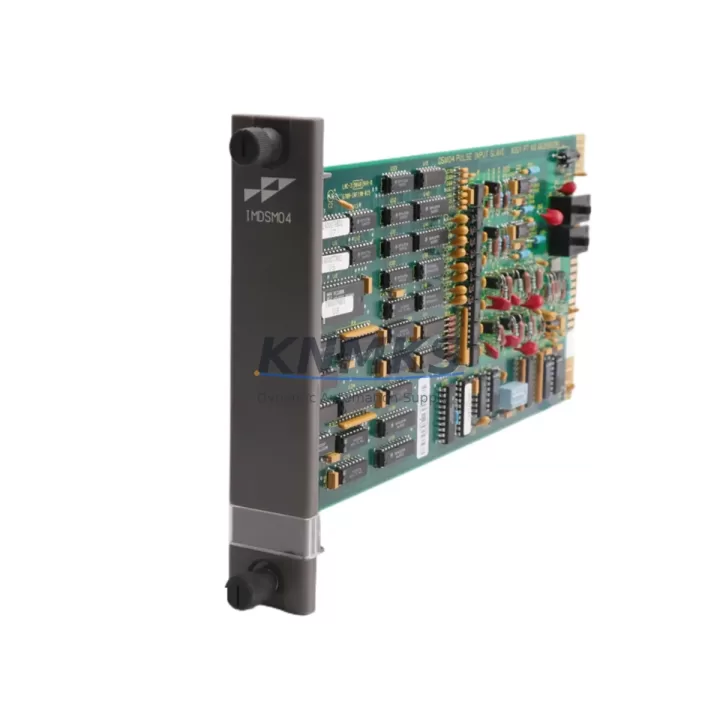
ABB IMDSM04 Migration-Ready Pulse Input Module: Legacy System Retrofit & Compatibility Upgrade
The ABB IMDSM04 is a Pulse Input Module designed for the ABB S800 I/O system, fully compatible with the AC800M Distributed Control System (DCS) platform. As industrial facilities face increasing pressure to modernize aging control infrastructure, the IMDSM04 serves as a critical migration-ready component — enabling engineers to replace discontinued pulse input modules, extend the operational life of existing S800 I/O racks, and maintain process continuity without full system overhauls.
Whether you are managing a brownfield retrofit, replacing end-of-life DCS components, or upgrading a legacy control cabinet to meet current safety and communication standards, the IMDSM04 provides a verified drop-in replacement path with minimal engineering rework. Its compatibility with the S800 I/O backplane and the AC800M controller family makes it a preferred choice for maintenance engineers and system integrators working on long-cycle industrial assets in power generation, oil & gas, pulp & paper, and chemical processing plants.
Migration Compatibility Table
| Parameter | Details |
|---|---|
| Module Type | Pulse Input Module (Digital Frequency / Counter Input) |
| Compatible Platform | ABB S800 I/O System, AC800M DCS Controller |
| Backplane Interface | S800 I/O Backplane (TB820 / TB840 compatible) |
| Installation Requirement | Standard S800 I/O rail mount; no additional hardware adapter required |
| Communication Compatibility | PROFIBUS DP via CI820 / CI830 communication interface modules |
| Replacement Recommendation | Direct replacement for discontinued ABB S800 pulse input variants; verify firmware revision before swap |
| Commissioning Focus | Module address configuration, pulse scaling parameters, and signal wiring polarity verification |
| Support terms | support terms confirmed by quotation — covers manufacturing defects and functional failures under normal operating conditions |
Retrofit Planning for Existing Automation Systems
A successful IMDSM04 retrofit begins well before the module arrives on-site. Engineers must audit the existing S800 I/O rack configuration, confirm available slot positions on the TB820 or TB840 baseplate, and verify that the CI820 or CI830 PROFIBUS communication interface module has sufficient I/O capacity to accommodate the additional pulse input channel. In many legacy installations, the rack may already be populated with AI810 analog input modules, DI810 digital input modules, and AO810 analog output modules — leaving limited physical space that must be mapped before ordering.
Power budget verification is equally critical. The S800 I/O system distributes 24 VDC field power through the backplane, and adding the IMDSM04 requires confirming that the existing PS800 power supply module can sustain the additional load without triggering undervoltage protection. In older installations where the power supply has been running near capacity, a parallel PS800 unit may need to be added to the cabinet before the new module is installed.
Terminal wiring adaptation is another common challenge during pulse input module replacement. The IMDSM04 uses the standard S800 I/O terminal block pinout, but legacy field wiring may have been routed to a different terminal assignment if the original module was from a third-party or earlier ABB generation. Engineers should document the existing wiring diagram, verify signal polarity, and confirm whether the pulse source (flow meter, encoder, or proximity switch) outputs a voltage-free contact, NPN, or PNP signal — as the IMDSM04 input configuration must match the field device output type.
For sites running Control Builder M (CBM) as the engineering tool for the AC800M controller, the module replacement process also involves updating the hardware configuration in the project tree, downloading the revised configuration to the controller, and verifying that the pulse input function block in the application program correctly maps to the new module’s channel address. If the plant uses an ABB 800xA System as the DCS operator interface, the associated HMI faceplates and trend displays linked to the pulse input signal should be validated after the module swap to confirm that engineering unit scaling and alarm limits remain intact.
Downtime Control During System Migration
Minimizing unplanned downtime is the primary concern for any control system migration involving live production assets. For IMDSM04 replacement projects, the recommended approach is to pre-configure the module offline using a spare AC800M controller or a bench test rack before bringing it to the field. This allows engineers to verify module recognition, channel addressing, and pulse input scaling in a controlled environment — eliminating the most common sources of commissioning delay.
On-site, the module swap should be coordinated with the operations team to align with a scheduled maintenance window or a planned process shutdown. The S800 I/O system supports hot-swap capability on certain configurations, but pulse input modules connected to active flow measurement loops should be isolated at the field device level before removal to prevent spurious pulse counts from propagating to the controller and triggering false flow totalization or interlock activation.
After physical installation, the commissioning sequence should follow a structured checklist: confirm module LED status (RUN indicator green, no ERR flash), verify channel-level diagnostics in Control Builder M, perform a live pulse injection test from the field device, and compare the engineering unit readout in the 800xA operator station against the field instrument display. Any discrepancy in pulse scaling or engineering unit conversion should be resolved in the application program before returning the loop to automatic control. Full commissioning records, including before/after signal screenshots and wiring photographs, should be archived as part of the plant’s as-built documentation update.
KNMKS ships the IMDSM04 with a pre-shipment functional test report, confirming that each module has been powered, addressed, and verified against ABB factory specifications before dispatch. This reduces the risk of receiving a non-functional unit and supports faster on-site commissioning with confidence.
Retrofit Support FAQ
Q1: Is the IMDSM04 a direct drop-in replacement for other ABB S800 pulse input modules?
The IMDSM04 is designed for the ABB S800 I/O platform and uses the standard S800 backplane interface. It can replace earlier pulse input module variants within the S800 family, provided the firmware revision of the AC800M controller is compatible with the module’s hardware generation. Always verify the controller firmware version in Control Builder M before finalizing the replacement order. KNMKS technical support can assist with compatibility confirmation based on your controller serial number and firmware revision.
Q2: What wiring changes are required when replacing a legacy pulse input module with the IMDSM04?
In most S800 I/O installations, the terminal block wiring follows the standard ABB pinout and no rewiring is required. However, if the original module used a non-standard terminal assignment or if the field device signal type (NPN/PNP/voltage-free contact) differs from the IMDSM04 input configuration, signal conditioning or wiring adaptation may be needed. KNMKS recommends reviewing the IMDSM04 hardware manual and comparing it against the existing wiring diagram before installation.
Q3: Does KNMKS provide pre-shipment testing and what does the support terms confirmed by quotation cover?
Yes. Every IMDSM04 unit shipped by KNMKS undergoes a pre-shipment functional test that verifies power-up, module recognition, and channel-level signal response. The support terms confirmed by quotation cover manufacturing defects and functional failures under normal operating conditions from the date of shipment. It does not cover damage resulting from incorrect installation, overvoltage, or unauthorized modification. Support requests are processed directly through KNMKS with a target response time of 2 business days.
Q4: What is the typical lead time and do you maintain stock for urgent replacement orders?
KNMKS maintains inventory of the IMDSM04 to support urgent replacement and emergency breakdown scenarios. Standard orders are dispatched within 1–3 business days. For critical plant shutdowns or emergency breakdown situations, please contact our sales team directly at admin@knmks.com or +86 18359268345 to confirm real-time stock availability and expedited shipping options.
© 2026 KNMKS. All rights reserved.
Original Source: https://knmks.com
Contact: admin@knmks.com | +86 18359268345
Product Identification
- Brand / Ecosystem
-
ABB
ABB - Model / Series
-
IMDSM04
AC800M Series - Product Family
- PLCs & Controllers
- Availability Status
- Available on request after model and quantity confirmation
- Inquiry Type
- B2B RFQ, replacement inquiry and project spare-part request
- Pre-Quote Check
- Exact SKU, brand, series, quantity, nameplate photos and destination country are checked before quotation
System Path
Where this product fits in the KNMKS automation structure.
Specification & Inquiry Focus
- Control platform
- PLC, PAC and modular controllers
- Common needs
- CPU, rack, power and I/O expansion
- Project support
- Replacement, cabinet build and maintenance
Buyer Confirmation
Information KNMKS checks before replying.
- Exact model
- IMDSM04
- Brand / ecosystem
- ABB
- Product family
- PLCs & Controllers
- Application note
- Replacement, maintenance, project build or spare-part list
- Useful photos
- Nameplate, installed unit, cabinet layout or connector side
- Delivery details
- Quantity, destination country and target schedule
Document Support
Files and notes can be confirmed during quotation.
- Product photos or nameplate confirmation when available
- Packing and delivery notes before quotation confirmation
- Support scope and delivery terms confirmed per inquiry
- Export document coordination for qualified B2B requests
Inquiry Support
- Model cross-checking before quotation
- CPU, power, rack and expansion module matching
- Support for replacement and project inquiry
What to Send Us
- Brand and exact model number: ABB IMDSM04
- Quantity and required delivery time
- Application, replacement requirement or nameplate photo
- Destination country and shipping preference
RFQ Preparation
This is a product inquiry page built for RFQ communication.
Fast Model Check
Send this model to KNMKS for confirmation.
Include quantity, destination country and photos if this is a maintenance replacement. The inquiry will be saved with a reference number after submission.
Brand & Compatibility Note
KNMKS displays automation product information for well-known industrial brand ecosystems and compatible replacement references. Brand names are used for product identification and compatibility reference only; final availability and commercial terms are confirmed per quotation.
 Manufacturing
 Machine Tools
 Packaging
 Energy & Power



 HMI & Displays
 Servo Systems
 Variable Frequency Drives
 Sensors