
Overview
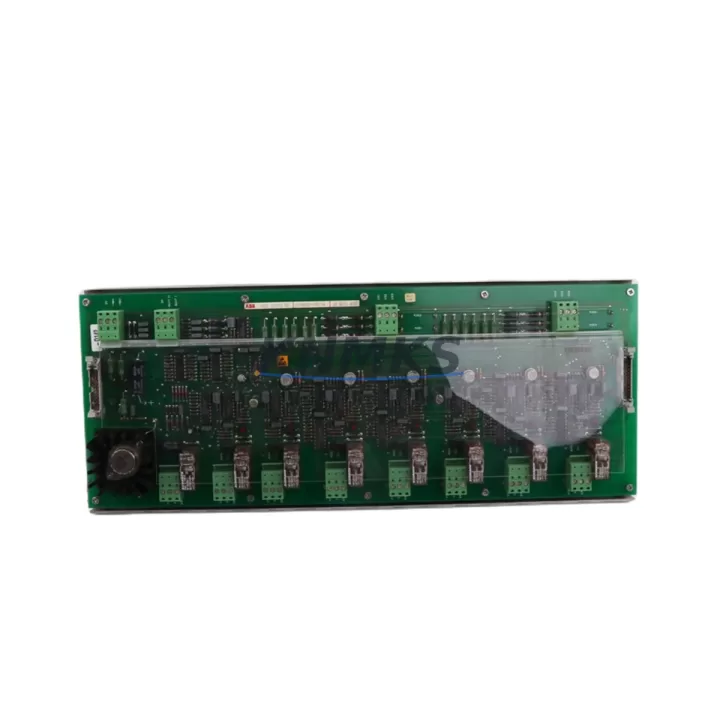
ABB HIEE200072R2 USB030AE02 Spare Part for Factory Uptime
The ABB HIEE200072R2 (USB030AE02) is a 72W DC power supply module engineered for the ABB AC800M Distributed Control System platform — one of the most widely deployed DCS architectures in process industries including oil & gas, pulp & paper, chemical, and power generation. As a maintenance-proven spare part, this module supports uninterrupted factory operation by providing a direct, original-specification replacement for aging or failed units in live control cabinets.
Sourced as an original ABB component and verified against factory specifications, the HIEE200072R2 USB030AE02 is tested prior to shipment and backed by a support terms confirmed by quotation. For maintenance engineers managing aging AC800M installations, having this module in your on-site spare parts inventory is a critical risk-reduction measure — particularly in facilities where DCS downtime translates directly to production loss and safety system interruption.
Whether you are executing a planned annual shutdown, responding to an unplanned power supply fault, or building a preventive maintenance stock for a multi-cabinet AC800M system, the HIEE200072R2 USB030AE02 delivers the compatibility, reliability, and supply continuity that industrial procurement demands.
Spare Maintenance Table
| Part Number | HIEE200072R2 / USB030AE02 |
| Brand | ABB |
| Series | AC800M DCS |
| Product Type | Power Supply Module |
| Rated Output Power | 72W |
| Input Voltage | 24V DC (nominal, AC800M backplane supply) |
| Output Voltage | Regulated DC, per AC800M system spec |
| Form Factor | DIN-rail / rack-mount module, AC800M compatible |
| Weight | 1,200 g |
| Country of Origin | Germany |
| Compatibility | ABB AC800M controller family; PM851, PM856, PM860, PM861 processor modules |
| Installation | Direct module swap; no firmware change required for same-series replacement |
| Application Environment | Process control cabinets, DCS marshalling panels, industrial automation enclosures |
| Maintenance Recommendation | Inspect every 12–24 months; replace proactively at first sign of output voltage drift or thermal anomaly |
| Condition | Original, factory-spec, tested before shipment |
| Support terms | 12 months from date of shipment |
Maintenance Planning for Continuous Operation
When replacing the HIEE200072R2 USB030AE02 in an AC800M control cabinet, a disciplined maintenance engineer will not stop at the power supply module alone. The surrounding electrical environment must be assessed to confirm that the root cause of failure has been isolated and that the new spare is installed into a healthy system.
Begin by inspecting the AC800M backplane (TB820V2 or equivalent) for signs of corrosion, loose module connectors, or thermal stress marks — a degraded backplane can cause premature failure of a newly installed power supply. Next, verify the incoming 24V DC supply rail feeding the cabinet; fluctuations or ripple beyond specification will stress the replacement module immediately. Check the PM856 or PM860 processor module for fault logs that may indicate whether the power supply failure was a symptom of a broader system event.
I/O modules such as the DI810 digital input module and AO810V2 analog output module should be inspected for status LEDs indicating power-related faults during the outage window. If the cabinet includes a CI854 PROFIBUS communication module or CI857 PROFINET interface, confirm that fieldbus communication has been fully restored after power-up — communication modules are sensitive to power interruption sequences and may require a soft reset.
For cabinets with redundant power configurations, inspect the redundancy module (SD821 or SD822) to confirm load-sharing is functioning correctly after the swap. Additionally, check cabinet fuses and MCBs on the 24V distribution rail — a blown fuse upstream of the power supply is a common contributing factor that is frequently overlooked during emergency replacements. Finally, if the system includes an HMI station (Panel 800 series) connected to the AC800M, verify that the HMI communication link has re-established and that no alarm suppression was left active during the maintenance window.
Stocking the HIEE200072R2 USB030AE02 alongside these associated components in your spare parts cabinet ensures that your maintenance team can execute a complete cabinet recovery — not just a single module swap — within a single planned or emergency maintenance window.
Site Replacement Workflow
Step 1 — Pre-replacement verification: Confirm the failed module part number against the cabinet BOM. Verify that the replacement HIEE200072R2 USB030AE02 matches the installed revision. Check ABB AC800M release notes for any known compatibility advisories between USB030AE02 hardware revisions and your current controller firmware.
Step 2 — Safe isolation: Follow your site LOTO (Lockout/Tagout) procedure. For hot-swap capable AC800M configurations with redundant power, confirm redundancy is active before removing the failed module. For non-redundant installations, coordinate with operations for a controlled shutdown window.
Step 3 — Module removal and inspection: Remove the failed HIEE200072R2 and inspect the module slot and backplane connector for debris, burn marks, or pin damage. Clean the slot before installing the replacement.
Step 4 — Installation and power-up: Seat the replacement module firmly. Restore power in sequence per ABB AC800M commissioning guidelines. Monitor the module status LED for normal indication (green steady) within 30 seconds of power-up.
Step 5 — System validation: Confirm all I/O modules have returned to RUN state. Verify fieldbus communication on CI854/CI857 modules. Clear any latched alarms in the AC800M engineering tool (Automation Builder or Control Builder M). Document the replacement in your site maintenance log with date, module serial number, and technician sign-off.
Step 6 — Spare stock replenishment: Immediately initiate a purchase order to replenish the consumed spare. Lead times for original ABB AC800M power supply modules can extend 4–12 weeks through standard distribution channels; maintaining a minimum stock of one unit per cabinet cluster is recommended for facilities with uptime SLAs.
Spare Parts Support FAQ
Q1: Is the HIEE200072R2 USB030AE02 compatible with all AC800M controller variants?
The USB030AE02 power supply module is designed for the ABB AC800M platform and is compatible with the PM851, PM856, PM860, and PM861 processor families. Compatibility with specific hardware revisions should be confirmed against your installed AC800M system version. Contact our technical team with your cabinet BOM for pre-shipment compatibility verification.
Q2: What testing is performed before shipment?
Each HIEE200072R2 USB030AE02 unit is functionally tested prior to shipment to verify output voltage regulation, module communication handshake, and physical connector integrity. A test report is available upon request. All units are shipped with ESD-protective packaging to prevent transit damage.
Q3: What does the support terms confirmed by quotation cover?
The support terms confirmed by quotation cover manufacturing defects and functional failure under normal operating conditions as specified by ABB for the AC800M platform. Support requests are supported with direct technical assistance and priority replacement dispatch. The confirmed support period begins from the confirmed shipment date.
Q4: Can you support long-term or blanket purchase orders for this module?
Yes. For facilities managing multiple AC800M cabinets or executing multi-year maintenance contracts, we support blanket purchase orders, reserved stock agreements, and scheduled delivery programs. Long-term supply arrangements help procurement engineers lock in pricing and guarantee availability for planned shutdowns and annual maintenance cycles. Contact admin@knmks.com to discuss your requirements.
© 2026 KNMKS. All rights reserved.
Original Source: https://knmks.com
Contact: admin@knmks.com | +86 18359268345
Product Identification
- Brand / Ecosystem
-
ABB
ABB - Model / Series
-
HIEE200072R2 USB030AE02
AC800M Series - Product Family
- PLCs & Controllers
- Availability Status
- Available on request after model and quantity confirmation
- Inquiry Type
- B2B RFQ, replacement inquiry and project spare-part request
- Pre-Quote Check
- Exact SKU, brand, series, quantity, nameplate photos and destination country are checked before quotation
System Path
Where this product fits in the KNMKS automation structure.
Specification & Inquiry Focus
- Control platform
- PLC, PAC and modular controllers
- Common needs
- CPU, rack, power and I/O expansion
- Project support
- Replacement, cabinet build and maintenance
Buyer Confirmation
Information KNMKS checks before replying.
- Exact model
- HIEE200072R2 USB030AE02
- Brand / ecosystem
- ABB
- Product family
- PLCs & Controllers
- Application note
- Replacement, maintenance, project build or spare-part list
- Useful photos
- Nameplate, installed unit, cabinet layout or connector side
- Delivery details
- Quantity, destination country and target schedule
Document Support
Files and notes can be confirmed during quotation.
- Product photos or nameplate confirmation when available
- Packing and delivery notes before quotation confirmation
- Support scope and delivery terms confirmed per inquiry
- Export document coordination for qualified B2B requests
Inquiry Support
- Model cross-checking before quotation
- CPU, power, rack and expansion module matching
- Support for replacement and project inquiry
What to Send Us
- Brand and exact model number: ABB HIEE200072R2 USB030AE02
- Quantity and required delivery time
- Application, replacement requirement or nameplate photo
- Destination country and shipping preference
RFQ Preparation
This is a product inquiry page built for RFQ communication.
Fast Model Check
Send this model to KNMKS for confirmation.
Include quantity, destination country and photos if this is a maintenance replacement. The inquiry will be saved with a reference number after submission.
Brand & Compatibility Note
KNMKS displays automation product information for well-known industrial brand ecosystems and compatible replacement references. Brand names are used for product identification and compatibility reference only; final availability and commercial terms are confirmed per quotation.
 Manufacturing
 Machine Tools
 Packaging
 Energy & Power



 HMI & Displays
 Servo Systems
 Variable Frequency Drives
 Sensors