
Overview
ABB GJR5142600R0001 Spare Analog Input for AC 800M DCS
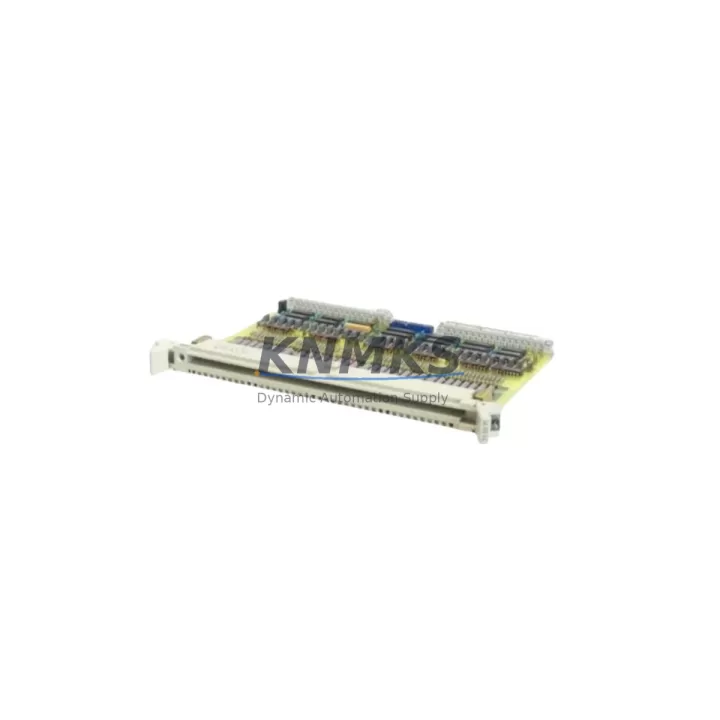
The ABB GJR5142600R0001 (alternate designation 35EB91B) is an S800 I/O series analog input module designed for integration with the ABB AC 800M Distributed Control System. As a maintenance-proven spare part, it supports continuous factory operation by enabling rapid field replacement without requiring hardware redesign or software reconfiguration. For maintenance engineers managing aging DCS infrastructure, having a verified, pre-tested unit of this module availability confirmed by RFQ is a critical element of any proactive spare parts strategy.
The S800 I/O platform is widely deployed across oil and gas, pulp and paper, power generation, chemical processing, and water treatment facilities. The GJR5142600R0001 module occupies a standard S800 I/O station slot and communicates with the AC 800M controller via the ModuleBus interface. Its analog input channels accept standard process signals, making it directly compatible with field transmitters, pressure sensors, temperature loops, and flow measurement devices already installed in legacy control cabinets.
When sourcing this module as a spare, procurement engineers should confirm the firmware revision level of the existing installed base and match it to the replacement unit. The AC 800M controller’s hardware configuration tool (Control Builder M) must recognize the module’s hardware identity string to avoid I/O station faults on restart. In most cases, a direct swap is possible without modifying the application program, provided the slot address and channel assignments remain unchanged.
Spare Maintenance Table
| Parameter | Specification / Recommendation |
|---|---|
| Part Number | GJR5142600R0001 (35EB91B) |
| Brand / Series | ABB / S800 I/O |
| Module Type | Analog Input Module |
| Compatible Controller | ABB AC 800M DCS |
| Communication Interface | ModuleBus (S800 I/O Station) |
| Signal Type | Analog Input (mA / V process signals) |
| Installation | S800 I/O Station rail-mount, standard slot |
| Country of Origin | Germany |
| Weight | 220 g |
| Maintenance Recommendation | Inspect terminal wiring, verify slot address, confirm firmware compatibility before hot-swap |
| Compatibility Verification | Control Builder M hardware scan recommended post-installation |
| Pre-Shipment Testing | Yes — functional test performed before dispatch |
| Support terms | support terms confirmed by quotation |
Maintenance Planning for Continuous Operation
Effective maintenance planning for an AC 800M-based DCS requires more than stocking the GJR5142600R0001 analog input module in isolation. A complete spare parts strategy should account for the full signal chain and power distribution architecture within the I/O station.
The S800 I/O station relies on a dedicated power supply module — typically the SD821 or SD822 — to provide regulated 24 VDC to the I/O bus. If the analog input module is being replaced due to a suspected power-related fault, the I/O station power supply should be inspected and load-tested before the new module is installed. Overlooking a degraded power supply is a common cause of repeat module failures in high-density I/O cabinets.
Terminal block wiring should be verified against the original loop drawings before disconnecting the field cables. In S800 installations, the TB820 or TB840 termination units carry the field wiring and connect to the I/O module via a ribbon cable or direct plug. Confirming that the termination unit is undamaged and that all screw terminals are torqued to specification prevents signal errors after replacement.
For facilities running mixed analog and digital I/O, the adjacent DI810 or DO810 digital I/O modules in the same station should be visually inspected during the same maintenance window. Shared backplane faults or bus communication errors can affect multiple modules simultaneously, and replacing only the failed analog input module without checking its neighbors may result in a second unplanned outage shortly after.
Where signal isolation is required — particularly in environments with high electrical noise from variable frequency drives or large motor starters — inline signal isolators or barriers between the field transmitter and the analog input channel should be checked for drift or failure. A degraded isolator can produce intermittent analog readings that are difficult to distinguish from a module fault.
For facilities with an ABB Panel 800 or CP600 series HMI connected to the AC 800M, the HMI tag database should be reviewed after module replacement to confirm that analog input tags are reading correctly and that any alarm limits or engineering unit conversions remain intact. A module swap that changes the channel scaling behavior can silently corrupt process displays without triggering a controller fault.
Finally, for long-term supply continuity, procurement teams should consider establishing a standing inventory agreement for the GJR5142600R0001 alongside related S800 I/O modules. The S800 platform has been in service for over two decades, and while ABB continues to support it, lead times for original spare parts can extend significantly during peak demand periods. Maintaining a buffer stock of 2–4 units per site reduces exposure to unplanned downtime caused by supply chain delays.
Site Replacement Workflow
Replacing the GJR5142600R0001 in a live AC 800M system requires a structured approach to minimize downtime and protect the integrity of the running application. The following workflow reflects best practices for S800 I/O module replacement in an operational DCS environment:
Step 1 — Pre-Replacement Verification: Confirm the module slot address in Control Builder M. Record the current analog input channel values and alarm states from the HMI or historian. Verify that the replacement unit carries the same hardware revision and firmware version as the installed module.
Step 2 — Field Isolation: Place the affected control loop in manual mode at the DCS workstation. Notify the process operator and confirm that the loop can be held in manual for the duration of the replacement. If the loop controls a critical process variable, coordinate with operations to schedule a brief process hold.
Step 3 — Module Removal: Disconnect the termination unit ribbon cable or field wiring connector from the module. Remove the module from the I/O station slot. Inspect the slot backplane connector for bent pins or contamination before inserting the replacement.
Step 4 — Replacement Installation: Insert the new GJR5142600R0001 into the same slot. Reconnect the termination unit. Power the I/O station and observe the module status LED. A solid green LED indicates successful ModuleBus communication with the AC 800M controller.
Step 5 — Post-Replacement Validation: In Control Builder M, perform a hardware scan to confirm the module is recognized. Compare live analog input readings against the pre-replacement baseline. Return the control loop to automatic mode and monitor for 15–30 minutes before closing the work order.
Spare Parts Support FAQ
Q1: Is the GJR5142600R0001 a direct drop-in replacement for the existing S800 analog input module in my AC 800M system?
In the vast majority of installations, yes. The module occupies a standard S800 I/O station slot and communicates via ModuleBus without requiring changes to the controller application program. However, if your system uses a customized hardware configuration or a non-standard firmware version, we recommend verifying the hardware identity string in Control Builder M before committing to a full swap.
Q2: How do I confirm compatibility before ordering?
Provide us with your existing module’s part number, hardware revision (printed on the module label), and the AC 800M firmware version running on your controller. Our technical team will cross-reference these details and confirm compatibility before shipment. We perform a functional pre-shipment test on every unit to ensure it meets original ABB specifications.
Q3: What is your lead time and long-term supply availability for this module?
We maintain stock of the GJR5142600R0001 and can typically ship within 1–3 business days. For facilities requiring long-term supply assurance, we offer standing inventory agreements covering 12–36 months of projected demand. Contact our sales team to discuss volume pricing and reserved stock arrangements.
Q4: What support terms coverage is provided?
Every GJR5142600R0001 unit shipped by KNMKS carries a support terms confirmed by quotation covering manufacturing defects and functional failures under normal operating conditions. Units are pre-tested before dispatch. In the event of a support terms claim, we provide a replacement unit with priority shipping to minimize your site downtime.
© 2026 KNMKS. All rights reserved.
Original Source: https://knmks.com
Contact: admin@knmks.com | +86 18359268345
Product Identification
- Brand / Ecosystem
-
ABB
ABB - Model / Series
-
GJR5142600R0001-35EB91B
AC800M Series - Product Family
- PLCs & Controllers
- Availability Status
- Available on request after model and quantity confirmation
- Inquiry Type
- B2B RFQ, replacement inquiry and project spare-part request
- Pre-Quote Check
- Exact SKU, brand, series, quantity, nameplate photos and destination country are checked before quotation
System Path
Where this product fits in the KNMKS automation structure.
Specification & Inquiry Focus
- Control platform
- PLC, PAC and modular controllers
- Common needs
- CPU, rack, power and I/O expansion
- Project support
- Replacement, cabinet build and maintenance
Buyer Confirmation
Information KNMKS checks before replying.
- Exact model
- GJR5142600R0001-35EB91B
- Brand / ecosystem
- ABB
- Product family
- PLCs & Controllers
- Application note
- Replacement, maintenance, project build or spare-part list
- Useful photos
- Nameplate, installed unit, cabinet layout or connector side
- Delivery details
- Quantity, destination country and target schedule
Document Support
Files and notes can be confirmed during quotation.
- Product photos or nameplate confirmation when available
- Packing and delivery notes before quotation confirmation
- Support scope and delivery terms confirmed per inquiry
- Export document coordination for qualified B2B requests
Inquiry Support
- Model cross-checking before quotation
- CPU, power, rack and expansion module matching
- Support for replacement and project inquiry
What to Send Us
- Brand and exact model number: ABB GJR5142600R0001-35EB91B
- Quantity and required delivery time
- Application, replacement requirement or nameplate photo
- Destination country and shipping preference
RFQ Preparation
This is a product inquiry page built for RFQ communication.
Fast Model Check
Send this model to KNMKS for confirmation.
Include quantity, destination country and photos if this is a maintenance replacement. The inquiry will be saved with a reference number after submission.
Brand & Compatibility Note
KNMKS displays automation product information for well-known industrial brand ecosystems and compatible replacement references. Brand names are used for product identification and compatibility reference only; final availability and commercial terms are confirmed per quotation.
 Manufacturing
 Machine Tools
 Packaging
 Energy & Power



 HMI & Displays
 Servo Systems
 Variable Frequency Drives
 Sensors