
Overview
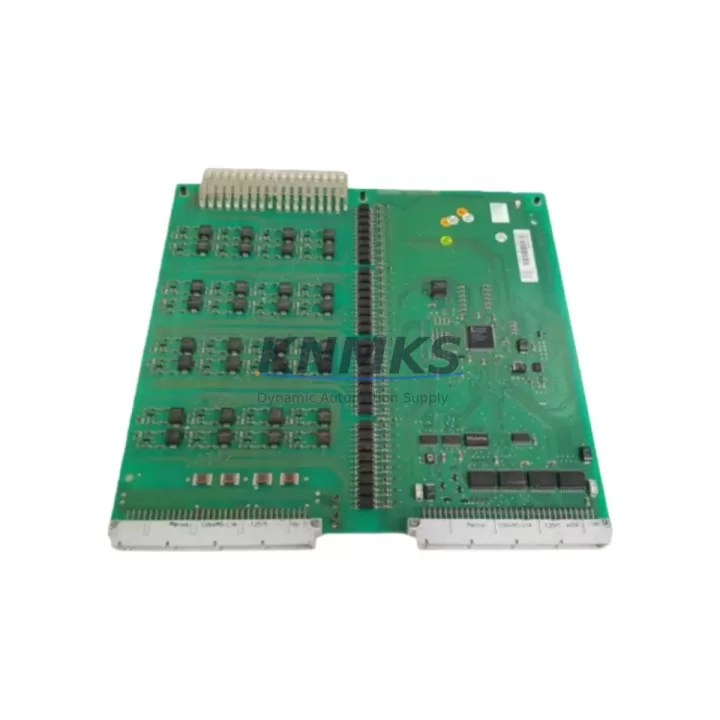
ABB DSDI120AV1 3BSE018296R1 Maintenance-Proven Spare Part for Factory Uptime
The ABB DSDI120AV1 (part number 3BSE018296R1) is a 24-channel digital input module designed for the ABB S800 I/O system, widely deployed in AC800M-based DCS and process automation architectures across energy, petrochemical, pulp & paper, and continuous manufacturing facilities. As a maintenance-proven spare part, the DSDI120AV1 supports rapid field replacement, minimizes unplanned downtime, and ensures signal integrity across critical process loops. KNMKS maintains verified stock of this module, fully tested prior to shipment, backed by a support terms confirmed by quotation and long-term supply commitment.
For maintenance engineers managing aging S800 I/O racks, the DSDI120AV1 is a direct drop-in replacement for failed or degraded digital input channels. Its compatibility with the S800 I/O bus and AC800M controller architecture means no firmware reconfiguration is required when replacing a like-for-like unit. Procurement engineers can source this module with confidence: each unit undergoes functional verification before dispatch, and KNMKS provides documentation support for incoming inspection and asset registration.
Spare Maintenance Table
| Parameter | Specification |
|---|---|
| Part Number | 3BSE018296R1 |
| Model | DSDI120AV1 |
| Brand | ABB |
| Series | S800 I/O |
| Compatible Controller | AC800M (PM860, PM861, PM864, PM866) |
| Module Type | Digital Input Module |
| Number of Channels | 24 DI channels |
| Input Signal | 24 VDC digital signals |
| Communication Interface | S800 I/O Bus (Modulebus) |
| Mounting | S800 I/O Baseunit (TB820V2 / TB840A compatible) |
| Operating Temperature | 0°C to +55°C |
| Origin | Germany |
| Condition | Original, factory-tested |
| Support terms | 12 Months |
| Shipping | Global express, insured packaging |
| Lead Time | availability confirmed by RFQ — ships within 1–3 business days |
Maintenance Planning for Continuous Operation
When a DSDI120AV1 module is flagged during routine control cabinet inspection or fault diagnostics, the replacement workflow should extend beyond the module itself. A thorough site assessment reduces the risk of repeat failures and ensures the restored I/O rack operates reliably through the next maintenance cycle.
Begin by verifying the TB820V2 or TB840A baseunit that the DSDI120AV1 mounts onto. Baseunit connector pins and locking mechanisms degrade over time, particularly in high-vibration or high-humidity environments. A worn baseunit can cause intermittent channel faults even after a module swap. Simultaneously, inspect the 24 VDC field power supply feeding the digital input circuits — voltage sag or ripple on the field supply rail is a common root cause of spurious DI state changes that are often misdiagnosed as module failure.
Check the CI854A or CI858 communication interface module in the same I/O cluster. A degraded Modulebus communication interface can cause the AC800M controller to report false module health alarms, leading to unnecessary module replacements. Confirm that the Modulebus termination resistors are correctly installed and that the bus cable is free of mechanical stress at the connector points.
For field wiring connected to the DSDI120AV1 channels, inspect the terminal blocks and field cable shields at the marshalling cabinet. Loose terminations on the signal commons or shield grounds are a frequent source of noise-induced false inputs, especially in facilities with variable-frequency drives or high-current switching equipment nearby. If the installation uses signal isolators or Zener barriers between field instruments and the DI module, verify that the isolator output voltage levels are within the module’s input threshold specifications.
During annual shutdown maintenance, it is good practice to also inspect the SD832 or SD833 power distribution modules supplying the S800 I/O rack. These modules distribute 24 VDC to multiple I/O modules and their internal fuses or current-limiting circuits can degrade silently. A failing power distribution module will cause multiple I/O modules — including the DSDI120AV1 — to report intermittent faults simultaneously, which can be misread as a systemic bus failure.
Finally, if the facility operates an OP870 or Panel 800 HMI connected to the AC800M system, verify that the HMI alarm history for the affected I/O station is reviewed before closing the work order. Recurring alarm patterns on specific DI channels often indicate field device issues — limit switches, proximity sensors, or solenoid feedback contacts — rather than module faults, and addressing these upstream prevents repeat callouts.
Site Replacement Workflow
Step 1 — Preparation: Confirm the replacement DSDI120AV1 (3BSE018296R1) part number matches the installed unit. Cross-reference the AC800M hardware configuration in Control Builder M to verify the module address and channel assignments before removal.
Step 2 — Safe Isolation: Place the affected I/O station in forced manual or safe state via the AC800M controller. Do not power down the entire I/O rack unless the process safety plan requires it — the S800 I/O system supports hot-swap replacement of modules without full rack shutdown, significantly reducing process interruption time.
Step 3 — Module Removal: Disconnect field wiring at the baseunit terminal side. Release the module locking tab and slide the DSDI120AV1 out of the baseunit. Inspect the baseunit connector for bent pins or contamination before inserting the replacement module.
Step 4 — Installation and Verification: Insert the replacement DSDI120AV1 into the baseunit until the locking tab engages. Reconnect field wiring and restore the I/O station in Control Builder M. Verify that all 24 channels report correct states against known field device positions before releasing the station to automatic control.
Step 5 — Documentation: Record the replacement in the plant CMMS with the new module serial number, installation date, and post-replacement test results. Update the spare parts inventory to trigger replenishment of the consumed DSDI120AV1 unit, maintaining minimum stock levels for critical I/O modules.
Spare Parts Support FAQ
Q1: Is the DSDI120AV1 3BSE018296R1 a direct replacement for older S800 digital input modules?
Yes. The DSDI120AV1 is compatible with all S800 I/O basunits and AC800M controller versions that support the standard Modulebus protocol. No firmware changes or hardware reconfiguration are required for a like-for-like replacement. If upgrading from an earlier S800 DI module variant, verify the baseunit type and channel count match your existing hardware configuration in Control Builder M.
Q2: How is each unit tested before shipment?
Every DSDI120AV1 supplied by KNMKS undergoes functional verification including power-on self-test, Modulebus communication check, and channel-level input signal testing. Units that do not pass all test criteria are not dispatched. A test report is available upon request for incoming inspection and quality records.
Q3: What is the support terms coverage and what does it include?
All DSDI120AV1 modules are covered by a support terms confirmed by quotation from the date of shipment. The support terms covers manufacturing defects and functional failures under normal operating conditions. KNMKS provides replacement or repair at no additional cost within the confirmed support period. Support requests are processed within 5 business days of fault confirmation.
Q4: Can KNMKS support long-term supply for ongoing maintenance programs?
Yes. KNMKS maintains standing inventory of the DSDI120AV1 3BSE018296R1 and can support blanket purchase orders, annual maintenance contracts, and scheduled replenishment programs. For facilities managing large S800 I/O installations, we recommend establishing a minimum stock level agreement to ensure critical spare availability without capital-intensive over-stocking. Contact our team to discuss supply terms tailored to your maintenance cycle.
© 2026 KNMKS. All rights reserved.
Original Source: https://knmks.com
Contact: admin@knmks.com | +86 18359268345
Product Identification
- Brand / Ecosystem
-
ABB
ABB - Model / Series
-
DSDI120AV1 3BSE018296R1
AC800M Series - Product Family
- PLCs & Controllers
- Availability Status
- Available on request after model and quantity confirmation
- Inquiry Type
- B2B RFQ, replacement inquiry and project spare-part request
- Pre-Quote Check
- Exact SKU, brand, series, quantity, nameplate photos and destination country are checked before quotation
System Path
Where this product fits in the KNMKS automation structure.
Specification & Inquiry Focus
- Control platform
- PLC, PAC and modular controllers
- Common needs
- CPU, rack, power and I/O expansion
- Project support
- Replacement, cabinet build and maintenance
Buyer Confirmation
Information KNMKS checks before replying.
- Exact model
- DSDI120AV1 3BSE018296R1
- Brand / ecosystem
- ABB
- Product family
- PLCs & Controllers
- Application note
- Replacement, maintenance, project build or spare-part list
- Useful photos
- Nameplate, installed unit, cabinet layout or connector side
- Delivery details
- Quantity, destination country and target schedule
Document Support
Files and notes can be confirmed during quotation.
- Product photos or nameplate confirmation when available
- Packing and delivery notes before quotation confirmation
- Support scope and delivery terms confirmed per inquiry
- Export document coordination for qualified B2B requests
Inquiry Support
- Model cross-checking before quotation
- CPU, power, rack and expansion module matching
- Support for replacement and project inquiry
What to Send Us
- Brand and exact model number: ABB DSDI120AV1 3BSE018296R1
- Quantity and required delivery time
- Application, replacement requirement or nameplate photo
- Destination country and shipping preference
RFQ Preparation
This is a product inquiry page built for RFQ communication.
Fast Model Check
Send this model to KNMKS for confirmation.
Include quantity, destination country and photos if this is a maintenance replacement. The inquiry will be saved with a reference number after submission.
Brand & Compatibility Note
KNMKS displays automation product information for well-known industrial brand ecosystems and compatible replacement references. Brand names are used for product identification and compatibility reference only; final availability and commercial terms are confirmed per quotation.
 Manufacturing
 Machine Tools
 Packaging
 Energy & Power



 HMI & Displays
 Servo Systems
 Variable Frequency Drives
 Sensors