
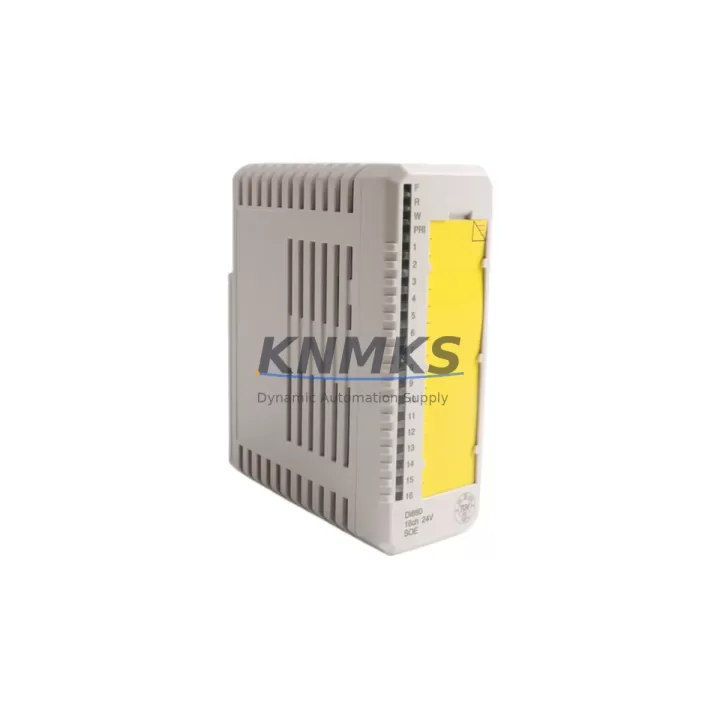
Overview
ABB DI880 3BSE028586R1 Digital Input S800 I/O Retrofit: Migration-Ready Replacement for Legacy Control Systems
The ABB DI880 (3BSE028586R1) is a 24-channel digital input module designed for the S800 I/O platform, fully compatible with ABB’s AC800M and AC800F process controllers. As legacy DCS and PLC installations age beyond their supported lifecycle, the DI880 serves as a direct, migration-ready replacement for discontinued input modules in existing S800 I/O racks — enabling engineers to restore full system functionality without redesigning the control architecture or rewriting application logic.
Whether you are managing a brownfield retrofit, recovering from an unplanned module failure, or executing a phased control system upgrade, the DI880 3BSE028586R1 is engineered to slot into existing S800 backplane positions with minimal reconfiguration. Its 24 digital input channels support 24 VDC field signals, and the module communicates over the S800 ModuleBus, maintaining full compatibility with the existing fieldbus topology already wired into your control cabinet.
Before proceeding with installation, engineers should verify several critical parameters: confirm that the existing MTU (Module Termination Unit) — typically an TB820 or TB840 — matches the DI880’s terminal assignment; validate that the S800 I/O station’s power supply module, such as the SD821 or SD822, provides sufficient current budget after adding the replacement module; and confirm the module address setting on the backplane matches the address previously assigned to the failed unit. Incorrect address configuration is one of the most common causes of delayed commissioning during emergency replacements.
Migration Compatibility Table
| Parameter | DI880 3BSE028586R1 Specification | Retrofit Notes |
|---|---|---|
| Input Channels | 24 × Digital Input (24 VDC) | Verify field wiring polarity before reconnection |
| Communication Interface | S800 ModuleBus (optical) | Compatible with existing TB820/TB840 MTU; no rewiring required |
| Controller Compatibility | AC800M, AC800F | Confirm Control Builder M project version supports DI880 FW |
| Backplane Installation | S800 I/O rack, standard slot | Module address must match original slot assignment |
| Power Consumption | Approx. 1.5 W (module bus) | Verify SD821/SD822 power budget before hot-swap |
| Firmware Compatibility | Supports current S800 I/O firmware baseline | Update CI854/CI858 coupler firmware if running legacy versions |
| Replacement Path | Direct drop-in for DI880 variants | Cross-check 3BSE028586R1 vs. earlier R-suffix revisions for HW changes |
| Support terms | support terms confirmed by quotation | Covers manufacturing defects; includes pre-shipment functional test |
Retrofit Planning for Existing Automation Systems
A successful S800 I/O retrofit requires coordinated planning across hardware, software, and field wiring layers. When replacing a failed or end-of-life DI880 in an operating plant, the first step is to export the current AC800M application from Control Builder M and archive it before any hardware changes. This protects the existing program logic, HMI tag bindings, and alarm configurations from accidental loss during the swap.
On the hardware side, the DI880 3BSE028586R1 installs directly into the S800 I/O rack alongside other S800 modules such as the DO880 digital output module, AI810 analog input module, and AO810 analog output module. If the retrofit involves expanding I/O capacity rather than a like-for-like replacement, engineers must also account for the CI854B or CI858 FieldBus Communication Interface coupler, which governs the number of I/O modules addressable per station. Exceeding the coupler’s I/O budget will result in modules failing to initialize on power-up.
For installations where the control cabinet also houses a PM865 or PM891 processor module, verify that the Control Builder M hardware configuration file accurately reflects the new DI880 slot position. If the module is being installed in a previously empty slot, a hardware configuration download to the controller will be required — this can typically be performed online without interrupting running process loops, provided the controller is in RUN mode and the application supports online change.
Field signal integrity should be validated after reconnection. Use a loop tester or signal simulator to confirm that each of the 24 input channels correctly reflects the expected ON/OFF state before releasing the system back to process control. Pay particular attention to channels connected to safety-critical interlocks or emergency shutdown circuits, where a wiring error could trigger an unplanned trip.
If the retrofit also involves migrating from an older Advant OCS or MOD 300 platform to the AC800M/S800 architecture, the DI880 is a standard building block in ABB’s recommended migration path. In such projects, the CI854B coupler, TB840 MTU, and SD822 power supply are typically ordered together with the DI880 to form a complete I/O station assembly.
Downtime Control During System Migration
Minimizing unplanned downtime is the primary operational concern during any control system retrofit. For the DI880 3BSE028586R1, the replacement procedure can typically be completed within a planned maintenance window of two to four hours, assuming the replacement module has been pre-tested and the engineering team has prepared a commissioning checklist in advance.
Key practices for downtime control include: pre-configuring the DI880 module address offline before entering the control room; preparing a printed copy of the existing I/O channel assignment from the Control Builder M hardware editor; and staging the replacement module, MTU, and any required tools at the cabinet before initiating the shutdown sequence. If the process allows, place the affected control loops in manual mode at the DCS operator station before removing the failed module — this prevents spurious alarms and protects downstream equipment from responding to lost input signals.
After physical installation, power up the I/O station and confirm that the DI880 appears in the Control Builder M online hardware view with a green status indicator before switching control loops back to automatic. If the module shows a fault LED, check the module address, MTU seating, and power supply voltage before escalating to a firmware-level diagnostic. In most cases, address misconfiguration or an unseated MTU connector accounts for the majority of first-power-up faults encountered during S800 I/O replacements.
All units supplied are pre-shipment tested and covered by a support terms confirmed by quotation. In-stock inventory ensures fast dispatch, reducing the lead time risk that is often the largest contributor to extended downtime in legacy system recovery scenarios.
Retrofit Support FAQ
Q: Is the DI880 3BSE028586R1 a direct replacement for earlier DI880 revisions?
A: The 3BSE028586R1 is the current production revision of the DI880. It is functionally compatible with earlier R-suffix revisions in the same S800 I/O rack. However, engineers should cross-reference the hardware revision notes in the DI880 Product Manual (3BSE028586) to confirm that no terminal assignment or firmware dependency changes affect their specific installation.
Q: Can the DI880 be installed without a controller shutdown?
A: The S800 I/O platform supports hot-swap of I/O modules in most configurations, provided the CI854B or CI858 coupler remains powered and the AC800M controller is in RUN mode. However, the specific process risk of removing an active input module should be assessed by the site engineer before proceeding. Placing affected loops in manual mode at the operator station is strongly recommended before module removal.
Q: What termination unit is required for the DI880?
A: The DI880 3BSE028586R1 is used with the TB820 or TB840 MTU (Module Termination Unit), depending on the field wiring configuration. The TB820 provides screw-terminal connections for individual field cables, while the TB840 supports marshalling cabinet wiring via a 40-pin connector. Confirm the existing MTU type before ordering to avoid a mismatch that would require field rewiring.
Q: What does the support terms confirmed by quotation cover?
A: All DI880 3BSE028586R1 units are covered by a support terms confirmed by quotation from the date of shipment. The support terms covers manufacturing defects and functional failures under normal operating conditions. Each unit undergoes a pre-shipment functional test to verify channel integrity and communication interface operation before dispatch. For support requests or technical support, contact admin@knmks.com.
© 2026 KNMKS. All rights reserved.
Original Source: https://knmks.com
Contact: admin@knmks.com | +86 18359268345
Product Identification
- Brand / Ecosystem
-
ABB
ABB - Model / Series
-
DI880 3BSE028586R1
AC800M Series - Product Family
- PLCs & Controllers
- Availability Status
- Available on request after model and quantity confirmation
- Inquiry Type
- B2B RFQ, replacement inquiry and project spare-part request
- Pre-Quote Check
- Exact SKU, brand, series, quantity, nameplate photos and destination country are checked before quotation
System Path
Where this product fits in the KNMKS automation structure.
Specification & Inquiry Focus
- Control platform
- PLC, PAC and modular controllers
- Common needs
- CPU, rack, power and I/O expansion
- Project support
- Replacement, cabinet build and maintenance
Buyer Confirmation
Information KNMKS checks before replying.
- Exact model
- DI880 3BSE028586R1
- Brand / ecosystem
- ABB
- Product family
- PLCs & Controllers
- Application note
- Replacement, maintenance, project build or spare-part list
- Useful photos
- Nameplate, installed unit, cabinet layout or connector side
- Delivery details
- Quantity, destination country and target schedule
Document Support
Files and notes can be confirmed during quotation.
- Product photos or nameplate confirmation when available
- Packing and delivery notes before quotation confirmation
- Support scope and delivery terms confirmed per inquiry
- Export document coordination for qualified B2B requests
Inquiry Support
- Model cross-checking before quotation
- CPU, power, rack and expansion module matching
- Support for replacement and project inquiry
What to Send Us
- Brand and exact model number: ABB DI880 3BSE028586R1
- Quantity and required delivery time
- Application, replacement requirement or nameplate photo
- Destination country and shipping preference
RFQ Preparation
This is a product inquiry page built for RFQ communication.
Fast Model Check
Send this model to KNMKS for confirmation.
Include quantity, destination country and photos if this is a maintenance replacement. The inquiry will be saved with a reference number after submission.
Brand & Compatibility Note
KNMKS displays automation product information for well-known industrial brand ecosystems and compatible replacement references. Brand names are used for product identification and compatibility reference only; final availability and commercial terms are confirmed per quotation.
 Manufacturing
 Machine Tools
 Packaging
 Energy & Power



 HMI & Displays
 Servo Systems
 Variable Frequency Drives
 Sensors