
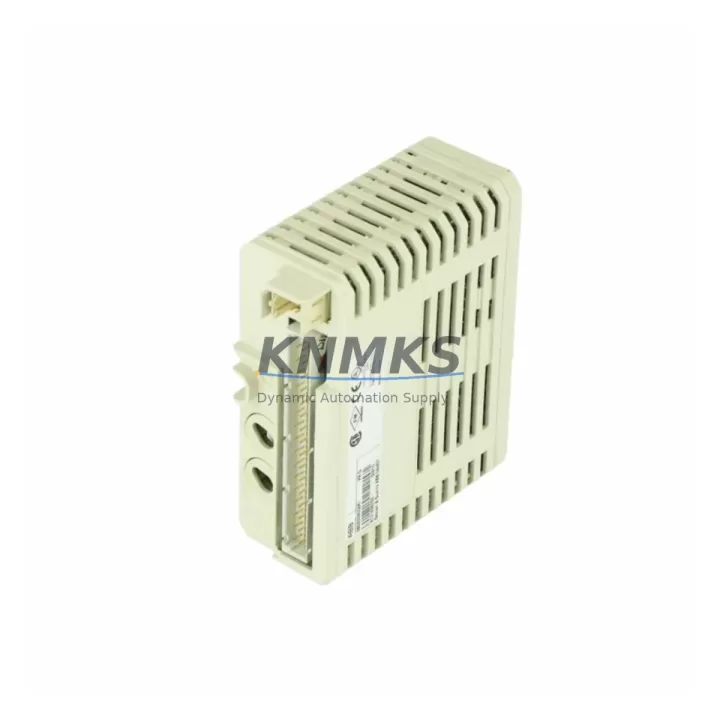
Overview
ABB DI840 3BSE020836R1 Migration-Ready Digital Input Module: Legacy System Retrofit & Compatibility Upgrade
The ABB DI840 (3BSE020836R1) is a 16-channel, 24 VDC digital input module designed for the ABB S800 I/O system, fully compatible with the AC800M process controller platform. As legacy DCS and PLC installations approach end-of-life, the DI840 remains one of the most frequently specified drop-in replacements for aging or discontinued digital input modules within the S800 rack architecture. Whether you are managing a planned shutdown retrofit, an emergency spare replacement, or a phased control system modernization, the DI840 3BSE020836R1 provides a verified migration path with minimal engineering rework.
Each unit is pre-shipment tested against ABB factory specifications, covering channel isolation, input threshold voltage, response time, and backplane communication integrity. A support terms confirmed by quotation is included with every shipment, backed by documented test records available upon request.
Migration Compatibility Table
| Parameter | Specification / Retrofit Guidance |
|---|---|
| Module Type | Digital Input, 16-channel, 24 VDC |
| Compatible Controller | ABB AC800M (PM851, PM856, PM860, PM864, PM866 series) |
| Compatible I/O Rack | ABB S800 I/O – TB820V2 ModuleBus Modem, TB840A, TB807 terminal bases |
| Replaces / Supersedes | DI810 (3BSE008508R1), DI811 (3BSE008552R1), DI820 (3BSE008544R1) – verify terminal base compatibility before swap |
| Input Voltage Range | 24 VDC nominal (15–30 VDC operating range) |
| Backplane Interface | ModuleBus (optical), plug-in to S800 terminal base – no rewiring required for same-base swap |
| Module Address | Set via DIP switch on terminal base; verify address map in Control Builder M before hot-swap |
| Communication Protocol | ModuleBus over PROFIBUS DP or MMS/FOUNDATION Fieldbus via CI840A / CI854A coupler |
| Installation Space | Single S800 slot; confirm rack slot availability and power budget on S800 power supply (SD821, SD822, SD823) |
| Firmware Compatibility | Compatible with AC800M firmware 5.x and 6.x; no firmware update required for standard replacement |
| HMI / SCADA Impact | No tag remapping required for same-slot replacement; verify signal names in 800xA Information Management or third-party SCADA |
| Pre-Shipment Test | Channel-by-channel functional test, backplane communication check, isolation verification |
| Support terms | 12 months from shipment date, covering manufacturing defects and functional failure |
Retrofit Planning for Existing Automation Systems
Replacing a DI840 3BSE020836R1 within an operating S800 I/O rack requires careful pre-work to avoid unplanned downtime. The first step is confirming the terminal base type currently installed — the TB820V2 ModuleBus Modem base is the most common pairing, but some older installations use TB807 or TB810 bases that may require adapter verification. Once the base is confirmed, check the DIP switch address setting on the existing module before removal, and document it for the replacement unit.
Power budget is a critical consideration when adding or replacing modules in a populated S800 rack. The SD821 or SD822 power supply feeding the rack should be verified to have sufficient headroom — the DI840 draws approximately 100 mA from the 24 VDC backplane supply. If the rack is near capacity, a second power supply or load redistribution across multiple racks may be required before the swap.
For systems using a CI840A PROFIBUS DP coupler or CI854A FOUNDATION Fieldbus coupler, the communication link to the AC800M controller should be verified after module insertion. In most same-slot replacements, the coupler automatically re-establishes the ModuleBus connection without requiring a controller restart. However, if the replacement is part of a broader rack reconfiguration — for example, adding an AO810V2 analog output module or an AI810 analog input module to expand I/O capacity — a full rack re-scan in Control Builder M is recommended to update the hardware configuration tree.
Signal isolation should also be reviewed during retrofit planning. In mixed-signal environments where the DI840 shares a cabinet with relay output modules such as the DO810 digital output module, ensure that inductive load suppression is in place on output circuits to prevent voltage spikes from coupling into the 24 VDC input wiring. Proper cable segregation and shielding practices, as specified in ABB’s S800 I/O installation guidelines, remain applicable regardless of module generation.
For sites migrating from older ABB Advant or MOD 300 platforms to AC800M, the DI840 is frequently specified as part of the new I/O layer. In these cross-platform migrations, the engineering team must rebuild the signal list from scratch in Control Builder M, mapping each physical channel to the corresponding function block input. This process is distinct from a same-platform module swap and typically requires a structured FAT (Factory Acceptance Test) and SAT (Site Acceptance Test) protocol before live commissioning.
Downtime Control During System Migration
Minimizing production downtime during a DI840 replacement or S800 rack upgrade depends on preparation quality more than execution speed. The most effective approach is to complete all pre-work — address documentation, terminal base verification, power budget calculation, and Control Builder M backup — before the maintenance window begins.
For planned replacements, a cold-swap procedure is standard: de-energize the terminal base, remove the existing DI840, insert the replacement unit, re-energize, and verify channel status in the AC800M diagnostic display or 800xA System Graphic. Total elapsed time for a prepared technician is typically under 10 minutes per module.
Where process continuity is critical and a hot-swap is required, the AC800M platform supports redundant I/O configurations using paired S800 racks. In this architecture, the standby rack continues to supply digital input signals to the controller while the primary module is replaced, eliminating any signal interruption. Confirm with your system integrator whether the existing installation is configured for redundant I/O before attempting a live swap.
Program logic protection is straightforward for same-slot replacements: the AC800M retains the application program in non-volatile memory and does not require a reload after a module swap. However, if the replacement is accompanied by a firmware update to the AC800M controller (for example, upgrading from firmware 5.1 to 6.0), a controlled controller restart is required, and all connected I/O — including the DI840 — will experience a brief interruption during the boot sequence. Schedule firmware updates separately from module replacements to isolate risk.
Maintaining a documented spare parts inventory of at least one DI840 3BSE020836R1 per active rack is a widely adopted practice in facilities with long production cycles. Given that ABB has transitioned some S800 variants to limited availability, securing multi-year supply agreements ensures continuity without emergency procurement lead times.
Retrofit Support FAQ
Q1: Is the DI840 3BSE020836R1 a direct replacement for the DI810 or DI820?
The DI840 is functionally compatible with the DI810 and DI820 in most S800 rack configurations, but the terminal base must be verified. The DI840 requires a TB820V2 or equivalent ModuleBus-capable base. If the existing installation uses an older TB807 base, a base replacement may be required. Channel count and wiring pinout are identical for standard 16-channel configurations.
Q2: What commissioning steps are required after installing a replacement DI840?
After physical installation, verify the DIP switch address matches the original module, confirm the green LED status on the module front panel, and check the channel status display in Control Builder M or the 800xA System Graphic. No software download is required for a same-slot, same-address replacement. For new slot assignments, update the hardware configuration in Control Builder M and perform a download to the AC800M controller.
Q3: How is the DI840 tested before shipment?
Each DI840 3BSE020836R1 unit undergoes a pre-shipment functional test covering all 16 input channels, backplane ModuleBus communication, input threshold voltage verification, and channel isolation. Test records are available upon request. All units ship with a support terms confirmed by quotation covering manufacturing defects and functional failure under normal operating conditions.
Q4: What is the typical lead time and inventory availability?
We maintain stock of the DI840 3BSE020836R1 for immediate shipment. For multi-unit orders or long-term supply agreements (12–36 months), contact our sales team to discuss volume pricing and reserved inventory arrangements. Emergency orders can typically be dispatched within 24–48 hours of order confirmation.
© 2026 KNMKS. All rights reserved.
Original Source: https://knmks.com
Contact: admin@knmks.com | +86 18359268345
Product Identification
- Brand / Ecosystem
-
ABB
ABB - Model / Series
-
DI840 3BSE020836R1
AC800M Series - Product Family
- PLCs & Controllers
- Availability Status
- Available on request after model and quantity confirmation
- Inquiry Type
- B2B RFQ, replacement inquiry and project spare-part request
- Pre-Quote Check
- Exact SKU, brand, series, quantity, nameplate photos and destination country are checked before quotation
System Path
Where this product fits in the KNMKS automation structure.
Specification & Inquiry Focus
- Control platform
- PLC, PAC and modular controllers
- Common needs
- CPU, rack, power and I/O expansion
- Project support
- Replacement, cabinet build and maintenance
Buyer Confirmation
Information KNMKS checks before replying.
- Exact model
- DI840 3BSE020836R1
- Brand / ecosystem
- ABB
- Product family
- PLCs & Controllers
- Application note
- Replacement, maintenance, project build or spare-part list
- Useful photos
- Nameplate, installed unit, cabinet layout or connector side
- Delivery details
- Quantity, destination country and target schedule
Document Support
Files and notes can be confirmed during quotation.
- Product photos or nameplate confirmation when available
- Packing and delivery notes before quotation confirmation
- Support scope and delivery terms confirmed per inquiry
- Export document coordination for qualified B2B requests
Inquiry Support
- Model cross-checking before quotation
- CPU, power, rack and expansion module matching
- Support for replacement and project inquiry
What to Send Us
- Brand and exact model number: ABB DI840 3BSE020836R1
- Quantity and required delivery time
- Application, replacement requirement or nameplate photo
- Destination country and shipping preference
RFQ Preparation
This is a product inquiry page built for RFQ communication.
Fast Model Check
Send this model to KNMKS for confirmation.
Include quantity, destination country and photos if this is a maintenance replacement. The inquiry will be saved with a reference number after submission.
Brand & Compatibility Note
KNMKS displays automation product information for well-known industrial brand ecosystems and compatible replacement references. Brand names are used for product identification and compatibility reference only; final availability and commercial terms are confirmed per quotation.
 Manufacturing
 Machine Tools
 Packaging
 Energy & Power



 HMI & Displays
 Servo Systems
 Variable Frequency Drives
 Sensors