
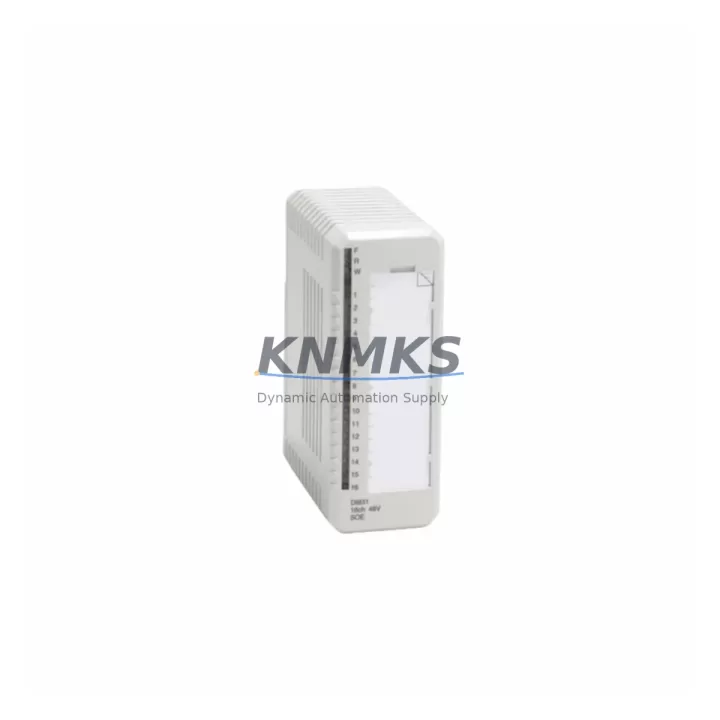
Overview
ABB DI831/DP840 Migration-Ready Digital Input for Legacy DCS
The ABB DI831/DP840 is a migration-ready digital input module engineered for direct replacement within ABB S800 I/O systems and AC800M Distributed Control System architectures. As legacy automation platforms approach end-of-support milestones, engineering teams managing scheduled outages, emergency replacements, or phased control system upgrades rely on pre-tested, drop-in compatible modules to minimize downtime and protect existing program logic. The DI831/DP840 addresses this need with full PROFIBUS DP compatibility, a compact DIN-rail footprint, and a support terms confirmed by quotation backed by multi-region stock availability for fast global dispatch.
Whether your facility is executing a Phase 1 hardware swap — replacing failed or end-of-life I/O modules while retaining the existing AC800M controller and PROFIBUS DP backbone — or planning a broader Phase 2 migration toward a modernized control architecture, the DI831/DP840 provides a reliable, validated entry point. Its 16-channel digital input configuration supports 24 VDC field signals, and the module integrates directly into the S800 I/O backplane without requiring additional wiring adapters or software reconfiguration in most standard installations.
Migration Compatibility Table
| Parameter | DI831/DP840 Specification | Retrofit / Migration Note |
|---|---|---|
| Module Type | Digital Input, 16-channel, 24 VDC | Direct replacement for DI810, DI811, DI814 in S800 I/O racks |
| Communication Interface | PROFIBUS DP via DP840 coupler | Retain existing PROFIBUS DP segment; verify GSD file version compatibility |
| Backplane / Rack Interface | S800 I/O MTU (Module Termination Unit) | Confirm MTU type (TB820/TB840) matches installation; no backplane rewiring required |
| Module Address | Set via DP840 coupler rotary switch | Match existing PROFIBUS node address; update Control Builder M configuration if address changes |
| Power Consumption | Supplied via S800 I/O bus | Verify PS800 or TB840 power supply capacity before hot-swap; check total bus load |
| Terminal Wiring | Field terminals on MTU (not on module) | No field rewiring required when MTU is retained; inspect terminal condition before reinsertion |
| Firmware Compatibility | Compatible with AC800M firmware R5.x and above | Confirm controller firmware version in Control Builder M before replacement |
| HMI / SCADA Impact | Signal tags retained if module address unchanged | Verify 800xA or Freelance HMI faceplates after replacement; no tag remapping expected |
| Installation Space | Standard S800 I/O slot (35 mm DIN rail) | No additional panel space required; confirm slot availability in existing S800 rack |
| Pre-Shipment Testing | 100% functional test prior to dispatch | Each unit tested against ABB S800 I/O reference configuration before shipment |
| Support terms | 12 months from date of delivery | Covers manufacturing defects; includes technical support for commissioning queries |
| Origin | Germany (DE) | OEM-grade hardware; multi-region stock for emergency and scheduled dispatch |
Retrofit Planning for Existing Automation Systems
A successful DI831/DP840 retrofit begins well before the module arrives on site. Engineering teams should start by auditing the existing S800 I/O rack configuration — confirming the number of occupied slots, the TB820 or TB840 module termination units in use, and the current PROFIBUS DP node addresses assigned via the DP840 coupler. Where the DP840 coupler itself is being replaced alongside the DI831 input module, the rotary address switch must be set to match the original node address before the coupler is inserted into the rack, preventing any PROFIBUS segment disruption.
Power budget verification is a critical pre-installation step. The PS800 field power supply or the TB840 power distribution unit feeds the S800 I/O bus, and adding or replacing modules without checking the total bus load can cause intermittent faults or module initialization failures. Retrieve the current power consumption figures from the existing Control Builder M project and compare against the PS800 rated output before proceeding.
For sites running ABB 800xA System as the supervisory layer, the DI831/DP840 replacement is typically transparent to the HMI layer provided the PROFIBUS node address and GSD file configuration remain unchanged. However, teams should verify that the 800xA Aspect Object for the affected I/O station reflects the correct module type after replacement, particularly if the site has migrated from an older DI810 or DI811 module type. In parallel migrations where the AC800M controller is also being upgraded — for example, from an older PM851 or PM856 processor module to a current-generation PM891 — the Control Builder M project should be re-downloaded and verified against the new hardware configuration before returning the loop to automatic control.
Communication continuity across the PROFIBUS DP segment is maintained by ensuring the DP840 coupler remains powered during adjacent slot work where possible. For sites with redundant PROFIBUS DP configurations using dual DP840 couplers, the switchover to the redundant path should be tested prior to removing the primary coupler. Signal isolators or barriers installed upstream of the DI831 input channels should also be inspected during the retrofit window — replacing a digital input module without checking the condition of upstream MTL or P+F signal conditioning equipment is a common source of post-retrofit signal quality issues.
Downtime Control During System Migration
Minimizing unplanned downtime during a DI831/DP840 replacement requires a structured pre-outage checklist and a clear rollback plan. Before the maintenance window opens, the existing AC800M application program should be backed up from Control Builder M and stored offline. The current PROFIBUS DP configuration — including node addresses, GSD file versions, and cyclic data lengths — should be exported and retained as a reference. This ensures that if the replacement module exhibits unexpected behavior during commissioning, the original configuration can be restored without relying on memory or incomplete site documentation.
During the replacement itself, the S800 I/O hot-swap capability allows the DI831 module to be removed and reinserted without powering down the entire rack, provided the DP840 coupler and MTU remain in place. This significantly reduces the impact on adjacent I/O channels and allows the PROFIBUS DP segment to remain active throughout the swap. After reinsertion, the module status LED sequence should be observed — a steady green RUN indicator confirms successful initialization and PROFIBUS DP communication with the AC800M controller.
Field signal verification is the final commissioning step. Each of the 16 digital input channels should be exercised from the field device — confirming that the corresponding signal tag in the 800xA or Freelance HMI updates correctly and that any interlocks or permissives dependent on those signals respond as expected. Where field devices cannot be operated safely during the commissioning window, loop test mode within Control Builder M can be used to simulate input states and verify program logic continuity without requiring physical signal activation. Completing this verification before returning the loop to automatic control is the most reliable method of confirming a successful, zero-defect retrofit.
Retrofit Support FAQ
Q: Is the DI831/DP840 a direct drop-in replacement for the DI810 or DI811 in an existing S800 I/O rack?
A: Yes, in most standard configurations. The DI831 uses the same S800 I/O MTU footprint as the DI810 and DI811, so field wiring on the TB820 or TB840 termination unit does not need to be disturbed. The DP840 coupler address must match the original PROFIBUS node address, and the GSD file in the Control Builder M project should be verified to confirm compatibility with the DI831 module type.
Q: What pre-shipment testing is performed on each DI831/DP840 unit?
A: Every unit undergoes 100% functional testing against an ABB S800 I/O reference rack prior to dispatch. Testing covers PROFIBUS DP communication initialization, all 16 digital input channels, module LED status verification, and power consumption measurement. A test report is available on request.
Q: How quickly can a DI831/DP840 be dispatched for an emergency replacement?
A: Multi-region stock is maintained to support emergency dispatch globally. Standard lead time for in-stock units is 1–3 business days depending on destination. Express shipping options are available for critical outage situations. Contact admin@knmks.com or +86 18359268345 to confirm current stock availability and dispatch timeline.
Q: What does the support terms confirmed by quotation cover?
A: The support terms confirmed by quotation cover manufacturing defects and functional failures under normal operating conditions from the date of delivery. It includes technical support for commissioning-related queries. Units that have been physically damaged, modified, or operated outside ABB’s specified environmental ratings are excluded. Support requests are processed directly through KNMKS with a target response time of 1 business day.
© 2026 KNMKS. All rights reserved.
Original Source: https://knmks.com
Contact: admin@knmks.com | +86 18359268345
Product Identification
- Brand / Ecosystem
-
ABB
ABB - Model / Series
-
DI831/DP840
AC800M Series - Product Family
- PLCs & Controllers
- Availability Status
- Available on request after model and quantity confirmation
- Inquiry Type
- B2B RFQ, replacement inquiry and project spare-part request
- Pre-Quote Check
- Exact SKU, brand, series, quantity, nameplate photos and destination country are checked before quotation
System Path
Where this product fits in the KNMKS automation structure.
Specification & Inquiry Focus
- Control platform
- PLC, PAC and modular controllers
- Common needs
- CPU, rack, power and I/O expansion
- Project support
- Replacement, cabinet build and maintenance
Buyer Confirmation
Information KNMKS checks before replying.
- Exact model
- DI831/DP840
- Brand / ecosystem
- ABB
- Product family
- PLCs & Controllers
- Application note
- Replacement, maintenance, project build or spare-part list
- Useful photos
- Nameplate, installed unit, cabinet layout or connector side
- Delivery details
- Quantity, destination country and target schedule
Document Support
Files and notes can be confirmed during quotation.
- Product photos or nameplate confirmation when available
- Packing and delivery notes before quotation confirmation
- Support scope and delivery terms confirmed per inquiry
- Export document coordination for qualified B2B requests
Inquiry Support
- Model cross-checking before quotation
- CPU, power, rack and expansion module matching
- Support for replacement and project inquiry
What to Send Us
- Brand and exact model number: ABB DI831/DP840
- Quantity and required delivery time
- Application, replacement requirement or nameplate photo
- Destination country and shipping preference
RFQ Preparation
This is a product inquiry page built for RFQ communication.
Fast Model Check
Send this model to KNMKS for confirmation.
Include quantity, destination country and photos if this is a maintenance replacement. The inquiry will be saved with a reference number after submission.
Brand & Compatibility Note
KNMKS displays automation product information for well-known industrial brand ecosystems and compatible replacement references. Brand names are used for product identification and compatibility reference only; final availability and commercial terms are confirmed per quotation.
 Manufacturing
 Machine Tools
 Packaging
 Energy & Power



 HMI & Displays
 Servo Systems
 Variable Frequency Drives
 Sensors