
Overview
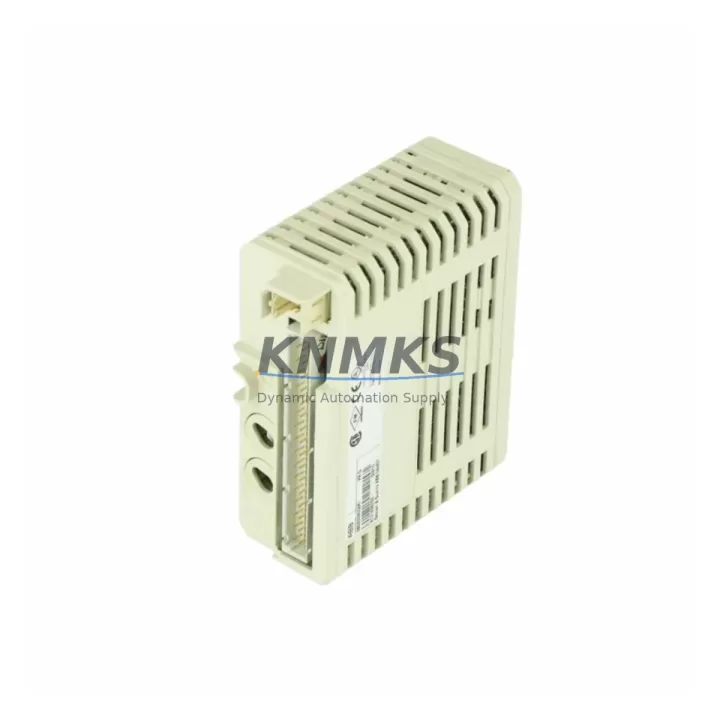
ABB DI810-EA 3BSE008508R2 Maintenance-Proven Spare Part for Factory Uptime
The ABB DI810-EA (3BSE008508R2) is a 24 VDC digital input module belonging to the S800 I/O series, purpose-built for integration with ABB’s AC800M Distributed Control System. In process industries — pulp and paper, oil and gas, power generation, and chemical plants — this module serves as a critical field signal interface, converting discrete 24 VDC field signals into structured data readable by the AC800M controller. When this module fails or degrades, the consequences extend beyond a single I/O channel: entire process loops can go blind, forcing operators into manual override and exposing the plant to unplanned downtime.
KNMKS maintains verified stock of the DI810-EA 3BSE008508R2, sourced from original ABB supply chains, pre-shipment tested against ABB functional specifications, and backed by a support terms confirmed by quotation. Each unit is inspected for firmware compatibility, channel integrity, and connector condition before dispatch — ensuring that what arrives on-site is ready for immediate installation without additional bench testing.
Spare Maintenance Table
| Parameter | Specification |
|---|---|
| Part Number | DI810-EA |
| Order Code | 3BSE008508R2 |
| Series | ABB S800 I/O |
| Module Type | Digital Input Module |
| Input Channels | 16 channels, 24 VDC |
| Signal Type | Discrete / Digital (sourcing) |
| Compatible Controller | AC800M (PM851, PM856, PM860, PM861, PM864, PM866) |
| Backplane Interface | S800 ModuleBus |
| Mounting | S800 I/O Station (TB820V2 / TB840A) |
| Operating Temperature | 0°C to +55°C |
| Protection Class | IP20 |
| Origin | Germany (DE) |
| Support terms | 12 Months — KNMKS Pre-Shipment Tested |
| Availability | availability confirmed by RFQ — Ready to Ship |
| Contact | admin@knmks.com | +86 18359268345 |
Maintenance Planning for Continuous Operation
Replacing the DI810-EA 3BSE008508R2 in an AC800M control cabinet is rarely an isolated task. Maintenance engineers and procurement teams working on S800 I/O stations should treat this replacement as an opportunity to audit the surrounding electrical environment and reduce the risk of repeat failures.
Before or during the DI810-EA swap, inspect the TB820V2 or TB840A termination unit for oxidized terminals, loose field wiring, and damaged screw clamps — a degraded termination unit is a common root cause of intermittent input faults that are incorrectly attributed to the module itself. Verify that the 24 VDC field power supply feeding the input channels is within tolerance; an under-voltage condition will cause false-low readings across all 16 channels and may have contributed to the original module failure.
Check the SA811 or SA801 power supply module on the S800 I/O station rail — these units supply backplane power to all I/O modules in the station, and a marginal power supply will cause erratic behavior across multiple modules simultaneously. If the station includes analog modules such as the AI810 or AI820, verify their channel calibration after the digital input replacement, as power rail disturbances during module hot-swap can shift analog reference baselines.
For AC800M systems with fieldbus communication, confirm that the CI854A or CI858 communication interface module is reporting clean PROFIBUS or FOUNDATION Fieldbus diagnostics after the DI810-EA is reinstalled. A module replacement that disturbs the backplane can temporarily interrupt fieldbus polling cycles, which may trigger spurious alarms in the DCS historian. Additionally, review the DO810 digital output module paired with this input circuit — in interlock and permissive logic, a failed input module often masks a corresponding output module fault that only becomes visible once the input is restored.
For sites maintaining a structured spare parts inventory, the DI810-EA 3BSE008508R2 should be stocked alongside the TB820V2 termination unit, at least one SA811 power supply, and a CI854A communication interface — this combination covers the most common single-point failures in an S800 I/O station and supports a complete cabinet restoration within a single maintenance window.
Site Replacement Workflow
Step 1 — Pre-Replacement Verification: Confirm the replacement unit’s order code (3BSE008508R2) matches the installed module label. Verify AC800M firmware version compatibility via ABB’s S800 I/O compatibility matrix. Ensure the TB820V2 or TB840A termination unit is de-energized before module removal.
Step 2 — Safe Removal: In the AC800M engineering tool (Control Builder M), force all 16 input channels to a safe state or place the associated control loops in manual mode. Remove the DI810-EA by releasing the module latch — no tools required. Inspect the backplane connector pins for damage or contamination before inserting the replacement.
Step 3 — Module Installation: Insert the new DI810-EA 3BSE008508R2 until the latch clicks. The AC800M will automatically detect the module via ModuleBus and load the stored configuration — no manual address setting is required. Channel mapping is preserved from the previous configuration, eliminating re-engineering time.
Step 4 — Functional Verification: Restore field power and confirm all 16 input channels report expected states in the AC800M diagnostic display. Cross-check against the field device status (limit switches, proximity sensors, push buttons) to validate signal integrity. Return control loops to automatic mode and monitor for 15–30 minutes before closing the cabinet.
Step 5 — Documentation: Record the replacement in the plant maintenance log with the new module serial number, installation date, and technician ID. Update the spare parts inventory to trigger a reorder for the consumed DI810-EA unit, maintaining minimum stock levels for the next planned or emergency replacement cycle.
Spare Parts Support FAQ
Q1: Is the DI810-EA 3BSE008508R2 compatible with all AC800M controller versions?
The DI810-EA is compatible with all AC800M PM8xx series processors (PM851 through PM866) when used with a TB820V2 or TB840A termination unit on an S800 I/O station. Compatibility with specific firmware versions should be verified against ABB’s S800 I/O release notes. KNMKS can provide compatibility guidance based on your installed AC800M version — contact admin@knmks.com with your controller order code.
Q2: What pre-shipment testing does KNMKS perform on the DI810-EA?
Each DI810-EA 3BSE008508R2 unit undergoes functional channel verification across all 16 inputs, backplane connector inspection, firmware version confirmation, and physical condition assessment before dispatch. Units that do not pass all checks are not shipped. A support terms confirmed by quotation cover manufacturing defects and functional failures under normal operating conditions from the date of delivery.
Q3: Can KNMKS support long-term supply agreements for the DI810-EA and related S800 I/O modules?
Yes. KNMKS offers 12–36 month supply agreements for the DI810-EA 3BSE008508R2 and associated S800 I/O components including termination units, power supply modules, and communication interfaces. Long-term agreements include reserved stock allocation, priority dispatch, and fixed pricing — reducing procurement risk for plants operating legacy AC800M systems beyond ABB’s standard product lifecycle. Contact admin@knmks.com to discuss volume and lead time requirements.
Q4: What is the recommended minimum stock level for the DI810-EA in a production facility?
For facilities with 1–3 S800 I/O stations, a minimum of 2 DI810-EA units is recommended to cover both emergency replacement and planned annual maintenance. Facilities with 4 or more stations, or those operating in continuous process environments (24/7 uptime requirements), should maintain 3–5 units on-site. KNMKS can assist with a site-specific spare parts assessment based on your installed I/O station count and criticality classification.
© 2026 KNMKS. All rights reserved.
Original Source: https://knmks.com
Contact: admin@knmks.com | +86 18359268345
Product Identification
- Brand / Ecosystem
-
ABB
ABB - Model / Series
-
DI810-EA 3BSE008508R2
AC800M Series - Product Family
- PLCs & Controllers
- Availability Status
- Available on request after model and quantity confirmation
- Inquiry Type
- B2B RFQ, replacement inquiry and project spare-part request
- Pre-Quote Check
- Exact SKU, brand, series, quantity, nameplate photos and destination country are checked before quotation
System Path
Where this product fits in the KNMKS automation structure.
Specification & Inquiry Focus
- Control platform
- PLC, PAC and modular controllers
- Common needs
- CPU, rack, power and I/O expansion
- Project support
- Replacement, cabinet build and maintenance
Buyer Confirmation
Information KNMKS checks before replying.
- Exact model
- DI810-EA 3BSE008508R2
- Brand / ecosystem
- ABB
- Product family
- PLCs & Controllers
- Application note
- Replacement, maintenance, project build or spare-part list
- Useful photos
- Nameplate, installed unit, cabinet layout or connector side
- Delivery details
- Quantity, destination country and target schedule
Document Support
Files and notes can be confirmed during quotation.
- Product photos or nameplate confirmation when available
- Packing and delivery notes before quotation confirmation
- Support scope and delivery terms confirmed per inquiry
- Export document coordination for qualified B2B requests
Inquiry Support
- Model cross-checking before quotation
- CPU, power, rack and expansion module matching
- Support for replacement and project inquiry
What to Send Us
- Brand and exact model number: ABB DI810-EA 3BSE008508R2
- Quantity and required delivery time
- Application, replacement requirement or nameplate photo
- Destination country and shipping preference
RFQ Preparation
This is a product inquiry page built for RFQ communication.
Fast Model Check
Send this model to KNMKS for confirmation.
Include quantity, destination country and photos if this is a maintenance replacement. The inquiry will be saved with a reference number after submission.
Brand & Compatibility Note
KNMKS displays automation product information for well-known industrial brand ecosystems and compatible replacement references. Brand names are used for product identification and compatibility reference only; final availability and commercial terms are confirmed per quotation.
 Manufacturing
 Machine Tools
 Packaging
 Energy & Power



 HMI & Displays
 Servo Systems
 Variable Frequency Drives
 Sensors