
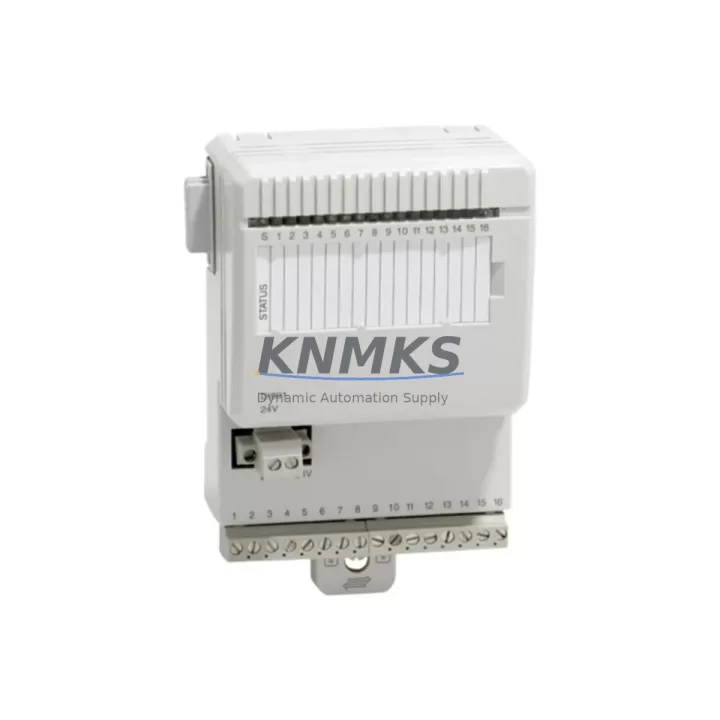
Overview
ABB DI801 3BSE020508R1 Maintenance-Proven Spare Part for Factory Uptime
The ABB DI801 (3BSE020508R1) is a 24 VDC digital input module designed for the S800 I/O system, fully compatible with ABB’s AC800M Distributed Control System. As a field-proven spare part, the DI801 is a critical component in continuous-process industries including pulp & paper, oil & gas, power generation, chemical processing, and water treatment — anywhere that unplanned downtime translates directly into production loss and safety risk.
Maintenance engineers and spare-parts procurement teams rely on the DI801 to restore digital signal acquisition rapidly after module failure, sensor wiring faults, or scheduled overhaul. Stocking at least one verified DI801 unit per control cabinet is a widely adopted best practice in facilities running AC800M-based DCS architectures. With 16 channels of 24 VDC digital input, galvanic isolation, and hot-swap capability within the S800 I/O rail, the DI801 minimises intervention time and eliminates the need for full system shutdown during replacement.
Every unit supplied by KNMKS is sourced from authorised channels, subjected to functional power-on and channel-integrity testing before dispatch, and covered by a support terms confirmed by quotation. Long-term supply continuity is maintained to support facilities operating legacy AC800M systems well beyond the original product lifecycle.
Spare Maintenance Table
| Parameter | Specification |
|---|---|
| Part Number | DI801 / 3BSE020508R1 |
| Brand | ABB |
| Series | S800 I/O |
| Compatible System | AC800M DCS, S800 I/O Rail |
| Module Type | Digital Input Module |
| Number of Channels | 16 DI channels |
| Input Voltage | 24 VDC |
| Isolation | Galvanic isolation, channel-to-bus |
| Hot-Swap Support | Yes (S800 I/O rail) |
| Mounting | S800 I/O module base unit (MTU) |
| Operating Temperature | 0 °C to +55 °C |
| Country of Origin | Germany |
| Condition | Original, new or tested-serviceable |
| Pre-shipment Test | Power-on functional & channel integrity test |
| Support terms | 12 months from date of shipment |
| Lead Time | availability confirmed by RFQ — typically ships within 2 business days |
Maintenance Planning for Continuous Operation
When a DI801 module is flagged during routine control-cabinet inspection or triggers a diagnostic alarm in the AC800M controller, the replacement workflow should extend beyond the module itself. A disciplined maintenance engineer will simultaneously verify the condition of adjacent and electrically connected components to prevent repeat failures and confirm full system restoration.
Begin with the MTU (Module Termination Unit) or base unit that the DI801 plugs into — inspect the connector pins for oxidation, mechanical damage, or contamination. Next, check the 24 VDC field power supply feeding the digital input circuits; a degraded or noisy supply is a common root cause of intermittent DI faults that are incorrectly attributed to the module itself. If the cabinet uses a dedicated ABB SD802 or SD803 power distribution module, verify its output voltage and current capacity under load.
Review the field wiring terminal blocks connected to the DI801 input channels — loose terminations, corroded conductors, or undersized cable cross-sections can cause false-open or false-closed readings that survive module replacement. Where signal runs are long or routed near high-voltage equipment, confirm that signal isolators or surge protection barriers are intact and within specification.
For cabinets that also house DO801 digital output modules or AI810 / AI820 analogue input modules on the same S800 I/O rail, inspect their status LEDs and diagnostic registers in the AC800M engineering tool (Control Builder M) as part of the same maintenance window — a single rail fault can mask multiple module issues. If the system includes CI854 or CI857 communication interface modules for PROFIBUS or FOUNDATION Fieldbus connectivity, confirm that bus termination resistors are correctly fitted and that the fieldbus segment is error-free after the DI801 is reseated or replaced.
Finally, update the site’s spare-parts register to reflect the consumed DI801 unit and initiate a replenishment order to maintain the recommended minimum stock level. For facilities with extended annual shutdown cycles, procuring two DI801 units per critical control loop is advisable to cover both emergency replacement and planned overhaul without lead-time risk.
Site Replacement Workflow
- Confirm module identity: Verify the part number label on the installed module reads DI801 / 3BSE020508R1. Cross-check against the AC800M hardware configuration in Control Builder M to confirm slot assignment and channel mapping.
- Isolate field signals: Where process safety permits, isolate the 24 VDC field supply to the affected module base. For hot-swap-capable installations, the S800 I/O rail allows module removal without powering down the entire I/O station — confirm this is permitted under your site’s MOC (Management of Change) procedure.
- Remove and inspect: Extract the DI801 by releasing the module latch. Inspect the MTU connector and the module’s gold-contact edge for contamination or physical damage before inserting the replacement unit.
- Insert replacement DI801: Seat the new module firmly until the latch clicks. The AC800M controller will automatically detect the module and restore channel configuration from its stored hardware profile — no manual re-parameterisation is required if the replacement carries the same order code.
- Verify channel status: In Control Builder M or the operator HMI, confirm all 16 DI channels return to expected states. Cross-check against field device status (limit switches, proximity sensors, push-buttons) to validate signal integrity end-to-end.
- Document and close: Record the replacement in the site CMMS (Computerised Maintenance Management System), note the failed module’s serial number, and update the spare-parts inventory. Return the removed module for evaluation or certified disposal.
This workflow is applicable whether replacing an end-of-life DI801 in an ageing AC800M system or substituting a failed unit during an emergency production-recovery event. The DI801’s backward compatibility within the S800 I/O family means it can replace earlier-revision units without firmware or configuration changes in the majority of installed base scenarios.
Spare Parts Support FAQ
Q1: Is the DI801 3BSE020508R1 compatible with all AC800M controller versions?
The DI801 is designed for the S800 I/O system and is compatible with all AC800M controller variants (PM860, PM861, PM864, PM866, PM891) when used with the appropriate S800 I/O station and MTU base. Compatibility with specific firmware versions should be confirmed against the ABB S800 I/O hardware release notes for your installed Control Builder M version.
Q2: What is included in KNMKS’s pre-shipment testing for the DI801?
Each DI801 unit undergoes a power-on functional test confirming module initialisation, LED status indication, and channel-level input response across all 16 digital input channels. Units that do not pass full channel integrity verification are not dispatched. A test report is available upon request for quality-critical procurement.
Q3: How should I manage DI801 inventory for a facility with multiple AC800M cabinets?
Industry practice for continuous-process facilities is to maintain one DI801 spare per four to six installed units, with a minimum of one unit per site regardless of installed quantity. For facilities with annual or biennial planned shutdowns, a higher buffer (two to three units) is recommended to cover both emergency and scheduled replacement demand without relying on spot-market availability.
Q4: What is the support terms coverage and what does it include?
All DI801 units supplied by KNMKS carry a support terms confirmed by quotation from the date of shipment. The support terms covers functional failure under normal operating conditions and includes free replacement or repair. It does not cover damage resulting from incorrect installation, overvoltage events, or physical mishandling. KNMKS maintains long-term supply continuity for the DI801 to support facilities operating legacy S800 I/O systems beyond the standard product lifecycle.
© 2026 KNMKS. All rights reserved.
Original Source: https://knmks.com
Contact: admin@knmks.com | +86 18359268345
Product Identification
- Brand / Ecosystem
-
ABB
ABB - Model / Series
-
DI801 3BSE020508R1
AC800M Series - Product Family
- PLCs & Controllers
- Availability Status
- Available on request after model and quantity confirmation
- Inquiry Type
- B2B RFQ, replacement inquiry and project spare-part request
- Pre-Quote Check
- Exact SKU, brand, series, quantity, nameplate photos and destination country are checked before quotation
System Path
Where this product fits in the KNMKS automation structure.
Specification & Inquiry Focus
- Control platform
- PLC, PAC and modular controllers
- Common needs
- CPU, rack, power and I/O expansion
- Project support
- Replacement, cabinet build and maintenance
Buyer Confirmation
Information KNMKS checks before replying.
- Exact model
- DI801 3BSE020508R1
- Brand / ecosystem
- ABB
- Product family
- PLCs & Controllers
- Application note
- Replacement, maintenance, project build or spare-part list
- Useful photos
- Nameplate, installed unit, cabinet layout or connector side
- Delivery details
- Quantity, destination country and target schedule
Document Support
Files and notes can be confirmed during quotation.
- Product photos or nameplate confirmation when available
- Packing and delivery notes before quotation confirmation
- Support scope and delivery terms confirmed per inquiry
- Export document coordination for qualified B2B requests
Inquiry Support
- Model cross-checking before quotation
- CPU, power, rack and expansion module matching
- Support for replacement and project inquiry
What to Send Us
- Brand and exact model number: ABB DI801 3BSE020508R1
- Quantity and required delivery time
- Application, replacement requirement or nameplate photo
- Destination country and shipping preference
RFQ Preparation
This is a product inquiry page built for RFQ communication.
Fast Model Check
Send this model to KNMKS for confirmation.
Include quantity, destination country and photos if this is a maintenance replacement. The inquiry will be saved with a reference number after submission.
Brand & Compatibility Note
KNMKS displays automation product information for well-known industrial brand ecosystems and compatible replacement references. Brand names are used for product identification and compatibility reference only; final availability and commercial terms are confirmed per quotation.
 Manufacturing
 Machine Tools
 Packaging
 Energy & Power



 HMI & Displays
 Servo Systems
 Variable Frequency Drives
 Sensors