
Overview
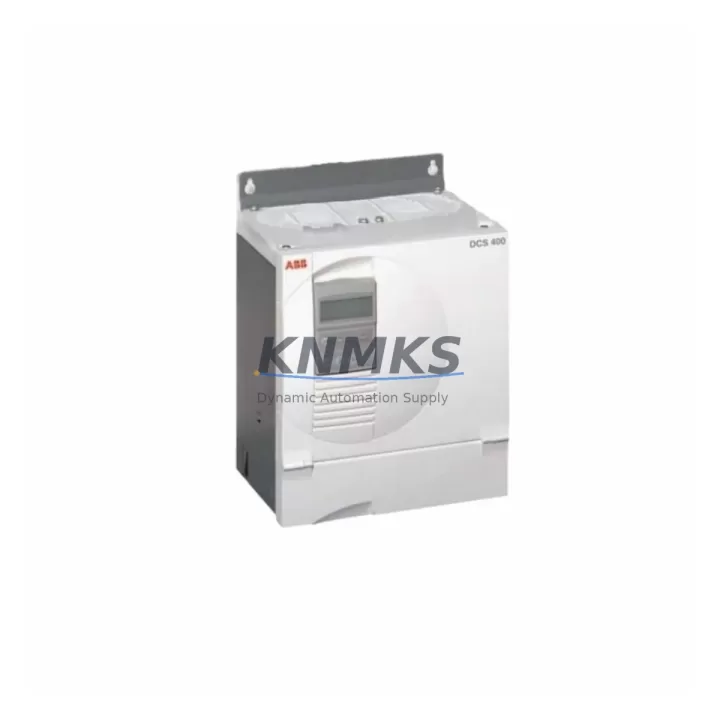
ABB DCS401.0230 Migration-Ready DC Drive for Legacy Control Systems
The ABB DCS401.0230 is a migration-ready DC drive from the ABB DCS400 series, engineered to serve as a direct replacement for discontinued or end-of-life DC drive modules in legacy automation environments. Whether you are managing a planned retrofit of an aging production line, responding to an unplanned failure of a discontinued drive, or executing a phased control cabinet upgrade, the DCS401.0230 provides the electrical compatibility, communication flexibility, and mechanical form factor required to minimize engineering rework and reduce total downtime.
Industrial facilities running legacy DC drive systems — including older ABB DCS300, DCS500, or third-party equivalent platforms — frequently encounter challenges when sourcing replacement components. Discontinued part numbers, obsolete firmware dependencies, and incompatible terminal layouts can extend unplanned outages from hours into days. The DCS401.0230 addresses these challenges directly: it is designed to integrate into existing DCS400-series racks and control cabinets with minimal modification, preserving original wiring harnesses, terminal block assignments, and backplane interface connections wherever possible.
Before installation, engineers should verify the following parameters against the existing system documentation: supply voltage capacity and transformer rating, DC bus current rating and armature current compatibility, terminal block pitch and conductor cross-section, backplane slot addressing and module ID configuration, fieldbus or serial communication protocol (including DDCS, Modbus RTU, or PROFIBUS DP assignments), HMI screen tag mapping and drive parameter references, firmware version compatibility with the existing PLC or DCS controller, available mounting depth and ventilation clearance within the control cabinet, and the sequence of field commissioning steps required to restore closed-loop speed or torque control.
In multi-axis systems, the DCS401.0230 is commonly deployed alongside the ABB DCS401.0050 and ABB DCS401.0100 for coordinated axis control, sharing a common DC bus and synchronized via the DDCS fiber-optic communication link. Power supply modules such as the ABB SDCS-POW-4 are typically retained during a like-for-like drive swap, provided the existing power supply capacity meets the new drive’s inrush and continuous current requirements. For applications requiring expanded I/O or analog signal conditioning, the ABB SDCS-IOB-3 I/O extension board integrates directly with the DCS400 platform and does not require re-addressing when the main drive module is replaced. In retrofit projects involving communication protocol migration — for example, transitioning from a proprietary serial link to PROFIBUS DP — the ABB RDCO-03 DDCS communication adapter provides a validated upgrade path without requiring changes to the main drive firmware baseline.
For legacy systems where the original programming terminal or commissioning cable is no longer available, the ABB DCS400 Panel (CDP312R) provides local parameter access, fault history retrieval, and drive commissioning capability directly at the cabinet door, eliminating the need for a laptop or external programming device during initial startup.
Migration Compatibility Table
| Parameter | Detail |
|---|---|
| SKU / Part Number | DCS401.0230 |
| Series | ABB DCS400 |
| Product Type | DC Drive (Armature Converter) |
| Replaces / Compatible With | DCS400 series discontinued variants; legacy DCS300/DCS500 with wiring adaptation |
| Communication Protocols | DDCS (fiber), Modbus RTU, PROFIBUS DP (via adapter) |
| Backplane Interface | DCS400-series standard backplane slot |
| Terminal Wiring | Compatible with existing DCS400 terminal block layout; verify conductor sizing |
| Mounting / Installation | Standard DCS400 cabinet rail mount; confirm ventilation clearance |
| Firmware Compatibility | Verify against existing PLC/DCS firmware revision before commissioning |
| Commissioning Requirement | Parameter restore from backup or manual re-entry; field tuning recommended |
| Country of Origin | Germany (DE) |
| Support terms | 12 months from shipment date |
| Shipping | Global shipping available; export documentation provided |
Retrofit Planning for Existing Automation Systems
A successful DCS401.0230 retrofit begins with a thorough audit of the existing control cabinet. Document the current drive’s parameter set using the CDP312R panel or the DriveWindow commissioning tool before powering down — this backup is essential for restoring speed reference scaling, current limits, ramp rates, and PID tuning values after the replacement drive is installed. Confirm that the existing ABB SDCS-POW-4 power supply module can sustain the inrush current profile of the DCS401.0230 under full-load starting conditions; if the power supply is marginal, replacement should be scheduled concurrently to avoid a secondary failure during commissioning.
Terminal block wiring should be photographed and labeled before disconnection. The DCS400 platform uses a standardized terminal layout, but field modifications — particularly in older installations — may have introduced non-standard jumper configurations or external signal conditioning circuits using components such as signal isolators or shunt resistors. These must be identified and preserved during the swap. If the system includes an ABB SDCS-IOB-3 I/O extension board for analog tachometer feedback or external enable signals, verify that the board’s DIP switch addressing matches the replacement drive’s expected I/O map before powering up.
For systems communicating over PROFIBUS DP, confirm that the GSD file version installed in the PLC engineering station matches the firmware revision of the DCS401.0230. Mismatched GSD files are a common source of communication faults during first power-up after a drive replacement. If the existing system uses DDCS fiber-optic links to coordinate multiple drives — for example, a master DCS401.0230 controlling subordinate ABB DCS401.0050 axes — verify fiber connector cleanliness and optical power budget before closing the cabinet.
HMI screen tag mapping should be reviewed if the SCADA or operator panel references drive-specific parameter addresses. In many legacy installations, HMI tags are mapped directly to drive parameter numbers rather than symbolic names, making them sensitive to firmware version differences between the original and replacement drive.
Downtime Control During System Migration
Minimizing production downtime during a DC drive replacement requires preparation that begins before the replacement unit arrives on site. Request a full parameter backup from the existing drive using the CDP312R panel or DriveWindow software, and store the backup file in at least two locations. Prepare a commissioning checklist that covers power-up sequence, communication link verification, speed reference calibration, current limit confirmation, and closed-loop response validation under no-load and partial-load conditions.
Where production schedules permit, plan the physical swap during a scheduled maintenance window rather than responding reactively to a drive failure. Pre-stage the DCS401.0230 in the maintenance area, verify its firmware version, and perform a bench power-up test before bringing it to the production floor. This approach eliminates the risk of discovering a configuration issue during a live outage window.
For critical production lines where even a brief interruption is unacceptable, consider maintaining a pre-configured spare DCS401.0230 with the site-specific parameter set already loaded. This reduces the on-site commissioning time to terminal reconnection, communication link verification, and a brief functional test — typically achievable within a single shift. All units supplied by KNMKS are pre-tested prior to shipment and include a support terms confirmed by quotation, providing documented assurance of operational readiness before the unit enters your spare parts inventory.
Retrofit Support FAQ
Q: Is the DCS401.0230 a direct drop-in replacement for my existing DCS400 series drive?
A: In most DCS400-series installations, the DCS401.0230 is mechanically and electrically compatible with the existing cabinet slot, terminal block layout, and backplane interface. However, firmware version, parameter set, and communication protocol configuration must be verified and restored after installation. A parameter backup from the outgoing drive is strongly recommended before removal.
Q: What commissioning steps are required after installation?
A: After physical installation and terminal reconnection, restore the parameter backup to the replacement drive using the CDP312R panel or DriveWindow. Verify communication link status (DDCS, Modbus, or PROFIBUS DP as applicable), confirm speed reference scaling and current limit settings, and perform a no-load run before returning the drive to full production duty. Field tuning of PID parameters may be required if the motor or load characteristics differ from the original installation.
Q: How do I confirm wiring compatibility before installation?
A: Compare the terminal block diagram from the DCS401.0230 technical manual against the as-built wiring documentation for the existing installation. Pay particular attention to analog input scaling, enable signal polarity, tachometer feedback wiring, and any external signal conditioning circuits. If as-built drawings are unavailable, photograph and label all terminals before disconnection.
Q: What support terms and pre-shipment testing does KNMKS provide?
A: All DCS401.0230 units supplied by KNMKS are functionally tested prior to shipment. Each unit carries a support terms confirmed by quotation from the shipment date, covering manufacturing defects and operational failures under normal industrial operating conditions. Expedited shipping and export documentation are available for international orders.
© 2026 KNMKS. All rights reserved.
Original Source: https://knmks.com
Contact: admin@knmks.com | +86 18359268345
Product Identification
- Brand / Ecosystem
-
ABB
ABB - Model / Series
-
DCS401.0230
Legacy Series - Product Family
- Variable Frequency Drives
- Availability Status
- Available on request after model and quantity confirmation
- Inquiry Type
- B2B RFQ, replacement inquiry and project spare-part request
- Pre-Quote Check
- Exact SKU, brand, series, quantity, nameplate photos and destination country are checked before quotation
System Path
Where this product fits in the KNMKS automation structure.
Specification & Inquiry Focus
- Drive range
- AC drives, VFDs and accessories
- Common needs
- Voltage, kW/HP and load type
- Project support
- Motor control, energy saving and spares
Buyer Confirmation
Information KNMKS checks before replying.
- Exact model
- DCS401.0230
- Brand / ecosystem
- ABB
- Product family
- Variable Frequency Drives
- Application note
- Replacement, maintenance, project build or spare-part list
- Useful photos
- Nameplate, installed unit, cabinet layout or connector side
- Delivery details
- Quantity, destination country and target schedule
Document Support
Files and notes can be confirmed during quotation.
- Product photos or nameplate confirmation when available
- Packing and delivery notes before quotation confirmation
- Support scope and delivery terms confirmed per inquiry
- Export document coordination for qualified B2B requests
Inquiry Support
- Input/output voltage and kW/HP confirmation
- Energy-saving motor control inquiry
- Accessory and spare-unit support
What to Send Us
- Brand and exact model number: ABB DCS401.0230
- Quantity and required delivery time
- Application, replacement requirement or nameplate photo
- Destination country and shipping preference
RFQ Preparation
This is a product inquiry page built for RFQ communication.
Fast Model Check
Send this model to KNMKS for confirmation.
Include quantity, destination country and photos if this is a maintenance replacement. The inquiry will be saved with a reference number after submission.
Brand & Compatibility Note
KNMKS displays automation product information for well-known industrial brand ecosystems and compatible replacement references. Brand names are used for product identification and compatibility reference only; final availability and commercial terms are confirmed per quotation.
 Manufacturing
 Machine Tools
 Packaging
 Energy & Power
 PLCs & Controllers
 HMI & Displays
 Servo Systems
 Sensors